
jewelie
Rank 4
Rank 4
March 18, 2020
Solved

Is my In Home Display (IHD) displaying the wrong time?

  • March 18, 2020
  • 58 replies
  • 8570 views

Hi

We had our SMETS2.0 smart meter and IHD last year.

Looks like there's still bugs.  😉

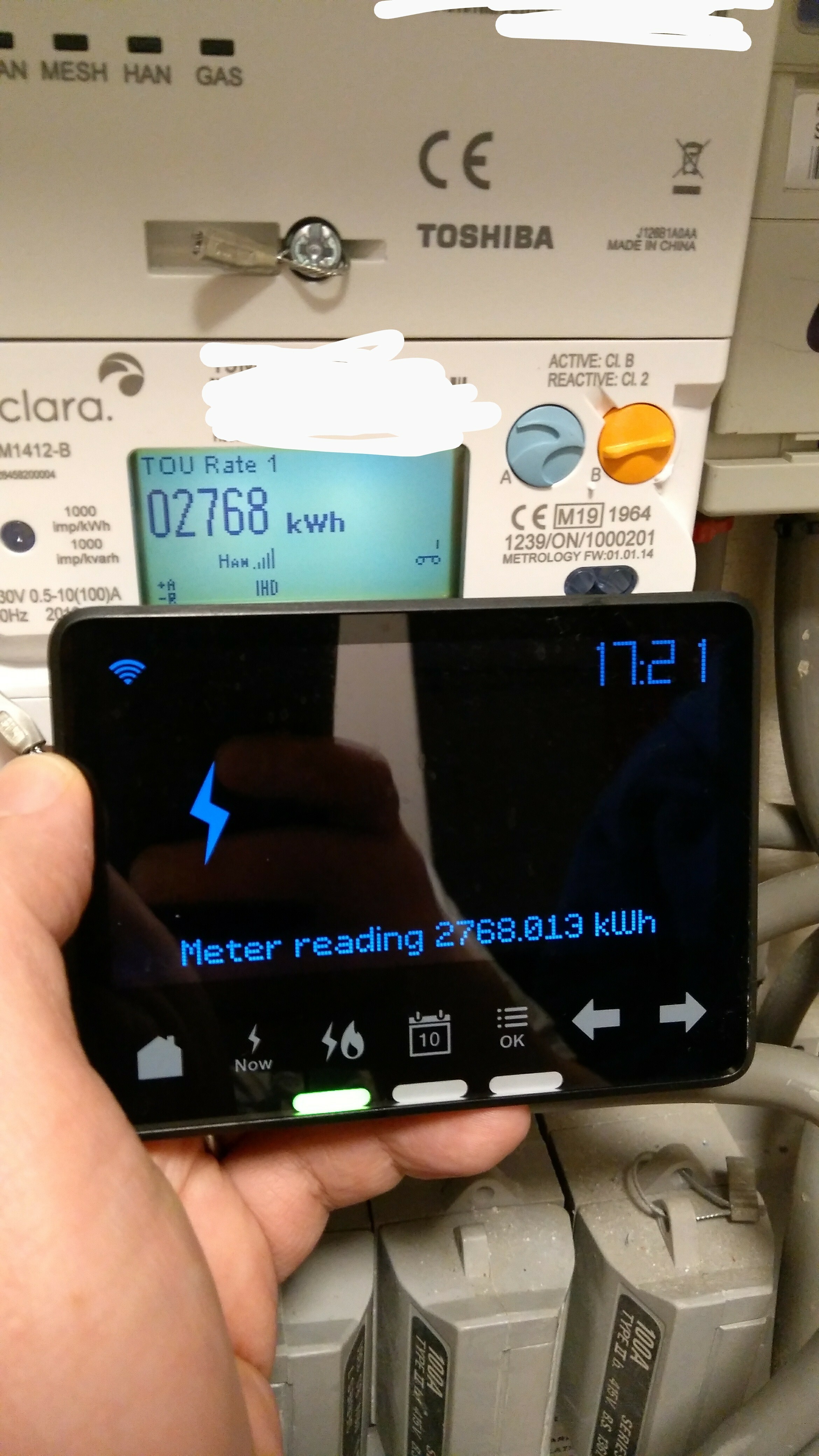
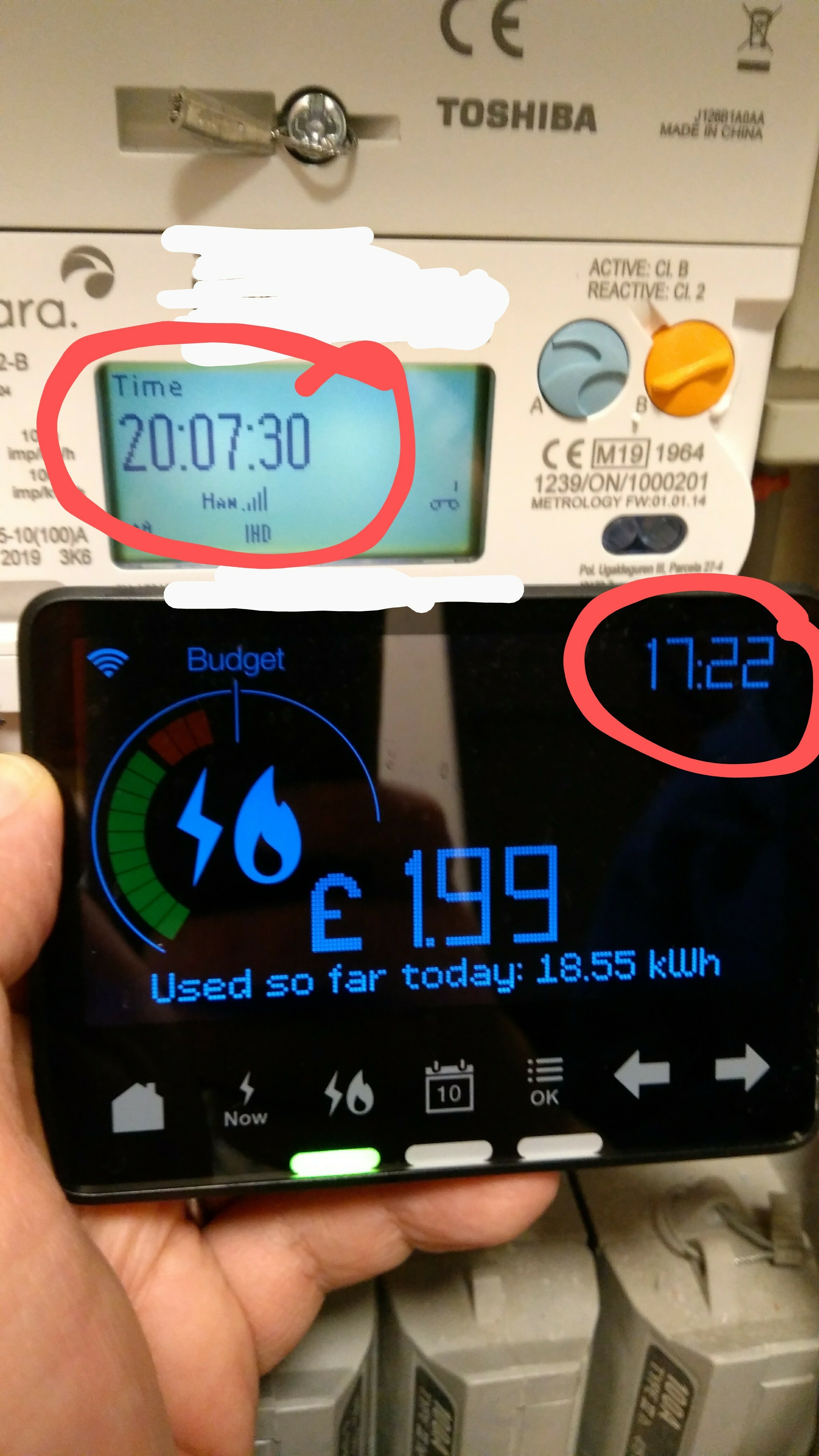
As you can see from the attached photos, the IHD is properly synchronised and paired with the meter, the right meter, and it gets the meter readings, and the meter has the right time on it; however, the IHD doesn't have the right time.  No amount of resetting the IHD seems to cure this.  This means it messes up the night mode timings (and also confuses me, I keep thinking it's earlier than it is, lol!)

The IHD model is Chameleon IHD3-PPMID / CA30111.

The meter is an Aclara SGM1413-B.

The communications hub is a Toshiba SKU-1 Cellular.

(I have another photo I've not posted demonstrating that the MPANs match on both meter and IHD too.)

I know it's not a high priority issue but I thought I'd best feed it back to you.


Julie

x
 

Best answer by BenS_OVO

Updated on 30/10/25 by Ben_OVO


Sorry to hear your smart meter In-Home Display (IHD) isn’t showing you the correct time. This normally indicates that the IHD isn’t paired properly to the smart meter.


In order to get this sorted it’s worth contacting our Support Team, who should be able to send a remote message to your meter and IHD to get them re-paired. 


There’s more info in getting the best out of your IHD on our device guides below - 


SMETS1 Pipit In Home Display (IHD) guide

SMETS1 Chameleon In Home Display (IHD) guide

SMETS2 In Home Display (IHD) guide


Don’t forget you can also check out your smart meter usage data on your online account or OVO app (download for Android or iOS).


OVO member but not got a smart meter yet? - Book today!

Interested but not yet an OVO member? - Check out our plans!

58 replies

Tim_OVO
OVO Staff
OVO Forum Legend
April 7, 2020

Lots of info provided here, thanks @jewelie 


It’s a known issue this - I have raised it a few months back, when another forum user flagged it. I have just asked for an update on a fix, or workaround. 


When I hear, I’ll get back to you here :)

Carbon neutral - we need a community to get there! My green tech: Aclara SGM 1411-B smart meter, Chameleon IHD6
Transparent
Rank 20
Rank 20
April 7, 2020

Thanks @Tim_OVO 

I think there are several “issues” here. Not just one.

  • one meter (of 2) no longer sending readings back to OVO
  • one meter no longer sending updates to the IHD, although readings are available online
  • periods with meters reporting zero usage
  • consecutive periods with identical usage being reported
  • massively large readings within a period where there are no other readings

We really need to separate these out so that we are better able to report faults. That’s why we need @BenS_OVO to say which ones you’re already onto… and which ones still lack sufficient feedback for you to identify.


Save energy... recycle electrons!
Tim_OVO
OVO Staff
OVO Forum Legend
April 7, 2020

An update on the usage issue:


‘We need to further understand the patterns of behaviour. For instance does it always do it at the same hour or on the same day. Does it recover the next day etc. The advice has therefore been that they want us to take this into the lab and test. However given the current environment, we don’t have access to labs. We will therefore have this in our back log until we can regain access.”


For communication issues, I would make sure this isn’t something we know a fix for / can fix remotely send us a message on webchat via the Help Centre.

Carbon neutral - we need a community to get there! My green tech: Aclara SGM 1411-B smart meter, Chameleon IHD6
Transparent
Rank 20
Rank 20
April 7, 2020

I don’t fully understand this.

And I also think there’s quite a bit of “information gathering” which can be done before anyone gets back in the Lab to start tinkering.

Three of us here (@Jon Langford@jewelie and myself) and three more over here (@Wigwam66@pauleywauley and @Tiamun) are reporting similar combinations of faults with SMETS2 meters, all of which are communications failures.

Over the past 8 months, @BenS_OVO has picked up such faults, done some lab analysis, and then sent a SMETS command or a code update to an individual site which has resulted in a “fix”. So his tactics have been met with some reasonable level of success. :slight_smile:

However, the combinations of these faults aren’t diminishing.

Whilst we have the time, and no one is in the SMETS Lab2, can we not use this Forum space to check through the symptoms we’re seeing in an attempt to define which might be inter-related?

We’d need someone like Ben to ask us for clarifications so that there’s a check-list prepared in advance of lab-time.

If OVO needs to know something like “does it always do it at the same hour or on the same day?” then we can answer that now.


I have a sneaky suspicion that some of the faults we’ve been reporting have got fixed “by accident” as Ben (or another Team Member) has manually sent a SMETS command. See here earlier in this Topic where Ben is “surprised” he fixed something!

Well I for one, and probably @jewelie too, would be quite happy for a command to be sent now. We can then report which faults if any have been changed/fixed.

We don’t need lab-time to do this.

I don’t favour each of us trying to report faults separately via the standard CS email address. That looses the advantage of us pooling our feedback together.

The Forum is a great platform for us to make progress on this.


What do you think @Tim_OVO ?

Save energy... recycle electrons!
Tim_OVO
OVO Staff
OVO Forum Legend
April 8, 2020

I’ll pass on the link of this topic onto the engineers, @Transparent - you make a good point. But alas my technically knowledge is limited. 

Carbon neutral - we need a community to get there! My green tech: Aclara SGM 1411-B smart meter, Chameleon IHD6
Transparent
Rank 20
Rank 20
April 17, 2020

I don’t know if someone at OVO has been experimenting with sending SMETS Commands yesterday evening (16apr20), but there have been significant failures of my HAN and Mesh networks starting sometime after 8pm.

My IHD has been resetting itself, displaying the “three lights on”, followed by the network ID and “Welcome” messages.

It then mainly sulks with the display showing “Waiting for current data”, occasionally alternating with “Connection lost”.

Every so often the cycle repeats, starting again with “3 lights on”.


Since there’s no clock and the Zigbee signal strength is at minimum, I had a look at the indicators on the Comms Hub.

To my surprise, the HAN indicator was still showing the usual slow-flash pattern.

However, the MESH indicator is on the Medium flash. (I have an SKU2)

So with changes to two networks, I suspect this is due to a code update or SMETS Command, rather than a Comms Hub failure.

What do you think @BenS_OVO ?

Have you or your colleagues been tinkering?

Can you detect at your end the symptoms which I’m seeing here?

Save energy... recycle electrons!
Nancy_OVO
Retired Moderator
Retired Moderator
April 20, 2020

Hey guys,

I don’t think Ben would have done anything in this instance as he likely doesn’t have access to your account. Unless you’ve called up the Customer Services team, it sounds like the issue has resolved itself :sparkles:

Cheers!

Your guiding light(bulb)
Transparent
Rank 20
Rank 20
April 20, 2020

Well yes @Nancy_OVO - as it happens, my IHD was again yielding the correct data and my Mesh Network was once more on slow-flash yesterday (Sunday) morning.

But how did you know the issue had resolved itself?

I’m pretty sure Ben does know how to get at my meters because he ran through a number of code upgrades last year whilst we were trying to debug something else.

But, like him (see above), I’m wary of things just sorting themselves out. The frequency of these communication problems is increasing - 3 active threads on the Forum at the moment. And I believe this is the first occasion that a Mesh Network has claimed to have failed.

Us customers would like to provide better accuracy in our reporting. But we have absolutely no idea what OVO can detect of these issues. We need a feedback mechanism to help nail this down.

Save energy... recycle electrons!
Transparent
Rank 20
Rank 20
April 22, 2020

Hey @Nancy_OVO - I’m still hoping you can tell me:

But how did you know the issue had resolved itself?

If there’s some sort of command that allows you to see my meter status, then that could be the key to resolving this whole problem.  :slight_smile:

Save energy... recycle electrons!
Nancy_OVO
Retired Moderator
Retired Moderator
April 23, 2020

Hi @Transparent - I’m sure Ben does know how to access your account but members of staff wouldn’t be randomly doing this without the explicit permission of the account holder. I’m sure he was granted this when he called you last year.

Your guiding light(bulb)