
jewelie
Rank 4
Rank 4
March 18, 2020
Solved

Is my In Home Display (IHD) displaying the wrong time?

  • March 18, 2020
  • 58 replies
  • 8570 views

Hi

We had our SMETS2.0 smart meter and IHD last year.

Looks like there's still bugs.  😉

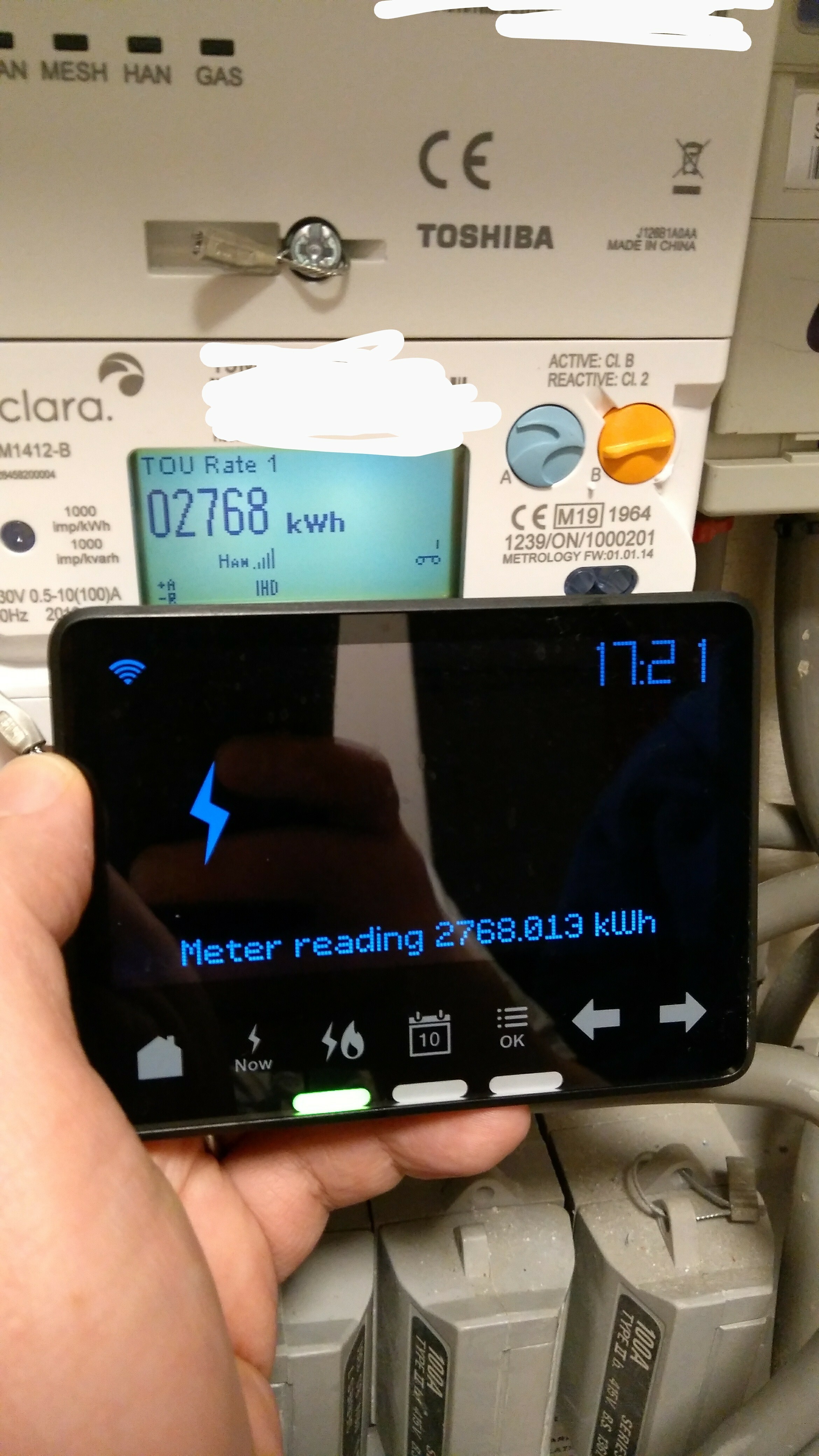
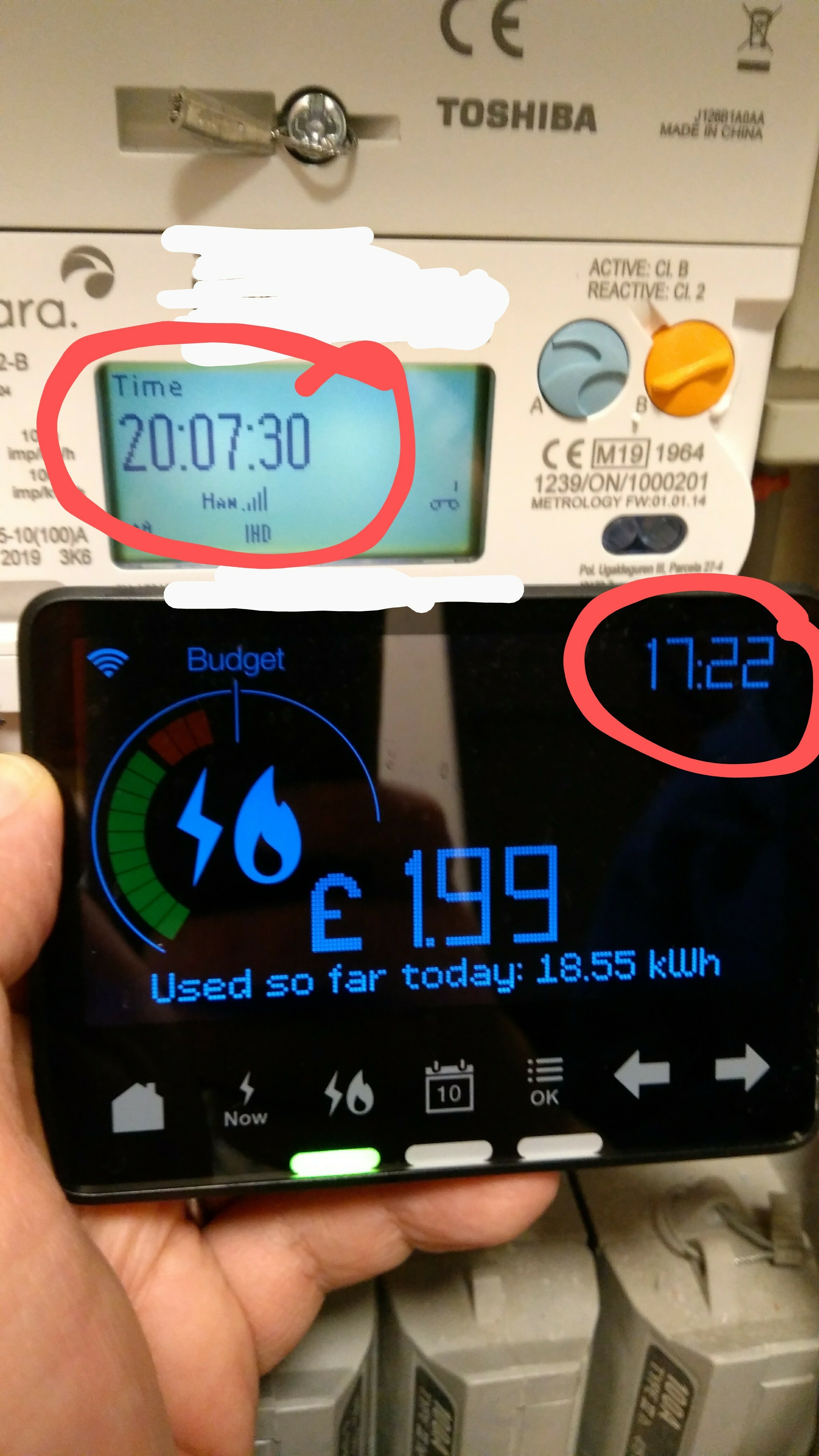
As you can see from the attached photos, the IHD is properly synchronised and paired with the meter, the right meter, and it gets the meter readings, and the meter has the right time on it; however, the IHD doesn't have the right time.  No amount of resetting the IHD seems to cure this.  This means it messes up the night mode timings (and also confuses me, I keep thinking it's earlier than it is, lol!)

The IHD model is Chameleon IHD3-PPMID / CA30111.

The meter is an Aclara SGM1413-B.

The communications hub is a Toshiba SKU-1 Cellular.

(I have another photo I've not posted demonstrating that the MPANs match on both meter and IHD too.)

I know it's not a high priority issue but I thought I'd best feed it back to you.


Julie

x
 

Best answer by BenS_OVO

Updated on 30/10/25 by Ben_OVO


Sorry to hear your smart meter In-Home Display (IHD) isn’t showing you the correct time. This normally indicates that the IHD isn’t paired properly to the smart meter.


In order to get this sorted it’s worth contacting our Support Team, who should be able to send a remote message to your meter and IHD to get them re-paired. 


There’s more info in getting the best out of your IHD on our device guides below - 


SMETS1 Pipit In Home Display (IHD) guide

SMETS1 Chameleon In Home Display (IHD) guide

SMETS2 In Home Display (IHD) guide


Don’t forget you can also check out your smart meter usage data on your online account or OVO app (download for Android or iOS).


OVO member but not got a smart meter yet? - Book today!

Interested but not yet an OVO member? - Check out our plans!

58 replies

Transparent
Rank 20
Rank 20
April 23, 2020

:slight_smile: Yes. I agree. I’m quite happy to have new code on my meters (even if that does end up crashing them!). I’m equally certain that any such test would not be applied to meters on other customer’s sites.

Much of the information I’m now able to share on this Forum has come from OVO trying various solutions on my meters during 2019. So the risks were well worthwhile taking in my case.


And my other question from Monday morning….?

But how did you know the issue had resolved itself?

Save energy... recycle electrons!
Nancy_OVO
Retired Moderator
Retired Moderator
April 24, 2020

I was just making an educated guess, @Transparent :slight_smile:

Your guiding light(bulb)
Transparent
Rank 20
Rank 20
April 24, 2020

Rats! :rat:

I thought we might be onto something there!

I still have a suggestion which might work to provide better feedback. It’s obvious that us customers are seeing missing data which you at OVO aren’t aware of.

We need to add some extra icons into the Usage pages on MyOVO.

I can’t write more now as I’m plastering a ceiling!

Save energy... recycle electrons!
Newcomer
June 23, 2020

Hi 

my in home display is showing 00:00 which is the wrong time is it something to worry about. Is there a way to update this 

thanks 

Transparent
Rank 20
Rank 20
June 24, 2020

This is really good news @bob smith :slight_smile:

… not for you. But it’s what OVO’s Smart Meter Engineers need in order to find out why this can happen!

If you’ve read the earlier posts on this Topic you’ll see that @jewelie had an incorrect time on her IHD but the problem disappeared merely because a Meter Read command was sent to the Communications Hub.

So for the moment, please do absolutely nothing!

I’m going to tag @Tim_OVO and @BenS_OVO so they know what you’ve just reported.

Please fill out your Forum Profile page so they can pick up your customer account number from there.

And let us know here if the time-shift has remained consistent overnight.

Many thanks.

Save energy... recycle electrons!
Tim_OVO
OVO Staff
OVO Forum Legend
June 27, 2020

And let us know here if the time-shift has remained consistent overnight.


What’s the verdict, @bob smith - has the time corrected itself?


If not, let’s try this: 


the problem disappeared merely because a Meter Read command was sent to the Communications Hub.


Request a meter read command via our Support team. We’re on FacebookTwitter or message on webchat via the Help Centre.

Carbon neutral - we need a community to get there! My green tech: Aclara SGM 1411-B smart meter, Chameleon IHD6
Newcomer
December 29, 2022

I moved into my current house a couple of years ago with smart meters already installed. Ovo sent us out an IHD to use, but it has never displayed the correct information. It doesn't matter what time of day I look at it, it will always show that we have used 72p of electricity and 94p of gas. The time is also incorrect on the IHD. 


More worrying, the data on the mobile phone app doesn't seem to match the my actual usage for gas. Its not massively out but more than can be explained by 24 hours to update the app. However electricity usage matches perfectly with the app. I cant submit meter readings to correct my bills as it will only accept smart readings.


We've attempted to contact Ovo to fix this in July, August, and October. If you ring, they say it needs a specialist team to deal with it that you have to email. If you email, you get an automated email stating that they will respond to you 5 working days and then you never hear from them again. I'm at a loss as to who to contact in order to get this resolved. 

Blastoise186
Super User
Super User
December 29, 2022

Hey @BenP ,

Can you show me some photos of the meters and IHD please? I’d like to check something.

Securing energy by zapping security bugs... For that is The Blastoise Way! Remember, I'm just like you - AI Powered Evil Geniuses aren't Staff!