Rank 2
August 23, 2020
Solved

Why is my SMETS2 Chameleon In Home Display (IHD6) no longer showing data, a few weeks after smart meter was installed?

  • August 23, 2020
  • 80 replies
  • 6308 views

I moved across to a smart meter on 22 July 20.  The IHD is a Chameleon display, and it was all working fine for the first few weeks barring the odd blank screen which having read around the threads was expected as some work was done in the background to commission my meters etc. 

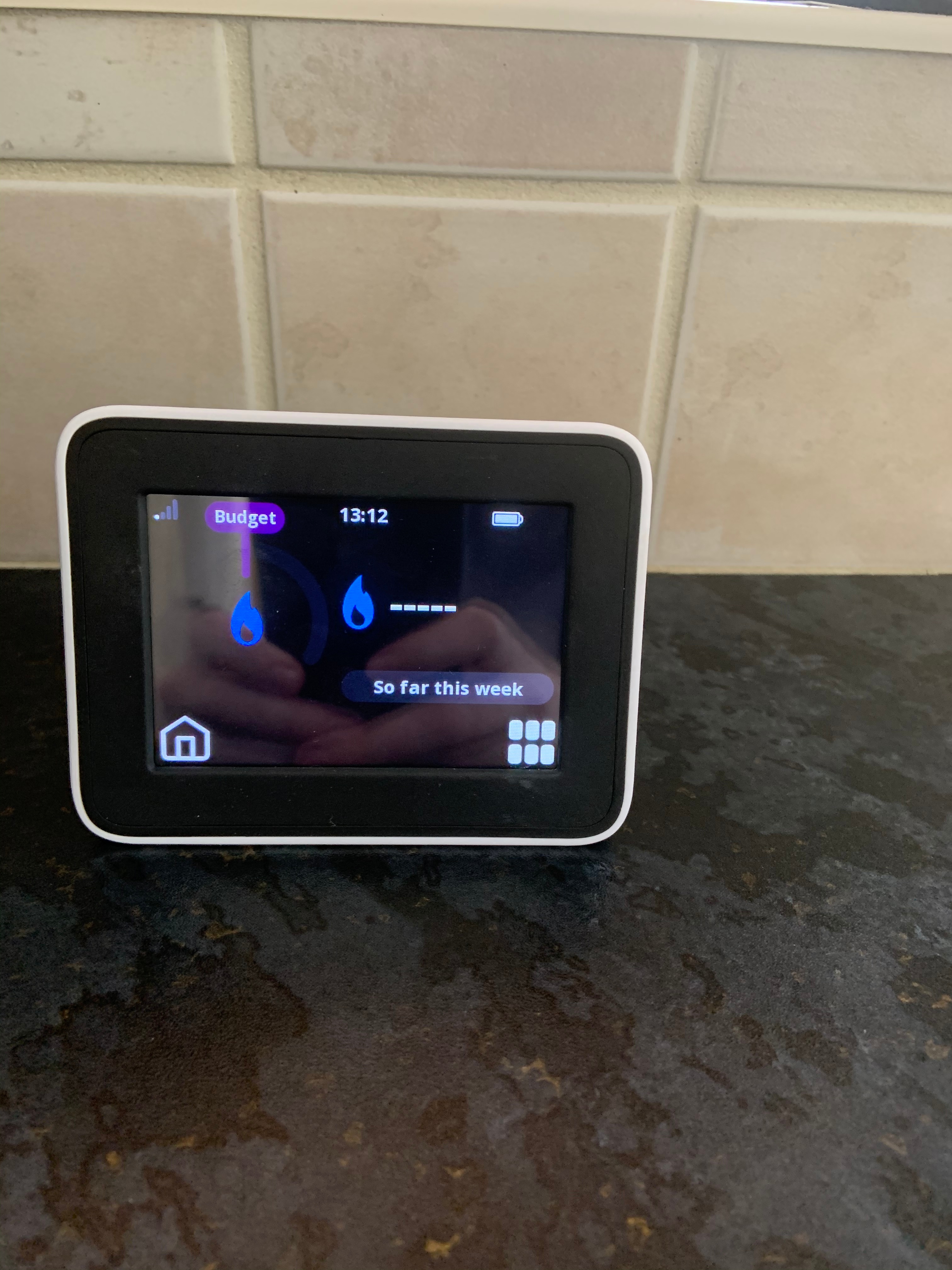
I came home from work late Friday night, 21 Aug, to find that while the meter was still functioning, pretty much every single bit of data was now showing up as blank, this after it had been working for the first few weeks.  It’s not a communication issue - it’s on the kitchen window ledge, something like 6 feet from the pantry where the meters are, and it has been working fine until now.  Having checked the meters themselves they seem to be working ok and have readings on them that look sensible.  
 

Any ideas on the IHD?  I’ve attached a couple of photos to show what I mean.  Thanks in advance.


Best answer by Transparent

Updated on 03/11/25 by Ben_OVO

In addition to the advice below, check out this related topic to understand why you may be having communication issues with your Chameleon In-Home Display (IHD).


The language of the on-screen messages is slightly different. But overall I think this is the same as we’ve been discussing on the Topic about Waiting for current data.

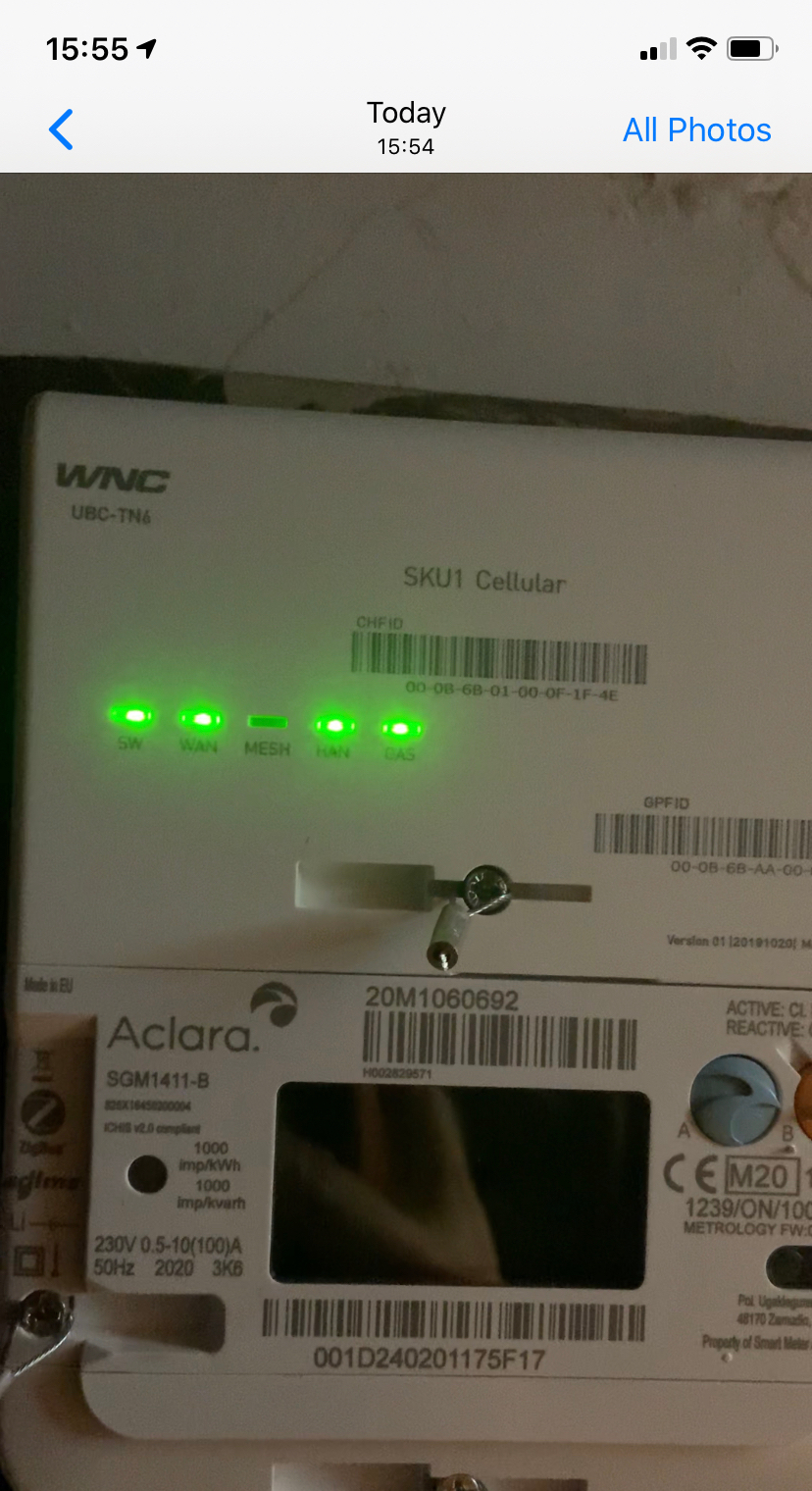
Just have a look at your Communications Hub and see what indicators are flashing at what rates. You should see a slow flash rate on all 5 LEDs (except the Mesh, which is probably off). I’ve drawn a graphic here of the three fault-conditions which replace the slow-flash when an error is detected.


Hi @Transparent 

As you suggest, there’s 4 slow flashing green lights, with the Mesh light not flashing.


You did well to catch them at the flash on-state! :slight_smile:

So both the (WNC) Comms Hub and the IHD are happy that they’ve got a live Home Area Network. It’s just that data isn’t being transferred between them.


The possibilities are most likely to be one of:


a: Your SMETS2 meters are still receiving software updates as part of the off-site commissioning process. Have a look online at your My OVO page and see if you’ve still got sensible readings on the Usage section.

b: Someone in OVO’s programming team has introduced an error when writing the code-upgrade suite. This has resulted in a software upgrade for a Chameleon IHD3 being sent to your IHD6, and it’s sulking.

c: It’s one of those bizarre latch-ups which happen occasionally. We already know that it can be stimulated back to life by sending a SMETS-reset or Meter-Xread command. See this dialogue between a senior OVO engineer and a customer in spring this year.

d: It will self-correct just like most of the rest of the Waiting for current data reports. But if you want to speed it up, you can contact OVO and ask them to have a look. The IHD will detect the conversation and pretend it was functioning all along. We don’t yet know why this happens, but please try to resist throwing it across the room because they don’t bounce too well. :wink:


OVO customer but not got a smart meter yet? - Book today!

Interested but not yet an OVO customer? - Check out our plans!

80 replies

MelchettAuthor
Rank 2
December 29, 2020

Thanks for the update @Melchett, I’ve been meaning to let our community members know of work that’s happening in this space. 


We are working on a resource that we hope will allow us to better diagnose IHD and smart connectivity issues, @Blastoise186 I’ll share this with you as soon as I can. 


The ideal situation (all TBC as this work is ongoing) is that we will be able to allow you to diagnose the cause, and what the required steps are. That might be: do nothing, this is not a fault but part of the pairing process and will be amended in X days, or, this is a fault, we need you to confirm X, Y, Z on the IHD and A, B, C on the meter, and copy this into a web chat. That will mean we can get on with fixing it quickly without much effort from you. 


 We’re not there yet, @Melchett - can you provide a link to this topic in a web chat here. Average wait is 10 seconds. This can then be taken off your hands and a case raised with screenshots already provided. 


Appreciate your ongoing patience and commitment to getting these devices working. 


Tim

@Tim_OVO@Blastoise186 


Sorry, Tim - Ovo’s blown it.  I went on to the webchat to ask for this to be raised and explained how long this has been going on for and that between my job and caring responsibilities I didn’t have time for this.  I sent a link to this thread and was told ah we have to do an IHD health check (it’d be one heck of a coincidence for 2 IHDs to have the same fault) which would take 10 working days to resolve.  Half way through the IHD check the webchat failed.  So it’s back to square one. 

We’re into formal complaint and me leaving territory now unless someone can sort this out in a sensible timeframe without me having to jump through the same hoops everytime.   Given that I’m paying a significant premium to be with Ovo compared to other deals currently available I’m struggling to see the benefit of staying.

Transparent
Rank 20
Rank 20
December 29, 2020

Oh, this is hopeless, @Melchett .

I learned this morning that OVO has an operational SMETS Notification system. This means they can see alerts being sent by SMETS devices on your site, and therefore presumably can check to see if the Communications Hub and the IHD are actually sending data to each rather (as opposed to simply being connected to the ZigBee Home Area Network).

The SMETS Notification/ messaging system is surely key to this.

Previously I’d assumed that OVO were working blind, and having to rely on what us customers reported by way of symptoms.

Perhaps it’s just the Customer Services staff who are working blind. Perhaps they have to create a specific request for a SMETS technician to check a log-file for Notifications sent by the kit on a customer site.

Save energy... recycle electrons!
MelchettAuthor
Rank 2
December 29, 2020

Oh, this is hopeless, @Melchett .

I learned this morning that OVO has an operational SMETS Notification system. This means they can see alerts being sent by SMETS devices on your site, and therefore presumably can check to see if the Communications Hub and the IHD are actually sending data to each rather (as opposed to simply being connected to the ZigBee Home Area Network).

The SMETS Notification/ messaging system is surely key to this.

Previously I’d assumed that OVO were working blind, and having to rely on what us customers reported by way of symptoms.

Perhaps it’s just the Customer Services staff who are working blind. Perhaps they have to create a specific request for a SMETS technician to check a log-file for Notifications sent by the kit on a customer site.


@Transparent  Whilst I’ve been shopping around I’ve come across the same issues with Bulb smart meter customers and Bulb are taking the view that the comms hub needs to be re-booted which has to be done by the DCC, and that the root of the issue is the connection between the comms hub, the smart meter and the smart network.   Now I can’t pretend to understand the fine detail behind this, other than it sounds like a network connectivty issue.   Sounds to me like it’s not fit for purpose - which is a sentiment on the Bulb forum about the way the IHDs have been incorporated into the system.

So whilst I might well face the same issues if I moved to Bulb, at least I’d be paying considerably less and they will pay my exit fee!

Transparent
Rank 20
Rank 20
December 29, 2020

That’s interesting @Melchett - you’re second person to say something like this in the last 5 days!

The other comments were in a Private Message, so I won’t re-broadcast them here. But I do have a couple of observations.

1: I believe it is possible to commission the on-site devices in such a way that the connections are stable and remain so. Perhaps both Bulb and OVO haven’t yet found a software mechanism to detect when the on-site comms go AWOL and act on that, but other Energy Suppliers are having more success.

2: I think all SMETS_commands have to issued by DCC! But it’s the Energy Suppliers or equipment manufacturers who initiate these commands via a secure/encrypted four-way protocol. It might be the case that some of those requests require an additional level of authorisation by DCC, such as a command to reset a Comms Hub in such a way that it causes a short-term power-outage.

Like you, I don’t know the fine detail, but it is inevitably the case that customers with Smart Meters will leave those Suppliers who are unable to adequately monitor the system status and apply the required mitigation when things go wrong.

If Covid19 hadn’t intervened, I think I could’ve helped OVO resolve this problem in early summer when the Forum here was alive with bug-reports. All it takes is a cup of OVO coffee and an hour’s pooling of ideas around a whiteboard.

Save energy... recycle electrons!
Blastoise186
Super User
Super User
December 29, 2020

Hi @Melchett ,

Thanks for getting back to us, and I’m sorry you’re still getting caught up with this issue.

I think there might have been a server glitch this afternoon, since my live chat also got cut off mid session, but I was able to reconnect quickly. I’m not sure what happened, but it sounds related. However, it seems as if a bug was triggered that meant the chat session didn’t reconnect me properly and somehow reset to a new one. I’m going to report this shortly to get that looked into.

If you have entered the complaints process, someone should respond within five working days and they’ll aim to try and sort this out. Several clues have been uncovered recently which I believe are being looked into. But if you’d prefer to leave OVO anyway, I can understand your decision.

Either way, I wish you a Happy New Year and good luck in 2021.

Securing energy by zapping security bugs... For that is The Blastoise Way! Remember, I'm just like you - AI Powered Evil Geniuses aren't Staff!
Newcomer
January 27, 2021

Hi,

Hope you can help with a strange one.

Overnight my IHD6 has stopped displaying Electricity meter related data. As far as the IHD6 is concerned its only getting data from the gas meter. 

On the IHD6 I have 3 solid bars of signal from the Coms Hub but only the GAS meter details logged. When placing the IHD6 on top of the Coms unit there was no change - its not a signal issue from the Coms hub to IHD6.

On the Coms Hub I have 4 slow flashing lights (no MESH light) HAN light flashes as expected.

On the Electricity meter I have usage data and what I believe is the HAN icon. HAN appears to be working correctly.

I've tried switching off the IHD6 for 30 minutes, no change after signal acquisition.


Does anyone have any good ideas as to what’s happened? 


Many Thanks


Andy


Blastoise186
Super User
Super User
January 27, 2021

Hey there @Andy302 ,

Can you go into the IHD settings, tap IHD Info and tell me what the firmware versions are please? This helps us to know what you’re on.

I have an idea of what the issue is too. But I just want to check

Securing energy by zapping security bugs... For that is The Blastoise Way! Remember, I'm just like you - AI Powered Evil Geniuses aren't Staff!
Newcomer
January 27, 2021

HI,


GUID:

0C-A2-F4-00-00-4E-F0-49

S/W

IHD6-CAD-PPMID 1.4


Hope thats what you need!


thanks

Blastoise186
Super User
Super User
January 27, 2021

Perfect. It’s not that particular one then.

There’s a couple of things you can try here if memory serves. Firstly, go into Config Menu and then do Join Network. That might force the IHD to pick up the electricity meter again properly.

If that fails, you can try doing Clear Settings and Data. Or as a last resort, try asking the Support Team to re-pair your IHD with the meters again as it might have gotten kicked out somehow.

Securing energy by zapping security bugs... For that is The Blastoise Way! Remember, I'm just like you - AI Powered Evil Geniuses aren't Staff!
Newcomer
January 27, 2021

Hi, 

Thanks, Ive already tried settings and data clear. Where do I find the Config menu? Is it on the IHD6 as I can only see settings… nothing about joining a network.


Cheers