Rank 2
August 23, 2020
Solved

Why is my SMETS2 Chameleon In Home Display (IHD6) no longer showing data, a few weeks after smart meter was installed?

  • August 23, 2020
  • 80 replies
  • 6308 views

I moved across to a smart meter on 22 July 20.  The IHD is a Chameleon display, and it was all working fine for the first few weeks barring the odd blank screen which having read around the threads was expected as some work was done in the background to commission my meters etc. 

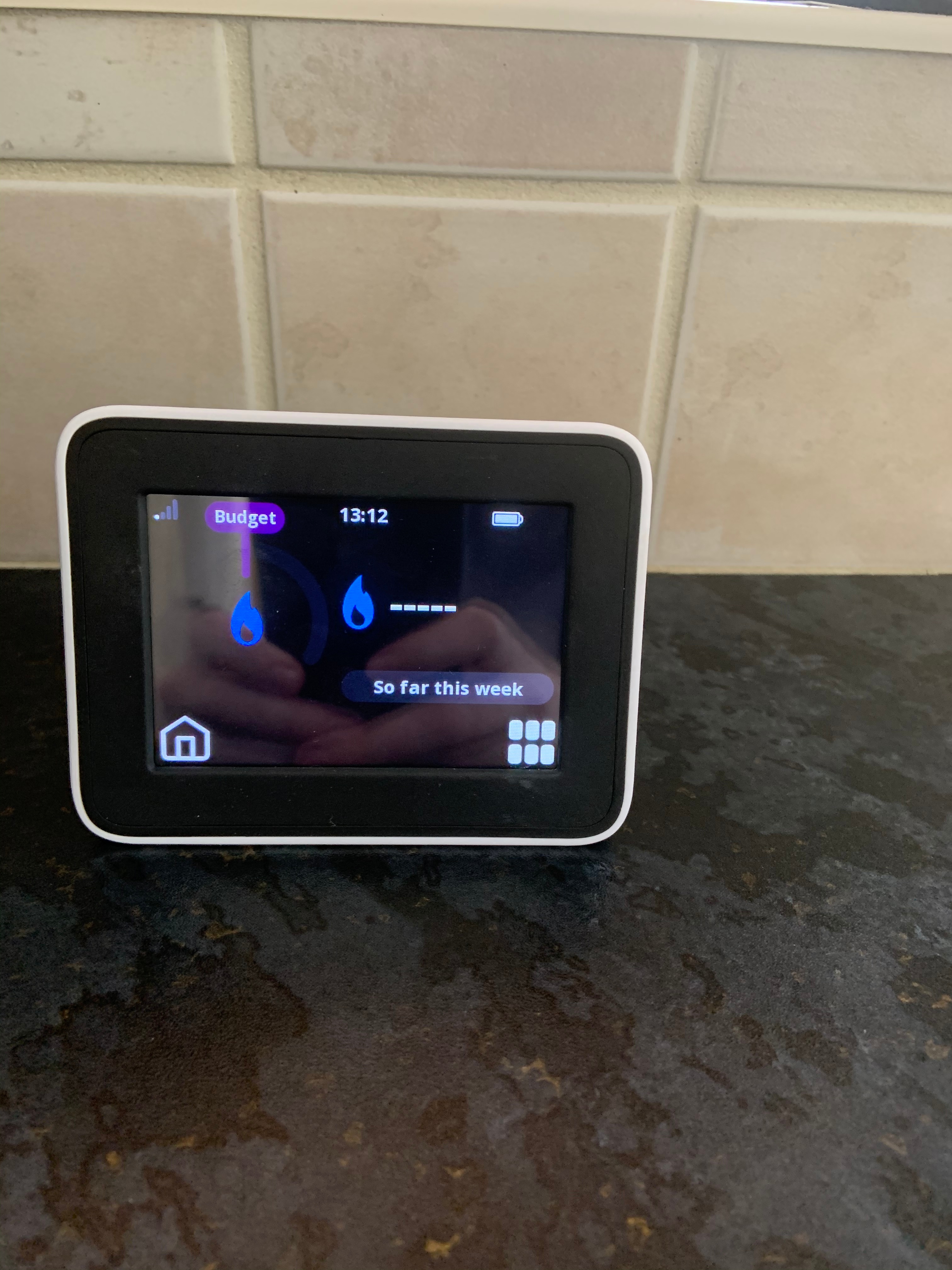
I came home from work late Friday night, 21 Aug, to find that while the meter was still functioning, pretty much every single bit of data was now showing up as blank, this after it had been working for the first few weeks.  It’s not a communication issue - it’s on the kitchen window ledge, something like 6 feet from the pantry where the meters are, and it has been working fine until now.  Having checked the meters themselves they seem to be working ok and have readings on them that look sensible.  
 

Any ideas on the IHD?  I’ve attached a couple of photos to show what I mean.  Thanks in advance.


Best answer by Transparent

Updated on 03/11/25 by Ben_OVO

In addition to the advice below, check out this related topic to understand why you may be having communication issues with your Chameleon In-Home Display (IHD).


The language of the on-screen messages is slightly different. But overall I think this is the same as we’ve been discussing on the Topic about Waiting for current data.

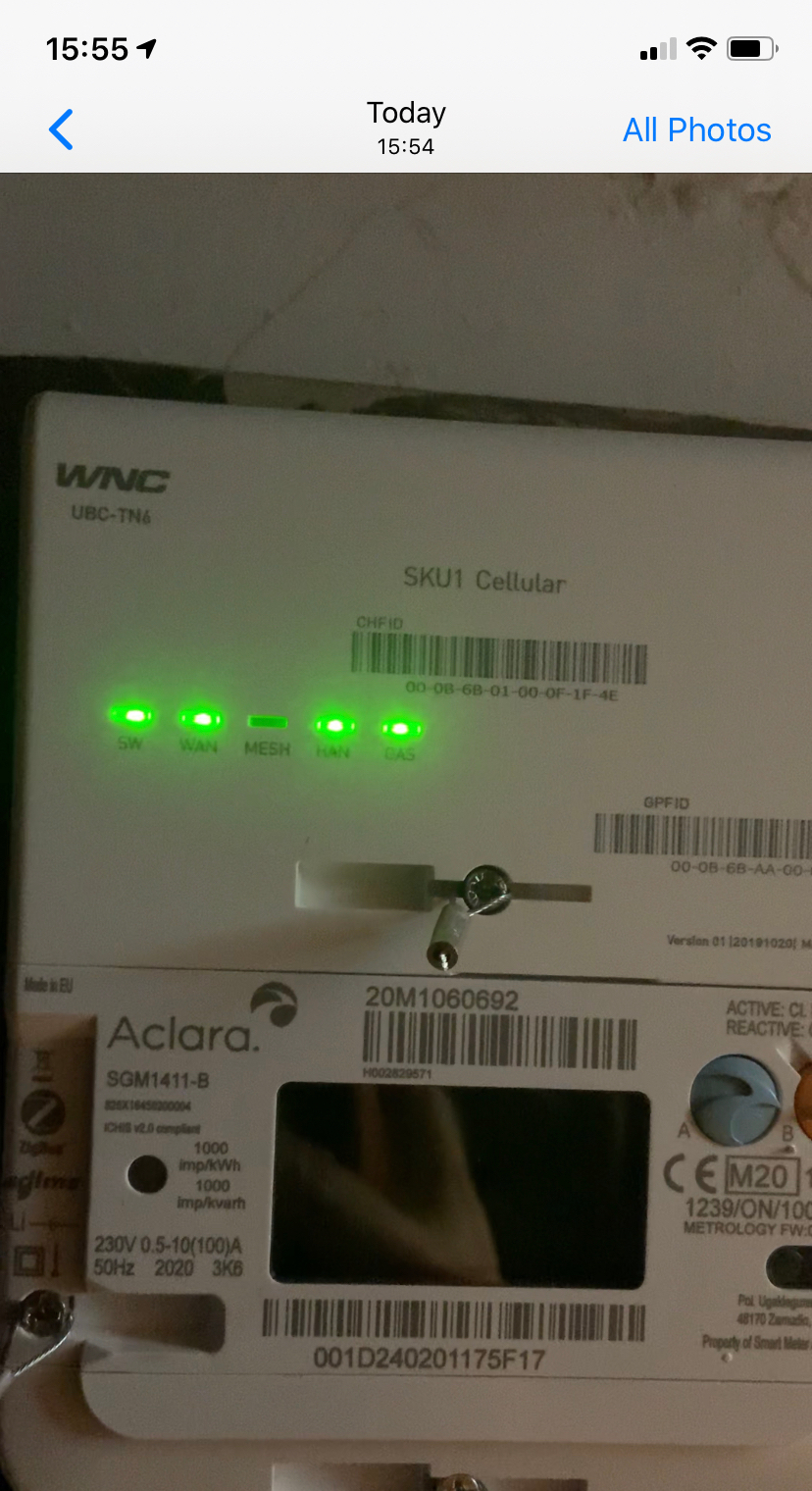
Just have a look at your Communications Hub and see what indicators are flashing at what rates. You should see a slow flash rate on all 5 LEDs (except the Mesh, which is probably off). I’ve drawn a graphic here of the three fault-conditions which replace the slow-flash when an error is detected.


Hi @Transparent 

As you suggest, there’s 4 slow flashing green lights, with the Mesh light not flashing.


You did well to catch them at the flash on-state! :slight_smile:

So both the (WNC) Comms Hub and the IHD are happy that they’ve got a live Home Area Network. It’s just that data isn’t being transferred between them.


The possibilities are most likely to be one of:


a: Your SMETS2 meters are still receiving software updates as part of the off-site commissioning process. Have a look online at your My OVO page and see if you’ve still got sensible readings on the Usage section.

b: Someone in OVO’s programming team has introduced an error when writing the code-upgrade suite. This has resulted in a software upgrade for a Chameleon IHD3 being sent to your IHD6, and it’s sulking.

c: It’s one of those bizarre latch-ups which happen occasionally. We already know that it can be stimulated back to life by sending a SMETS-reset or Meter-Xread command. See this dialogue between a senior OVO engineer and a customer in spring this year.

d: It will self-correct just like most of the rest of the Waiting for current data reports. But if you want to speed it up, you can contact OVO and ask them to have a look. The IHD will detect the conversation and pretend it was functioning all along. We don’t yet know why this happens, but please try to resist throwing it across the room because they don’t bounce too well. :wink:


OVO customer but not got a smart meter yet? - Book today!

Interested but not yet an OVO customer? - Check out our plans!

80 replies

Blastoise186
Super User
Super User
January 27, 2021

Yup, if you go into Settings and then press the right arrow, it should be in there somewhere.

Can you also check Meter Info for me, just to make sure the IHD knows about your meters? That might provide a further clue

Securing energy by zapping security bugs... For that is The Blastoise Way! Remember, I'm just like you - AI Powered Evil Geniuses aren't Staff!
Newcomer
January 27, 2021

OK, in Settings I have Wifi, alerts and tones, night mode, brightness, home screen, language, clear settings and data and account pairing. No sign of join network.

Meter info only has GAS meter data, reading, MPRN and supply status. 

Its almost like the electricity side has been wiped from the IHD6.

Blastoise186
Super User
Super User
January 27, 2021

Possibly. The Support Team might need to pair it back up again.

Sorry for the trouble there!

Securing energy by zapping security bugs... For that is The Blastoise Way! Remember, I'm just like you - AI Powered Evil Geniuses aren't Staff!
TomThumb
Rank 6
Rank 6
January 27, 2021

It would be also be good to confirm  @Andy302 if you are seeing the most recent usage history / meter readings via you online Ovo account, 

Be aware that If there are any lost com’s back to Ovo from last night,  this might not become apparent until today’s data is published to your account tomorrow.


Tom...

3 meters: Smart Gas & Smart Elec / Traditional Gas meter
Blastoise186
Super User
Super User
January 27, 2021

Something else that might help, would be if you’re OK with connecting your IHD to Wi-Fi @Andy302 . This may allow it to pull down some firmware updates and might help to fix the issue you’re seeing.

There’s a guide at 

which can help there too.

While it’s possible that something is causing interference, I very much doubt that if you’ve got a perfect signal. But I would suggest moving the IHD a little further away from the electric meter just to be safe.

But yeah, it ultimately looks like your IHD6 has somehow unpaired itself from the electricity meter, but not the gas meter. Weird...

Securing energy by zapping security bugs... For that is The Blastoise Way! Remember, I'm just like you - AI Powered Evil Geniuses aren't Staff!
Newcomer
January 28, 2021

Thanks for all the advice.

The IHD6 has been connected to wifi since day 1 so I would hope its got all the updates as they happen. 

The IHD6 normally lives on my desk well away from the Coms hub so I don't think its getting swamped/interference from the meter equipment.

Anyway, roll forward to this morning and its now all functioning again as it should without any input from me.

I can confirm that the S/W version has changed overnight though..

S/W

IHD6-CAD-PPMID 1.4 CAD 1.9

Would this have fixed it?

Many Thanks


Andy


Transparent
Rank 20
Rank 20
January 28, 2021

@Blastoise186 wrote:

it ultimately looks like your IHD6 has somehow unpaired itself from the electricity meter, but not the gas meter. Weird…

That would be impossible. The IHD is paired only with your WNC Communications Hub, which sits on top of the Aclara electricity meter.

The electricity meter doesn’t operate on the Home Area Network (HAN). Its commands and data are passed to & from the Comms Hub via the Intimate Hub Communications Interface (IHCI) - a physical connector which also supplies 12v power.


Aclara SMETS2 electricity meter


@Andy302wrote:

the S/W version has changed overnight though.

I’m not sure that it has. The software is still 1.4, but it’s now also reporting the CAD firmware version. This is probably as a result of you following what @Blastoise186 recommended yesterday to connect the IHD to your home WiFi. It’s just “awakened” the software which was there all along.


We are soon hoping to implement a new system to communicate faults like this to the relevant technical staff. We need better feedback to understand what’s happening. Some faults get resolved by a single command being sent by the Smart Metering team. Others disappear when SMETS_commands get sent overnight by the new Billing System software.

In neither case do we know if there ever was an actual fault which got analysed and fixed, or whether an engineer simply sent a low-level Reset command which resolved the issue. If it’s the latter then there will an ever-growing tide of customers reporting issues with Smart Meters which keep reappearing.

Save energy... recycle electrons!
Newcomer
January 28, 2021

Well, here's another twist to add to the case file.

Having said earlier that it was all working again this morning I returned to the office after lunch to find that this time it was only displaying the electricity information. Gas was now gone, exactly the same situation as before in that only one meter info was shown when checking meter info, it was as if we only had a Gas smart meter.

I turned to my PC to start a new reply to this thread , when I turned back and looked at the IHD6 it was showing both Gas and Electricity again. Very strange…..

I’ll keep a log of when I notice it happening and what, if anything, i do to get it back to normal.

Transparent
Rank 20
Rank 20
January 28, 2021

This obeys Sod’s 2nd Law:

The propensity for a device to operate as required is inversely proportional to the number and status of the people watching it.

If you really want it to keep working, insist that OVO send a couple of field engineers. It will operate impeccably for the duration of their visit. :wink:

Save energy... recycle electrons!
hecate
Rank 2
Rank 2
February 8, 2021

@Blastoise186 I had similar issue to @Andy302 and ohers, which I reported in this thread, to which you’ve contributed.

About 4 weeks after installation, IHD stopped diplaying data and was seeking connnection. A day or two later it returned. The only cause I could atribute was that it was linked to “gas meter intialiation” message. All seemed to be fine, but on reappearance of data it looks as if electricty reading interval reset to monthly - it was set to daily on instalation.

Still an unresolved issue, but looks like there’s an underlying theme and not just a one off for me.

hecate