Rank 2
August 23, 2020
Solved

Why is my SMETS2 Chameleon In Home Display (IHD6) no longer showing data, a few weeks after smart meter was installed?

  • August 23, 2020
  • 80 replies
  • 6308 views

I moved across to a smart meter on 22 July 20.  The IHD is a Chameleon display, and it was all working fine for the first few weeks barring the odd blank screen which having read around the threads was expected as some work was done in the background to commission my meters etc. 

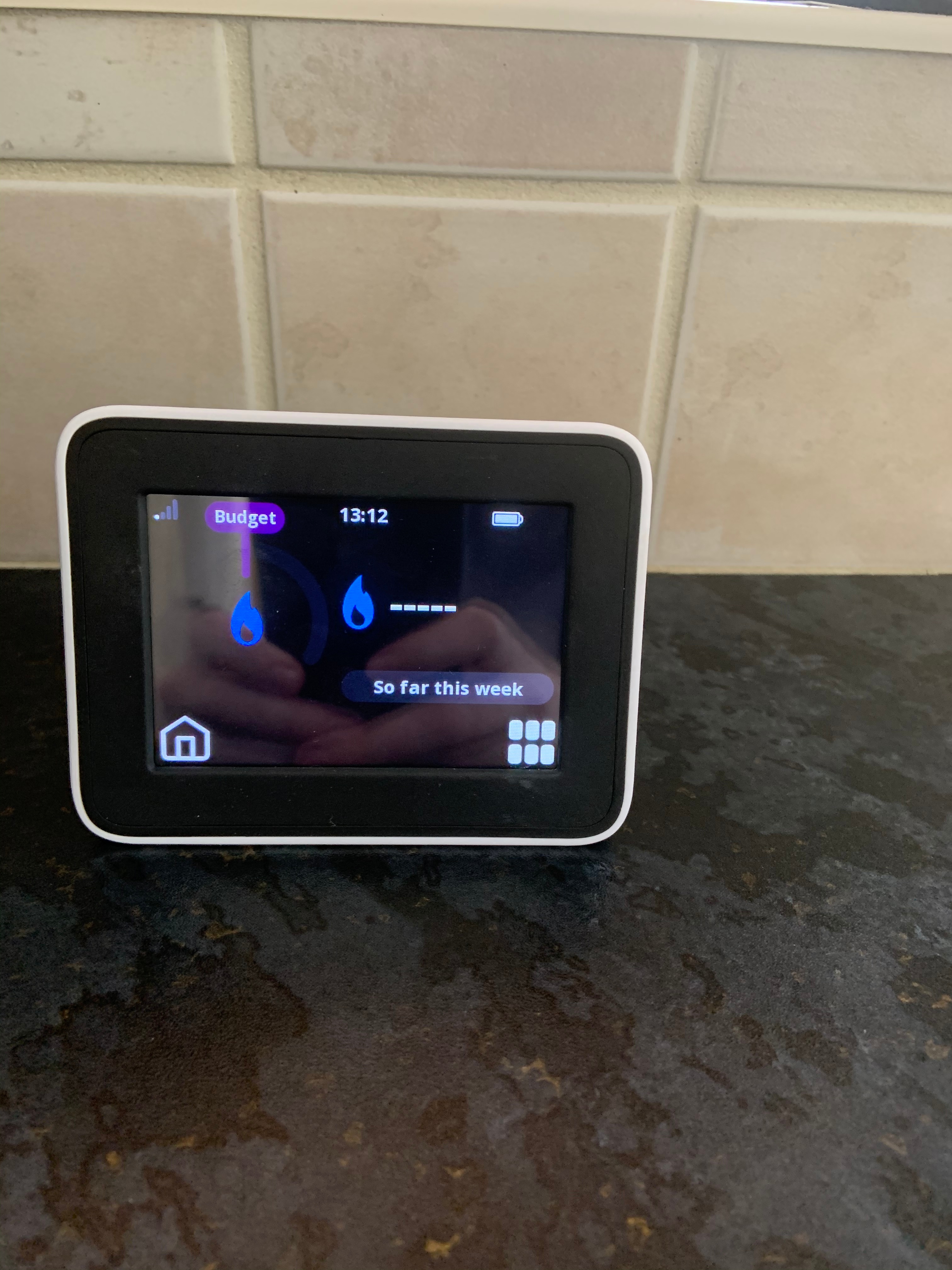
I came home from work late Friday night, 21 Aug, to find that while the meter was still functioning, pretty much every single bit of data was now showing up as blank, this after it had been working for the first few weeks.  It’s not a communication issue - it’s on the kitchen window ledge, something like 6 feet from the pantry where the meters are, and it has been working fine until now.  Having checked the meters themselves they seem to be working ok and have readings on them that look sensible.  
 

Any ideas on the IHD?  I’ve attached a couple of photos to show what I mean.  Thanks in advance.


Best answer by Transparent

Updated on 03/11/25 by Ben_OVO

In addition to the advice below, check out this related topic to understand why you may be having communication issues with your Chameleon In-Home Display (IHD).


The language of the on-screen messages is slightly different. But overall I think this is the same as we’ve been discussing on the Topic about Waiting for current data.

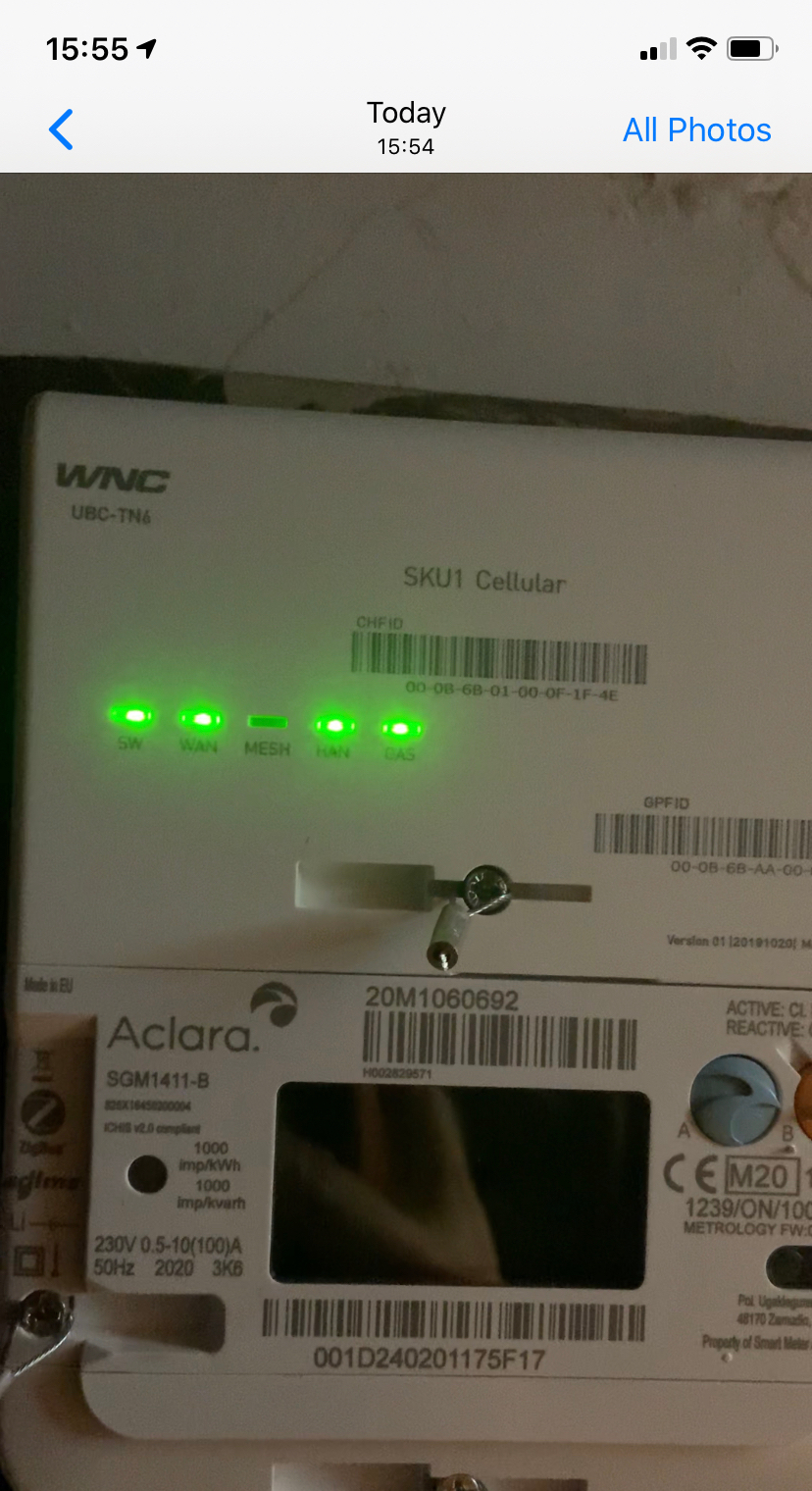
Just have a look at your Communications Hub and see what indicators are flashing at what rates. You should see a slow flash rate on all 5 LEDs (except the Mesh, which is probably off). I’ve drawn a graphic here of the three fault-conditions which replace the slow-flash when an error is detected.


Hi @Transparent 

As you suggest, there’s 4 slow flashing green lights, with the Mesh light not flashing.


You did well to catch them at the flash on-state! :slight_smile:

So both the (WNC) Comms Hub and the IHD are happy that they’ve got a live Home Area Network. It’s just that data isn’t being transferred between them.


The possibilities are most likely to be one of:


a: Your SMETS2 meters are still receiving software updates as part of the off-site commissioning process. Have a look online at your My OVO page and see if you’ve still got sensible readings on the Usage section.

b: Someone in OVO’s programming team has introduced an error when writing the code-upgrade suite. This has resulted in a software upgrade for a Chameleon IHD3 being sent to your IHD6, and it’s sulking.

c: It’s one of those bizarre latch-ups which happen occasionally. We already know that it can be stimulated back to life by sending a SMETS-reset or Meter-Xread command. See this dialogue between a senior OVO engineer and a customer in spring this year.

d: It will self-correct just like most of the rest of the Waiting for current data reports. But if you want to speed it up, you can contact OVO and ask them to have a look. The IHD will detect the conversation and pretend it was functioning all along. We don’t yet know why this happens, but please try to resist throwing it across the room because they don’t bounce too well. :wink:


OVO customer but not got a smart meter yet? - Book today!

Interested but not yet an OVO customer? - Check out our plans!

80 replies

Newcomer
November 25, 2020

New smart meter installed yesterday. Had to switch elec off as problem discovered during installation. When power restored smart meter no longer connecting. Is plugged in, have rebooted, have disconnected and reconnected wifi, have left device shutdown overnight, the only thing flashing are the bars in top left hand corner. Help ??!! Please :)

Blastoise186
Super User
Super User
November 25, 2020

Hi @Sf19 ,

If you’ve only recently had the meter installed, it can take a few weeks to fully activate and the IHD might not be active at first. Could you post some screenshots for us please?

Securing energy by zapping security bugs... For that is The Blastoise Way! Remember, I'm just like you - AI Powered Evil Geniuses aren't Staff!
Newcomer
November 25, 2020

Hi Blastoise186,

It was working fine when the engineer left,  but won't kick back in post the electricity being switched off.  Cheers


Blastoise186
Super User
Super User
November 25, 2020

Ah ha! Gotcha.

That’s an IHD6 if memory serves. There are a few known issues with both IHD3 and IHD6 models which we’re trying to pin down. This thread has a few examples 

If you’re OK with this, @Tim_OVO will have some questions for you soon that can help to diagnose the issues. We’ll keep you posted on that and if you’re able to fill them out, it would definitely help us out a lot.

Securing energy by zapping security bugs... For that is The Blastoise Way! Remember, I'm just like you - AI Powered Evil Geniuses aren't Staff!
Blastoise186
Super User
Super User
November 25, 2020

In the meantime, can you give 

 a try? Sometimes the suggestions in that article can help too. :)

Securing energy by zapping security bugs... For that is The Blastoise Way! Remember, I'm just like you - AI Powered Evil Geniuses aren't Staff!
Tim_OVO
OVO Staff
OVO Forum Legend
November 26, 2020

Thanks for the post, @Sf19 


I’ve moved this to another topic on the same thing. As you can see, it’s pretty common. 


Please have a read of the ‘best answer’ (at the top), which outlines all of the likely causes of this, and what to do. 


You can use this topic to keep us updated. You’ll help the next members that comes after you. :blush:

Carbon neutral - we need a community to get there! My green tech: Aclara SGM 1411-B smart meter, Chameleon IHD6
MelchettAuthor
Rank 2
December 16, 2020

@Tim_OVO  So this rumbles on and my patience gets thinner.  After forced updates which didn’t work I was sent a new IHD., probably a couple of months ago now.  Having set it up it has worked fine until the past couple of days and now, well it isn’t. 

The IHD seems to be stuck in a loop of automatically rebooting itself and then when it comes back on the screen flashes (pulses might be more accurate) but with no data on being shown. I’ve attached photos to show what I mean. 

Have to say though, I’m pretty much at the end of my tether with this entire experience.  Wish I had never bothered.  I think the ‘solved’ banner at the top of this thread was a little premature.


Blastoise186
Super User
Super User
December 16, 2020

Welcome back @Melchett , thanks for the update. I’m sorry to hear you’re still struggling with this one.

Please allow me to introduce myself, as you’ve probably not seen me before. I’m Blastoise186 aka Blastoise, one of the newer forum volunteers. I started helping out after you first reported issues, so I’m currently catching up with the thread. I also try to help solve tricky issues where possible.

I’ve been keeping a very close eye on a whole bunch of these IHD issues and I think I’m seeing a very common trend here between quite a few of them, but I can’t figure out why. For some reason, there seems to be a common issue between the IHD3/IHD6 and the WNC branded Communication Hubs in many of the threads where the IHD has died. I’m beginning to think that there’s something wrong with the WNC hubs that causes them to break IHDs more frequently than some of the others like the Toshiba hubs.

I’m going to have a chat with Tim about this when I get chance, but I wouldn’t be surprised if my hunch is right.


Please bear with us and we’ll try to get to the bottom of all these issues as soon as we can.

Thanks for understanding.

Securing energy by zapping security bugs... For that is The Blastoise Way! Remember, I'm just like you - AI Powered Evil Geniuses aren't Staff!
Tim_OVO
OVO Staff
OVO Forum Legend
December 17, 2020

Thanks for the update @Melchett, I’ve been meaning to let our community members know of work that’s happening in this space. 


We are working on a resource that we hope will allow us to better diagnose IHD and smart connectivity issues, @Blastoise186 I’ll share this with you as soon as I can. 


The ideal situation (all TBC as this work is ongoing) is that we will be able to allow you to diagnose the cause, and what the required steps are. That might be: do nothing, this is not a fault but part of the pairing process and will be amended in X days, or, this is a fault, we need you to confirm X, Y, Z on the IHD and A, B, C on the meter, and copy this into a web chat. That will mean we can get on with fixing it quickly without much effort from you. 


 We’re not there yet, @Melchett - can you provide a link to this topic in a web chat here. Average wait is 10 seconds. This can then be taken off your hands and a case raised with screenshots already provided. 


Appreciate your ongoing patience and commitment to getting these devices working. 


Tim

Carbon neutral - we need a community to get there! My green tech: Aclara SGM 1411-B smart meter, Chameleon IHD6
MelchettAuthor
Rank 2
December 17, 2020

@Tim_OVO

Will do.  Although I have to say with everything that is going on - combined with the higher prices Ovo now charge - I’m not sure how much longer I will be a customer for.  I don’t have much patience left.  I have minimal free time between work and caring responsibilities,  I’d rather not spend it chasing Ovo’s faults. and paying a premium for the privilege (I know you personally are trying to be helpful, but this is entirely an Ovo issue following a move to smart meters.)