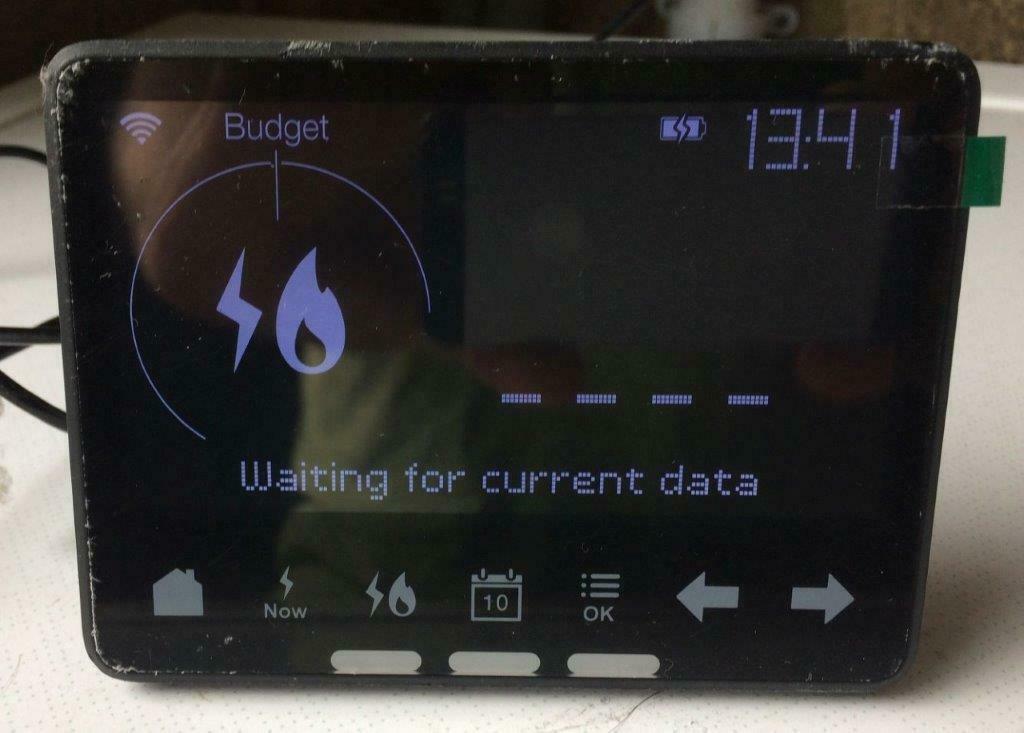
My IHD display worked fine for 5 days after arrival. Now it just shows “waiting for current data” and nothing else. ive restarted it, reset it and moved it right next to box and still nothing. so annoying. Nothing on forum but loads on bulbs forum. does anybody know how to reconnect it to the actual meter. I’m sure there must be a menu on the meter but it’s locked by pin and no instructions on the web. IHD is a waste of time at present! and I’ve tried everything and still won’t work. It was fine 2 days ago and only installed a week ago
Whilst most IHDs are up and running from the date your smart meters are installed, it’s not unusual for them to lose some data or experience a few teething-issues as we carry out behind-the-scenes initialising work (read more about this on this great user-guide).
Hopefully your IHD should start working as expected once the smart meters are fully up and running (this can take up to six weeks from the date of the appointment) but, if not, read on to check our next trouble-shooting steps.
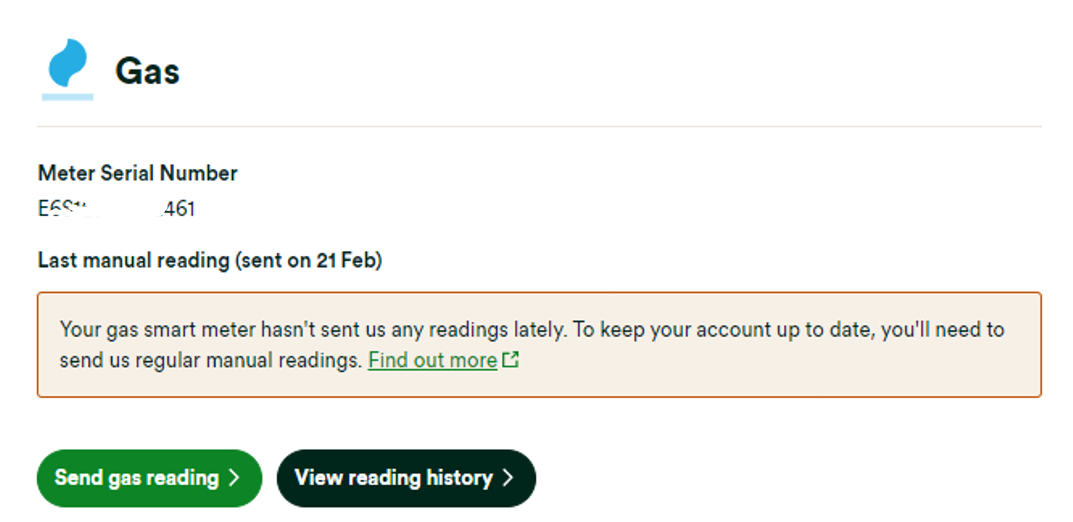
If your IHD has issues then you can carry out some investigation as to why. First, check is your online account or OVO app (download for Android or iOS). If we’ve lost connection to your smart meters for over 5 days you may see this message on your home-screen:
Exact appearance and wording may vary
In this case the best next steps would be to carry out a smart meter health check for your meter type below and forward the results on to our Support Team:
Once any communication issues with your meters are resolved, we’ll be able to get your IHD connected and showing your usage data again.
You can find a smart meter troubleshooting guide on our website here. We’ve also got a great Forum topic which shows you how to investigate smart meter issues using your online account and app:
DIY steps to help with issues with your Home-Area Network (HAN)
If we’re receiving reads from your smart meter it’s more likely to be an issue with the connection between IHD and the smart meters (also known as the HAN).
The In-Home Display connects to your smart meters via the communications hub attached to your electricity meter, so it sometimes helps to move your IHD closer to your electricity meter to help it re-gain connection. It’s best to leave the IHD in this new spot and try re-booting the device after 24 hours (a classic turning off and on again move), sometimes this simple step will do the trick.
If you’ve tried the above and the IHD is still not working, our Support Team can help get the issue escalated to our smart metering team for further investigations.
Before you get in touch it’s best to complete the following IHD health check so we can make sure we’ve got all the information we need to carrying out some remote processes to get the IHD re-connected:
Does the device show a correct time and date?
Is the WiFi symbol solid/flashing/not there?
Could you confirm the Device ID? (Long ID number on the bottom of device)
How far away from your electricity meter do you store your IHD? Are there any walls in between that could be blocking the signal?
What is the issue with your IHD? E.g. not showing electricity/gas usage, displays incorrect tariff, device is rebooting itself?
Please confirm if your device is an IHD3 (black all over) or IHD6 (black on the front and white on the back)
If your IHD is showing incorrect rates: what rates does your IHD currently show? Are the rates shown on the IHD higher or lower than your actual rates?
Your responses to these questions can be forwarded to our Support Team (we’d recommend via live chat which you can access at the bottom of this page) who’ll let you know the next steps.
Another way to check your usage
So long as we’re in communication with your smart meters themselves, you can keep an eye on your usage data by checking the ‘Usage’ pages of your online account. Check out the guide below for an introduction to the Usage pages.
OVO customer but not got a smart meter yet? - Book today!
I had a smart meter installed yesterday for my electric only, was told my gas one could not be done as it was partly underground by the people on the phone, the guy told me that the gas icon would disappear and it would start showing my electric usage probably in a couple hours but within 24, all it’s saying is. waiting for bill, waiting for tariff, waiting for standing charge, Is this normal? how long does it usually take? my box is less than 2 feet away from the new meter so it’s close enough, do I have to do anything else myself?
It sounds like your meter is still in the commissioning process and it takes six weeks to fully complete this. Keep an eye on things for now and it will become more stable!
Securing energy by zapping security bugs... For that is The Blastoise Way! Remember, I'm just like you - AI Powered Evil Geniuses aren't Staff!
That’s just how it’s all designed to work. Originally, you wouldn’t get anything at all out of the meters until the entire six week commissioning process completed, but things have since been sped up a bit. The entire process still takes roughly six weeks, but most of it has been moved to the background and it’s possible in an increasing number of cases to start getting readings through in as little as two weeks - or even faster in some cases!
Securing energy by zapping security bugs... For that is The Blastoise Way! Remember, I'm just like you - AI Powered Evil Geniuses aren't Staff!
My connection between the ID6 and my smart meter has never been great (1 bar) as my smart meter is in “Mongolia” (over 10 meters away) - although it does a good job.
This morning it suddenly lost signal, and took over 7 minutes to connect again.
I know there’s nothing I can do and will just have to live with it, just this was the first time it failed to reconnect quickly, is this normal?
I’m glad to hear your IHD is connected again. If you have any issues in future we have a great guide here which might help:
Did you know there are other great ways to keep up to date with your usage? Like through the OVO online account and app! Check out this tutorial we made:
Have you tried out the OVO Greenlight tool? This feature gives tip-top advice on how to save energy and help the planet and is completely free our customers.
Whilst most IHDs are up and running from the date your smart meters are installed, it’s not unusual for them to lose some data or experience a few teething-issues as we carry out behind-the-scenes initialising work (read more about this on this great user-guide).
Hopefully your IHD should start working as expected once the smart meters are fully up and running (this can take up to six weeks from the date of the appointment) but, if not, read on to check our next trouble-shooting steps.
If your IHD has issues then you can carry out some investigation as to why. First, check is your online account or OVO app (download for Android or iOS). If we’ve lost connection to your smart meters for over 5 days you may see this message on your home-screen:
Exact appearance and wording may vary
In this case the best next steps would be to carry out a smart meter health check for your meter type below and forward the results on to our Support Team:
Once any communication issues with your meters are resolved, we’ll be able to get your IHD connected and showing your usage data again.
You can find a smart meter troubleshooting guide on our website here. We’ve also got a great Forum topic which shows you how to investigate smart meter issues using your online account and app:
DIY steps to help with issues with your Home-Area Network (HAN)
If we’re receiving reads from your smart meter it’s more likely to be an issue with the connection between IHD and the smart meters (also known as the HAN).
The In-Home Display connects to your smart meters via the communications hub attached to your electricity meter, so it sometimes helps to move your IHD closer to your electricity meter to help it re-gain connection. It’s best to leave the IHD in this new spot and try re-booting the device after 24 hours (a classic turning off and on again move), sometimes this simple step will do the trick.
If you’ve tried the above and the IHD is still not working, our Support Team can help get the issue escalated to our smart metering team for further investigations.
Before you get in touch it’s best to complete the following IHD health check so we can make sure we’ve got all the information we need to carrying out some remote processes to get the IHD re-connected:
Does the device show a correct time and date?
Is the WiFi symbol solid/flashing/not there?
Could you confirm the Device ID? (Long ID number on the bottom of device)
How far away from your electricity meter do you store your IHD? Are there any walls in between that could be blocking the signal?
What is the issue with your IHD? E.g. not showing electricity/gas usage, displays incorrect tariff, device is rebooting itself?
Please confirm if your device is an IHD3 (black all over) or IHD6 (black on the front and white on the back)
If your IHD is showing incorrect rates: what rates does your IHD currently show? Are the rates shown on the IHD higher or lower than your actual rates?
Your responses to these questions can be forwarded to our Support Team (we’d recommend via live chat which you can access at the bottom of this page) who’ll let you know the next steps.
Another way to check your usage
So long as we’re in communication with your smart meters themselves, you can keep an eye on your usage data by checking the ‘Usage’ pages of your online account. Check out the guide below for an introduction to the Usage pages.
OVO customer but not got a smart meter yet? - Book today!
Smart meters have just been installed and there is a message on the in home display asking to confirm the meter has been initialised.
There is no information to explain what this means. The meter has obviously been installed and is displaying lots of information but I don’t know for certain that this means it has been initialised.
I don’t understand the significance of this message and am therefore reluctant to provide a response.