



Rank 6
April 11, 2020
Solved

OVO SMETS2 smart meter communication - what do the WAN, HAN lights mean?

  • April 11, 2020
  • 72 replies
  • 19859 views

Hi. I am new to the forum.

I have been with OVO for 10 months and I have had 2 SMETS2 meters fitted not long after I moved to OVO.

Unfortunately, the system has never worked properly since installation !

What used to happen intermittently was one of 2 scenarios:

The WAN light used to go off and my smart meter would stop sending my meter readings to OVO or the HAN light used to go off and my IHD would stop working with the message "waiting for current data"  being displayed.

Last week all 4 lights (including the WAN and HAN lights) continued to work on the meter (they all flashed on once every 4 or 5 seconds) and yet my IHD stopped working which had never happened before whilst all 4 lights were working !?

A couple of days ago the IHD came back on again but despite all 4 lights still displaying on the meter, my meter readings don't update on the OVO app.

How is this ?

 I thought if the WAN (Wide Area Network) light was on, my electric meter could communicate my meter readings to OVO.

Also I can't understand why last time, my IHD lost the wifi signal in the first place with the HAN (Home Area Network) light being on ?

By the way I have a Chameleon IHD and regarding the wifi signal on the IHD, it is a strong signal (4 bars) as my IHD is only around 5 meters from the meter with only an internal wall (4" thick) which has no effect on the wifi signal. 

The lowest it goes down to is 3 bars.

Any feedback would be much appreciated.

Mike


Best answer by Transparent

Updated on 30/10/25 by Ben_OVO

Sorry to hear of the communication issues you’re having with your S2 smart meters - In order to diagnose what might be causing these issues we’d recommend carrying out a smart meter health check.

For a full lowdown on what the lights on your meter indicate check out the detailed response from our Community member below:


WAN, MESH and HAN lights:


WAN - Wide Area Network

Shows your communication hub’s ability to communicate with your supplier. Flashing indicate a connection. 


MESH - Mesh Communications Network

If you have a SK2 or SKU3 type of Communications Hub, then both WAN and MESH are active, and will display the slow-flash from these indicators if all is well.


If you have a SKU1 (85% of houses do), then the MESH indicator will always be off because that section of electronics isn’t present.


HAN - Home Area Network

This light shows the connection status of your electricity meter, gas meter and IHD with your communications hub on the HAN (Home Area Network).


See this topic for a complete guide on what each hub indicate light means.


What the lights mean when there’s a fault:


Now let’s just separate out the different faults you’ve been seeing.


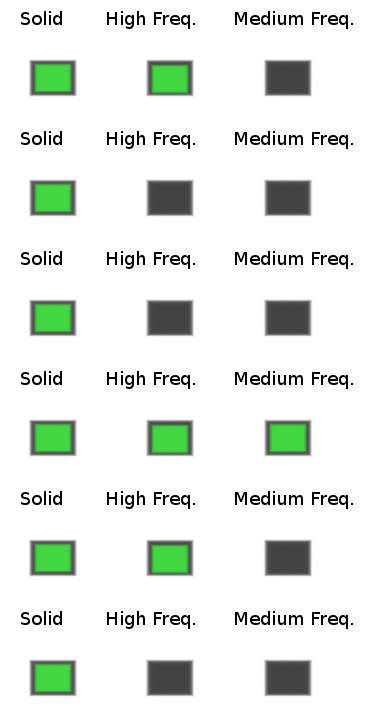
A; A solid WAN may indicate a lack of communication with OVO. the WAN and/or HAN indicator going off is very unusual. In the case of a fault on either of these networks, the correct flash rate should be “medium” (roughly once every 5 seconds).

Communications Hub indicator error sequences

It’s unlikely that you’ll ever actually see the “High” flash rate because this occurs when the Communications Hub is starting up and trying to find the networks.

An indicator that’s completely off means that this part of the code isn’t operational at all. Most customers have SKU1-type SMETS2 meters, in which case the Mesh indicator will be off. Ie there is no Mesh network for this model.


B; It isn’t unusual to have an IHD not displaying correct data but still have the HAN indicator showing the usual slow-flash. The indicator only shows that the Zigbee carrier frequency is alive. Frustratingly it doesn’t mean that any useful data is being transferred!

The same is true of the signal-strength bars on your Chameleon IHD. They will still be present even if the code receiving/interpreting data from the Comms Hub isn’t working. :confounded:


C; In similar fashion, just because the WAN indicator is in slow-flash mode doesn’t mean that OVO are actually receiving your data. Since you’re in the Telefonica territory, the WAN merely informs you that the carrier between you and the mast is alive.

The only way to tell if OVO is successfully receiving data from your site is to login to your online account and view your Usage statistics.


So there’s some initial feedback on what you’ve carefully described to us. And you might also want to read this topic where a few of us have recently been discussing IHD-related errors, and this topic is a great one for the ‘Waiting for current data’ issue.


How to confirm no communication from solid WAN 


If the WAN on your meter is solid, and you’ve confirmed no usage data on your online account, you can reach out to our Support Team to book an appointment to get it all fixed, free of charge.


OVO customer but not got a smart meter yet? - Book today!

Smart meter not communicating? Fill out this Online Form

Interested but not yet an OVO customer? - Check out our plans!

72 replies

MikeEAuthor
Rank 6
April 14, 2020

Update:

I had both gas and electricity usage truncated on the 7th April but I just discovered that a new entry has been added on my electric and 4 entries on my gas but I believe these to be wrong as I can't believe that I used only 10p of gas on those 4 days !


Rank 2
April 14, 2020

No, you won’t be able to all OVO tomorrow @MajorSqueeze . They’ve closed their 4 call centres to all but emergencies.

But in any case, I think the current issues we have with SMETS2 meters are best discussed on the Forum. Here we can compare with what others are seeing, and attempt to clarify which symptoms each of us is reporting.

One of the Moderators, @Tim_OVO is trying to keep track of our Feedback, and I’m inserting inter-Topic links to help with this.

You’ll see that I posted here last week, a list of the mix of current “faults” which need analysing and testing.

Occasionally you’ll see me tag @BenS_OVO who is much more of a “techie”. But that’s just so he receives an alert that we’re discussing something relevant to the SMETS Engineering Team. Don’t expect him to pop up here on the Forum unless he’s needing to clarify something.


Just as an FYI to this, my backdated stats from the 7th have now come through, so all is back up to date. Someones put 50p in the meter I suspect :)

MikeEAuthor
Rank 6
April 14, 2020

No, you won’t be able to all OVO tomorrow @MajorSqueeze . They’ve closed their 4 call centres to all but emergencies.

But in any case, I think the current issues we have with SMETS2 meters are best discussed on the Forum. Here we can compare with what others are seeing, and attempt to clarify which symptoms each of us is reporting.

One of the Moderators, @Tim_OVO is trying to keep track of our Feedback, and I’m inserting inter-Topic links to help with this.

You’ll see that I posted here last week, a list of the mix of current “faults” which need analysing and testing.

Occasionally you’ll see me tag @BenS_OVO who is much more of a “techie”. But that’s just so he receives an alert that we’re discussing something relevant to the SMETS Engineering Team. Don’t expect him to pop up here on the Forum unless he’s needing to clarify something.


Just as an FYI to this, my backdated stats from the 7th have now come through, so all is back up to date. Someones put 50p in the meter I suspect :)

My backdated stats have come back as well.

I am just waiting for my IHD to sync with the electric meter as it's saying "waiting for current data" again.

Transparent
Rank 20
Rank 20
April 14, 2020

@Mikeovo wrote:


Does this photo help?


:wink:

Save energy... recycle electrons!
MikeEAuthor
Rank 6
April 14, 2020

@Transparent - thanks for correcting my post :)

MikeEAuthor
Rank 6
April 14, 2020

I would start another topic but I have forgotten how to lol

I was wondering if turning off the (Chameleon) IHD occasionally when it has been on for, say, 5 or 6 hours and I am fed up of seeing the "waiting for current data" message can make these meter problems worse ?

Thanks


Transparent
Rank 20
Rank 20
April 14, 2020

@Mikeovo- there’s a “Create Topic” at the top right of this page, which might be what you’re looking for! :wink:

I waited about 8 months last year with my IHD reporting “waiting for current data”. You can turn it off/on as much as you like. It’s got solid-state (NAND Flash) memory inside it. So without having more information on how that’s deployed, I have no idea what it may or may not need to retrieve from your Comms Hub when you switch it back on.

Thanks for taking my “corrections” in the light-hearted way I’d intended. You’ve learned a heck of a lot in the 3 days since you arrived here on the Forum. :sunglasses:

Ofgem have identified “lack of public knowledge” as a significant factor which holds back the deployment of more technology related to Smart Metering. So it’s very much up to us to learn what we can and spread correct information to all friends, neighbours and work colleagues. That’s why I tend not let anything inaccurate stick around here on the Forum for too long.

If you want a glimpse of what’s around the corner, then have a look at this Topic on Auxilliary Load Control Switches where I’m discussing with two OVO staff members some technology which had been raised during a visit to OVO in Summer ‘19.

Save energy... recycle electrons!
MikeEAuthor
Rank 6
April 14, 2020

@Transparent Thanks for the advice on my IHD :)

I can't see any "Create Topic" on this page. Never mind lol

Transparent
Rank 20
Rank 20
April 14, 2020

This is what the top of this page looks like to me @Mikeovo 


Save energy... recycle electrons!
MikeEAuthor
Rank 6
April 14, 2020

I have this:

