



Rank 6
April 11, 2020
Solved

OVO SMETS2 smart meter communication - what do the WAN, HAN lights mean?

  • April 11, 2020
  • 72 replies
  • 19859 views

Hi. I am new to the forum.

I have been with OVO for 10 months and I have had 2 SMETS2 meters fitted not long after I moved to OVO.

Unfortunately, the system has never worked properly since installation !

What used to happen intermittently was one of 2 scenarios:

The WAN light used to go off and my smart meter would stop sending my meter readings to OVO or the HAN light used to go off and my IHD would stop working with the message "waiting for current data"  being displayed.

Last week all 4 lights (including the WAN and HAN lights) continued to work on the meter (they all flashed on once every 4 or 5 seconds) and yet my IHD stopped working which had never happened before whilst all 4 lights were working !?

A couple of days ago the IHD came back on again but despite all 4 lights still displaying on the meter, my meter readings don't update on the OVO app.

How is this ?

 I thought if the WAN (Wide Area Network) light was on, my electric meter could communicate my meter readings to OVO.

Also I can't understand why last time, my IHD lost the wifi signal in the first place with the HAN (Home Area Network) light being on ?

By the way I have a Chameleon IHD and regarding the wifi signal on the IHD, it is a strong signal (4 bars) as my IHD is only around 5 meters from the meter with only an internal wall (4" thick) which has no effect on the wifi signal. 

The lowest it goes down to is 3 bars.

Any feedback would be much appreciated.

Mike


Best answer by Transparent

Updated on 30/10/25 by Ben_OVO

Sorry to hear of the communication issues you’re having with your S2 smart meters - In order to diagnose what might be causing these issues we’d recommend carrying out a smart meter health check.

For a full lowdown on what the lights on your meter indicate check out the detailed response from our Community member below:


WAN, MESH and HAN lights:


WAN - Wide Area Network

Shows your communication hub’s ability to communicate with your supplier. Flashing indicate a connection. 


MESH - Mesh Communications Network

If you have a SK2 or SKU3 type of Communications Hub, then both WAN and MESH are active, and will display the slow-flash from these indicators if all is well.


If you have a SKU1 (85% of houses do), then the MESH indicator will always be off because that section of electronics isn’t present.


HAN - Home Area Network

This light shows the connection status of your electricity meter, gas meter and IHD with your communications hub on the HAN (Home Area Network).


See this topic for a complete guide on what each hub indicate light means.


What the lights mean when there’s a fault:


Now let’s just separate out the different faults you’ve been seeing.


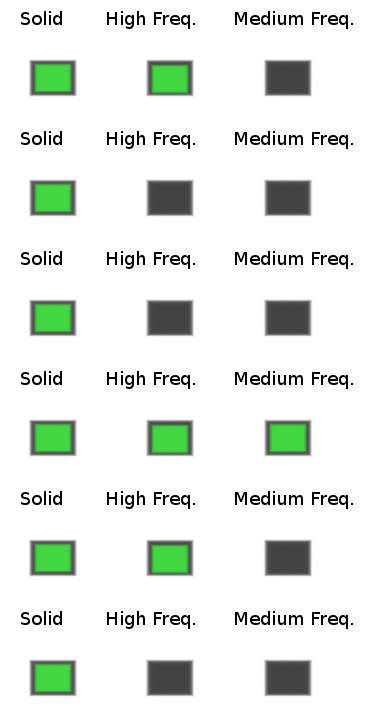
A; A solid WAN may indicate a lack of communication with OVO. the WAN and/or HAN indicator going off is very unusual. In the case of a fault on either of these networks, the correct flash rate should be “medium” (roughly once every 5 seconds).

Communications Hub indicator error sequences

It’s unlikely that you’ll ever actually see the “High” flash rate because this occurs when the Communications Hub is starting up and trying to find the networks.

An indicator that’s completely off means that this part of the code isn’t operational at all. Most customers have SKU1-type SMETS2 meters, in which case the Mesh indicator will be off. Ie there is no Mesh network for this model.


B; It isn’t unusual to have an IHD not displaying correct data but still have the HAN indicator showing the usual slow-flash. The indicator only shows that the Zigbee carrier frequency is alive. Frustratingly it doesn’t mean that any useful data is being transferred!

The same is true of the signal-strength bars on your Chameleon IHD. They will still be present even if the code receiving/interpreting data from the Comms Hub isn’t working. :confounded:


C; In similar fashion, just because the WAN indicator is in slow-flash mode doesn’t mean that OVO are actually receiving your data. Since you’re in the Telefonica territory, the WAN merely informs you that the carrier between you and the mast is alive.

The only way to tell if OVO is successfully receiving data from your site is to login to your online account and view your Usage statistics.


So there’s some initial feedback on what you’ve carefully described to us. And you might also want to read this topic where a few of us have recently been discussing IHD-related errors, and this topic is a great one for the ‘Waiting for current data’ issue.


How to confirm no communication from solid WAN 


If the WAN on your meter is solid, and you’ve confirmed no usage data on your online account, you can reach out to our Support Team to book an appointment to get it all fixed, free of charge.


OVO customer but not got a smart meter yet? - Book today!

Smart meter not communicating? Fill out this Online Form

Interested but not yet an OVO customer? - Check out our plans!

72 replies

Transparent
Rank 20
Rank 20
April 14, 2020

I don’t know what sort of mobile device you’re using @Mikeovo nor what Browser software that is…

… however, you have three symbols at the right-hand side which I don’t normally see. So if I was looking for “Create Topic”, I’d start by having a look at what those buttons do!

Save energy... recycle electrons!
MikeEAuthor
Rank 6
April 14, 2020

I don’t know what sort of mobile device you’re using @Mikeovo nor what Browser software that is…

… however, you have three symbols at the right-hand side which I don’t normally see. So if I was looking for “Create Topic”, I’d start by having a look at what those buttons do!

I use the Chrome browser on a Samsung tablet.


Those 3 dots give me this:

I forgot how I posted my first post (this post)


I am taking this topic off topic now. Sorry


p.s. it's the same forum page if I use Google browser.

Anyway my query has been answered on this thread so I'll leave it as it is ! :)


Transparent
Rank 20
Rank 20
April 14, 2020

Yes, we’re going off-topic. So the sooner we get you to create a new Topic, the better!


Save energy... recycle electrons!
MikeEAuthor
Rank 6
April 14, 2020

Yes, we’re going off-topic. So the sooner we get you to create a new Topic, the better!


They belong to my tablet !


Because I view the forum in Landscape mode (as opposed to Portrait mode), those tablet icons are on the side of the screen rather than the bottom !


Thanks for trying to help anyway.

Transparent
Rank 20
Rank 20
April 14, 2020

Oh rats! :rat:

Normally at times like this I’d be looking for help from another of the Forum Ninjas, @ITGeek123 . But he’s had an overdose of video-games throughout the long Easter weekend, and is reportedly trying to do some real work today. :head_bandage:

Save energy... recycle electrons!
MikeEAuthor
Rank 6
April 14, 2020

Oh rats! :rat:

Normally at times like this I’d be looking for help from another of the Forum Ninjas, @ITGeek123 . But he’s had an overdose of video-games throughout the long Easter weekend, and is reportedly trying to do some real work today. :head_bandage:

No problem !

NinjaGeek
Rank 12
Rank 12
April 15, 2020

Oh rats! :rat:

Normally at times like this I’d be looking for help from another of the Forum Ninjas, @ITGeek123 . But he’s had an overdose of video-games throughout the long Easter weekend, and is reportedly trying to do some real work today. :head_bandage:

Haha thanks for the mention @Transparent I am around today but still extremely busy with my real job (Until OVO Hire me) I will be dipping in and out today. 

Viewing the Forum on a mobile device. You need to be logged into the website to create a topic. Once logged in, you will see a green circle located the bottom right with a pencil icon as shown in the image below :thumbsup:


Renewable energy + EV enthusiast
MikeEAuthor
Rank 6
April 15, 2020

Oh rats! :rat:

Normally at times like this I’d be looking for help from another of the Forum Ninjas, @ITGeek123 . But he’s had an overdose of video-games throughout the long Easter weekend, and is reportedly trying to do some real work today. :head_bandage:

Haha thanks for the mention @Transparent I am around today but still extremely busy with my real job (Until OVO Hire me) I will be dipping in and out today. 

Viewing the Forum on a mobile device. You need to be logged into the website to create a topic. Once logged in, you will see a green circle located the bottom right with a pencil icon as shown in the image below :thumbsup:


@ITGeek123 thanks for reminding me about how I started this topic on here !


You are right I never had a "Create topic" icon only a pencil icon on my tablet.

Now I remember lol.


Back on topic.

All my usage stats have been updated all that is missing is usage data on my IHD.


It still says "waiting for current data" so not too bad if only a tad annoying.


MikeEAuthor
Rank 6
April 21, 2020

UPDATE:

The data usage problem is sorted now so I won't need to post on here anymore.

Well done to OVO for sorting out the problem !


Transparent
Rank 20
Rank 20
April 21, 2020

@Mikeovo wrote:

“...so I won't need to post on here anymore”

Oh no! That’s really sad! :cry:

But I’m sure you’ll be back. Some of these communications faults got “fixed” over the weekend without intervention from an engineer. So they’re just as likely to go wrong all over again next time it’s a new moon and the wind is from the east!

Save energy... recycle electrons!

