Rank 6
April 11, 2020
Solved

OVO SMETS2 smart meter communication - what do the WAN, HAN lights mean?

  • April 11, 2020
  • 72 replies
  • 19859 views

Hi. I am new to the forum.

I have been with OVO for 10 months and I have had 2 SMETS2 meters fitted not long after I moved to OVO.

Unfortunately, the system has never worked properly since installation !

What used to happen intermittently was one of 2 scenarios:

The WAN light used to go off and my smart meter would stop sending my meter readings to OVO or the HAN light used to go off and my IHD would stop working with the message "waiting for current data"  being displayed.

Last week all 4 lights (including the WAN and HAN lights) continued to work on the meter (they all flashed on once every 4 or 5 seconds) and yet my IHD stopped working which had never happened before whilst all 4 lights were working !?

A couple of days ago the IHD came back on again but despite all 4 lights still displaying on the meter, my meter readings don't update on the OVO app.

How is this ?

 I thought if the WAN (Wide Area Network) light was on, my electric meter could communicate my meter readings to OVO.

Also I can't understand why last time, my IHD lost the wifi signal in the first place with the HAN (Home Area Network) light being on ?

By the way I have a Chameleon IHD and regarding the wifi signal on the IHD, it is a strong signal (4 bars) as my IHD is only around 5 meters from the meter with only an internal wall (4" thick) which has no effect on the wifi signal. 

The lowest it goes down to is 3 bars.

Any feedback would be much appreciated.

Mike


Best answer by Transparent

Updated on 30/10/25 by Ben_OVO

Sorry to hear of the communication issues you’re having with your S2 smart meters - In order to diagnose what might be causing these issues we’d recommend carrying out a smart meter health check.

For a full lowdown on what the lights on your meter indicate check out the detailed response from our Community member below:


WAN, MESH and HAN lights:


WAN - Wide Area Network

Shows your communication hub’s ability to communicate with your supplier. Flashing indicate a connection. 


MESH - Mesh Communications Network

If you have a SK2 or SKU3 type of Communications Hub, then both WAN and MESH are active, and will display the slow-flash from these indicators if all is well.


If you have a SKU1 (85% of houses do), then the MESH indicator will always be off because that section of electronics isn’t present.


HAN - Home Area Network

This light shows the connection status of your electricity meter, gas meter and IHD with your communications hub on the HAN (Home Area Network).


See this topic for a complete guide on what each hub indicate light means.


What the lights mean when there’s a fault:


Now let’s just separate out the different faults you’ve been seeing.


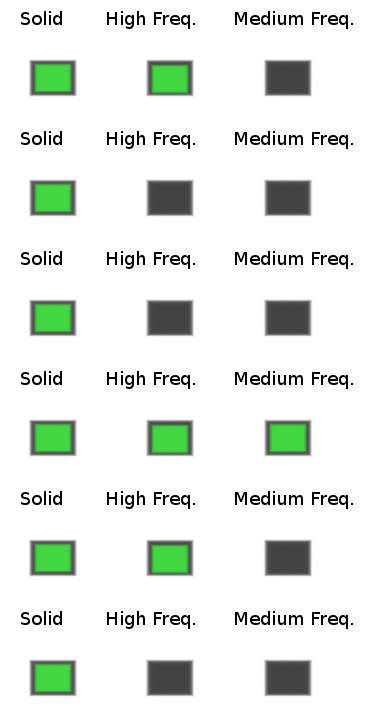
A; A solid WAN may indicate a lack of communication with OVO. the WAN and/or HAN indicator going off is very unusual. In the case of a fault on either of these networks, the correct flash rate should be “medium” (roughly once every 5 seconds).

Communications Hub indicator error sequences

It’s unlikely that you’ll ever actually see the “High” flash rate because this occurs when the Communications Hub is starting up and trying to find the networks.

An indicator that’s completely off means that this part of the code isn’t operational at all. Most customers have SKU1-type SMETS2 meters, in which case the Mesh indicator will be off. Ie there is no Mesh network for this model.


B; It isn’t unusual to have an IHD not displaying correct data but still have the HAN indicator showing the usual slow-flash. The indicator only shows that the Zigbee carrier frequency is alive. Frustratingly it doesn’t mean that any useful data is being transferred!

The same is true of the signal-strength bars on your Chameleon IHD. They will still be present even if the code receiving/interpreting data from the Comms Hub isn’t working. :confounded:


C; In similar fashion, just because the WAN indicator is in slow-flash mode doesn’t mean that OVO are actually receiving your data. Since you’re in the Telefonica territory, the WAN merely informs you that the carrier between you and the mast is alive.

The only way to tell if OVO is successfully receiving data from your site is to login to your online account and view your Usage statistics.


So there’s some initial feedback on what you’ve carefully described to us. And you might also want to read this topic where a few of us have recently been discussing IHD-related errors, and this topic is a great one for the ‘Waiting for current data’ issue.


How to confirm no communication from solid WAN 


If the WAN on your meter is solid, and you’ve confirmed no usage data on your online account, you can reach out to our Support Team to book an appointment to get it all fixed, free of charge.


OVO customer but not got a smart meter yet? - Book today!

Smart meter not communicating? Fill out this Online Form

Interested but not yet an OVO customer? - Check out our plans!

72 replies

Newcomer
April 14, 2020

Hi, 

To add my problem to this list, I only had a smart meter installation on the 2nd March. My IHD seems to be working and shows real-time usage and the daily/weekly usage, however in my OVO app, and on the website, the usage section is missing data for both Gas & Elec. Any ideas? The elec is blank since 8th March and nothing in April, and Gas is missing since 7th April.  Thanks


Newcomer
April 14, 2020

To add some context to mine please see the below picture - gas seems to be working correctly but electricity has just disappeared. Had a look online and no reading showing for electricity for a few days.


MikeEAuthor
Rank 6
April 14, 2020

Update:

Another thing that has never happened before is that my electricity usage now and daily, weekly and monthly usage is shown even though the rest of the display is blank !


Also the electricity icon has reappeared this morning.

Over the last few days only the gas icon was showing after I got a message "Elec data unavailable"

Transparent
Rank 20
Rank 20
April 14, 2020

Thanks @Chissy23 - all useful feedback.

Can I point out that there’s quite a few of us who’ve had no meter readings (gas or electricity) online since 7th April. See the graph here in a my post above.

The meter data from your Communications Hub to your IHD operates across a local Home Area Network (HAN). This is quite separate from the Wide Area Network (WAN) which delivers your meter readings to OVO via the Data Communications Company (DCC).

So you are effectively reporting two separate “faults” to us here.

Don’t worry if this is too technical. So long as us customers keep providing accurate feedback, then it’s the role of OVO’s SMETS Engineering Team to analyse what’s happening.


Thanks too for your update @Mikeovo .

I don’t know what data is actually held within your Chameleon IHD as opposed to what it retrieves from your Comms Hub when you press a button.

But the SMETS Engineering Team will know what this means, so I’ll leave it for their diagnosis.

Save energy... recycle electrons!
MikeEAuthor
Rank 6
April 14, 2020

Thanks @Transparent

I do understand the difference between the 2 networks HAN and WAN.

You are right there are in effect 2 separate issues !


Quote:

I don’t know what data is actually held within your Chameleon IHD as opposed to what it retrieves from your Comms Hub when you press a button.


Well until this morning none of the buttons worked when I pressed them, I just got an error beep and a message "waiting for current data" !

On my screenshot (taken just over an hour ago) this error message is replaced by my electric kWh usage which, incidentally, updates.

It is now showing 18.61 kWh as opposed to the 18.13 kWh reading when I took the photo.

Edit:

Just thought that the 18.61 kWh must include gas as well as I would never have used 18 kWh of electric since midnight.

I was In bed until around 6.30 am this morning !


Newcomer
April 14, 2020

Apologies but I do not understand much of the technical stuff - all I know is that one day it was working fine then next day electricity disappeared. 

Transparent
Rank 20
Rank 20
April 14, 2020

@Chissy23- that’s fine. You’ve given good feedback. Let’s leave the rest for OVO’s engineers to look into. They will be able to check when and why your online data ceased being available.


Yes, @Mikeovo - I’m just pondering why your IHD isn’t able to display weekly/monthly data which it apparently knew yesterday!

There’s lots I don’t know about how data gets passed between the on-site devices.

Next time I visit OVO’s Bristol HQ I’m going to see if I can pick some engineering brains and translate that knowledge into diagrams. But with the pandemic lockdown  that won’t be for a long while yet.

For the sake of others who come across this Topic in the next few weeks, I will just post here again the current version of my SMETS diagram because that will save them having to move elsewhere around the Forum.


The different colours of radiated signal above each aerial denote the networks:


Hopefully that will help others see what we’re talking about!

Save energy... recycle electrons!
Rank 5
April 14, 2020

Hello Gang….


I know it’s not along the lines of the Smart Meter problem but I appear to have a problem with the V2G charger. My numbers don’t tally.

I’ve been on Furlough for 40 days...even before the Government knew what the word meant and just returned to the flock on 1st April. Though connected to the car 24/7 since 11th March, it has ticked over nicely using about 1.5 kWh of electricity every day exporting only about 25 watts/hour so for the month of March there was next to no rebate due (although OVO kindly gave me a credit for the same amount paid in February...and then took it back when I mentioned I didn’t think I was entitled to any).

I “Fired up the Quattro” on the 1st April and it trips out 2-3 times a day, normally when I’m trying to export to the grid as apposed to when they are selling me the stuff. I’ve checked the figures every half hour with OVO and every hour with Kaluza using their apps and there’s something very seriously wrong.

Firstly the imports and exports appear to be out by 1 hour…..ie, Kaluza says I’m importing about an hour after OVO say I received it. But the more serious (for me) problem is the amount Kaluza say I import...after I deduct the normal daily usage…..is about 28% less than I’m paying for...obviously used in the conversion from AC to DC and back…..this is easily checked by looking at the times when I’m asleep in bed and nothing is switched on...between midnight and 7.00am. The furlough clearly shows that for the whole month I averaged 1 kW for the whole 7 hours…...but after that and the 28% are deducted the figures Kaluza say I’m importing and exporting are 90% lower than my figures. As of this morning Kaluza say I’ve imported 21.1 kW and exported 26 kW this month…..but I recon those numbers should be in the region of 211 kWs and 260 kWs roughly. 

Just a note, my car is a 62 kW LEAF with 60 kW available. At 10am on 11th the battery was at 46% (27.6 kWs) and this morning it was 100% (60 kWs, a difference of 32.4 kWs) having gone through a couple of charge and discharge cycles ...but Kaluza say I’ve only imported 21.1kWs and exported 26 kWs….all month. In order to get the correct figures I have to enter 72 bits of data daily and I haven’t been able to go back too far yet but there does appear to be a pattern and I wonder this….Did OVO forget to put the clocks forward in March? and did Kaluza move the decimal point one to the left when they put the clocks forward?...Yes I know it should have happened automatically...but it’s a question worth asking.

Failing that, if all the information is correct then I have a problem with my car and the charger which are constantly importing and exporting large amounts of electricity to and from the car….

As an example of the discrepancy here’s the smart meter alongside the Kaluza app. The meter says I’m exporting to the grid 2.87 kW and the the app says I’m exporting 0.3 kW which would be consistent with 10% as I was also drawing from the car for the cooker...I’d be interested in anyone’s view on my theory…

PS….the smart meter readout isn’t dirty….I just haven’t removed the cellophane...the i phone however... is.


MikeEAuthor
Rank 6
April 14, 2020

Apologies but I do not understand much of the technical stuff - all I know is that one day it was working fine then next day electricity disappeared. 

I am not that knowledgeable either but as I understand it your gas meter sends a signal to your electric meter showing your gas usage (if any) every 30 minutes (not more often than this to save on the battery) and the electric meter gathers your electricity usage in real time and sends it to OVO either every 30 minutes or monthly depending on your settings.

Your IHD gets the usage on the screen directly from the electric meter.

Rank 5
April 14, 2020

regarding my early comments about the clocks being out by 1 hour….I think I may have the answer.

The system should be for BST there are 23 hours in the day and for GMT there are 25 hours...ie the clocks go forward in Summer from 2-3am and back in winter by 1 hour from 2-1am 


OVO appear to have got that a bit wrong and put the clocks back from 1 to midnight….twice but forgot to move 2 O'clock...so when everyone else is operating on 23 hours...they’re operating on 24….or 25 depending which way you look at it…