



Rank 1
March 5, 2019
Solved

New IHD showing high levels of usage - is this right?
  • March 5, 2019
  • 110 replies
  • 8678 views


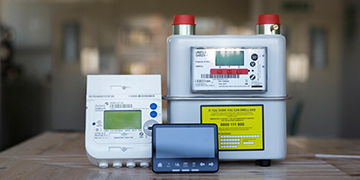
Hi, I had my smart meters installed yesterday lunchtime, this morning my IHD tells me I used a combined gas and electric totalling over £25!! there is no way this is correct. My daughter had a shower this evening for 5 minutes and the electric cost went up on the IHD by £5.....anyone else having these unusual readings? its worrying me as my bill is going to be massive!

Best answer by jewelie

Updated on 23/10/25 by Ben_OVO


Sorry for the inaccurate usage costs you’re seeing on your In-Home Display (IHD).


With a smart meter the tariff information showing on the device should match the rates showing on the ‘plan details’ page of your online account or app. If the tariff figures loaded on your device aren’t correct, it may appear that your usage costs are far higher than they should be - reach out to our Support Team to get that corrected. You can find out how to see your plan details using this guide:


It is worth bearing in mind the following: 


Usage costs on your IHD may not 100% match your daily charges


If the unit rates loaded on to your device are not accurate the daily costs shown here will not match what you are actually charged. For this reason we’d always advise checking the actual usage charges on the ‘Billing’ page of your online account or app. You can find out how to use the Usage pages using this guide:


No increase in costs due to a smart meter:


Having a smart meter installed won't directly increase your costs. There are no hidden effects on usage, and your tariff won't change. 


Your meter will be accurate:


The meter will clock accurately. Old meters (this does depend on how old your previous meter was) can slow down, or even speed up meaning they're not measuring your energy usage correctly. We'd only expect to see this with very old meters. A brand new meter, smart or otherwise, will clock what you're using accurately.


IHD user guides can be found here:


OVO member but not got a smart meter yet? - Book today!

Interested but not yet an OVO member? - Check out our plans!


110 replies

Darran_OVO
Retired Moderator
Retired Moderator
June 21, 2019
Thanks @Mja great to get this feedback, I have forwarded it onto Ben who's leading on the SMET2 testing. We run continuous testing even after rollout, as this is still very new technology so impossible to iron out all the kinks before go live, but we hope to react as quickly as we can to get them resolved.

And thanks to @Somerpark for sharing the Bulb experience, good to know its a wider challenge than just some of the issues we are seeing. You can read about Bulb's issues here.

Ben has been actively reading all the posts relating to SMET2 so is finding all this feedback super useful. Keep it coming and we will ensure we remain focused on getting any issues resolved as quickly as we can.

Darran
Did a reply solve your question? Then mark it as the correct answer!
Transparent
Rank 20
Rank 20
June 21, 2019
Thanks for that update @Mja. The LED flash sequence is what I expected... unfortunately.

From my viewpoint, it's a pity there isn't an LED indicator which specifically reports the status of communication with the SMETS2 Electricity Meter below the Communications Hub. I can understand why it's omitted because the two units are physically interconnected via the ICHI (Intimate Communications Hub Interface).

It's going to be even more tricky to diagnose problems with SMETS2 meters in the Northern territory. Those Comms Hubs have only two LED indicators, either of which can flash green or red. I'll try and build a similar "Customer Guide" for those too.
Save energy... recycle electrons!
Rank 4
June 21, 2019
Hi @Transparent

Where are you getting your info on parts like the ICHI (Intimate Communications Hub Interface)? You seem to have so much more knowledge than all of OVO combined ;-)
Although I just Googled it, and now realise that the info from the DCC is the first hit. However, I presume you do have to know it's exact name to get that instant hit.

Tony
Transparent
Rank 20
Rank 20
June 21, 2019
Hah, @tony1tf Do you want me to divulge all my sources?! 🙊

Yes, DCC's own website is an absolute treasure trove of useful documents. But you do need to be careful that you're reading those that are currently "live" as opposed to Proposals or Position Statements whilst the Smart Meter system was being developed.

There's a whole page of documents about Communication Hubs, and a link on the right hand side which takes you to information about the ICHI in particular. The level of detail is excellent:


Fortuitously, I can speed-read technical documents. So, yes, I have actually read all of DCC's library of "live" documents about SMETS2 meters and Comms Hubs!

Beware too, that just because a feature is specified in a "Final" document, doesn't mean that it is an available function at the moment. It's possible that the current iteration of the software leaves it inactive until a future firmware upgrade. As we learned on Monday when we met at OVO's HQ, that seems to be the reason why you don't get data from your SMETS2 electricity meter.

I'm sure I don't know more than OVO. They have whole teams working on SMETS2. But of course, each team member concentrates on particular aspects of the work.
Save energy... recycle electrons!
Newcomer
June 23, 2019

May I just jump in and clarify what @Eva_OVO has written?

 @Mick85@Mleeson and @Mja - the issue with erroneous readings on the Chameleon IHDs

has been clarified by OVO

yesterday. The software bug is in the Communications Hub

which sits on top of your SMETS2 Electricity Meter

, rather than the IHD

itself. See what I posted here on this other Topic yesterday, and the following message from @Darran_OVO where he explains why he edited what I'd just posted.

This is actually somewhat of a relief. Unlike the IHDs
, the Comms Hubs

can have their software upgraded remotely without a site visit. So when OVO

have finished testing the new code, it will be uploaded directly.

Dealing now solely with the points made by @Mleeson and @Mja , do I understand correctly that you both have gas meter readings showing on your IHD

, but not electricity?

Do you see the same when you log in to your My OVO account page?

If so, could you please fill out your Forum Profile pages? I'm looking for details like the area of the country you live in, and whether you have PV solar panels
etc.

Thanks.


Hi @Transparent,

Apologies for the delay in my reply and thanks for your help! I have now also updated my profile and can confirm that you are correct in that my IHD is showing my gas readings, but not electricity. I also haven't had electricity meter readings registered on MyOVO since 14th July.

I can also confirm that similarly to @Mja my Comms Hub is a Toshiba variant and all lights except 'mesh' are flashing green every few seconds.

I hope this information is of some use?

 @Darran_OVO In relation to the lack of electricity meter readings being submitted to OVO and the 'mesh' issue with my Comma Hub, can you confirm whether it would be best to query this via Facebook/Twitter. I receive the online account management discount, so do not want to jeopardise this!

Thanks,


Matt


Transparent
Rank 20
Rank 20
June 23, 2019

Thanks for the update @Mleeson

Firstly, you don't have a "mesh problem"!

88% of Comms Hubs in the Southern & Central Territories don't have any need for a Mesh network. Your Comms Hub is operating just fine with the modified 3G network operated by Telefonica. That's why the WAN indicator is flashing.

Secondly, you should definitely message the team on webchat via the Help Centre to report the loss of SMETS2 electricity readings. Try to give as clear a set of symptoms as possible so that @Darran_OVO can also alert Ben for further investigation.

When was the SMETS2 installation date?

Have you made any changes to your energy requirements on or around 13th July, such as installing PV panels, or a heat pump on Economy-7?

Save energy... recycle electrons!
August 11, 2019
All these problems boil down to the fact Ovo engineers do not commission the meters on site.
The meters are installed but the commissioning is done at a later date remotely, so there will be delays in the meters working properly, and until commissioned they are not showing correct usage, tariffs, etc
Really to stop all this confusion and aggravation Ovo should be looking at commissioning on site.
August 11, 2019
Really surprising this isn't proactively explained to people having new installations, the amount of traffic on here would go down thats for sure and it would alleviate the worry some people may feel.

Update on the behaviour of my IHD is the displayed gas £usage is incredibly low and displayed electricity £usage is still incredibly high. When I look at the IHD sometimes it says waiting for data, sometimes it doesn't. The explanation of the IHD needing 4-6 weeks to sync will hopefully resolve it.


Just a few small steps and ovo could really improve customer experience when having smart meters installed, it appears to me they are rushing the process.
August 11, 2019
Hi @Transparent

Where are you getting your info on parts like the ICHI (Intimate Communications Hub Interface)? You seem to have so much more knowledge than all of OVO combined ;-)
Although I just Googled it, and now realise that the info from the DCC is the first hit. However, I presume you do have to know it's exact name to get that instant hit.

Tony

Sounds like a meter fitter to me, spy in the camp 😉
Transparent
Rank 20
Rank 20
August 11, 2019
I'm afraid that's not possible @Tufty71. The Installation work on site does as much of the commissioning as can be achieved at that time. The four devices (or three if gas isn't used) are paired with each other, and checks are made to ensure that there is a viable link between the Communications Hub and OVO's SMETS2 team.

This link is not direct, but first via the WAN provider (Arqiva or Telefonica) and thence through DCC. At that stage the signals are using a bare minimum of encryption.

Once OVO have verified that the link is operational, DCC take over the next stage of the Commissioning Process. They, and not OVO, own the Comms Hub.

Only in the final stages of the process will DCC send the necessary ID numbers to OVO which allow them to start running and configuring the SMETS2 meter components themselves. This includes downloading the customer's tariff info and changing the data stream to match the input required by their in-house billing system.

This procedure has taken years to establish and agree contracts across all parties. It is enshrined in the regulatory framework and has been verified by GCHQ to ensure that it is secure. It should never be possible for someone to arrive on-site and fully commission a meter onto the National Smart Meter Network.
Save energy... recycle electrons!

