



Rank 1
March 5, 2019
Solved

New IHD showing high levels of usage - is this right?
  • March 5, 2019
  • 110 replies
  • 8678 views


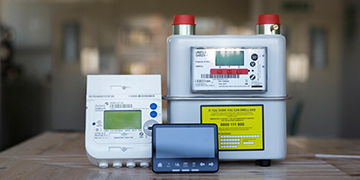
Hi, I had my smart meters installed yesterday lunchtime, this morning my IHD tells me I used a combined gas and electric totalling over £25!! there is no way this is correct. My daughter had a shower this evening for 5 minutes and the electric cost went up on the IHD by £5.....anyone else having these unusual readings? its worrying me as my bill is going to be massive!

Best answer by jewelie

Updated on 23/10/25 by Ben_OVO


Sorry for the inaccurate usage costs you’re seeing on your In-Home Display (IHD).


With a smart meter the tariff information showing on the device should match the rates showing on the ‘plan details’ page of your online account or app. If the tariff figures loaded on your device aren’t correct, it may appear that your usage costs are far higher than they should be - reach out to our Support Team to get that corrected. You can find out how to see your plan details using this guide:


It is worth bearing in mind the following: 


Usage costs on your IHD may not 100% match your daily charges


If the unit rates loaded on to your device are not accurate the daily costs shown here will not match what you are actually charged. For this reason we’d always advise checking the actual usage charges on the ‘Billing’ page of your online account or app. You can find out how to use the Usage pages using this guide:


No increase in costs due to a smart meter:


Having a smart meter installed won't directly increase your costs. There are no hidden effects on usage, and your tariff won't change. 


Your meter will be accurate:


The meter will clock accurately. Old meters (this does depend on how old your previous meter was) can slow down, or even speed up meaning they're not measuring your energy usage correctly. We'd only expect to see this with very old meters. A brand new meter, smart or otherwise, will clock what you're using accurately.


IHD user guides can be found here:


OVO member but not got a smart meter yet? - Book today!

Interested but not yet an OVO member? - Check out our plans!


110 replies

Transparent
Rank 20
Rank 20
August 11, 2019
☺️ me a meter-fitter, eh?

Sorry, no @Tufty71 . I don't work in the energy industry. @tony1tf and I have met when visiting OVO at the beginning of June. And he will probably recall that I work as a builder/designer.
Save energy... recycle electrons!
August 11, 2019
Ahhh you're the brains, 😁.
As far as commissioning its possible, maybe not as far how OvO fit Smart but it definitely can be done 😉
August 11, 2019
Thanks for that update @Mja. The LED flash sequence is what I expected... unfortunately.

From my viewpoint, it's a pity there isn't an LED indicator which specifically reports the status of communication with the SMETS2 Electricity Meter
below the Communications Hub

. I can understand why it's omitted because the two units are physically interconnected via the ICHI (Intimate Communications Hub Interface).

It's going to be even more tricky to diagnose problems with SMETS2 meters
in the Northern territory. Those Comms Hubs

have only two LED indicators, either of which can flash green or red. I'll try and build a similar "Customer Guide" for those too.


The meters in the North and central North do indeed carry the Same communication hub, and yes its a two light system on the hub, han and wan, if it's red it will be solid and you have a problem🙄 but the green lights you see flash at varying rates dependant on state of connection etc so that can tell you all you need to know, as long as you know what they mean 😁
August 11, 2019
What's also worth noting as well, is the ihd may not reset itself. Once commissioned on the secure (smets 1) meter set up, it would auto turn off and immediately back on to reset, on the smets 2 set up, the ihd needs manually turning off and on.... So even though the meters might have been commissioned in that period of time after an engineer has been, you probably will have to do a manual reset (on/off) for you to get proper recorded energy consumption on your in house display
Transparent
Rank 20
Rank 20
August 12, 2019
I don't follow that @Tufty71 🤔

Which previous post are you referring to when you say that it's worth noting as well?
As well as what...?

I can't find anything on this Topic where anyone was discussing an IHD failing to pick up data that was being (correctly) transmitted across the HAN.

If the meters are communicating with the Comms Hub, then that's the source of data which gets sent to the IHD.

I've received several code updates sent to my SMETS2 Comms Hub in the last 5 weeks. These have changed the values which are displayed on the Chameleon IHD. However, the process occurs without intervention. There's no reset required.

How could an IHD be picking up an earlier set of data such that it required resetting in order to now get it correct?
Save energy... recycle electrons!
August 12, 2019
Seem to have a follower 😂
I will be plain, I fit Smart meters and come across all that that entails, I'm not claiming to be a professor of Smart meter workings, I give what I know, have experienced, and others have passed on in my field, and I work with some top engineers.
I've read back what I wrote and it seems quite easy to follow I think,....any advice or help I try to give on here is in good faith. In this instance it relates to some of the problems ovo customers have been encountering with ihds.... Maybe.... Its something I added to the conversation because a manual reset is required on the ihds we install, and funnily enough are the same as ovos
Newcomer
August 29, 2019
Smart meter installed yesterday, was told about all the virtues of tracking real time usage and costs being displayed based on my actual tariff.

Looking at the IHD its reporting that in the middle of summer (so no heating) on a day where the only gas usage was the boiler heating the hot water cylinder for less than an hour - which has cost nearly £9.

Just seems totally inaccurate. It’s worrying because I now don’t know what to expect on my bills.

My typical usage for total usage in summer (may to sept) for both fuels is c.£2 per day
Amy_OVO
Retired Moderator
Retired Moderator
August 30, 2019

Nothing useful so far but I see others are also experiencing incorrect tariffs in their In-House Displays.

My usage recorded by the IHD appears correct - just the money amount is out by a factor of 10.
There seems to be a massive silly bug in IHD units being supplied with 2nd gen SMETS2 smart meter installs. Even with the right tariff and kwh readings it fails at doing the basic maths to calculate the the cost.

Watch this space.

For now, our one is just turned off until there's some kind of official announcement about how they're going to fix this daft bug.


I've moved your post here, @Revstar, see the above best answer and the large thread for more info!

☺️
OVO-Joyed to help!
Transparent
Rank 20
Rank 20
August 30, 2019
Hi @Revstar - the actual message you need to jump to in this (long) Topic is my one here. Then read the rest if you still want to!
Save energy... recycle electrons!
Newcomer
September 19, 2019
mt smart meter installer showed me how to read the current reading on the ihd the reading on the display is vastly different to the smart reads shown on my account which show 00000 as of yesterday (18/9 with no read taken today 19/9
the meter was installed yesterday

