


Solved

Why do I get estimated readings in my bill when I have a smart meter?

  • February 13, 2017
  • 80 replies
  • 36410 views

Hi,


I have a smart meter why do I get estimated readings on my Bill? I thought a smart meter would know my correct readings.


Jonboy.

Best answer by Darran_OVO

Updated on 14/08/25 by Abby_OVO


Got a smart meter installed but noticed we’ve estimated your usage on your latest monthly summary? There’s a few reasons we could be using estimated readings when it comes to your bill, even if you have a smart meter.


It could be something as simple as not having the smart meter set up to send half hourly or daily readings. It’s worth checking your meter reading schedule with the Support Team, and get it updated if it’s set to a monthly reading. This will help prevent estimated bills as well as giving you a better view of your usage too. For more on this check out our handy topic below all about meter reading schedules:


If you know you have these set up and it’s not the issue, there’s a chance we could be experiencing communication issues with your meters.


The first place to check what’s going on with those smart meters is your online account or OVO app (download for Android or iOS). You’ll know something’s up if you see this message on the Homepage:

Exact wording may vary


This message will appear if we haven’t received a reading from your meter as expected for at least 5 days. Hopefully this is just an intermittent issue and the meters will get back in touch with us soon. In the meantime it’s worth submitting a meter reading a few days before your next monthly summary is due. 


To take a reading you’ll need to go to the meters themselves (this won’t be viewable on the In Home Display unfortunately).


For SMETS1 ‘Secure’ smart meters:


There’s a slight difference between the the S1 meters we installed. To take a dual (day/night) reading for Secure Liberty 110 S1 smart meters (which are designed to work best with storage heaters), press 9 on the meter’s keypad. If you’ve got a Secure Liberty 100 S1 smart meter, press 6 to confirm the Day and Night meter readings (pressing 9 will show the reading if you’re a single rate member with this meter).
 

For SMETS2 Aclara, Flonidan, Honeywell or Elster smart meters:


  Aclara (Elec) / Flonidan (Gas) Elster (Elec) / Honeywell (Gas)
Reading the meter
  • Elec: Press A three times until TOU Rate 1 appears.
  • Gas: Press C to wake up, then C to access the menu. Use B to scroll and C to select the reading option.
  • Elec: Press the top button once or twice
  • Gas: Press the circle button once or twice


You can then enter this reading by clicking ‘Send reading’ on the Homepage message or by clicking on the ‘Meter Readings’ menu option:
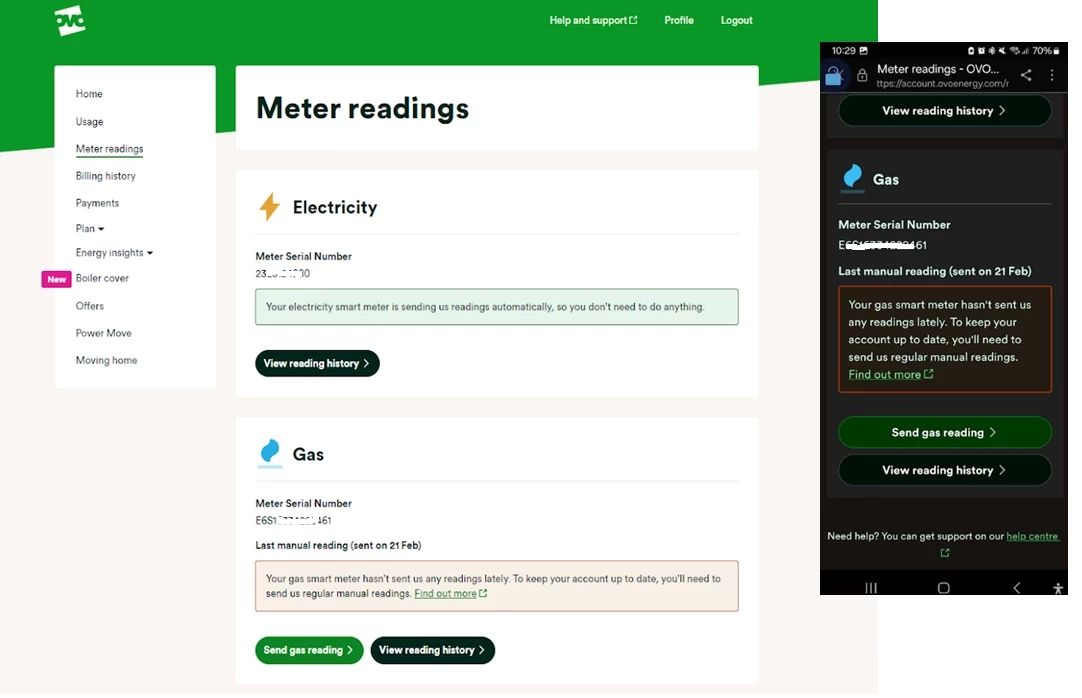
 

Exact appearance may vary


Here you’ll be able to see the last reading we received and the date this was sent to us. Unless you’ve sent a manually reading already, this will be a good indication of when your smart meter lost communication with us. Click ‘Send electricity reading’ and you’ll be taken here:
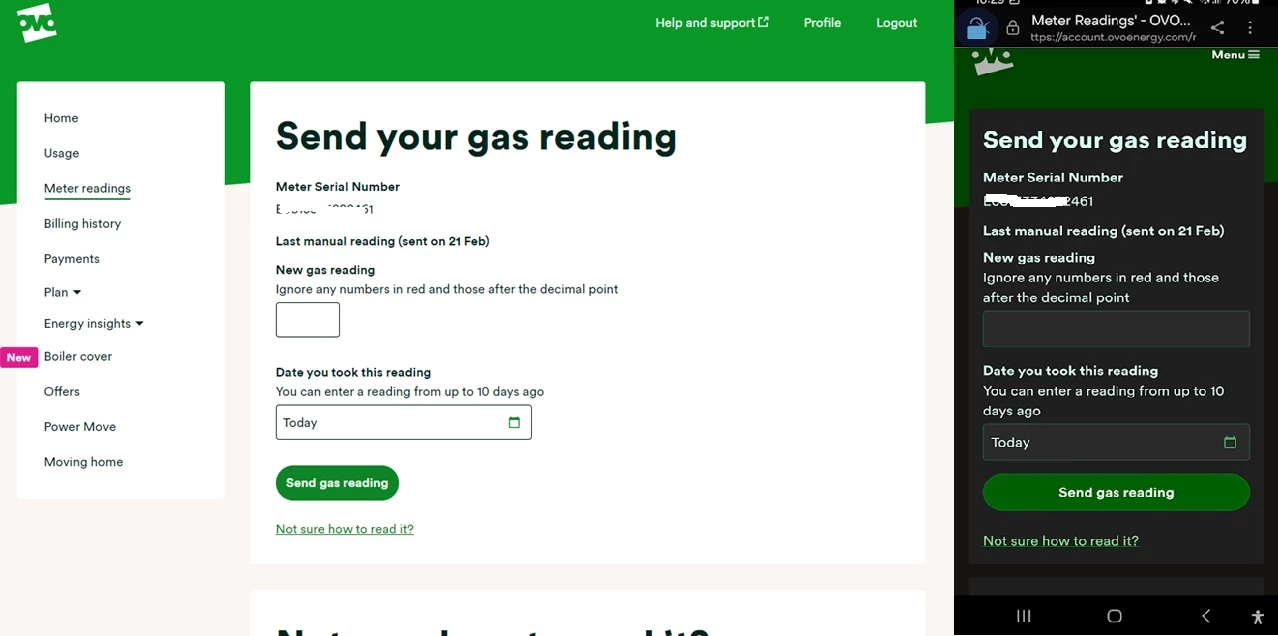


It’s worth checking the reading you’ve taken against the last reading (it shouldn’t be a lower number - unless your meter’s faulty!) You can then type today’s reading into the box or boxes (for an Economy 7 meter) provided:


Exact appearance may vary


Click ‘Next, send a gas reading’ to send the reading from your other meter (if this applies to you!). If you refresh your Homepage you’ll notice your balance will update to include the up-to-date usage costs. 


Hopefully this will be a temporary communication blip and we’ll be able to recover the communication without any further action. If it’s been a few weeks and you’re still noticing the smart meter message on your Homepage it’s worth carrying out a smart meter health check for your meter type below and forwarding the results on to our Support Team for further investigation:


SMETS1 Secure Smart Meter Health Check

SMETS2 Smart Meter Health Check


Fingers crossed those smart meters will be back in touch soon and you can continue enjoying all the great benefits of going smart:slight_smile:


OVO member but not got a smart meter yet? - Book today!


Interested but not yet an OVO member? - Check out our plans!

80 replies

Darran_OVO
Retired Moderator
  • Retired Moderator
  • Solved
  • February 14, 2017

Updated on 14/08/25 by Abby_OVO


Got a smart meter installed but noticed we’ve estimated your usage on your latest monthly summary? There’s a few reasons we could be using estimated readings when it comes to your bill, even if you have a smart meter.


It could be something as simple as not having the smart meter set up to send half hourly or daily readings. It’s worth checking your meter reading schedule with the Support Team, and get it updated if it’s set to a monthly reading. This will help prevent estimated bills as well as giving you a better view of your usage too. For more on this check out our handy topic below all about meter reading schedules:


If you know you have these set up and it’s not the issue, there’s a chance we could be experiencing communication issues with your meters.


The first place to check what’s going on with those smart meters is your online account or OVO app (download for Android or iOS). You’ll know something’s up if you see this message on the Homepage:

Exact wording may vary


This message will appear if we haven’t received a reading from your meter as expected for at least 5 days. Hopefully this is just an intermittent issue and the meters will get back in touch with us soon. In the meantime it’s worth submitting a meter reading a few days before your next monthly summary is due. 


To take a reading you’ll need to go to the meters themselves (this won’t be viewable on the In Home Display unfortunately).


For SMETS1 ‘Secure’ smart meters:


There’s a slight difference between the the S1 meters we installed. To take a dual (day/night) reading for Secure Liberty 110 S1 smart meters (which are designed to work best with storage heaters), press 9 on the meter’s keypad. If you’ve got a Secure Liberty 100 S1 smart meter, press 6 to confirm the Day and Night meter readings (pressing 9 will show the reading if you’re a single rate member with this meter).
 

For SMETS2 Aclara, Flonidan, Honeywell or Elster smart meters:


  Aclara (Elec) / Flonidan (Gas) Elster (Elec) / Honeywell (Gas)
Reading the meter
  • Elec: Press A three times until TOU Rate 1 appears.
  • Gas: Press C to wake up, then C to access the menu. Use B to scroll and C to select the reading option.
  • Elec: Press the top button once or twice
  • Gas: Press the circle button once or twice


You can then enter this reading by clicking ‘Send reading’ on the Homepage message or by clicking on the ‘Meter Readings’ menu option:


Exact appearance may vary


Here you’ll be able to see the last reading we received and the date this was sent to us. Unless you’ve sent a manually reading already, this will be a good indication of when your smart meter lost communication with us. Click ‘Send electricity reading’ and you’ll be taken here:


It’s worth checking the reading you’ve taken against the last reading (it shouldn’t be a lower number - unless your meter’s faulty!) You can then type today’s reading into the box or boxes (for an Economy 7 meter) provided:


Exact appearance may vary


Click ‘Next, send a gas reading’ to send the reading from your other meter (if this applies to you!). If you refresh your Homepage you’ll notice your balance will update to include the up-to-date usage costs. 


Hopefully this will be a temporary communication blip and we’ll be able to recover the communication without any further action. If it’s been a few weeks and you’re still noticing the smart meter message on your Homepage it’s worth carrying out a smart meter health check for your meter type below and forwarding the results on to our Support Team for further investigation:


SMETS1 Secure Smart Meter Health Check

SMETS2 Smart Meter Health Check


Fingers crossed those smart meters will be back in touch soon and you can continue enjoying all the great benefits of going smart:slight_smile:


OVO member but not got a smart meter yet? - Book today!


Interested but not yet an OVO member? - Check out our plans!


  • Rank 5
  • June 29, 2023

Hi I have just checked my meter to take a reading before the 1st July changes and I think it says "inactive."  It is a new meter and I have just checked all my meter reads online and they have all been estimated.  It's a little strange as my I HD is recording everything that's on...powerwise. I guess this is a job for the engineers??


Blastoise186
Super User
Forum|alt.badge.img+8
  • Super User
  • June 29, 2023

If it’s only just been fitted, it won’t be ready yet. Try giving it more time


BPLightlog
Super User
Forum|alt.badge.img+9
  • Super User
  • June 29, 2023

What type of meter have you got @Viv1966 ? We might be able to help in getting a reading for you


  • Rank 5
  • June 29, 2023

It's a Toshiba, if that's any help, 2nd generation, it was fitted on 15th June I think I have a meter read, but the other thing is since the engineer came, I can't get into the meter cupboard he seems to have closed it quite firmly, so I am peering through the glass trying to read it....but by all means if you can try please do 


BPLightlog
Super User
Forum|alt.badge.img+9
  • Super User
  • June 29, 2023

It's a Toshiba, if that's any help, 2nd generation, it was fitted on 15th June I think I have a meter read, but the other thing is since the engineer came, I can't get into the meter cupboard he seems to have closed it quite firmly, so I am peering through the glass trying to read it....but by all means if you can try please do 

I think the Toshiba bit might be the comms part .. does it look like this? 

If so it’s an Aclara


BPLightlog
Super User
Forum|alt.badge.img+9
  • Super User
  • June 29, 2023

If it is an Aclara, the display should show as above with the words ‘Active Import’ and the figures below being the reading. 
You will need to be able to get to the meter at some point so it’s worth someone trying to open the cupboard 


  • Rank 5
  • June 29, 2023

No it's just one meter, so no it doesn't look like that, it's the same colour though. Yes my key seems to have lost its grip so I will try with pliers I think


Abby_OVO
Community Manager
Forum|alt.badge.img+4
  • Community Manager
  • June 30, 2023

Hey @Viv1966 


Did you manage to get into the cupboard to take a good look?


If you did, and you’re still not sure, you’re more than welcome to share a photo on here for everyone to take a look at and help you out.


  • Rank 5
  • June 30, 2023

@Abby_OVO no I haven't, however I have filled in a smart meter health check, can you tell me if the IHD would be taking accurate readings if the smart meter is saying "inactive?" Obviously I have checked all my meter readings and they have all been estimated this month.


  • Rank 5
  • June 30, 2023

@Abby_OVO my meter is just one meter it's a Toshiba I think the Comms is included in the one.


Blastoise186
Super User
Forum|alt.badge.img+8
  • Super User
  • June 30, 2023

Toshiba doesn’t make meters, only SMETS2 Comms Hubs. Try looking a bit further down.


  • Rank 5
  • June 30, 2023

@Blastoise186  ok will do do you know if the I HD will still be taking accurate readings if the meter doesn't seem to be? I need to send a reading to OVO before tomorrow..


Blastoise186
Super User
Forum|alt.badge.img+8
  • Super User
  • June 30, 2023

Yes, the IHD will retrieve accurate readings by requesting them from the meter. Use the Meter Info screen to retrieve them and they will be valid to submit to your account.


  • Rank 5
  • June 30, 2023

@Blastoise186 ok thanks for that


BPLightlog
Super User
Forum|alt.badge.img+9
  • Super User
  • June 30, 2023

I forgot to say that your new smart meter will take a little time to get connected properly for sending readings @Viv1966 .

It should be readable for you to check a reading although I think you mentioned that you did get a reading. 
As Blastoise says, the IHD should be linked and showing correctly. 
Even when everything is fully connected and sending readings, it’s worth checking the meter every so often or at least online to see that the readings are getting through consistently. It should sort the problem you had with the old one


  • Rank 5
  • June 30, 2023

@BPLightlog ....yes I have just checked it again, it is matching the IHD with the reading, but still says "inactive" but I have sent a reading to OVO now anyway.  Thanks for all your help everyone, how long will it take to settle down, or should I speak to the Help Centre?


BPLightlog
Super User
Forum|alt.badge.img+9
  • Super User
  • June 30, 2023

@BPLightlog ....yes I have just checked it again, it is matching the IHD with the reading, but still says "inactive" but I have sent a reading to OVO now anyway.  Thanks for all your help everyone, how long will it take to settle down, or should I speak to the Help Centre?

It can take up to 6 weeks from a new install but might well be up and running in a week or two


  • Newcomer
  • April 30, 2024

Hi everyone 

Have any of you had any issues with your March bill?

My electricity charges are incorrect - they've used 1/3 meter readings as a start and 5/3 meter reading as an end despite having a daily reading for the entire month from my smart meter.


I've spoken to 4 different people on the help chat and was promised it would be sorted so I wouldn't have a massive catch up bill this month but no luck.


Also it keeps telling me it can't tell me if my direct debit is correct and this has been going on for a month now. Causing me major worry as money is tight enough without knowing where the heck we are with our account.


Any hints/suggestions or any similar stories please?


Thank you


Chris_OVO
Community Manager
Forum|alt.badge.img+4
  • Community Manager
  • May 1, 2024

Hey @Rheamean14


As this sounds like an account-specific issue, your best option to get this resolved is to speak directly with our Support Team. Sadly, we don’t have access to the account through the forum to help with this.


We do have a full billing guide that gives more information on how billing works that might help. 


I hope you get this resolved soon 🙂


  • Newcomer
  • May 1, 2024

Thank you for the response.


Unfortunately I have done this 4 times and gotten nowhere.


At the end of my rope now to be honest. Causing a lot of stress 


Nukecad
Super User
Forum|alt.badge.img+4
  • Super User
  • May 1, 2024

Does the billing say it’s used actual readings or estimates?

Sometimes a Smart Meter reading doesn’t get to OVO for some reason.
Sometimes it might not be sending them, sometimes it is sending readings to the metering service, but they are not then getting passed on to OVO.
https://www.ovoenergy.com/help/article/what-to-do-if-your-smart-meter-isnt-sending-readings

Just a suggestion that may or may not work for you:

If your Smart Meter is currently sending daily readings then contact support and ask for that to be changed to half hourly readings - making that small change might just shake things up a bit, enough to put it back on track..


  • Newcomer
  • May 1, 2024

Hi thanks for the reply.

It's an actual reading from the electric meter. 

Spoken to them again this morning and apparently it's flagged on my account as an issue but the accounts team "have a backlog and rectifying the bill wasn't a priority". It's been escalated to high importance and the person I spoke to has also passed it to the complaints team.

Hopefully it will be sorted soon 


Nukecad
Super User
Forum|alt.badge.img+4
  • Super User
  • May 1, 2024


the accounts team "have a backlog and rectifying the bill wasn't a priority".

Amazing that anyone in a customer support role would actually say that.

If it’s true then somebody should give the ‘accounts team’ a swift kick up the backside, and remind them that for customers getting the correct billing would be seen as a basic essential, and the highest priority to fix if it isn’t correct


  • Newcomer
  • May 1, 2024

I know - couldn't believe it when I got that response. Apparently of the previous person I spoke to had flagged it as highly important it would have been looked at sooner. It's been a month and still not done. Must be one hell of a backlog

