There’s a few reasons we could be using estimated readings when it comes to your bill, even if you have a smart meter.
It could be something as simple as not having the smart meter set up to send half hourly or daily readings. It’s worth checking your meter reading schedule, and get it updated if it’s set to a monthly reading. You can check and update your reading schedule in that app, check out the topic below on how to do this:
This will help prevent estimated bills as well as giving you a better view of your usage too. For more on this check out our handy topic below all about meter reading schedules:
If you know you have these set up and it’s not the issue, there’s a chance we could be experiencing communication issues with your meters.
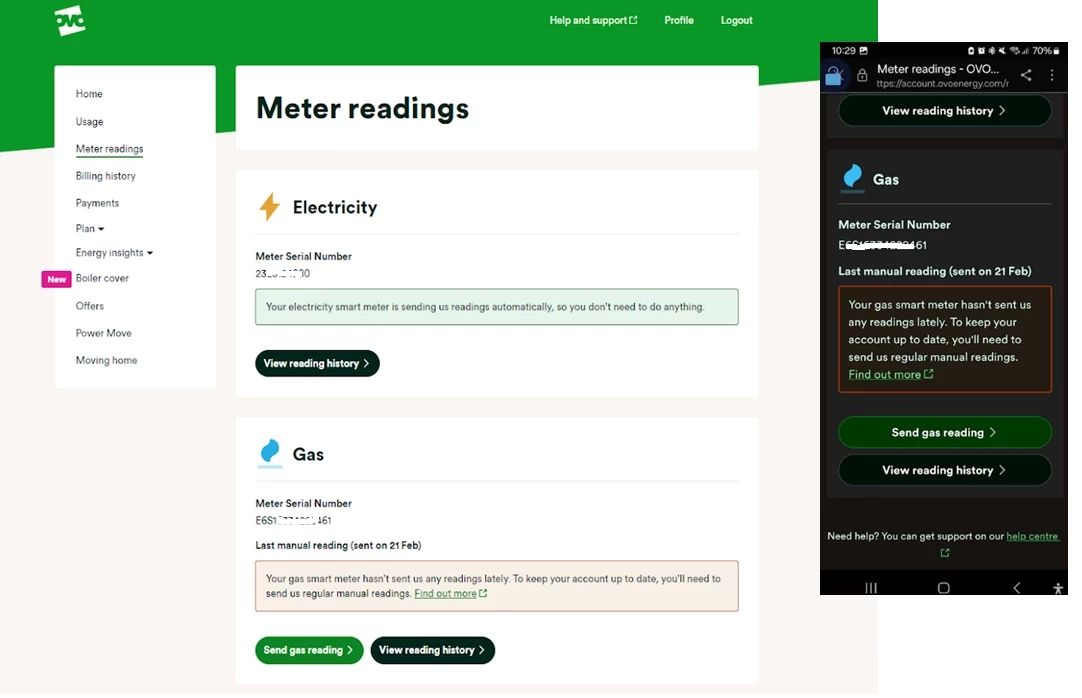
The first place to check what’s going on with those smart meters is your online account or OVO app (download for Android or iOS). You’ll know something’s up if you see this message on the Homepage:
Exact wording may vary
This message will appear if we haven’t received a reading from your meter as expected for at least 5 days. Hopefully this is just an intermittent issue and the meters will get back in touch with us soon. In the meantime it’s worth submitting a meter reading a few days before your next monthly summary is due.
To take a reading you’ll need to go to the meters themselves (this won’t be viewable on the In Home Display unfortunately).
There’s a slight difference between the the S1 meters we installed. To take a dual (day/night) reading for Secure Liberty 110 S1 smart meters (which are designed to work best with storage heaters), press 9 on the meter’s keypad. If you’ve got a Secure Liberty 100 S1 smart meter, press 6 to confirm the Day and Night meter readings (pressing 9 will show the reading if you’re a single rate member with this meter).
Elec: Press A three times until TOU Rate 1 appears.
Gas: Press C to wake up, then C to access the menu. Use B to scroll and C to select the reading option.
Elec: Press the top button once or twice
Gas: Press the circle button once or twice
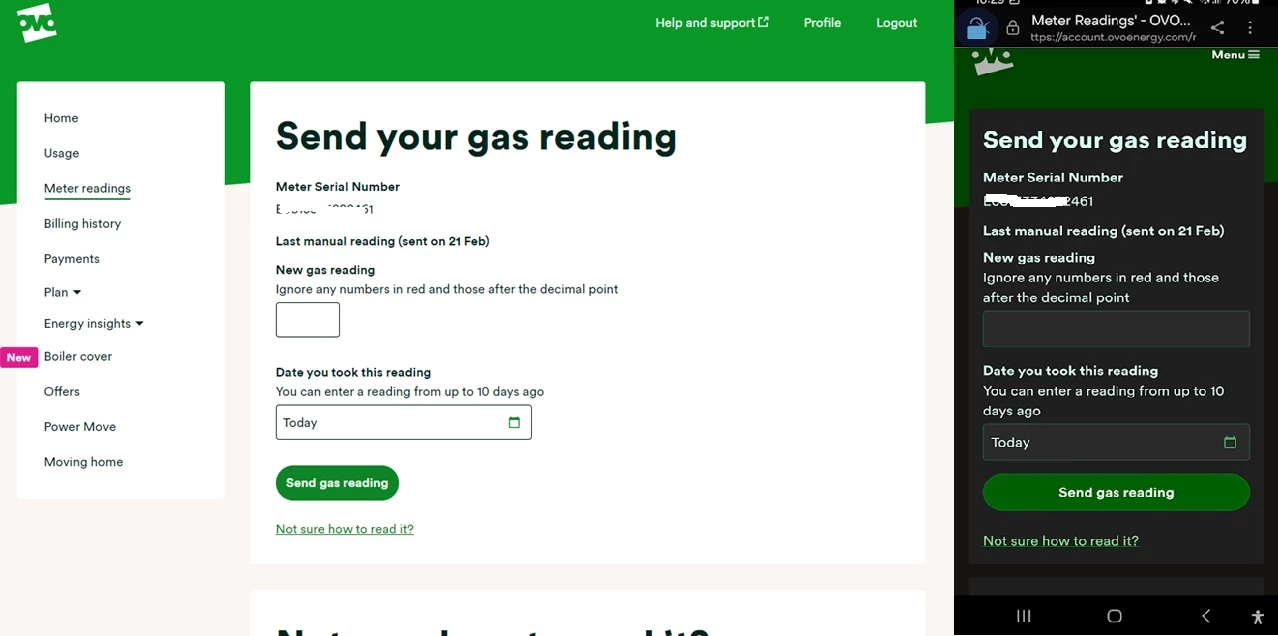
You can then enter this reading by clicking ‘Send reading’ on the Homepage message or by clicking on the ‘Meter Readings’ menu option:
Exact appearance may vary
Here you’ll be able to see the last reading we received and the date this was sent to us. Unless you’ve sent a manually reading already, this will be a good indication of when your smart meter lost communication with us. Click ‘Send electricity reading’ and you’ll be taken here:
It’s worth checking the reading you’ve taken against the last reading (it shouldn’t be a lower number - unless your meter’s faulty!) You can then type today’s reading into the box or boxes (for an Economy 7 meter) provided.
Click ‘Next, send a gas reading’ to send the reading from your other meter (if this applies to you!). If you refresh your Homepage you’ll notice your balance will update to include the up-to-date usage costs.
Hopefully this will be a temporary communication blip and we’ll be able to recover the communication without any further action. If it’s been a few weeks and you’re still noticing the smart meter message on your Homepage it’s worth carrying out a smart meter health check for your meter type below and forwarding the results on to our Support Team for further investigation:
Then the 16th May was probably just a too-high estimate,
This should be apparent from the reading history page: smart readings, estimates and manual readings should be labelled as such.
Noel | I have no official status; I'm just a volunteer who comes here to help other customers. My gear: Aclara SGM 1416-B Electricity-only E7 meter; Chameleon IHD3-PPMID-AAA | It may look as if I know what I’m talking about, but don’t let that fool you. |
I can see some great advice has already been given by our forum volunteers about this.
As we don’t have access to your account here we can only really guess what has caused this jump in gas usage. It sounds like it is most likely to be an estimated reading however, I’d advise contacting our Support team so they can look into this further for you.
Ovo have then charged my account for both bills ...
Both bills have the same start readings but different end readings. The calculation for the second bill is correct and considers the start and end.
Should the first bill be disregarded in full sue to the statement?
It rather depends on how you pay for your energy.
If you pay by Direct Debit, all you need to do is make sure that the first - incorrect - bill is removed from your account. Support should be able to make that happen.
If you pay on receipt of bill, you should pay whatever the second bill instructs you to, if you’re satisfied that it’s correct.
Do you have a smart meter? If not, were the readings used for these bills ones submitted by you or OVO estimates? If they were actual readings for the closing date of the bill, you have nothing to worry about. If they were estimates, make sure to submit regular readings including one on the first day of each billing period.
Support should be able to sort this out after the weekend.
Noel | I have no official status; I'm just a volunteer who comes here to help other customers. My gear: Aclara SGM 1416-B Electricity-only E7 meter; Chameleon IHD3-PPMID-AAA | It may look as if I know what I’m talking about, but don’t let that fool you. |
Concerned about a high bill? This topic may have some helpful advice.
Hey @Confused terminology
I can understand your confusion! Firedog has given some helpful advice here:
Ovo have then charged my account for both bills ...
Both bills have the same start readings but different end readings. The calculation for the second bill is correct and considers the start and end.
Should the first bill be disregarded in full sue to the statement?
It rather depends on how you pay for your energy.
If you pay by Direct Debit, all you need to do is make sure that the first - incorrect - bill is removed from your account. Support should be able to make that happen.
If you pay on receipt of bill, you should pay whatever the second bill instructs you to, if you’re satisfied that it’s correct.
Do you have a smart meter? If not, were the readings used for these bills ones submitted by you or OVO estimates? If they were actual readings for the closing date of the bill, you have nothing to worry about. If they were estimates, make sure to submit regular readings including one on the first day of each billing period.
Support should be able to sort this out after the weekend.
I really appreciate the advice. Its a shame the support team don't understand and i have got no further even with a complaint as the adviser said it would be the best action...
I’m sorry to hear this @Confused terminology. If you’re unhappy with the resolution the complaints team have proposed you can escalate your complaint further. Find out more about the complaints process here.
Throughout the month of December, my kwh usage on the app was showing around 17kwh per day. However by the end of the month, it was showing as 23kwh per day. I thought I was on track to pay the same amount as the previous month but was surprised when the bill came through and my debit suddenly increased. Does anybody know the reason for this?