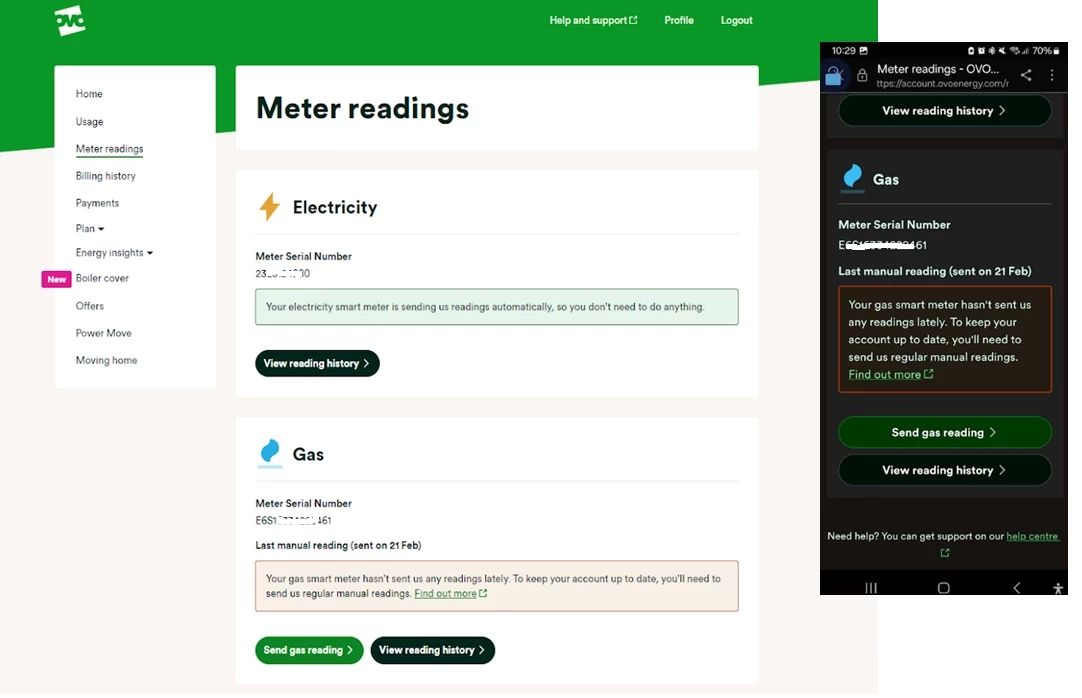
There’s a few reasons we could be using estimated readings when it comes to your bill, even if you have a smart meter.
It could be something as simple as not having the smart meter set up to send half hourly or daily readings. It’s worth checking your meter reading schedule, and get it updated if it’s set to a monthly reading. You can check and update your reading schedule in that app, check out the topic below on how to do this:
This will help prevent estimated bills as well as giving you a better view of your usage too. For more on this check out our handy topic below all about meter reading schedules:
If you know you have these set up and it’s not the issue, there’s a chance we could be experiencing communication issues with your meters.
The first place to check what’s going on with those smart meters is your online account or OVO app (download for Android or iOS). You’ll know something’s up if you see this message on the Homepage:
Exact wording may vary
This message will appear if we haven’t received a reading from your meter as expected for at least 5 days. Hopefully this is just an intermittent issue and the meters will get back in touch with us soon. In the meantime it’s worth submitting a meter reading a few days before your next monthly summary is due.
To take a reading you’ll need to go to the meters themselves (this won’t be viewable on the In Home Display unfortunately).
There’s a slight difference between the the S1 meters we installed. To take a dual (day/night) reading for Secure Liberty 110 S1 smart meters (which are designed to work best with storage heaters), press 9 on the meter’s keypad. If you’ve got a Secure Liberty 100 S1 smart meter, press 6 to confirm the Day and Night meter readings (pressing 9 will show the reading if you’re a single rate member with this meter).
Elec: Press A three times until TOU Rate 1 appears.
Gas: Press C to wake up, then C to access the menu. Use B to scroll and C to select the reading option.
Elec: Press the top button once or twice
Gas: Press the circle button once or twice
You can then enter this reading by clicking ‘Send reading’ on the Homepage message or by clicking on the ‘Meter Readings’ menu option:
Exact appearance may vary
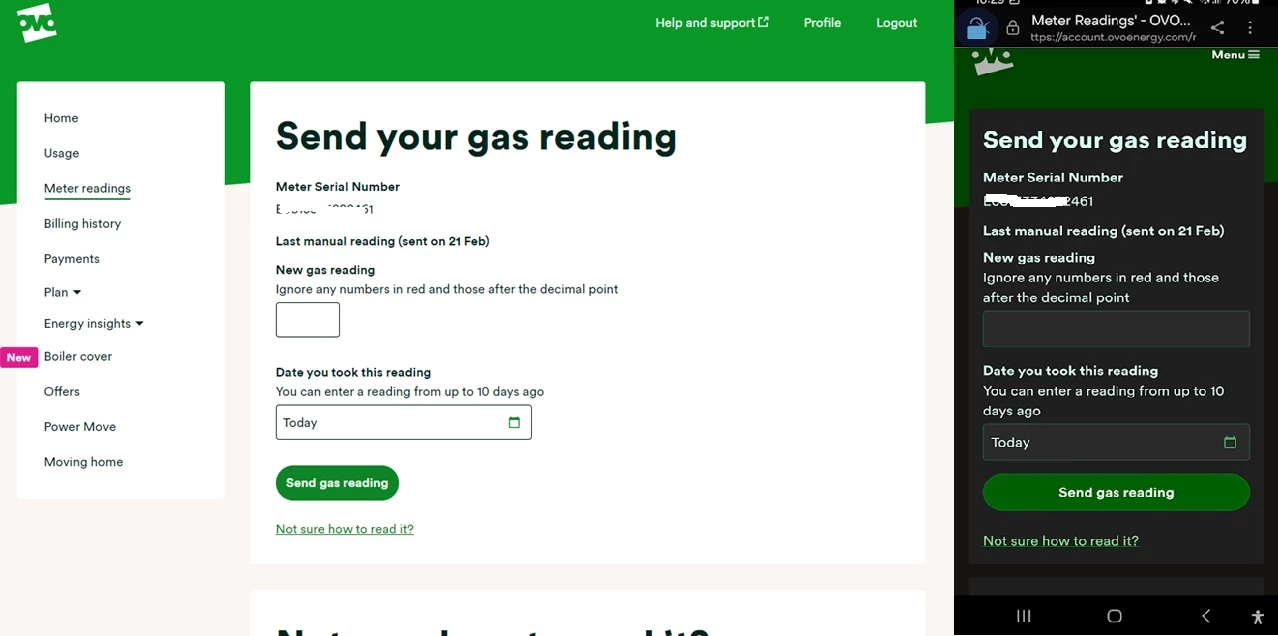
Here you’ll be able to see the last reading we received and the date this was sent to us. Unless you’ve sent a manually reading already, this will be a good indication of when your smart meter lost communication with us. Click ‘Send electricity reading’ and you’ll be taken here:
It’s worth checking the reading you’ve taken against the last reading (it shouldn’t be a lower number - unless your meter’s faulty!) You can then type today’s reading into the box or boxes (for an Economy 7 meter) provided.
Click ‘Next, send a gas reading’ to send the reading from your other meter (if this applies to you!). If you refresh your Homepage you’ll notice your balance will update to include the up-to-date usage costs.
Hopefully this will be a temporary communication blip and we’ll be able to recover the communication without any further action. If it’s been a few weeks and you’re still noticing the smart meter message on your Homepage it’s worth carrying out a smart meter health check for your meter type below and forwarding the results on to our Support Team for further investigation:
You requested Monthly readings rather than Daily/Half-Hourly
You can fix the former via the tool at https://smart-meter-help.ovoenergy.com and the latter by talking to OVO Support to increase the read frequency OR by changing your preferences in the app.
Securing energy by zapping security bugs... For that is The Blastoise Way! Remember, I'm just like you - AI Powered Evil Geniuses aren't Staff!
I’ve recently switched to a smart meter with Ovo Energy, and I’m really happy with the convenience. However, I’ve noticed some discrepancies in the energy usage readings compared to my previous manual meter readings.
I’m wondering if there are any tips or steps I can take to ensure that my smart meter readings are as accurate as possible. Is there any way to reduce fluctuations or errors in data? Additionally, I’ve heard about the option to reset or calibrate smart meters does anyone know if this helps with accuracy?
Smart meters provide two sets of data: the half-hourly usage figures (so long as you’ve selected the half-hourly option) and the meter readings, which will be taken daily unless you’ve selected the monthly option. The difference between two days’ readings will match the sum of the usage figures for the day to within < 2Wh. These two sets are retrieved from the meter separately once daily for most customers.
Smart meters are precision instruments, manufactured to exacting tolerances and certified to meet government requirements for accuracy. There’s not likely to be any question of the precision of the figures you’re seeing, if they’re indeed coming from the meter and not from OVO’s sometimes fanciful estimations.
Noel | I have no official status; I'm just a volunteer who comes here to help other customers. My gear: Aclara SGM 1416-B Electricity-only E7 meter; Chameleon IHD3-PPMID-AAA | It may look as if I know what I’m talking about, but don’t let that fool you. |
Smart meters provide two sets of data: the half-hourly usage figures (so long as you’ve selected the half-hourly option) and the meter readings, which will be taken daily unless you’ve selected the monthly option. The difference between two days’ readings will match the sum of the usage figures for the day to within < 2Wh. These two sets are retrieved from the meter separately once daily for most customers.
Smart meters are precision instruments, manufactured to exacting tolerances and certified to meet government requirements for accuracy. There’s not likely to be any question of the precision of the figures you’re seeing, if they’re indeed coming from the meter and not from OVO’s sometimes fanciful estimations.
The discrepancies I’ve noticed are mostly between my manual readings (taken periodically before the switch) and the daily usage data shown in the OVO app it’s consistently about 5-8% higher now.
I didn’t realize the half-hourly vs. daily data could play a role, so that’s helpful to know. Just to clarify:
If the meter’s daily readings are accurate (as you mentioned, being precision instruments), could the difference be due to how OVO processes or estimates the data before displaying it in the app?
Or might my previous manual readings have been less precise (e.g., human error or meter aging)?
I’ll double-check if I’m on half-hourly or monthly readings in my settings. Appreciate the insight about the <2Wh tolerance that gives me a good benchmark to compare.
(If you’ve encountered this before, any tips on how to reconcile historical vs. smart meter data would be great too!)
Or might my previous manual readings have been less precise (e.g., human error or meter aging)?
That’s not likely, unless the old meter was well past its best-before date. If the old usage data you’re seeing are based on actual readings and not estimates, then they should be accurate to within a kWh or two because any decimals are ignored when readings are submitted manually. A reading could be 123.999 kWh, but it would be entered as 123 kWh. If the next day’s reading were 124.000, that would be entered as 124. The day’s usage would thus be recorded as 1.000 kWh, which is … errr ... 1000 times too big!
A smart meter stores readings exactly at midnight (GMT) each day. You may be able to check the reading that will eventually appear in your online account against the one available on your IHD on the dot of midnight, so long as you don’t have a split-rate tariff like Economy 7.
It might make it easier for us to spot the discrepancies you’re seeing if you could share screenshots or tabular figures - we might even be able to come up with a reasonable explanation!
Noel | I have no official status; I'm just a volunteer who comes here to help other customers. My gear: Aclara SGM 1416-B Electricity-only E7 meter; Chameleon IHD3-PPMID-AAA | It may look as if I know what I’m talking about, but don’t let that fool you. |
I have moved into a new place within the last 2 months (1 bed 1 bath, very small, all electric) and every time I submit a meter reading I get told they are lower than expected.
There are two of us living here, and we are both students so we are very frugal - we never have the heating on, we always have the lights off unless it is night-time and we are not asleep, and we only turn the water heater on before our showers.
So when we submit readings and it says 'this is lower than expected' we believed we would have lower bills as a result. However, we are frequently being charged upwards of £70 a month, more than we have ever paid in flats before this where we had gas and had flatmates who used the energy excessively.
We are sadly not eligible for a smart meter, but would like some guidance as to why our bills are so high for our usage, and any tips to reduce it (that arent 'turn off lights, dont have heating on, switch things off at plugs' - as we are already doing all that).