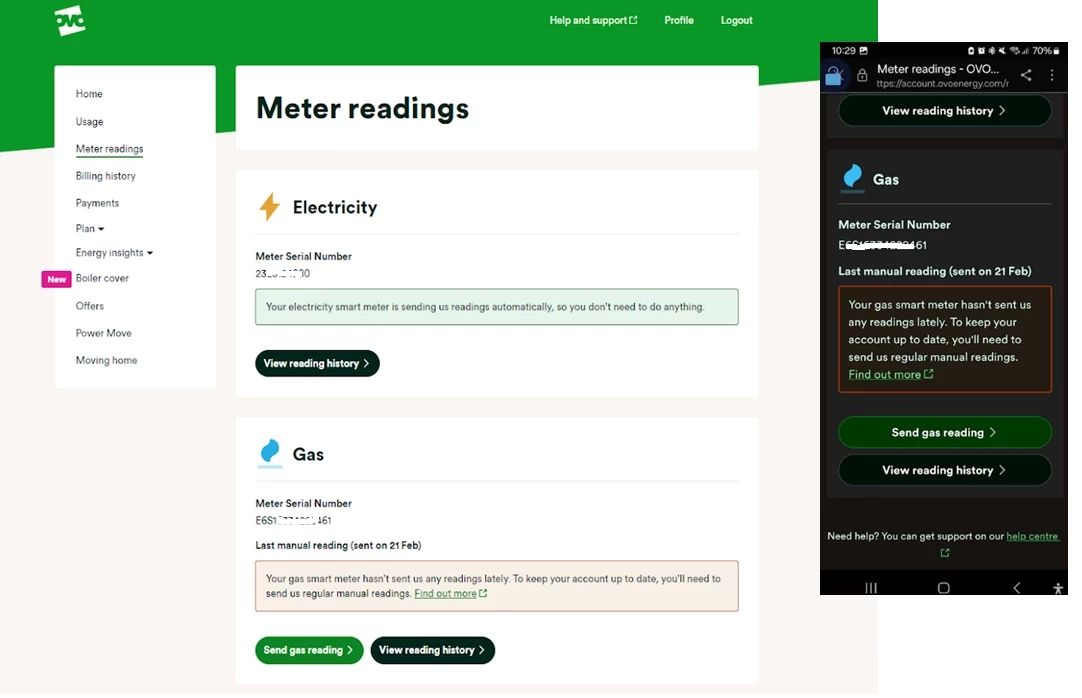
There’s a few reasons we could be using estimated readings when it comes to your bill, even if you have a smart meter.
It could be something as simple as not having the smart meter set up to send half hourly or daily readings. It’s worth checking your meter reading schedule, and get it updated if it’s set to a monthly reading. You can check and update your reading schedule in that app, check out the topic below on how to do this:
This will help prevent estimated bills as well as giving you a better view of your usage too. For more on this check out our handy topic below all about meter reading schedules:
If you know you have these set up and it’s not the issue, there’s a chance we could be experiencing communication issues with your meters.
The first place to check what’s going on with those smart meters is your online account or OVO app (download for Android or iOS). You’ll know something’s up if you see this message on the Homepage:
Exact wording may vary
This message will appear if we haven’t received a reading from your meter as expected for at least 5 days. Hopefully this is just an intermittent issue and the meters will get back in touch with us soon. In the meantime it’s worth submitting a meter reading a few days before your next monthly summary is due.
To take a reading you’ll need to go to the meters themselves (this won’t be viewable on the In Home Display unfortunately).
There’s a slight difference between the the S1 meters we installed. To take a dual (day/night) reading for Secure Liberty 110 S1 smart meters (which are designed to work best with storage heaters), press 9 on the meter’s keypad. If you’ve got a Secure Liberty 100 S1 smart meter, press 6 to confirm the Day and Night meter readings (pressing 9 will show the reading if you’re a single rate member with this meter).
Elec: Press A three times until TOU Rate 1 appears.
Gas: Press C to wake up, then C to access the menu. Use B to scroll and C to select the reading option.
Elec: Press the top button once or twice
Gas: Press the circle button once or twice
You can then enter this reading by clicking ‘Send reading’ on the Homepage message or by clicking on the ‘Meter Readings’ menu option:
Exact appearance may vary
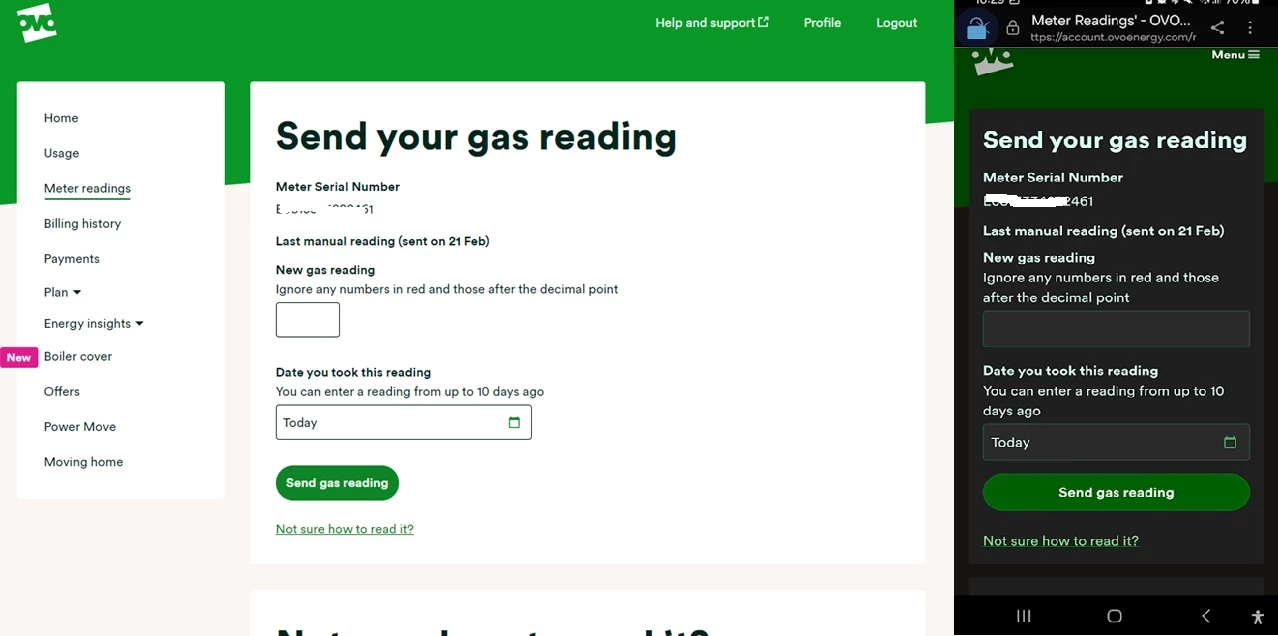
Here you’ll be able to see the last reading we received and the date this was sent to us. Unless you’ve sent a manually reading already, this will be a good indication of when your smart meter lost communication with us. Click ‘Send electricity reading’ and you’ll be taken here:
It’s worth checking the reading you’ve taken against the last reading (it shouldn’t be a lower number - unless your meter’s faulty!) You can then type today’s reading into the box or boxes (for an Economy 7 meter) provided.
Click ‘Next, send a gas reading’ to send the reading from your other meter (if this applies to you!). If you refresh your Homepage you’ll notice your balance will update to include the up-to-date usage costs.
Hopefully this will be a temporary communication blip and we’ll be able to recover the communication without any further action. If it’s been a few weeks and you’re still noticing the smart meter message on your Homepage it’s worth carrying out a smart meter health check for your meter type below and forwarding the results on to our Support Team for further investigation:
Are they the “too low” readings that you submitted? Or are the bills using “Estimated" readings because yours are considered to be too low to be true.
PS. How are you paying, is it by Direct Debit?
Its the peak energy use that is most of the bill - adds about £50 onto the bill. Last month I only did 2 readings and it estimated the third, which looks accurate. It said these are very low readings when I inputted them, so I assumed I would be charged less.
maybe there is something wrong with the meter readings though? like i said, we have all switches off at the plugs unless we are using them, lights turned off when there is daylight, no heating used and water heater on only just before a shower.
There’s something very strange here. The readings on the bill you shared are labelled Smart meter, yet you say you don’t have one. When you submit readings, you’re told they’re too low. It rather sounds as if there’s a meter mix-up here.
Just above that Electricity in detail section, you should see both the supply address and the Meter Serial Number (MSN). Is the address right? and does the MSN on the bill match the one on the meter itself? It might help if you posted a photo of the meter so we could see for ourselves.
Noel | I have no official status; I'm just a volunteer who comes here to help other customers. My gear: Aclara SGM 1416-B Electricity-only E7 meter; Chameleon IHD3-PPMID-AAA | It may look as if I know what I’m talking about, but don’t let that fool you. |
I’m glad to see a few of our community members have already stopped by to help out here.
As Firedog mentioned, it looks like you’ve already got smart meters installed, which would explain why you’d be ineligible to have them fitted.
Would you be able to share a photo of the meter? It would be helpful to know which model it is, and if the meter serial number is correct. As Firedog also mentioned, those additional meter readings sound like they may not match the ones coming from the smart meter if they are being deemed too low, so a photo of the meter would be helpful.
It does look though as if you are being based on the smart meter readings so the billing should be accurate if it’s been based on the meter readings from the correct meter.
Studying that bill your usage that you are being billed for actually seems reasonable.
You are on the Simpler Energy variable tariff - the charge per kWh is the same whather it’s peak or off-peak. I assume that it’s being shown as peak/off-peak like that because at some time the meter has been set up for E7 or E10 tariffs; which is exactly what you would want for a flat with electric storage heaters.
I’d take an educated guess here that the the flat has electric storage heaters, and that the previous tenants were using them; probably on E7 or E10 tariff.
If they were they they would have been using a lot more electricity each month especially in winter.
That could be why when you give a reading the computer says that it looks low - because it is much lower that they have been used to seeing for that property when the previous tenants were there and using the storage heaters.
Looking at what the bill says, and ignoring for now if those are smart readings or your sent in readings.
For your billing period 18th March to 17th April you used a total of 218.894 kWh of electricity.
That doesn’t seem anything out of the ordinary to me.
It’s more than the 146.75 that I used in the equivalent period (mine’s 24th March to 23rd April) - but I’m single and there are 2 of you so I would expect you to use more.
The 2 of you are using about 1.5x the electricity that I use as a single person in a 1-bed flat (I have gas heating), which looks reasonable to me. Indeed I would say it’s a low use for 2-people.
I’d just ignore it when it says that your readings look low. They look low to the computer simply because that are lower than what it was used to seeing from the previous tenants.
PS. You could probably get the price per kWh down if you went for a fixed tariff, but I know that isn’t always possible in a rental if you are not expecting to be there long term.
I’m glad to see a few of our community members have already stopped by to help out here.
As Firedog mentioned, it looks like you’ve already got smart meters installed, which would explain why you’d be ineligible to have them fitted.
Would you be able to share a photo of the meter? It would be helpful to know which model it is, and if the meter serial number is correct. As Firedog also mentioned, those additional meter readings sound like they may not match the ones coming from the smart meter if they are being deemed too low, so a photo of the meter would be helpful.
It does look though as if you are being based on the smart meter readings so the billing should be accurate if it’s been based on the meter readings from the correct meter.
Do let us know how you get on.
here is a photo of the meter - i dont believe it is a smart meter?