Rank 1
January 14, 2021
Solved

Why won't my Geo Trio II In Home Display (IHD) connect to my S2 smart meters with OVO?

  • January 14, 2021
  • 89 replies
  • 28687 views

Hi,

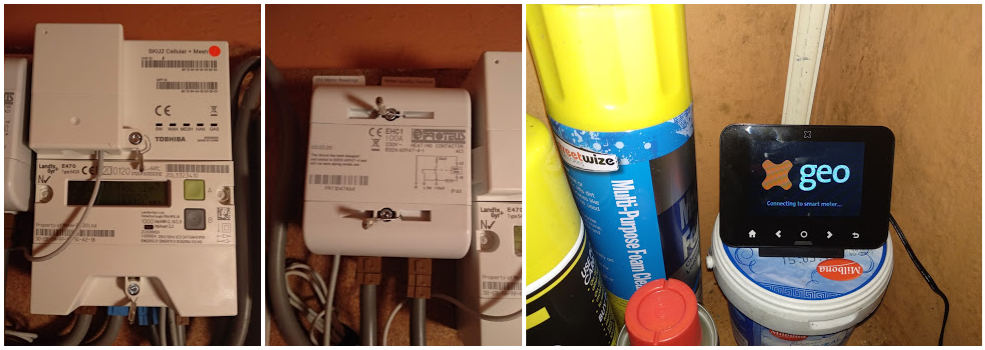
Since moving to OVO from EDF on Jan 5th, the Geo Trio II IHD supplied by EDF will not connect to the SMETS2 smart meter also supplied by EDF.

Even after resetting, it just sits there and say trying to connect. There appears to be a strong 5 bar WiFi signal and the IHD is less than 2 metres from the smart meter with no obstructions in between.

When I look at the IHD the screen says

      Meter Network Not Connected

             Status 22-0

      Not connected to meter network. If the problem persists, please contact your supplier.

I have contacted OVO support and answered their initial questions but they also suggest seeking help here on the forum.

Any ideas ?

thanks and regards, Kevin


Best answer by Jess_OVO

Updated on 08/05/26 by Abby_OVO​​​


I am the product manager for geo’s IHDs, but only speaking in a personal capacity. So here to try and help too with smart meter stuff generally, and obviously anything to do with our IHDs


Welcome to the OVO online community, @kevinmcintyre09 - very nice to have another IHD expert on board!


The older devices that support only SMETS1 of course would not work, but if they are enrolled and adopted into the DCC’s cloud, then any IHD already paired to them will still work. It is my understanding that a utility can pair a new device as long it supports SMETS1. The enrolment and adoption of SMETS1 meters means they look like SMETS2 to the DCC, but are under the hood still a SMETS1 meter.


Regards Ovo supporting devices that churn in, the DCC, BEIS and others are trying to help utilities in supporting IHDs that churn in by collating all the user manuals and guides. This is work in progress. SmartMe’s website already has many- https://www.smartme.co.uk/documents.html


In short, OVO Energy provide Chameleon IHD6s, and support the Pipit IHD, and the Chameleon IHD3, mainly for the Secure Liberty S1 smart meters. But as Kevin mentions, if you have an S2 smart meter, (or an S1 meter that is enrolled and adopted into the DCC’s cloud (in other words made into an S2), with a Geo IHD provided by a previous supplier, it will continue to work and we are able to support the re-pairing of these devices to the meter if needed. Our Support team are on hand to help.


Interesting news on improvements being made in this area though, as it will obviously reduce the need to issue a new device anytime someone switches supplier.


 Check out our Geo IHD FAQs:


Why is my Geo IHD only showing one fuel? (ie no gas or electricity data)?


The IHD should show both gas and electricity info. If you’re missing gas or electricity, please reach out to our Support Team. Again they may recommend a ‘smart meter health check’. You can do these checks in advance: for SMETS1 this is here, and SMETS2 this is here


If neither gas or electricity are showing on the IHD, try unplugging and plugging back in the device. If there’s no change, it might be an issue with the device. First we’d want to check everything is set up OK internally, so please reach out to our Support Team to get this checked.

 

OVO customer but not got a smart meter yet? - Book today!

Interested but not yet an OVO customer? - Check out our plans!

89 replies

Newcomer
April 5, 2023

Thanks. It seems to be set up now. After explaining what I needed a second time. It took 59 minutes in total to be sorted.

Newcomer
January 6, 2025

We’ve had a working Geo Trio II UHD for a couple of years or so and it occassionally drops its connection to the smart meters but after an hour or so it reconnects and all is well. However, on Christmas Eve I needed to replace a damaged electrical socket  and had to turn the the ring main off to facilitate this. Since then the IHD WILL NOT connect, It’s now been two weeks and still will not connect. I have restarted numerous times, including power cycling by removing the batteries and power for twenty minutes, I have tried resetting the IHD using the internal reset options but to no avail. At one point I came across a display that said it wasn’t receiving data from the smart meters but I’ve been unable to find that again.

Does anyone have any ideas?


Blastoise186
Super User
Super User
January 6, 2025

Hey ​@DH88Comet ,

Don’t panic! I can help diagnose this but I juuuuuust need one more thing from you, hope you don’t mind!

Please head into the System Status menu and tell me all the Status Codes you’re seeing. Once I have those, I’ll be able to tell you what you can do.

Thanks!

Securing energy by zapping security bugs... For that is The Blastoise Way! Remember, I'm just like you - AI Powered Evil Geniuses aren't Staff!
Newcomer
January 6, 2025

Hello,

Hope someone can help as on the verge of changing back to original supplier as OVO seem unable to fix issue with IHD not showing gas readings. The electric is working fine with no issue and it is just gas with error code 29-6.

I have SMET2 smart meter

Can anyone help before I need to look at switch back to Octopus.

Thank you


Newcomer
January 6, 2025

forgot to mention, smart readings are working fine back to OVO billing when are updated correctly everyday. this issue just seems to be the IHD and Gas

Blastoise186
Super User
Super User
January 6, 2025

Hello ​@mywaqas ,

This message was posted on behalf of ​@Blastoise186 by his experimental BlastoiseLabs system.

Please hang in there for a bit, your friendly local neighbourhood Blastoise will be along shortly but the code 29-6 might be fixable if you reboot the IHD. To do that, power the device off completely by removing both the batteries and the power cable for five minutes. then power it back up.

If that doesn’t work, the Comms Hub probably needs a reboot - OVO can request this but it takes a while because DCC isn’t the fastest thing in the world at getting stuff done.

If you’re unsure about anything, please reply to this thread and I’ll summon my master.

Thanks

SkyNetBlastoiseBot

Securing energy by zapping security bugs... For that is The Blastoise Way! Remember, I'm just like you - AI Powered Evil Geniuses aren't Staff!
Newcomer
January 6, 2025

ok so i rebooted it after power-off for 5 minutes


I still have no readings, it is giving error 29-9 for the gas under system menu

Blastoise186
Super User
Super User
January 6, 2025

Gotcha.

Comms Hub issue - it needs to be rebooted/power cycled. The fastest way is probably to just get an engineer out to do it.

Securing energy by zapping security bugs... For that is The Blastoise Way! Remember, I'm just like you - AI Powered Evil Geniuses aren't Staff!
Newcomer
January 6, 2025

do i just contact ovo to arrange this? can the reboot not be done remotely?


do you work for ovo so i can reference this thread?

Blastoise186
Super User
Super User
January 6, 2025

Only DCC can remotely reboot a Comms Hub - Suppliers like OVO can’t do that as they don’t have permission. OVO can put a request in to ask DCC to do it on their behalf though. With that being said… My notes do say to Power Cycle the Comms Hub, so it may need to be done on-site.

I don’t work for OVO myself, but you can use the discussion here to make things easier when you contact OVO Support. Best option is to Live Chat via https://ovoenergy.com/help and provide the agent with a link to this thread.

Securing energy by zapping security bugs... For that is The Blastoise Way! Remember, I'm just like you - AI Powered Evil Geniuses aren't Staff!