Rank 1
August 20, 2020
Solved

My Landis+Gyr E470 smart meter isn't communicating following my switch - what can I do?

  • August 20, 2020
  • 51 replies
  • 30457 views

Smart meter not working at all now, gas hasn't worked since leaving Coop ....only had a problem since changing supplier which wasn't my choice the Coop migrated all their customers to another supplier.

Had an engineer booked for early this year but it was cancelled due to Covid-19 which I understood. Had no feedback from Ovo since. The Co-op had my meter installed and it worked perfectly until I changed supplier.

I understand after hearing a call from an Ovo customer with the same problem who called a radio 5 programme after being told by the ombudsman there was nothing they could do because a third party was involved, namely the National Data Base. So not holding out much hope that my problem will be fixed either. So back to  sending manual energy readings.


Best answer by Transparent

Updated on 03/11/25 by Ben_OVO

Welcome to OVO!

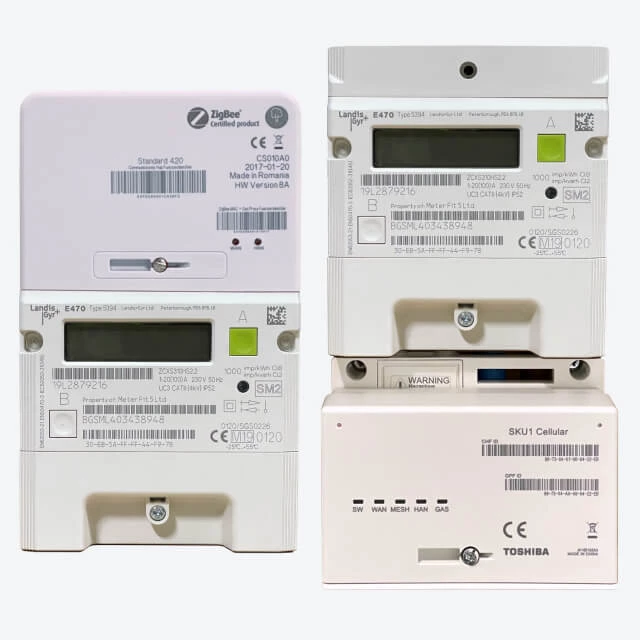
Great question to ask about the function of your Landis and Gyr meter after switching to OVO. The communication of your meters will depend on whether you have S1 or S2 Landis and Gyr meters - as both these meters have the model name E470 it can be hard to tell but luckily we’ve broken it down a bit in the guide below:


What does a SMETS1 (S1) Landis+Gyr E470 look like?


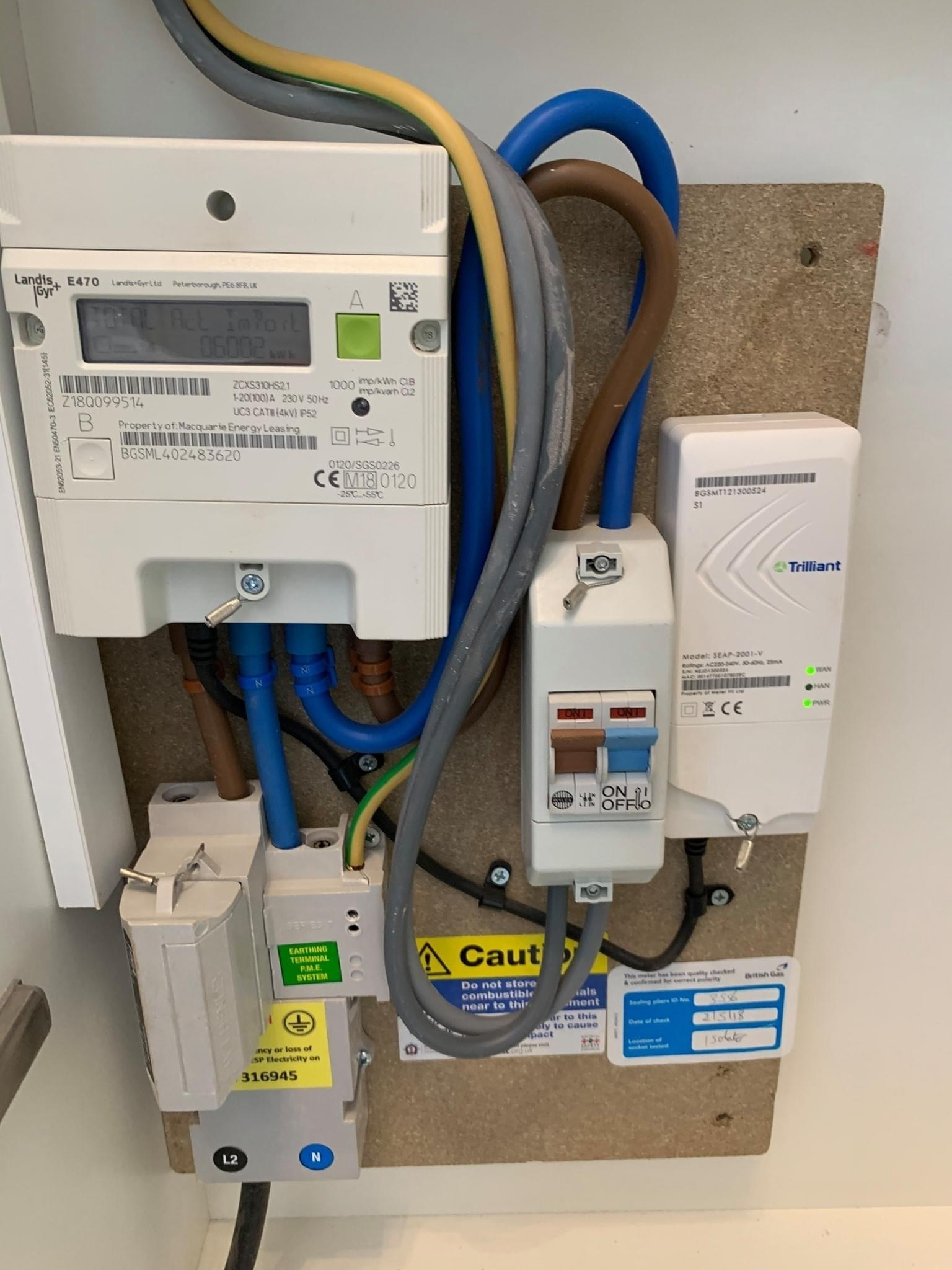
Here’s an example of one installed by British Gas/Centrica:


There’s also another type of SMETS1 Landis+Gyr E470 smart meter, that looks like this:


Another type of SMETS1 meter. Notice the separate comms hub to the right...


The common characteristic of the SMETS1 versions is that they have a separate Communications (Comms) Hub next to the meter, such as the Trilliant SEAP-2001-V. If you’ve got one of these, your gas meter will also be SMETS1 and is probably a Landis+Gyr G370.


What does a SMETS2 (S2) Landis+Gyr E470 look like?


They never have a black border around the display, and will always have one green and one grey button - but might not be in the same places.


What happens if the meters aren’t communicating?


You can submit this easily each month on your online account or OVO app (download for Android or iOS). Unfortunately we won’t be able to get your In-Home Display (IHD) paired up to show your usage data until we’re able to communicate with the meter. As soon as your meter is updated, we’ll be in touch to let you know - at this point you can contact our Support Team to get the IHD back up and running.


If  we aren’t communicating with your meters, fill out this Online Form which will be sent directly to the right team! 


OVO customer but not got a smart meter yet? - Book today!

Interested but not yet an OVO customer? - Check out our plans!

51 replies

Blastoise186
Super User
Super User
March 5, 2023

Thanks!

Everything looks good so far. I still don’t understand why suppliers keep giving out the Chameleon IHD3 rather than the IHD6/7 for S2 sites though…

Let’s try something real quick. Please can you run the meter(s) through https://smartmetercheck.citizensadvice.org.uk/ and tell me the results - especially which supplier it comes back with?

Securing energy by zapping security bugs... For that is The Blastoise Way! Remember, I'm just like you - AI Powered Evil Geniuses aren't Staff!
Newcomer
March 5, 2023

Your electricity meter's working in smart mode

Supplier: Electricity Plus Supply Limited

Newcomer
March 5, 2023

My Chameleon 3 came with the meter install, Oct 2019

Blastoise186
Super User
Super User
March 5, 2023

I see.

Electricity Plus Supply Limited = Telecom Plus PLC = Utility Warehouse. Utility Warehouse is a known Trading Name of Telecom Plus PLC.

They are connected to your meter based on the results of that check, or at very least, DCC believes they are.

I’d say the fault lies within UW own systems. You might want to go back to them and tell them that a forum volunteer on the OVO Forum has already checked the connection and it seems to be working fine. Feel free to link them to this thread too for proof of that.

If they still won’t budge, feel free to switch away to any supplier of your choosing.

Securing energy by zapping security bugs... For that is The Blastoise Way! Remember, I'm just like you - AI Powered Evil Geniuses aren't Staff!
Newcomer
March 5, 2023

Thanks for that.

Just for confirmation, the Bright app proves that my meter is sending up to date info to the DCC doesn’t it? Therefore a power cycle will achieve nothing?

Blastoise186
Super User
Super User
March 5, 2023

Correct. I believe that it’s working fine so I can’t see any value of power cycling it.

Securing energy by zapping security bugs... For that is The Blastoise Way! Remember, I'm just like you - AI Powered Evil Geniuses aren't Staff!
Rank 5
April 8, 2023

I have just switched to OVO and my meter isn't communicating or sending data to OVO. Has anyone else had this problem?

BPLightlog
Super User
Super User
April 8, 2023

Hi @Viv1966 and welcome to this customer forum. Smart meters typically take a few weeks to re-synchronise when switching supplier. It’s worth keeping track and updating readings manually in the meantime. 
Incidentally, do you happen to know if you have 1st or 2nd generation meters?

Bring me Sunshine ~ E&E {Solar PV, Battery Storage, Hybrid EV, ASHP and Home Assistant automation}
Csm
Rank 3
Rank 3
April 8, 2023

Hi @Viv1966 I have been told it can take upto 6 weeks for the meter to update to send reading I'm having to do them manual for the time being 

Csm
Rank 5
April 8, 2023

Hi @BPLightlog  I am not sure it has the letters SM 1 on the front of it so I am assuming it's 1st generation....am I right?