Rank 1
August 20, 2020
Solved

My Landis+Gyr E470 smart meter isn't communicating following my switch - what can I do?

  • August 20, 2020
  • 51 replies
  • 30457 views

Smart meter not working at all now, gas hasn't worked since leaving Coop ....only had a problem since changing supplier which wasn't my choice the Coop migrated all their customers to another supplier.

Had an engineer booked for early this year but it was cancelled due to Covid-19 which I understood. Had no feedback from Ovo since. The Co-op had my meter installed and it worked perfectly until I changed supplier.

I understand after hearing a call from an Ovo customer with the same problem who called a radio 5 programme after being told by the ombudsman there was nothing they could do because a third party was involved, namely the National Data Base. So not holding out much hope that my problem will be fixed either. So back to  sending manual energy readings.


Best answer by Transparent

Updated on 03/11/25 by Ben_OVO

Welcome to OVO!

Great question to ask about the function of your Landis and Gyr meter after switching to OVO. The communication of your meters will depend on whether you have S1 or S2 Landis and Gyr meters - as both these meters have the model name E470 it can be hard to tell but luckily we’ve broken it down a bit in the guide below:


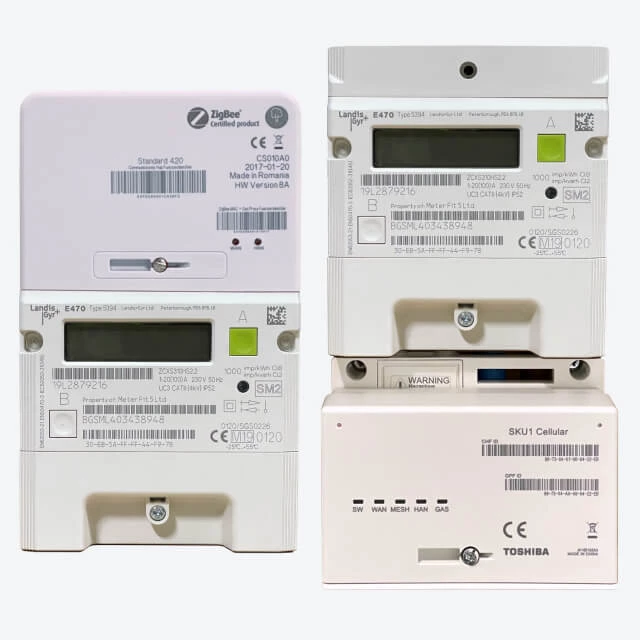
What does a SMETS1 (S1) Landis+Gyr E470 look like?


Here’s an example of one installed by British Gas/Centrica:


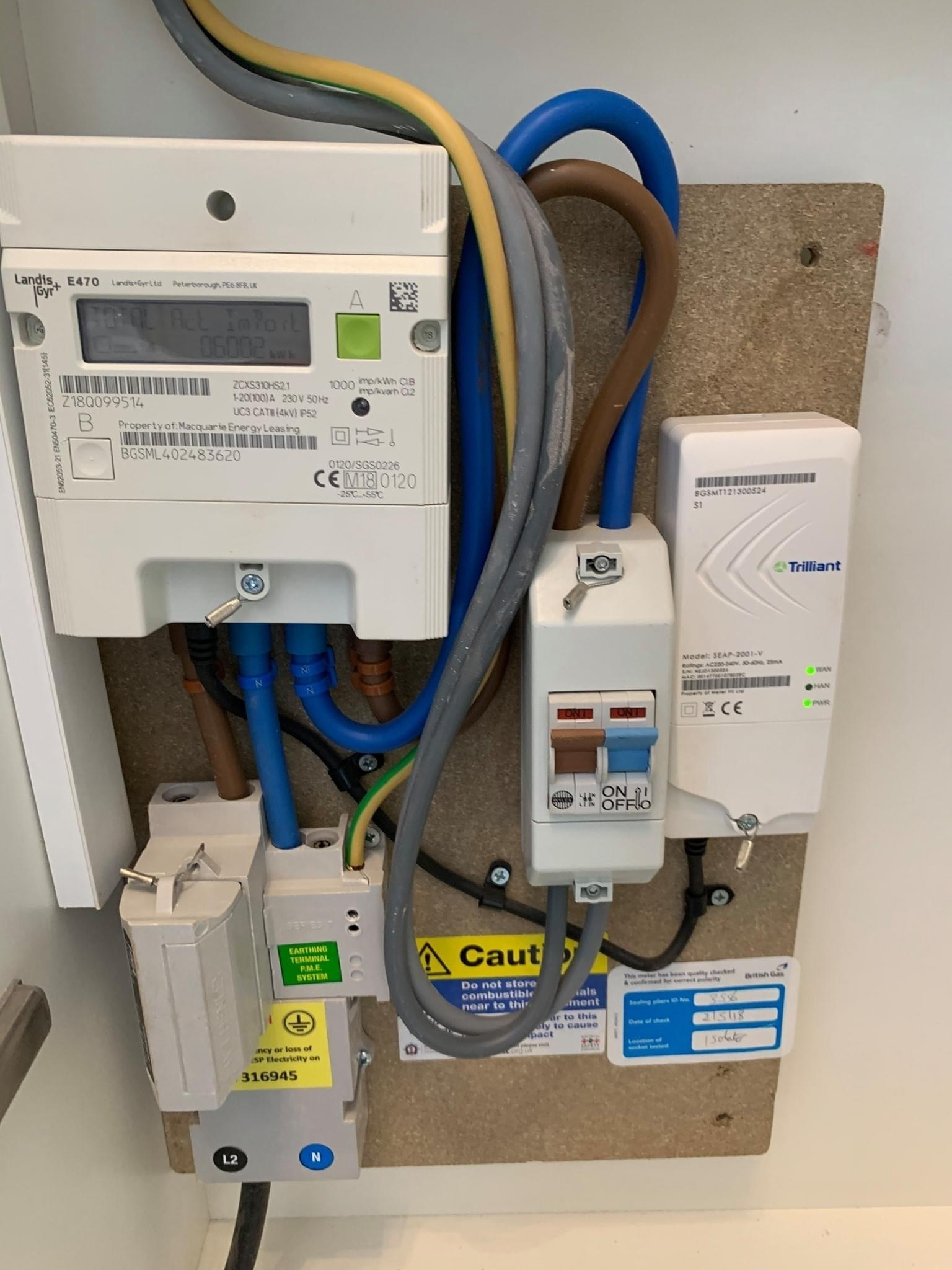
There’s also another type of SMETS1 Landis+Gyr E470 smart meter, that looks like this:


Another type of SMETS1 meter. Notice the separate comms hub to the right...


The common characteristic of the SMETS1 versions is that they have a separate Communications (Comms) Hub next to the meter, such as the Trilliant SEAP-2001-V. If you’ve got one of these, your gas meter will also be SMETS1 and is probably a Landis+Gyr G370.


What does a SMETS2 (S2) Landis+Gyr E470 look like?


They never have a black border around the display, and will always have one green and one grey button - but might not be in the same places.


What happens if the meters aren’t communicating?


You can submit this easily each month on your online account or OVO app (download for Android or iOS). Unfortunately we won’t be able to get your In-Home Display (IHD) paired up to show your usage data until we’re able to communicate with the meter. As soon as your meter is updated, we’ll be in touch to let you know - at this point you can contact our Support Team to get the IHD back up and running.


If  we aren’t communicating with your meters, fill out this Online Form which will be sent directly to the right team! 


OVO customer but not got a smart meter yet? - Book today!

Interested but not yet an OVO customer? - Check out our plans!

51 replies

Rank 5
April 8, 2023

Hi @Csm  thanks for that at least I have an idea now...do you send weekly readings?

Csm
Rank 3
Rank 3
April 8, 2023

Hi @Viv1966 I have been sending them weekly but was told as long as they get a reading by end of billing period this would be good 

Csm
BPLightlog
Super User
Super User
April 8, 2023

Hi @BPLightlog  I am not sure it has the letters SM 1 on the front of it so I am assuming it's 1st generation....am I right?


It’s difficult for me to tell without seeing the meter but yes, I would guess it is. It’s just that all 1st generation meters are going through an upgrade process which should help with connectivity 

Bring me Sunshine ~ E&E {Solar PV, Battery Storage, Hybrid EV, ASHP and Home Assistant automation}
Rank 5
April 10, 2023

Hi @BPLightlog  thank you for your advice I have read up a little about meters via OVo apparently if there is a Trilliant Communications Meter by the side of the smart meter it's more likely to be an SM1

Rank 5
April 10, 2023

Hi @Csm  thanks for your reply have submitted one meter reading now, will submit another this week

Blastoise186
Super User
Super User
April 10, 2023

If you came from British Gas, you could be waiting a while. Trilliant Comms Hubs have been causing nightmares with DCC.

Securing energy by zapping security bugs... For that is The Blastoise Way! Remember, I'm just like you - AI Powered Evil Geniuses aren't Staff!
Rank 5
April 10, 2023

Yes I did wasn't happy with them at all. Is it these Trilliant Meters that are causing the problem with communication s then?

Blastoise186
Super User
Super User
April 10, 2023

The meter you’ve got is probably an S1 Landis+Gyr E470. The Trilliant device is separate and is not a meter by itself.

All I know is that those hubs are more unreliable than most. I’m afraid everything else I know is non-public info that I can’t share. But yes, the long story short version is that your Trilliant hub is the most likely culprit.

Securing energy by zapping security bugs... For that is The Blastoise Way! Remember, I'm just like you - AI Powered Evil Geniuses aren't Staff!
Rank 5
April 10, 2023

@Blastoise186 thank you so I much for this info I have been banging my head against a brick wall with British Gas.…they have been charging very high bills and no knowledge of where they are getting there figures from as I have no Smart Monitor.. The figures have been changing weekly since I have left by the hundreds. So am figuring what to do next.


Blastoise186
Super User
Super User
April 10, 2023

OVO will try to get them working. If a year passes without any success, the meters will be replaced with S2 and a new IHD.

Securing energy by zapping security bugs... For that is The Blastoise Way! Remember, I'm just like you - AI Powered Evil Geniuses aren't Staff!