



Transparent
Rank 20
Rank 20
March 15, 2019
Tutorial

OVO SMETS2 (S2) Smart Meter installation - Member Guide
  • March 15, 2019
  • 60 replies
  • 91683 views
OVO SMETS2 (S2) Smart Meter installation - Member Guide

Updated on 17/04/26 by Abby_OVO


Member’s Guide to OVO SMETS2 (S2) smart meter installation


Having a new smart meter installed is something which most customers only experience once. This topic shows what the process involves and highlights particular issues with the newer SMETS2 meters which OVO started installing widely in March 2019.

You must be present for a smart meter installation. The engineer needs access to the house, even if both gas and electricity meters are in external enclosures. There is an initial survey of the state of gas appliances and your electric consumer unit. Photographs are taken and any gas boiler is turned off.

The electricity meter is usually changed first. The installer is permitted to snip the seal on the main fuse and can reseal it without needing to call your Distribution Network Operator (DNO).
 

ece44fa3-0693-4c6a-8339-412ab1a3af8b.jpg


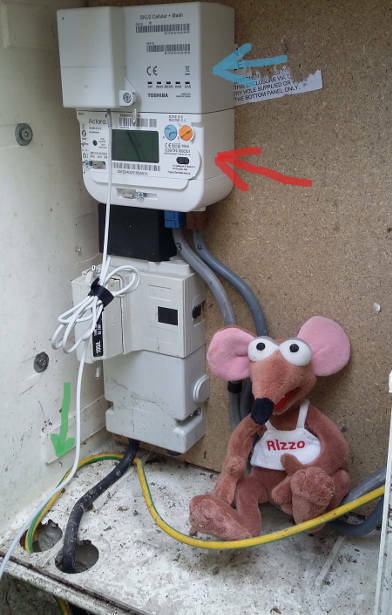
Here my SMETS2 meter is indicated with a red arrow. This one is made by a US Company called Aclara. It has two buttons marked A & B rather than the keypad of the earlier SMETS1 meters, which were manufactured by Secure.

Above the meter itself there is a communications module (blue arrow) which allows data transfer via the mobile phone network. There are several versions. As I'm in a rural area of Devon with relatively poor signals, this Toshiba unit is a Mesh Network device. It connects to an external aerial via the wire marked with a green arrow.
 

bcff455c-f97b-47a8-ab19-e68458f4df72.jpg


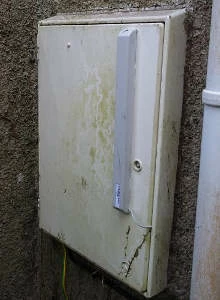
The aerial is the tall rectangular box which is literally stuck onto the outside of the door.

Your gas meter may be in a wall mounted enclosure, or buried in a "semi-concealed" box as is mine.

The installer first removes the old meter including the round regulator (orange arrow), and then screws a steel mounting frame in place, shown here with a green arrow.
 

81ec209b-e31e-4321-be23-36ba8fff2a8f.jpg


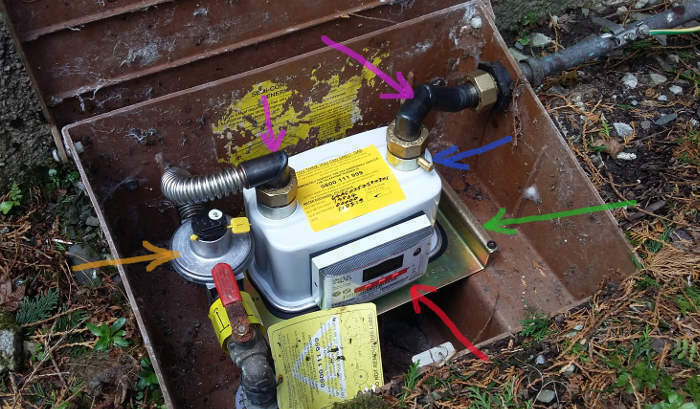
The meter may seem a relatively large device, but it's actually two items. The actual SMETS2 smart meter is indicated with the red arrow, and slots into the larger outer body.


My new gas meter is manufactured by Uniflo. Because there is no electricity available, it contains an inbuilt Lithium battery which should last around 10 years. A gas smart meter spends most of its time in sleep-mode to conserve power, waking up every few seconds to send a signal to the SMETS2 electricity meter.

OVO have designed and fabricated right-angled steel pipes marked here with purple arrows. These minimise the height required and allow the enclosure lid to properly close.

During the commissioning process, the installer connects a manometer to the test point identified with the blue arrow. The gas pressure pushes the fluid up one side of the u-shaped tube. If it remains steady over a two-minute timed period, then there are no leaks.

The installation engineer will now take another set of photographs which get inserted into relevant places in the electronic "form" on his mobile phone. There is a minimum set of 23 pictures which must accompany any installation.

As the exact installation process may evolve over time, please note that these SMETS2 meters were installed on 11th March 2019.


This guide continues in the comments below, or click on the headings below to go directly to that comment:


Commissioning Process


Wifi Interference


Bill and Statements


Smart meter communications network


SMETS1 Upgrades


Taking a manual electricity reading


Taking a manual gas reading


I can smell gas!


Communications Hub - Toshiba


Communications Hub Device Variations - South & Central Territories


OVO member but not got a smart meter yet? - Book today!

Smart meter not communicating? Fill in this Online Form

Interested but not yet an OVO member? - Check out our plans!

60 replies

BPLightlog
Super User
Super User
June 9, 2023

Hi @Sophiejoe and welcome to this customer forum. 
Someone may be able to help but could you explain a little more about which meter you have .. a photo is always good, just no personal details as it’s a public forum

Bring me Sunshine ~ E&E {Solar PV, Battery Storage, Hybrid EV, ASHP and Home Assistant automation}
Blastoise186
Super User
Super User
June 9, 2023

I think I can answer this one straight away actually.

It’s standard practice and a safeguard to make all newly installed Smart Meters initially run in Credit Mode during the Commissioning process, regardless of how you actually pay. This means that if Commissioning fails to complete, you’ll never be left off-supply with no possible way to top-up. This may take up to six weeks to complete.

I’d recommend putting that money aside for now and keep an eye on things so you can be ready for when the meter switches over.

Securing energy by zapping security bugs... For that is The Blastoise Way! Remember, I'm just like you - AI Powered Evil Geniuses aren't Staff!
Newcomer
June 9, 2023

I phoned Ovo this morning - was on the phone for 27 minutes getting it sorted. More or less got through straight away and it was on a credit mode. They’ve switched it over and it’s showing on the meter what I have in credit rather than what I had used. All sorted, quite swiftly. Thank you for your reply though. 

Newcomer
June 10, 2023

We had our electric smart meter changed this week to smet 2 and given a new ihd3 reader - 3 days later it still says waiting for info ?

when will the new meter details show on the ovo app and on the ihd3 ? The time is correct and a solid wireless symbol in top corner but it sats waiting for supplier details and current data?

BPLightlog
Super User
Super User
June 10, 2023

Hi @markjeast , a new smart meter can take a few weeks to fully sync. The data goes to a data centre (DCC) and then on to the supplier so there’s a bit of to-and-fro to get it set up. 


Bring me Sunshine ~ E&E {Solar PV, Battery Storage, Hybrid EV, ASHP and Home Assistant automation}
Newcomer
June 10, 2023

Thank you 👍

BPLightlog
Super User
Super User
June 10, 2023

It’s worth keeping and eye on it and sending readings every so often if they don’t get through. That’ll prevent them setting some estimates which could be more than actuals

Bring me Sunshine ~ E&E {Solar PV, Battery Storage, Hybrid EV, ASHP and Home Assistant automation}
Newcomer
June 10, 2023

Think the last smart reading on old meter was on weds - having knee replacement next week so will be unable to take reading for a few weeks so hopefully it will update by then 🤞sadly he only changed the electric meter so now have to get gas changed on July 4 too 

Emmanuelle_OVO
Retired Moderator
Retired Moderator
June 12, 2023

Hey @markjeast,


Welcome to the OVO Online Community,


I can see @BPLightlog has already given some really helpful advice here. Just wanted to add if your meter has communication issues, you could get added to the Priority Services Register if you are unable to take meter readings yourself. We can then book in meter readers free of charge.


Hope this helps. 

Renewable Energy? Big Fan.
Newcomer
June 14, 2023

Hi I am on the priorities register now - the new smart meter serial number is now showing  on my ovo account app and I’ve been told that it has been paired to the new meter today - it’s now showing as connection lost so I’m hoping this will sort itself in the next couple of days
