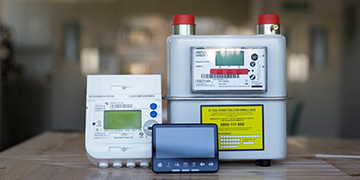
Well I had the latest version 2 smart meter installed in October (8 weeks ago)but was not left a manual nor is there an online version (only for version 1). Whilst daily usage is being communicated to the portable device that you plug into a wall socket it seems that my account is only picking up the electricity readings and not the gas. So the question is 'how do I manually read the smart meter for gas?
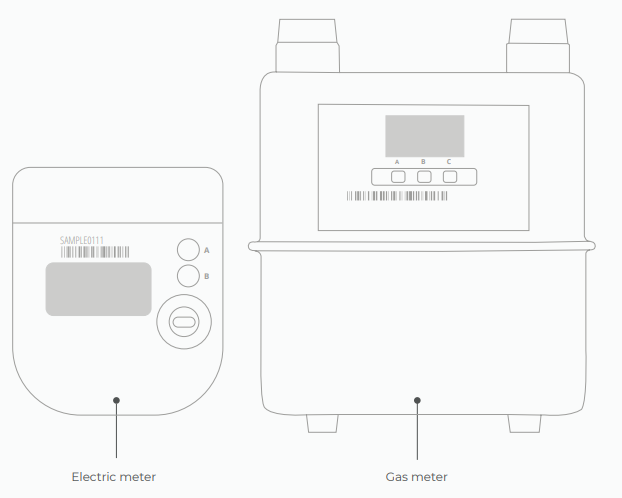
To take an electricity reading: Press A - 'TOU rate 1' will be the electricity reading. If you have an economy 7 meter, 'TOU rate 2' will show the rate 2 reading.
To take a gas reading:. The gas meter has the buttons A, B and C. (C is the options and A & B are to scroll through). When you wake up the meter it should automatically default to the reading screen.
We’ve also got a great page with further info on reading smart meters here.
NB: Some meters haven't got the buttons labelled, if that's the case, A is the top button B is the bottom.
How to diagnose communication issues with your SMETS2 smart meter:
If your In-Home Display (IHD) is only showing the electricity, then there could be a communication issue with your gas smart meter.
If the gas meter is connected to the communication hub (this is at the top of the meter) it will have the word HAN (which stands for Home Area Network) on it, there will also be a signal bar to show the HAN signal strength.
If there's WAN (Wider Area Network) and HAN coverage the WAN and HAN lights will flash every 5 seconds. If the meter is searching for a signal, the lights will flash every 3 seconds, if there's no signal at all the lights will flash every 1 second or they won't flash at all.
The Aclara SGM 1311 is an electricity meter, not a gas meter. If you have a gas supply, there will be another meter for it, and that’s where to take a reading from. Do you have a gas supply?
You can take a reading from the electricity meter by repeatedly pressing the top blue button, Button A. There may be more than one reading, so make a note of all four: TOU Rate 1, 2, 3 and 4. Rate 3 and 4 will be zero for most customers.
When the meter was installed, the occupant will have been given an In-House Display to make it easier to keep track of what the meter is doing. Have you found it? This little device will only work with the meter it was delivered with, so previous occupants should have left it behind, perhaps in a kitchen drawer. Sadly, they often take it with them when they leave. If you do find it, and it’s working after you plug it in, it should give you among many other things readings for both the gas and electricity meters.
Noel | I have no official status; I'm just a volunteer who comes here to help other customers. My gear: Aclara SGM 1416-B Electricity-only E7 meter; Chameleon IHD3-PPMID-AAA | It may look as if I know what I’m talking about, but don’t let that fool you. |
Your aclara smart meter should be sending in meter readings automatically. The tutorials below should be helpful:
How to take a manual smart meter reading?
To find out your current reading press the menu button or A on your electricity smart meter and the reading will appear after the words IMP KWH.
Aclara (Flonidan for gas)
Electricity: There’s 2 buttons on an electricity meter. Pressing B will cycle through all the menus on the meter screen and pressing A will cycle through all the sub menus. To take an electricity reading, you will need to press A - TOU rate 1 will be the electricity reading. For Economy 7 members, TOU rate 2 will show the rate 2 reading.
Gas: Gas meters have A, B and C. Pressing C will give you the menu and A & B will allow you to scroll through the options. The balance section is where you can check the reading (when you wake up the meter it should automatically default to the reading screen). Screen 1 - readings, active tariff price, standing charge, export reads, meter mode.
As Blastoise186 has already mentioned, we’d really need some more information about the meter so we can make sure to give you the correct instructions.
If you could share a photo that would be really helpful. I’ve linked below to a few topics which may be helpful too:
You can also check out this handy article. Feel free to share a photo of the meter too so we can point you exactly in the right direction.
Hope this helps.
Currently Playing: She's Electric
Need advice from other members?
Ask your question to our members - they have the experience you're looking for: