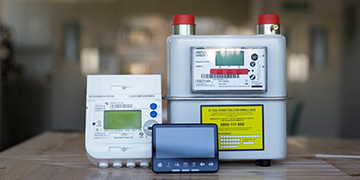
Well I had the latest version 2 smart meter installed in October (8 weeks ago)but was not left a manual nor is there an online version (only for version 1). Whilst daily usage is being communicated to the portable device that you plug into a wall socket it seems that my account is only picking up the electricity readings and not the gas. So the question is 'how do I manually read the smart meter for gas?
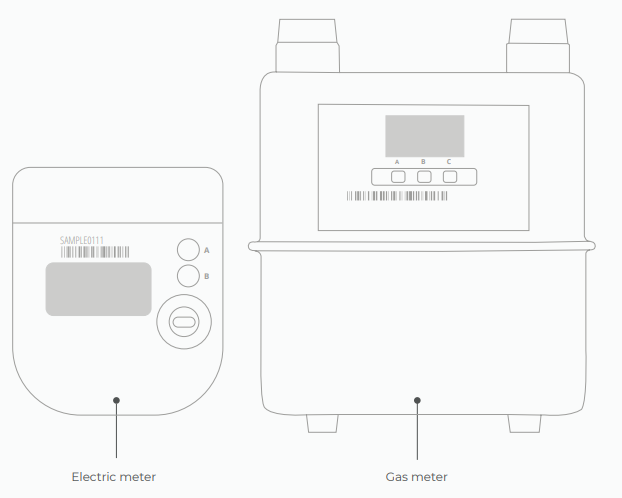
To take an electricity reading: Press A - 'TOU rate 1' will be the electricity reading. If you have an economy 7 meter, 'TOU rate 2' will show the rate 2 reading.
To take a gas reading:. The gas meter has the buttons A, B and C. (C is the options and A & B are to scroll through). When you wake up the meter it should automatically default to the reading screen.
We’ve also got a great page with further info on reading smart meters here.
NB: Some meters haven't got the buttons labelled, if that's the case, A is the top button B is the bottom.
How to diagnose communication issues with your SMETS2 smart meter:
If your In-Home Display (IHD) is only showing the electricity, then there could be a communication issue with your gas smart meter.
If the gas meter is connected to the communication hub (this is at the top of the meter) it will have the word HAN (which stands for Home Area Network) on it, there will also be a signal bar to show the HAN signal strength.
If there's WAN (Wider Area Network) and HAN coverage the WAN and HAN lights will flash every 5 seconds. If the meter is searching for a signal, the lights will flash every 3 seconds, if there's no signal at all the lights will flash every 1 second or they won't flash at all.
Two weeks ago I had an electrical SMETS2 smart meter fitted. It was fitted on a day where the commissioning system was failing nationwide, so the engineer told me I would have to submit my readings as before with the new meter.
thing is, the new meter reads 0. The SW and WAN lights are flashing in tandem on the Toshiba box, while the Aclara box just has its cellular display reading 0.
Hi there, I’ve got a new smart meter which doesn’t seem to be sending my energy readings to my provider. I haven’t sent any readings since getting the meter installed so don’t know to read it and manually send readings. I didn’t think I would have to do that.
I am on economy 7. My TOU Rate 1 is 00583 and TOU Rate 2 is 00384 kWh, apparently. those look nothing like the readings I used to submit before the smart meter, which were more along the lines of 05551 for night and 81034 for day. When I tried putting the 00583 and 00384 rates into the app, my energy provider said they looked wrong so now am not sure what to do. Can anyone help? Thank you!
While you’re here, could you post photos of the meter for us? We can help with potentially diagnosing comms issues in a way that can make things easier for you if you need to go back to your supplier. :)
Securing energy by zapping security bugs... For that is The Blastoise Way! Remember, I'm just like you - AI Powered Evil Geniuses aren't Staff!
thanks for all your help! I finally got through to my provider and it turns out they hadn’t registered the fact I’ve got a smart meter in their system (despite them fitting it for me over two months ago). So in fact what the app was asking was for me to input was the readings for my old meter. So now all I have to do is input the final readings from the old meter as if I’m paying the closing balance. But I will attach some pictures for you anyway (see: old meter, new smart meter with the two rates)