Rank 1
February 14, 2025
Solved

How to work my newly fitted smart meter on Economy 7?

  • February 14, 2025
  • 18 replies
  • 2127 views

Hello, I have just had a smart meter installed. I have asked to continue with my existing Economy 7 plan, it suits my lifestyle. On my old meter it was simple to check between the Daytime/Nighttime  usage. 
How do I know which tariff is currently being metered. ?

How do I collect my monthly usage on the 1st day of the month, as I have done previously.

 

Best answer by BPLightlog

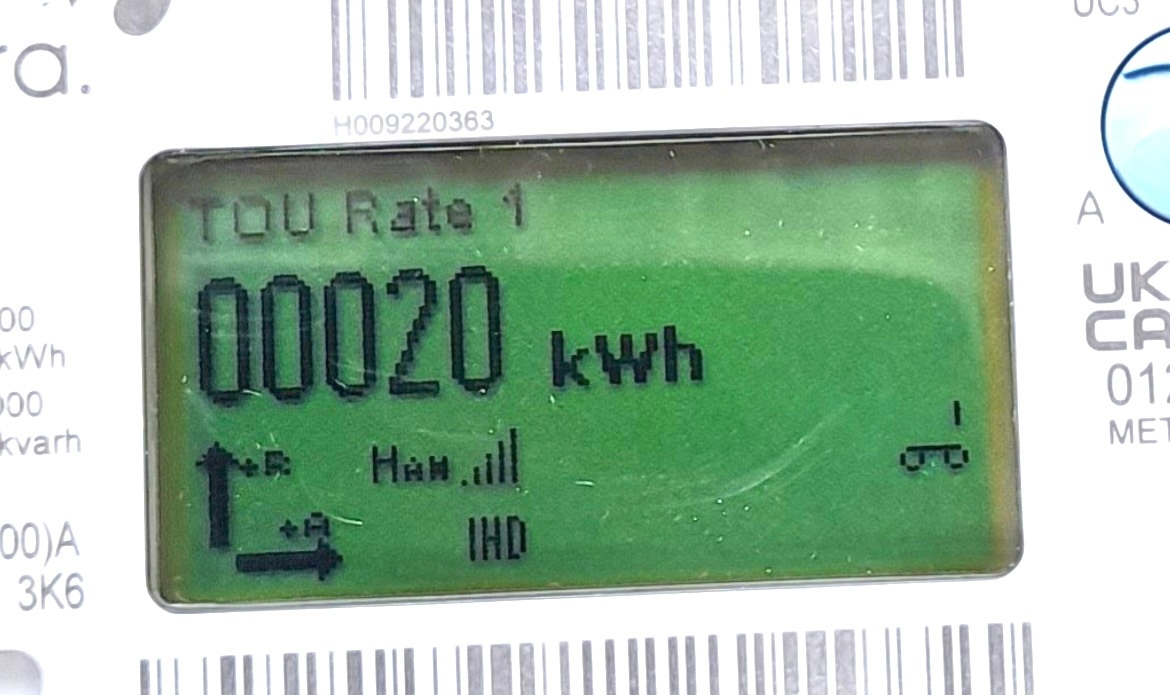
You can see TOU Rate1 at the top of the display. I’m fairly sure that is the day time rate  

And pressing button A cycles through the registers.

There’s an overview here 

and a useful guide to reading various types https://www.smartme.co.uk/reading-my-meter.html#qa

18 replies

Blastoise186
Super User
Super User
February 15, 2025

To get the readings you’re after, you only need the blue A button (the orange B button reveals more technical stuff). You can ignore basically everything else - that’s there for legal/statutory/regulatory reasons.

Securing energy by zapping security bugs... For that is The Blastoise Way! Remember, I'm just like you - AI Powered Evil Geniuses aren't Staff!
Firedog
Super User
Super User
February 15, 2025

I was given no instructions re;  Buttons to press or turn on the actual meter. 
 

Did you get an IHD when the meter was installed? Did the engineer explain how to use it? And is it working as expected? The IHD will give you most of the information you might need day-to-day.

As regards no instructions: ​@BPLightlog did mention that ‘pressing button A cycles through the registers’, as well as giving you a couple of handy links to further information about the meter. There’s a wealth of information here, for example:

OVO SMETS2 smart meter In Home Displays (IHD) - Guide
Smart meter guide for Aclara, Honeywell, Flonidan second generation smart meters

Both on this consolidated list:
Smart Meters and In Home Displays - Topic Hub

And, if you’re really interested, the 100-page, 4.5MB technical manual is available here: Aclara-SMETS2-Single-Phase-Electric.pdf  


Often the search bar at the top of this page will turn up the information you’re looking for. Otherwise, there are plenty of people in this forum willing to help with any questions you can’t find the answers to.
 

Noel | I have no official status; I'm just a volunteer who comes here to help other customers. My gear: Aclara SGM 1416-B Electricity-only E7 meter; Chameleon IHD3-PPMID-AAA | It may look as if I know what I’m talking about, but don’t let that fool you. |
Firedog
Super User
Super User
February 16, 2025

Oh by the way my postal code is LN6


That had me stumped for the first time, I’m afraid. There are clearly a lot of properties in that area whose network operator (DNO) isn’t the one I’d expect it to be. If your house was, like mine, served by National Grid Electricity Distribution (NGED East), your Economy 7 timings would be the same as mine (offpeak 00:00-07:00). If on the other hand you’re on an independent network, you may have to trust to what the engineer told you, because I don’t have access to the independent networks’ information. Do you happen to know who your DNO is? This page should help you find out: Who’s my electricity network operator?.


[Each DNO has an agreement with each supplier in its area to supply electricity on specific terms, like when the customer can draw power at cheaper rates overnight. That’s why it’s often a bit convoluted to find out just what timings apply to a particular supply.]

Noel | I have no official status; I'm just a volunteer who comes here to help other customers. My gear: Aclara SGM 1416-B Electricity-only E7 meter; Chameleon IHD3-PPMID-AAA | It may look as if I know what I’m talking about, but don’t let that fool you. |
Rank 1
April 21, 2025

Confusing and contradictory advice from OVO.  On one hand information on ‘How to read your smart meter’ says;  - see below copied sections.

Pricier "peak" rate Cheaper "peak" rate
Day rate Night rate
Normal  Low
Rate 2  Rate 1


Elsewhere it says 

  • Press the blue “A” button a few times, until you find a screen labelled “TOU Rate 1”

  • Then take down the reading 

  • If you have a 2 rate plan, keep pressing the button until you see “TOU Rate 2” and note down that reading as well.

Which instructions are correct?  I’m unsure! 

BPLightlog
Super User
Super User
April 21, 2025

Various different meter manufacturers have different ways to get the readings.

Mine is also an Aclara and the TOU1 and TOU2 are Peak and Off-Peak respectively.

You should also be able to see a screen showing ‘Active’ which would confirm which register is in use at that time

Bring me Sunshine ~ E&E {Solar PV, Battery Storage, Hybrid EV, ASHP and Home Assistant automation}
Firedog
Super User
Super User
April 21, 2025

It should be the default arrangement these days that TOU Rate 1 is for peak usage and TOU Rate 2 for offpeak. That means, of course, that there’s a 50% chance of somebody getting it wrong on your meter’s long and complicated journey from the factory to your wall, so it’s as well to check as soon as you can. 

You may find on the button ‘B’ menu an item labelled Active TOU Number. If you look during the day, this should show a big figure 1. 

Noel | I have no official status; I'm just a volunteer who comes here to help other customers. My gear: Aclara SGM 1416-B Electricity-only E7 meter; Chameleon IHD3-PPMID-AAA | It may look as if I know what I’m talking about, but don’t let that fool you. |
Chris_OVO
Community Manager
Community Manager
April 23, 2025

Hey ​@whywtf


You’ve had some great advice from ​@BPLightlog and ​@Firedog above. Have you had the chance to look over it yet? 


Please let us know if you have any follow up questions. We’ll do our best to help!

Renewable energy jokes never get old.
Rank 1
April 24, 2025

Thank you BPLightlog and Firedog, your info was a great help and now sorted.


Cheers