Rank 1
February 14, 2025
Solved

How to work my newly fitted smart meter on Economy 7?

  • February 14, 2025
  • 18 replies
  • 2127 views

Hello, I have just had a smart meter installed. I have asked to continue with my existing Economy 7 plan, it suits my lifestyle. On my old meter it was simple to check between the Daytime/Nighttime  usage. 
How do I know which tariff is currently being metered. ?

How do I collect my monthly usage on the 1st day of the month, as I have done previously.

 

Best answer by BPLightlog

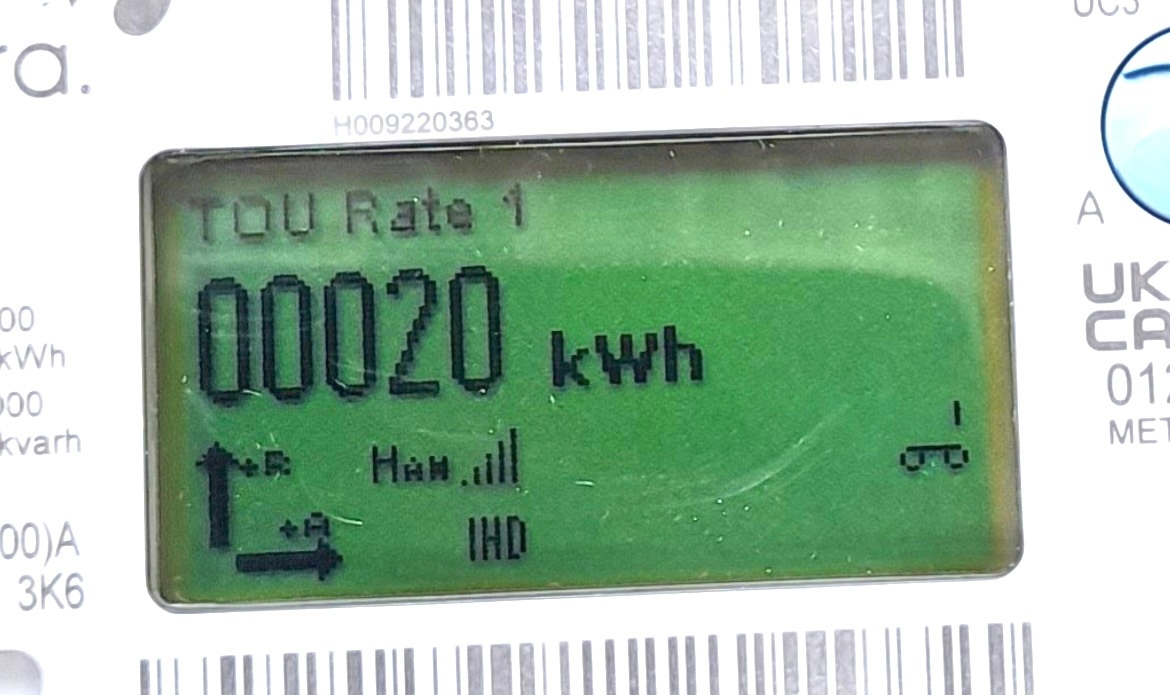
You can see TOU Rate1 at the top of the display. I’m fairly sure that is the day time rate  

And pressing button A cycles through the registers.

There’s an overview here 

and a useful guide to reading various types https://www.smartme.co.uk/reading-my-meter.html#qa

18 replies

Blastoise186
Super User
Super User
February 14, 2025

Afternoon ​@kbultray ,

I can help you figure that out, but I need to know what you’ve got first. Please post photos of your meter in your next reply and I’ll take a look.

Thanks!

Securing energy by zapping security bugs... For that is The Blastoise Way! Remember, I'm just like you - AI Powered Evil Geniuses aren't Staff!
BPLightlog
Super User
Super User
February 14, 2025

A smart meter will have separate registers ​@kbultray so you will be able to view peak and off peak usage once you get familiar with the menu. Depending on the model you have, they can also indicate which register is in current use

Bring me Sunshine ~ E&E {Solar PV, Battery Storage, Hybrid EV, ASHP and Home Assistant automation}
kbultrayAuthor
Rank 1
February 14, 2025


Blastoise186
Super User
Super User
February 14, 2025

Thanks!

For that meter, ToU 1 is Night/Off-Peak while ToU 2 is Day/Peak if memory serves.

Securing energy by zapping security bugs... For that is The Blastoise Way! Remember, I'm just like you - AI Powered Evil Geniuses aren't Staff!
BPLightlog
Super User
Super User
February 14, 2025

You can see TOU Rate1 at the top of the display. I’m fairly sure that is the day time rate  

And pressing button A cycles through the registers.

There’s an overview here 

and a useful guide to reading various types https://www.smartme.co.uk/reading-my-meter.html#qa

Bring me Sunshine ~ E&E {Solar PV, Battery Storage, Hybrid EV, ASHP and Home Assistant automation}
Firedog
Super User
Super User
February 14, 2025

TOU Rate 1 ought to be the Day (peak) rate. There was some evidence that DCC doesn’t like data from systems where the lowest register isn’t peak/anytime. To check, sometime tomorrow note the TOU Rate 1 and 2 meter readings. Boil the kettle a couple of times, then check the readings again an hour later. Only one of them should have increased - that’s the Day register.

There may be a screen on the button B menu showing Active TOU Number, i.e. 1 or 2. Your button doesn’t appear to be sealed; just rotate it clockwise if it doesn’t respond to presses.

That said, it would be more normal for an Economy 7 system to be fitted with a five-wire meter (yours only has four connected to the bottom of it). One of the wires would then deliver power to storage and water heaters only during offpeak periods. That doesn’t matter if you have robust time switches elsewhere to control the heaters. Just beware that the offpeak tariff will change a few minutes (often around 10, but theoretically up to 30) after the nominal switching time. You may have to keep an eagle eye on that Active TOU Number screen from the start of the E7 offpeak period an make a note of when it changes from 1 to 2. Then adjust the time switches on your heating equipment to suit so they don’t start drawing power before the cheap rate starts.

If you told us where you live (the first part of the postcode is enough), we should be able to say what the nominal E7 offpeak hours are. 
 

[Last - next time someone asks for a picture of your meter, please touch button A first to light up the screen 🙂 ]


Noel | I have no official status; I'm just a volunteer who comes here to help other customers. My gear: Aclara SGM 1416-B Electricity-only E7 meter; Chameleon IHD3-PPMID-AAA | It may look as if I know what I’m talking about, but don’t let that fool you. |
kbultrayAuthor
Rank 1
February 14, 2025

Thank you Firedog, I made a point of asking the technician re;  times. He assured me it is 00.30 - 07.30  for off-peak.

Cannot for the life of me understand why OvO should install such equipment without any guidance, Progress........Pah !

Firedog
Super User
Super User
February 14, 2025

OK, thanks. That puts you, I think, in Kent or Sussex. It means you’ll have to squat in front of the meter from half-past midnight tonight until the Active TOU Number changes from 1 to 2, then write the exact time down somewhere. Suppliers used to put a helpful sticker on the meter itself giving the nominal timings. That’s not a bad idea, except you could post the actual timings, useful for you and whoever else moves in when you eventually move out.   
  

Noel | I have no official status; I'm just a volunteer who comes here to help other customers. My gear: Aclara SGM 1416-B Electricity-only E7 meter; Chameleon IHD3-PPMID-AAA | It may look as if I know what I’m talking about, but don’t let that fool you. |
kbultrayAuthor
Rank 1
February 15, 2025

Firedog, I was given no instructions re;  Buttons to press or turn on the actual meter. 
As you can see there’s a blue A button. and an orange B button. Underneath there’s a cacophony of  letters and symbols which mean nothing to the customer.

Please can you enlighten me?

kbultrayAuthor
Rank 1
February 15, 2025

Oh by the way my postal code is LN6