Rank 1
October 21, 2018
Solved

Why can't I login into my online account, app or send reset password email?

  • October 21, 2018
  • 60 replies
  • 9030 views

Having major issues: I registered on the forums fine yet when I enter my customer ID and click on First Time Logging In or Reset Password, nothing is being sent to the email address I registered with..... I know that the Email is correct because OVO send me account updates to it...

Best answer by Mw2870

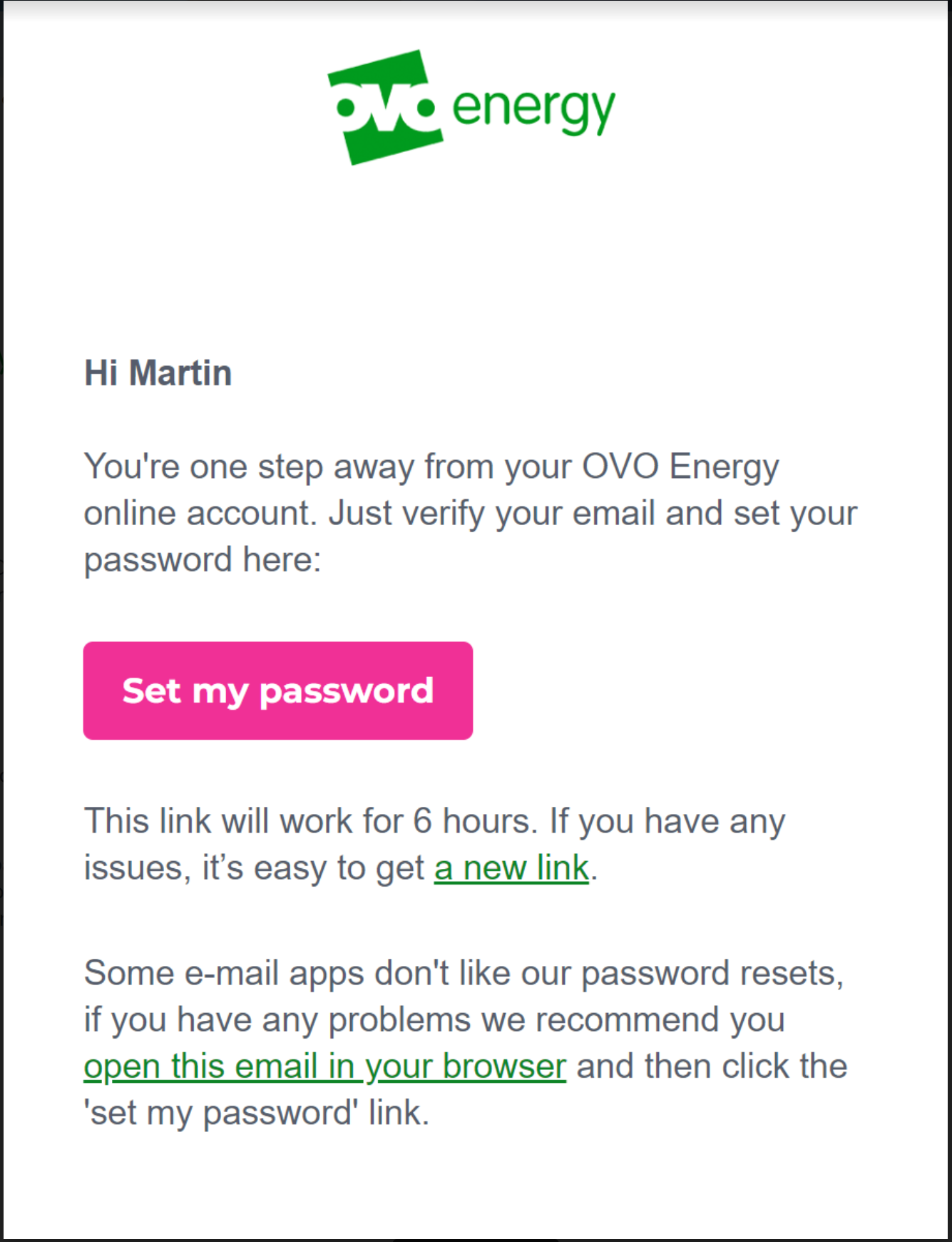
Updated 05/12/24 by Emmanuelle_OVO: Got issues registering or resetting a password for your OVO app or online account? We’ve made a recent change that might help:


OVO customers should ideally complete these steps in the web portal (online account) first. Once complete, these details will be copied over and available for use in the OVO App.


  • Select the option at the bottom of the reset email "open this email in your browser"


This should then allow you to follow the steps as prompted and login into your account.


Please note: This has been extensively tested and in the vast majority of cases will resolve the issue. However, there are still some issues with users of any Microsoft email domains such as Hotmail, Live, Outlook, Microsoft. We are working on the resolution for these customers and will update once a fix is made available.


There may still be issues for other customers with different email domains but these could be related to something else. Let us know in the comments below if you still have an issue resetting your password. Alternatively our Support team may be able to advise with this. 


60 replies

Newcomer
May 1, 2020

cant set up an account even with user id! going round in circles! what a waste of time!! wont be with ovo for long

Transparent
Rank 20
Rank 20
May 3, 2020

Hi @webbey2009 I think you’ll have to give us a bit more detail than that if we’re going to find a solution!

Here on the Forum we are fellow customers who use our experience to assist each other. So we’d need to know basic information such as:

  • What was the start date of your current tariff?
  • Did you have a previous tariff/account with OVO (even if you’ve switched elsewhere in the meantime)
  • Have you ensured you’re using the same email address that you’ve given to OVO?
Save energy... recycle electrons!
Newcomer
May 13, 2020

I have been a customer a a while and never had any issues regarding my in line account.

However, after numerous attempts on requesting the link with no success, I've called myovo and someone said it's my e mail provider putting them in Spam, this can't be the case as I have checked my junk mail.


Can anyone please help?


Amy_OVO
Retired Moderator
Retired Moderator
May 13, 2020

I’ve moved your post here, @Barbados 2020, please check out the best answer. 

Thanks!

OVO-Joyed to help!
Newcomer
May 23, 2020

I am trying to access an account that I have for 

** edited by mod** 

I rent this flat and need to submit meter readings but have been unsuccessful in accessing the account. Could you possibly forward the user name and password to me or do I have to create  anew account?

Thank you and regards

Mrs B Parker

Transparent
Rank 20
Rank 20
May 23, 2020

Dear @Mrs B Parker and welcome to the Forum.

I wonder if you realise that you have posted this message on a publicly-accessible open website? This Forum is where customers discuss matters concerning energy. It is not viewed by OVO’s Customer Services staff.

In normal circumstances, a Moderator would redact information from what you have written, but they will not return until after the bank-holiday weekend.


However, I am able to advise you the best course of action for your dilemma.

If you, as the tenant, are required to submit meter readings, but are unable to do so online, then you can send them in a message on webchat via the Help CentrePlease ensure you provide enough detail for the staff member receiving this to know who you are.


Secondly, if your tenancy agreement states that you, and not the landlord are responsible for paying energy bills, then you require a fresh account in your name. OVO will not permit you to pick up an account used by a previous occupant of the flat.

You should ensure that you have a starting-reading for the meter(s) on the date your tenancy commenced. Normally this would be checked by the landlord when a new tenant moves in. It may be slightly more than the reading taken when the old tenant moved out, depending on how long the flat has remained empty. You are only liable for the consumption made since your Contract started.

A new account takes 4-5 weeks to be fully active. This includes a statutory 14-day “cooling off period” because an energy supply falls under the rules of a Financial Service.


If I have misunderstood the situation or you require further clarification, then please post again here. However, do not write any details here which should remain confidential.


Save energy... recycle electrons!
Amy_OVO
Retired Moderator
Retired Moderator
May 26, 2020

I’ve edited out your personal details, @Mrs B Parker, there’s lost of handy info in this thread to help you get into your online account, that being said, @Transparent’s answer will steer you in the right direction. 

:slight_smile:

OVO-Joyed to help!
Newcomer
June 9, 2020

Trying to reset password so I can submit meter reading but not receiving any email to reset password. Been trying for several days. Nothing in inbox or trash.


Newcomer
June 9, 2020

Try spam folder also.

It’s a good idea to put the ovo e-mail address in your contacts too 

Ed_OVO
Retired Moderator
Retired Moderator
June 10, 2020

@kgreenhall and @whitehouse - I’ve moved your messages over here, as it’ll be really helpful for others in your situation to find all the info in one topic!


Check out the best answer for further info:


Hi @wizwych, welcome to the forum!

That sounds really annoying, presumably you are trying to use this reset link.

If it still doesn't work, here’s the topic you want, with a step by step process to follow to sort this. I’ll copy them below:

Top tips:

  • Login here.
  • Make sure you’re using the email address you registered with us, or your Customer ID (find this on your welcome email or a bill).
  • Send yourself a password reset email if you’re having issues.
  • Check your spam/junk to see if the email has gone there.
  • If you’ve changed your password and it’s not being accepted, try clearing your browsing history, autofill data, cache and cookies.


If none of this works, it’s worth contacting the team directly. You can contact us on FacebookTwitter webchat via the Help Centre.


Hope this helps!


I'm shocking at energy puns...