Rank 1
October 21, 2018
Solved

Why can't I login into my online account, app or send reset password email?

  • October 21, 2018
  • 60 replies
  • 9030 views

Having major issues: I registered on the forums fine yet when I enter my customer ID and click on First Time Logging In or Reset Password, nothing is being sent to the email address I registered with..... I know that the Email is correct because OVO send me account updates to it...

Best answer by Mw2870

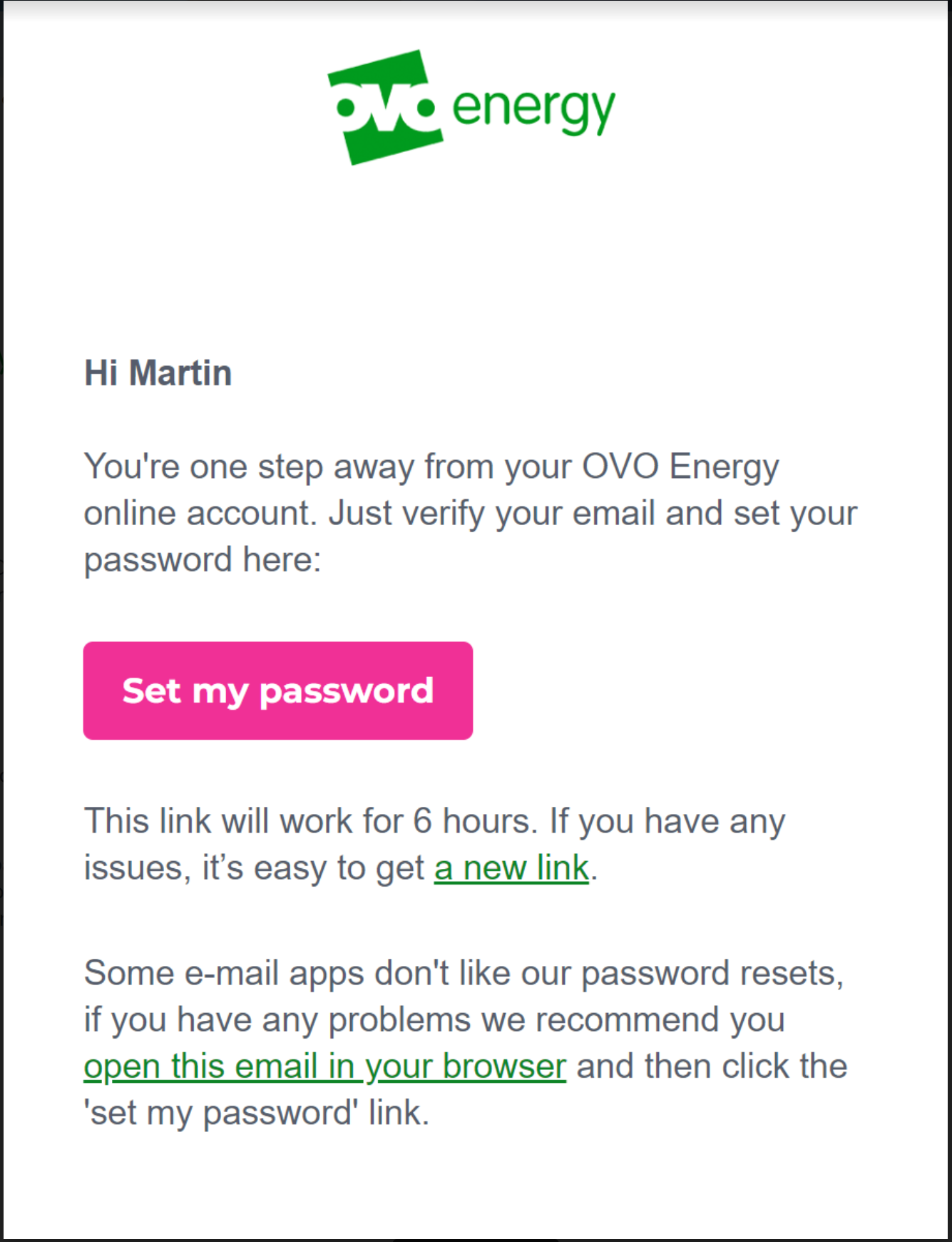
Updated 05/12/24 by Emmanuelle_OVO: Got issues registering or resetting a password for your OVO app or online account? We’ve made a recent change that might help:


OVO customers should ideally complete these steps in the web portal (online account) first. Once complete, these details will be copied over and available for use in the OVO App.


  • Select the option at the bottom of the reset email "open this email in your browser"


This should then allow you to follow the steps as prompted and login into your account.


Please note: This has been extensively tested and in the vast majority of cases will resolve the issue. However, there are still some issues with users of any Microsoft email domains such as Hotmail, Live, Outlook, Microsoft. We are working on the resolution for these customers and will update once a fix is made available.


There may still be issues for other customers with different email domains but these could be related to something else. Let us know in the comments below if you still have an issue resetting your password. Alternatively our Support team may be able to advise with this. 


60 replies

wizwychAuthor
Rank 1
June 18, 2020

Hi,

I signed up with Ovo earlier today and was asked to set a password etc for my portal account, and after completing the sign-up and getting all of my introductory emails I accessed the portal as normal.

About an hour ago I tried to access it again but it has logged me out, and when I tried signing in it said wrong username or password. I tried entering my password I'm sure that I used a few times, and some other passwords for good measure and was getting the instant error message of wrong email or password still. I tried the reset my password option, yet I'm not getting any emails from this what-so-ever, as well as when I select the "first time logging in" option which just directs me to the exact same password reset page anyway. I have tried this ten times and still have nothing in my inbox.

YES - I have checked my spam folder. And I know that the email is correct because I was getting Ovo emails fine earlier, and have done when creating this account just now.

It looks like other users on here have reported this issue - some going back two years - and one in particular saying that months have passed by and Ovo support who they have called over five times, who are just saying it is "being looked in to" yet they still cannot log-in, but if this cannot be resolved for me promptly and if I'm getting the same experience as this other customer I'll be going elsewhere.

And as of today I still cant login to my OVO account :)

wizwychAuthor
Rank 1
June 18, 2020

Yes after a yar of promises to get my account visible I still cant login to my ovo account here are the steps i have taken..


1 = Clicked First Time Logging In.

2 = Filled in Email Waited for Special Password (never Arrived)

3 = Checked junkmail and all other folders (Nothin, Zilch, Nada)

4  = Clicked Reset Password (never knew the password to begin wth)

5 = Filled in Email and as above nothing arrived..

6 = Called 0330 303 5063 (might aswell have spoke to myself no help at all)

7 =  GAVE UP.. went for a burger king..


Eva_OVO
OVO Staff
OVO Staff
June 18, 2020

I hope you enjoyed your burger king, I would’ve skipped straight to this step! :fries:

Send us a message on FacebookTwitter or webchat via the Help Centre so we can look into this, @wizwych.   In your message please confirm your name, DoB, account number and email address.

My friend told me how electricity is measured and I was like Watt!
Newcomer
June 18, 2020

Hello. I have tried to reset my password gvien the new accounting system but no password reset email arrvies. It is not in my spam folder. I have done this several times but to no avail. 

I need to be able to login and submit meter readings, check my balance and more, 


Eva_OVO
OVO Staff
OVO Staff
June 18, 2020

Follow the advice in my last comment and we can get this sorted for you, @JulianE! :)

My friend told me how electricity is measured and I was like Watt!
Tim_OVO
OVO Staff
OVO Forum Legend
June 22, 2020

Bumping this topic, as I can see there’s been a few forum members reporting login issues over the weekend. Anyone here been effected at all?

Carbon neutral - we need a community to get there! My green tech: Aclara SGM 1411-B smart meter, Chameleon IHD6
Newcomer
January 10, 2021

I am having the same problem with no password reset email coming into my inbox.


I have checked junk/spam folders, checked email address is correct and tried yesterday and today. Still nothing

Blastoise186
Super User
Super User
January 10, 2021

Hi @Spike_pkh ,

Sorry about that. I’ll ask @Tim_OVO to get someone to investigate further. From experience, I do know that some email providers are more reliable than others (and make fewer mistakes). Gmail tends to be better that Hotmail/Outlook with OVO.

If you’d like to change the email address on your account, the support team should be able to help with that in the morning. I think I have some ideas as to what’s happening as well. I’ll try testing something out later to see if I’m right.

Securing energy by zapping security bugs... For that is The Blastoise Way! Remember, I'm just like you - AI Powered Evil Geniuses aren't Staff!
Tim_OVO
OVO Staff
OVO Forum Legend
January 11, 2021

Hi @Spike_pkh - did this ever come through in the end? Here’s the info we give (I’m just going to update our other log in topics with this now:


New to OVO, the registration process as it should be:


How do I sign into the online account?
 

It’s super easy – you just need your OVO ID or email address. If you have (or have had) multiple accounts with us, it’s best to always use your OVO ID rather than your email address.

You’ll find your OVO ID on your welcome letter or email, or at the top of any of your statements. If you’ve logged in before and already know your password, you’ll only need to do ‘step 1’.


Step 1: Get to your My OVO energy online account

To log in directly, visit https://my.ovoenergy.com/

You can also log in from the OVO homepage – take a look in the top right corner for the button that says ‘My OVO’.


Step 2: Set up a password

Look underneath the big 'Log in' button. Find the link that says ‘First time logging in?’, and click it.


Step 3: Give your email address

Type in your email address and click ‘Submit’. If you’ve got more than one OVO account, we might ask for your OVO ID too.


Step 4: Check your email

We’ll send you an email with a link to set your password – open it, create your password, and you’re in. The email is from 'no-reply@ovoenergy.com' – and the subject line will be 'My OVO password change request'.

It’s important that you set your password within 30 minutes, as the link will expire. If you don’t get an email straight away, it’s worth checking your ‘spam’ folder. If you’re a Gmail user, it may also be filtered into your ‘promotions’ folder.


Step 5: Sign in whenever you like

That’s it. You’ve got access to your online account. It’s easy to use wherever you are, on your computer, laptop, tablet or smartphone.


We’re constantly updating our online portal and app to ensure it’s the best version it can be for you! This, along with your device updates can cause login issues from time to time. 


When something’s gone wrong


If you’re having issues logging via our app, try deleting and reinstalling - ensuring it’s the latest version. Sometimes this is all it needs to iron out any issues.


If you’re on a computer, try and use Google Chrome (or at least, avoid using Internet Explorer) as your account is optimised for this browser. Clear your cookies and cache and try login again, here’s how to do that:

  1. On your computer, open Chrome.
  2. At the top right, click More More.
  3. Click More tools and then Clear browsing data.
  4. At the top, choose a time range. To delete everything, select All time.
  5. Next to "Cookies and other site data" and "Cached images and files," check the boxes.
  6. Click Clear data.


If you’re logging in with your email address, you may wish to try your customer ID. Reset your password as part of this process, as after you reset it, your account will automatically try to login.


If it’s still not letting you in, we’ll need a few details so that we can work out the issue:


  1. Are you logging in using your email address or account number?
  2. Are you using the app or the browser version of the site?
  3. Can you send us a screenshot of the issue/error? If not please describe it in as much detail.
  4. How long has this been ongoing for?
  5. What device are you using? I.e iPhone 7, Dell laptop etc.
  6. What software does your device use? This can usually be found in the settings section of your device.


Forward as much of the above info as you can onto the team and they’ll get on it! 

You can reach out to the team on FacebookTwitter and our Help centre has online chat!

You can reach our team on: 0330 303 5063. Our opening hours are 8am-6pm Monday to Friday.

Carbon neutral - we need a community to get there! My green tech: Aclara SGM 1411-B smart meter, Chameleon IHD6
Newcomer
January 11, 2021

Nope, never came