



Rank 2
April 11, 2024
Solved

Power Move times in relation to recent clock changes

  • April 11, 2024
  • 23 replies
  • 598 views

Apologies if this has been answered previously.

I am pasting my chat with OVO social media in regards to my question, which they stated they couldn’t answer on the social media team. Hopefully, someone can shed some light on it, I can’t be the only one affected by it.

Hello, With regards to the Power Move...when the clocks went forward on March 31, the system wasn't caught up and still records my usage an hour earlier. Therefore, the current Power Move times are between 6pm-9pm which I have been adhering to. However, as the system is still 1 hour out, it means that my Power Move times are unknown and possibly between 7pm and 10pm. Are you able to confirm please if I am on target to get the Power Move reward, I shouldn't be penalised because of a system fault at OVO's end. If I should treat the Power Move hours as 7-10pm, I am struggling with that. It's a big leap from the previous 4-7pm which was entirely doable. 7-10pm is not though for me, as I need to take nutrition with my medication before 10pm
OVO

You sent
i can do 6pm - 9pm but need to know if these are the correct hours in relation to the 1 hour time difference that the system is displaying

You sent
as an example of where I might by getting penalised is that last night I cooked at just before 10pm, which meant that I should have qualified for the 6-9pm Power Move target. However the system recorded me as cooking dinner an hour earlier, before 9pm

Best answer by Firedog

Updated on 07/03/25 by Chris_OVO


@deanphillips2005 Here’s an idea that may help: account.ovoenergy.com seems to pick up the operating system’s time zone on Windows, so if this isn’t set to UTC+1 for BST, you’ll see the odd behaviour as regards the half-hour timings. This does seem unlikely, because the clock in the corner of the Windows screen will be an hour adrift, and most users will spot that. Perhaps you’re not on Windows …

In any case, check that your time zone is set properly for BST: e.g. right-click on the clock and select Adjust date and time. Most users will have Set the time automatically and Set the time zone automatically selected. If the latter isn’t selected, the two options above it will allow you to Adjust for daylight saving time automatically (DST) and to see and set the time zone. To persuade OVO to show you what you expect to see, it should be (UTC + 00.00) Dublin Edinburgh … with automatic DST.

If you’re using a different OS, the equivalent settings will be there somewhere.

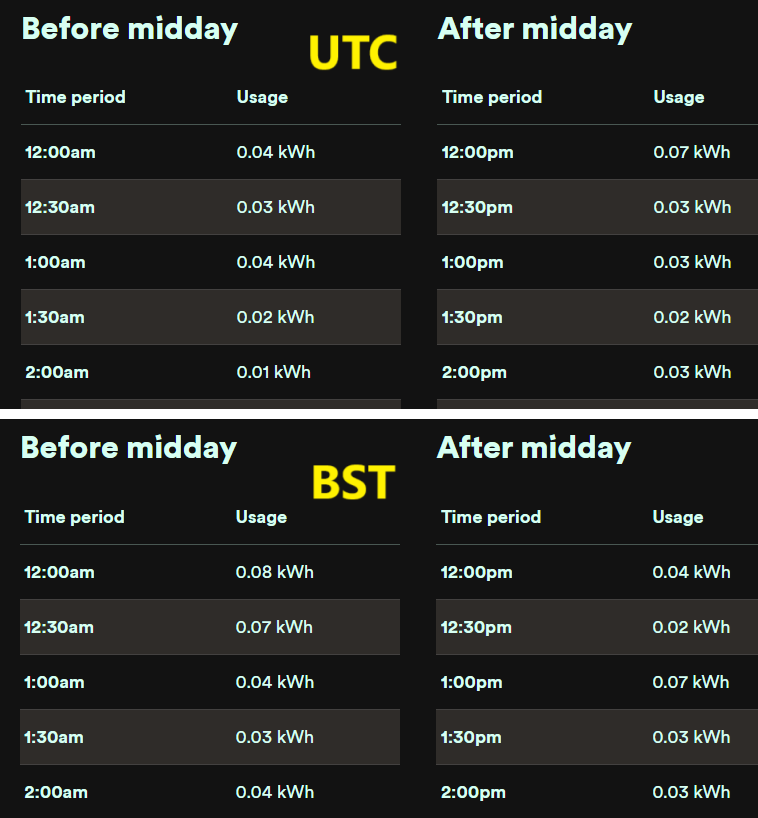
I just compared my Hh usage figures for yesterday with the Windows options to stay on UTC variously on and off. These were the results:


You’ll see the one hour’s offset, where UTC’s 12:00 becomes BST’s 1:00. 

Any help?

23 replies

Tron Burgundy
Rank 4
Rank 4
April 11, 2024

I hit every one of the £15 targets and I’m a small energy user.  I just made sure I did everything that used more energy on a week day and out of peak hours.  Washing machine, kettle, induction cooking, chip pan, hoovering….

@deanphillips2005 if you press F12 in your browser and go to the network tab you can set the filter to Fetch/XHR and look for requests ending in ?date= and look at the response.  You can see the data Ovo uses for the page.


Notice the hour difference for BST in the actual graph


Rank 2
April 11, 2024

I wrote a few notes about this here.  The system records all usage in UTC, but it depends on where you’re looking whether you see UTC or BST timings. The online usage pages show BST, but with a fudge for the first and last hours of the day. Where are you seeing last night’s cookery recorded before 21:00?


Hi, in answer to your query, Here. At 8pm it records 0.20 but in actual fact​ it had just gone 9pm. So I’m not sure on if I qualified for the Power Move and I’m none the wiser after asking OVO about it plus this forum as yet.​​​​​​


Firedog
Super User
Super User
April 11, 2024

Well, that shows that you were indeed drawing 400W between 20:00 and 20:30, and I would say that that was BST. Something very strange is happening if it was in fact UTC.

There is a bigger spike at 07:30; was this something you were in fact doing at 08:30, like cooking breakfast? 

As Tron Burgundy pointed out, you can check the data underlying the web page. Sign in to your account, then visit this URL in a new tab in the same session, putting your own OVO account no. instead of 1234567: 
https://smartpaymapi.ovoenergy.com/usage/api/half-hourly/1234567?date=2024-04-10 
Change the date if necessary to match the one your screenshot refers to. The timings on the API page are shown in UTC, for example 2024-04-10T20:00:00.000 is 9 PM on 10 April. The ‘T’ between the date and time is the indicator for UTC. 

I don’t like to suggest that the clock in your kitchen is wrong, but that has been known to happen (BTDT!). As they ask in police interrogations, what was on the TV or radio while you were cooking?

Meanwhile, I can assure you that the Power Move times are local, i.e 6-9 PM BST. 

Noel | I have no official status; I'm just a volunteer who comes here to help other customers. My gear: Aclara SGM 1416-B Electricity-only E7 meter; Chameleon IHD3-PPMID-AAA | It may look as if I know what I’m talking about, but don’t let that fool you. |
Rank 2
April 11, 2024

Hi, thanks for your detailed response. I will read in more depth soon. Regarding the usage in the listing at 07:30. Yes, the real time (in BST) was 08:30 and involved an electric shower. I’ll have a check at the link you gave to view underlying data also. I am struggling to get my head around the fact that a simple hours’ change can result in such chaos, and struggling even more to get my head around the fact that OVO cannot provide a fix. The timings from March 31st on my side are still showing an hour out of sync - some 11 days later. 

Firedog
Super User
Super User
April 11, 2024

OK, interesting. I’ve not heard of this phenomenon before. I wonder if it has anything to do with the tariff you’re on; some of the exotic multi-rate ones adjust for BST, so that might put a ‘UTC’ or ‘GMT’ flag on your account if you have different day and night rates. Do you?

As regards 31 March, the usage page on clock-change day is a mess for everybody. They have somehow to fudge displaying a day’s usage when there are only 46 or 50 half-hours in the day, so it’s not easy to make sense of the page.  

Noel | I have no official status; I'm just a volunteer who comes here to help other customers. My gear: Aclara SGM 1416-B Electricity-only E7 meter; Chameleon IHD3-PPMID-AAA | It may look as if I know what I’m talking about, but don’t let that fool you. |
Rank 2
April 11, 2024

OK, interesting. I’ve not heard of this phenomenon before. I wonder if it has anything to do with the tariff you’re on; some of the exotic multi-rate ones adjust for BST, so that might put a ‘UTC’ or ‘GMT’ flag on your account if you have different day and night rates. Do you?

As regards 31 March, the usage page on clock-change day is a mess for everybody. They have somehow to fudge displaying a day’s usage when there are only 46 or 50 half-hours in the day, so it’s not easy to make sense of the page.  

I’m on the standard tariff, ”Simpler Energy” for both electricity and gas. It is the same rates for both day and night. In my opinion, if OVO have technical issues with clock changes, as clearly they do in this case, then they should not offer their Power Move rebates. I was informed by OVO that the issue would “likely be just for this month”. They really need to get some kind of solution in place for clock changes. Or an even better solution: the powers that be do away with clock changes full stop. 

Firedog
Super User
Super User
April 11, 2024

That was just an idea. I just can’t see how a single account can fail to move with the times when everyone else’s does, and it’s not a sign of any general fault. I hope you get to the bottom of it.

Meanwhile, I can only suggest that you stick to following your kitchen clock when working around the PM target peak time. Only if you fail to earn the reward would you have to bother Support to grumble about it, with good reason that I’m sure would be taken into account.

Noel | I have no official status; I'm just a volunteer who comes here to help other customers. My gear: Aclara SGM 1416-B Electricity-only E7 meter; Chameleon IHD3-PPMID-AAA | It may look as if I know what I’m talking about, but don’t let that fool you. |
Emmanuelle_OVO
Retired Moderator
Retired Moderator
April 12, 2024

Apologies if this has been answered previously.

I am pasting my chat with OVO social media in regards to my question, which they stated they couldn’t answer on the social media team. Hopefully, someone can shed some light on it, I can’t be the only one affected by it.

Hello, With regards to the Power Move...when the clocks went forward on March 31, the system wasn't caught up and still records my usage an hour earlier. Therefore, the current Power Move times are between 6pm-9pm which I have been adhering to. However, as the system is still 1 hour out, it means that my Power Move times are unknown and possibly between 7pm and 10pm. Are you able to confirm please if I am on target to get the Power Move reward, I shouldn't be penalised because of a system fault at OVO's end. If I should treat the Power Move hours as 7-10pm, I am struggling with that. It's a big leap from the previous 4-7pm which was entirely doable. 7-10pm is not though for me, as I need to take nutrition with my medication before 10pm
OVO

You sent
i can do 6pm - 9pm but need to know if these are the correct hours in relation to the 1 hour time difference that the system is displaying

You sent
as an example of where I might by getting penalised is that last night I cooked at just before 10pm, which meant that I should have qualified for the 6-9pm Power Move target. However the system recorded me as cooking dinner an hour earlier, before 9pm

 

I’ve asked the Power Move team about this and will report back 😊

Renewable Energy? Big Fan.
Emmanuelle_OVO
Retired Moderator
Retired Moderator
April 12, 2024

I’ve had a response from the team:


In the OVO app - you're seeing your usage shown in UTC (coordinated universal time) - we're currently in BST so you're seeing everything as UTC +1. So when we get the consumption back from usage app and we assess the peak hours (stored in product-service with no time zone information), we convert it to UTC so 6pm BST is 5pm UTC and this is the time we use from the usage app to determine the peak consumption which is what the customer used at 6pm BST. We're still measuring your usage between 6-pm and evaluating your Power Move peak usage off correct data.

Renewable Energy? Big Fan.
Firedog
Super User
FiredogSuper UserSolved
Super User
April 13, 2024

Updated on 07/03/25 by Chris_OVO


@deanphillips2005 Here’s an idea that may help: account.ovoenergy.com seems to pick up the operating system’s time zone on Windows, so if this isn’t set to UTC+1 for BST, you’ll see the odd behaviour as regards the half-hour timings. This does seem unlikely, because the clock in the corner of the Windows screen will be an hour adrift, and most users will spot that. Perhaps you’re not on Windows …

In any case, check that your time zone is set properly for BST: e.g. right-click on the clock and select Adjust date and time. Most users will have Set the time automatically and Set the time zone automatically selected. If the latter isn’t selected, the two options above it will allow you to Adjust for daylight saving time automatically (DST) and to see and set the time zone. To persuade OVO to show you what you expect to see, it should be (UTC + 00.00) Dublin Edinburgh … with automatic DST.

If you’re using a different OS, the equivalent settings will be there somewhere.

I just compared my Hh usage figures for yesterday with the Windows options to stay on UTC variously on and off. These were the results:


You’ll see the one hour’s offset, where UTC’s 12:00 becomes BST’s 1:00. 

Any help?

Noel | I have no official status; I'm just a volunteer who comes here to help other customers. My gear: Aclara SGM 1416-B Electricity-only E7 meter; Chameleon IHD3-PPMID-AAA | It may look as if I know what I’m talking about, but don’t let that fool you. |
