



Rank 2
April 11, 2024
Solved

Power Move times in relation to recent clock changes

  • April 11, 2024
  • 23 replies
  • 598 views

Apologies if this has been answered previously.

I am pasting my chat with OVO social media in regards to my question, which they stated they couldn’t answer on the social media team. Hopefully, someone can shed some light on it, I can’t be the only one affected by it.

Hello, With regards to the Power Move...when the clocks went forward on March 31, the system wasn't caught up and still records my usage an hour earlier. Therefore, the current Power Move times are between 6pm-9pm which I have been adhering to. However, as the system is still 1 hour out, it means that my Power Move times are unknown and possibly between 7pm and 10pm. Are you able to confirm please if I am on target to get the Power Move reward, I shouldn't be penalised because of a system fault at OVO's end. If I should treat the Power Move hours as 7-10pm, I am struggling with that. It's a big leap from the previous 4-7pm which was entirely doable. 7-10pm is not though for me, as I need to take nutrition with my medication before 10pm
OVO

You sent
i can do 6pm - 9pm but need to know if these are the correct hours in relation to the 1 hour time difference that the system is displaying

You sent
as an example of where I might by getting penalised is that last night I cooked at just before 10pm, which meant that I should have qualified for the 6-9pm Power Move target. However the system recorded me as cooking dinner an hour earlier, before 9pm

Best answer by Firedog

Updated on 07/03/25 by Chris_OVO


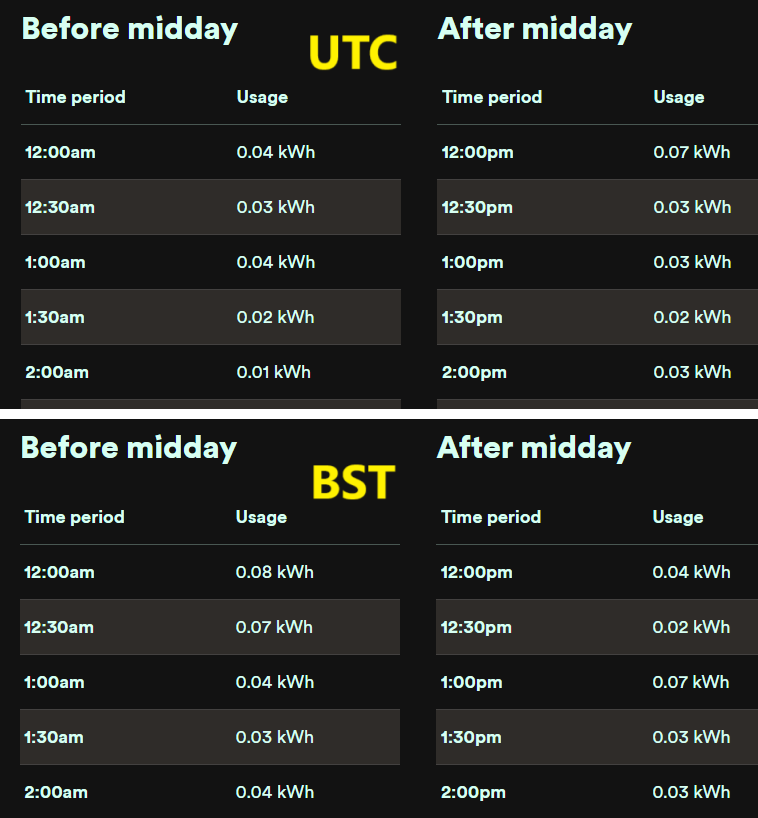
@deanphillips2005 Here’s an idea that may help: account.ovoenergy.com seems to pick up the operating system’s time zone on Windows, so if this isn’t set to UTC+1 for BST, you’ll see the odd behaviour as regards the half-hour timings. This does seem unlikely, because the clock in the corner of the Windows screen will be an hour adrift, and most users will spot that. Perhaps you’re not on Windows …

In any case, check that your time zone is set properly for BST: e.g. right-click on the clock and select Adjust date and time. Most users will have Set the time automatically and Set the time zone automatically selected. If the latter isn’t selected, the two options above it will allow you to Adjust for daylight saving time automatically (DST) and to see and set the time zone. To persuade OVO to show you what you expect to see, it should be (UTC + 00.00) Dublin Edinburgh … with automatic DST.

If you’re using a different OS, the equivalent settings will be there somewhere.

I just compared my Hh usage figures for yesterday with the Windows options to stay on UTC variously on and off. These were the results:


You’ll see the one hour’s offset, where UTC’s 12:00 becomes BST’s 1:00. 

Any help?

23 replies

Rank 2
April 13, 2024

Awesome responses from all on here. Firedog (Noel): I checked my time in Windows and, whilst it was set to the correct time, it wasn’t adjusted for DST for some reason. I changed this setting and the time jumped an hour back but then I set clock to “set the time automatically” and it jumped an hour forward to the correct current BST time. I’ve just logged onto the usage section and the times have now appeared to have changed to the proper time. I’ve gone back historically, and it looks like this has solved it. Wow.! Thanks! Without this solution, I’m pretty confident that I would in the same situation up to the next clock change.!

Rank 2
April 13, 2024

Apologies if this has been answered previously.

I am pasting my chat with OVO social media in regards to my question, which they stated they couldn’t answer on the social media team. Hopefully, someone can shed some light on it, I can’t be the only one affected by it.

Hello, With regards to the Power Move...when the clocks went forward on March 31, the system wasn't caught up and still records my usage an hour earlier. Therefore, the current Power Move times are between 6pm-9pm which I have been adhering to. However, as the system is still 1 hour out, it means that my Power Move times are unknown and possibly between 7pm and 10pm. Are you able to confirm please if I am on target to get the Power Move reward, I shouldn't be penalised because of a system fault at OVO's end. If I should treat the Power Move hours as 7-10pm, I am struggling with that. It's a big leap from the previous 4-7pm which was entirely doable. 7-10pm is not though for me, as I need to take nutrition with my medication before 10pm
OVO

You sent
i can do 6pm - 9pm but need to know if these are the correct hours in relation to the 1 hour time difference that the system is displaying

You sent
as an example of where I might by getting penalised is that last night I cooked at just before 10pm, which meant that I should have qualified for the 6-9pm Power Move target. However the system recorded me as cooking dinner an hour earlier, before 9pm

 

I’ve asked the Power Move team about this and will report back 😊

Thank you!

Firedog
Super User
Super User
April 13, 2024

... the usage section [...] times have now appeared to have changed to the proper time.


Brilliant - I’m glad we got there in the end 🙂

I’ve added this edge case to the notes I wrote.

Noel | I have no official status; I'm just a volunteer who comes here to help other customers. My gear: Aclara SGM 1416-B Electricity-only E7 meter; Chameleon IHD3-PPMID-AAA | It may look as if I know what I’m talking about, but don’t let that fool you. |
