Best answer by Tim_OVO

Updated on 15/06/23 by Emmanuelle_OVO


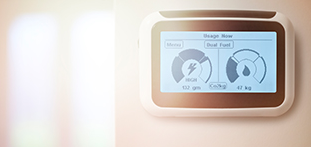
You won’t need to use the PIN code for your Pipit In Home Display (IHD), entering a PIN code removes the device from the network. If your IHD is asking for a PIN code it could be that the device is having connection issues. If so, try moving it closer to the electricity smart meter and turn the device off and on again.


See our full guide to help fix any IHD connectivity issues. 


This advice relates to the Pipit IHD. If you have a Chameleon IHD see your S1 IHD guide or S2 IHD  guide.


OVO member but not got a smart meter yet? - Book today!


Interested but not yet an OVO member? - Check out our plans!


50 replies

Tim_OVO
OVO Staff
Tim_OVOSolved
OVO Forum Legend
March 20, 2017

Updated on 15/06/23 by Emmanuelle_OVO


You won’t need to use the PIN code for your Pipit In Home Display (IHD), entering a PIN code removes the device from the network. If your IHD is asking for a PIN code it could be that the device is having connection issues. If so, try moving it closer to the electricity smart meter and turn the device off and on again.


See our full guide to help fix any IHD connectivity issues. 


This advice relates to the Pipit IHD. If you have a Chameleon IHD see your S1 IHD guide or S2 IHD  guide.


OVO member but not got a smart meter yet? - Book today!


Interested but not yet an OVO member? - Check out our plans!


Carbon neutral - we need a community to get there! My green tech: Aclara SGM 1411-B smart meter, Chameleon IHD6
LorraineH
Rank 1
LorraineHAuthor
Rank 1
March 22, 2017
Hi Tim

I have tried to reset many times but to no avail. At the moment I am getting estimated costs and this is not what I signed up to.

Is the reset button at the side of the display box?

Kind regards

Lorraine
LorraineH
Lucy_OVO
Retired Moderator
Retired Moderator
March 23, 2017
It sounds like you’re referring to the ‘Estimated bill’ section on the In Home Display (IHD). You won’t be able to reset this part (or the IHD) but you’ll be able to see your usage for the day, week and month via the ‘History’ tab.

Lucy
You guys know what’s watt
March 27, 2017
After having a smart meter installed for our electric I was given a plug-in display which proved to be a bit of a novelty but ultimately ended up unplugged and stuffed in a drawer with all our other rubbish. Thought that it was only wasting even more electric! Be green and refuse them that's my advice.
Lucy_OVO
Retired Moderator
Retired Moderator
March 28, 2017
After having a smart meter installed for our electric I was given a plug-in display which proved to be a bit of a novelty but ultimately ended up unplugged and stuffed in a drawer with all our other rubbish. Thought that it was only wasting even more electric! Be green and refuse them that's my advice.

It might be worth digging it out of your draw, mrratcatcher as the In Home Displays (IHD) are pretty handy.

The IHD keeps you up to date with how much energy you’re using, what it’s costing you, and how much carbon dioxide (CO2) you’re producing. You can change the screen to show your current use, or your use over the last few hours, days, weeks or months. You can also choose to see how much you’re using in kilowatt hours (kWh), or what it’s costing you.

Are you a Pay as you go or Pay monthly customer?

Lucy
You guys know what’s watt
March 28, 2017
It might be worth digging it out of your draw, mrratcatcher as the In Home Displays (IHD) are pretty handy.

The IHD keeps you up to date with how much energy you’re using, what it’s costing you, and how much carbon dioxide (CO2) you’re producing. You can change the screen to show your current use, or your use over the last few hours, days, weeks or months. You can also choose to see how much you’re using in kilowatt hours (kWh), or what it’s costing you.

Are you a Pay as you go or Pay monthly customer?

Lucy


We're Pay monthly. I find the OVO paym website to be more useful. The IHD display I found to be poor both in quality and user experience and it never accurately gave the information I wanted - the most annoying being just a rolling total for the amount billed - when it reached £150+ when the amount was £30-40 per month was when it was unplugged and stored in the kitchen drawer! The instruction left by the installer I thought were lacking in detail. It was just attracting dust.
Newcomer
March 28, 2017
Just after I had my OVO smart meters fitted I called to ask if there was a way of changing the default screen on the in home display so that I could have the dual fuel real time graphic showing permanently. I was told that it was not possible to keep this screen showing continuously and 'anyway they weren't very accurate'!
That was a year ago so I wander if things have changed?
Newcomer
March 28, 2017
Hi,

I have a paper copy of the guide to In-Home displays. Is it possible to get a pdf so that I can then recycle the paper one?

John
Tim_OVO
OVO Staff
OVO Forum Legend
March 31, 2017
Just after I had my OVO smart meters fitted I called to ask if there was a way of changing the default screen on the in home display so that I could have the dual fuel real time graphic showing permanently. I was told that it was not possible to keep this screen showing continuously and 'anyway they weren't very accurate'!
That was a year ago so I wander if things have changed?


Good query, Maurice - I've moved this to another topic on the In Home Display, to keep it all in one place.

So I have good and bad news - the In Home Display still has that default estimated bill screen, and this can't be changed (that's the bad news by the way). BUT we have a great new IHD in testing, which will be available later on this year, so watch this space.

Tim
Carbon neutral - we need a community to get there! My green tech: Aclara SGM 1411-B smart meter, Chameleon IHD6
Tim_OVO
OVO Staff
OVO Forum Legend
March 31, 2017
Hi,

I have a paper copy of the guide to In-Home displays. Is it possible to get a pdf so that I can then recycle the paper one?

John


I like your thinking, green warrior. I've also moved this query to another topic about the In Home Display, just to keep it all in one place.

I don't have a PDF guide to send you, but we have loads of info on it via OVO Answers. Check out this link to see for yourself: https://www.ovoenergy.com/search/ovoanswers?query=In+Home+Display&doctype=answers.

Tim
Carbon neutral - we need a community to get there! My green tech: Aclara SGM 1411-B smart meter, Chameleon IHD6