



Rank 2
November 26, 2022
Solved

MELCloud linked to Mitsubishi Ecodan air source heat pump lost internet connection- Won't re-connect?

  • November 26, 2022
  • 46 replies
  • 6551 views

I have MELCloud linked to my Mitubishi Ecodan air source heat pump.
Recently I lost the internet connection and cannot establish a reconnection.
My connection is via Access mode as my router does not have a WPS button.
I am able to complete the process for reconnection correctly but it does not connect.
I have previously been successful and there are no changes to my home network settings.
I am wondering if;
the MELCoud server is down?
or if I have a non standard password to my home wifi network - it includes a ’ and has a space in it?
Any help with reconnecting to the internet would be useful.

Best answer by Hillsides

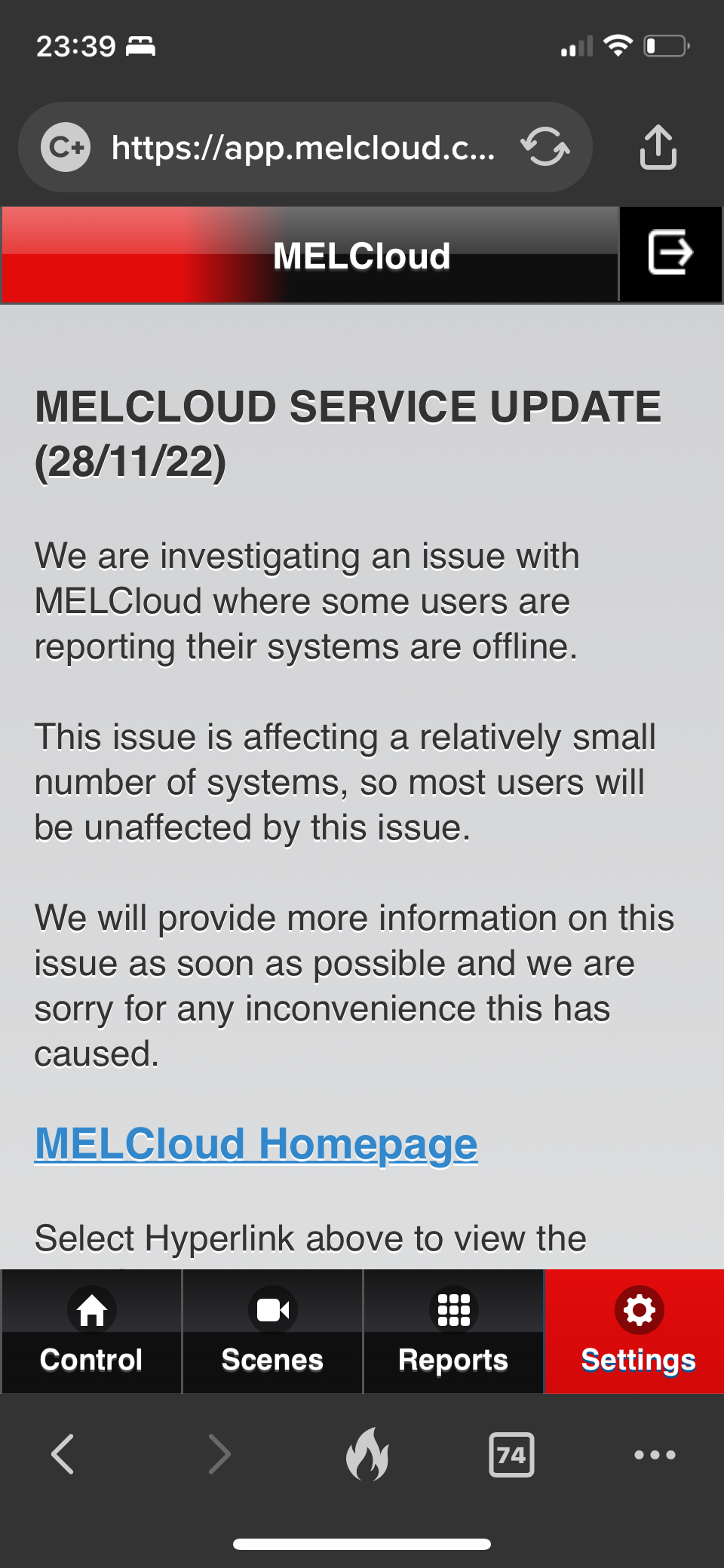
It seems to be a wider issue as there’s an update on the support page. 
 

not sure I believe the ‘relatively small’ numbers affected. 
 

I can’t find anyway to submit a support ticket. 


46 replies

Blastoise186
Super User
Super User
November 26, 2022

I’m afraid that app report isn’t telling me anything useful about your Wi-Fi signal. Try using Ubiquiti WiFiman instead. It’s a lot more helpful.

https://play.google.com/store/apps/details?id=com.ubnt.usurvey

https://apps.apple.com/us/app/ubiquiti-wifiman/id1385561119

I often recommend this one because I use it myself and I’m pretty happy to trust the results it gives.

Securing energy by zapping security bugs... For that is The Blastoise Way! Remember, I'm just like you - AI Powered Evil Geniuses aren't Staff!
Tim_OVO
OVO Staff
OVO Forum Legend
November 28, 2022

Hi @TonyShep,


I’ve seen something similar over the weekend from @lycandroid:


Perhaps related…?

Carbon neutral - we need a community to get there! My green tech: Aclara SGM 1411-B smart meter, Chameleon IHD6
Newcomer
November 28, 2022

In this case, no.  The issue on this thread concerns wifi connectivity whereas my problem just relates to a particular report (energy usage) not working.  My wifi connection has not been a problem and I have not seen a MELCloud outage.

The screenshot above from @TonyShep shows the wifi signal strength from the ecodan side.  It shows that it’s connected ok but at mid strength so, of itself, doesn’t indicate a problem.  My strength is actually less than that and has been working ok.

@TonyShep I am new to all this myself and so don’t want to confuse matters or waste anyone’s time - but what exact problem do you experience?  Do you get something telling you that the ecodan connection has failed?  A screenshot of that may be useful.  I only ask to reduce ambiguity about the core problem.

Newcomer
November 28, 2022

Hi. @TonyShep 

i think I’m getting the same issue as you with my Ecodan. The internet is connected, as far as I can see. But the data from the system is no longer being refreshed. 

I reset the boiler & the Wi-Fi login creds etc. 

Seems it’s not refreshing the data. 
The heating is still working, I think normally. 

the online web interface suggests it last got data / connected on the 24th nov. 
 

The LEDs on the Wi-Fi box attached to the tank flash normally and then flash error but it’s intermittent and doesn’t seem to relate to a connection issue.


Newcomer
November 28, 2022

@Hillsides what does the wifi strength show for you via Reports → Wi-Fi Signal Strength?

Also does Reports → Error Report show anything useful?

Newcomer
November 28, 2022

Hi @lycandroid 

i’m suspicious that the app is no longer receiving any updates, so not sure it represents anything useful for debugging. 
 

Also never had an error reported via the app. 
 

The only insight I have is from the message in the footer of the property interface. ‘Failed to refresh’


Newcomer
November 28, 2022

@Hillsides Not much to go on.

If it matters, I can say that I have a TP-Link Deco M4 mesh network and, so far, it seems to be working ok - bearing in mind I’ve had it less than a week.  My mitsubishi wifi is in the loft, next to cylinder.

In https://library.mitsubishielectric.co.uk/pdf/download_full/1008 it mentions:

Not all Routers will be able to connect to MELCloud service, if you are not sure please check with the Router manufacturer
before purchasing Mitsubishi Electric Wi-Fi Interface (MAC-557IF-E). Mitsubishi Electric have tested Edimax BR6428-NS
for use with the MELCloud service


However, that refers to MAC-557IF-E and I have a MAC-587IF-E so not sure if the same applies.  Nevertheless, that would obviously bring the signal strength up to near max, as it would be right beside it.

With that, you’d have to run a cable from your existing router (or access point, or whatever) to the edimax sited near the mitsubishi wifi box.  It also will of course need power. It would probably also work with a similar tp-link device which might be cheaper.

If you had a mesh network then similarly you could put a mesh unit beside the mitsubishi wifi as well.

Painful though and no guarantees of working.  Also annoying that to make something work that is supposed to be electrically efficient - you end up having to buy and power more electrical devices :(

Blastoise186
Super User
Super User
November 28, 2022

It’s important that if you go down that route, go for a mesh system - not Wi-Fi extenders. They’re two completely different things. Mesh Wi-Fi works great, Wi-Fi Extenders are horrible.

You can get various options from vendors like TP-Link, Ubiquiti, Netgear and a few others. If you struggle for power sockets, something that supports Power over Ethernet like Ubiquiti UniFi might help make things a bit easier.

Securing energy by zapping security bugs... For that is The Blastoise Way! Remember, I'm just like you - AI Powered Evil Geniuses aren't Staff!
Newcomer
November 28, 2022

Hi @lycandroid @Blastoise186 thanks for the thoughts. It’s been running fine for the last 18 months without data loss or connection loss. I have a netgear mesh with a satellite nearby. 
 

last week the ecodan lost connection and I got the standard email like a power outage. But it’s not been happy since. 
 

it’s not sent data since. I’ll chat with ecodan to see if they can shed light on it. 
 

cheers. 

Newcomer
November 28, 2022

Yep this is happening to me as well, started about 2 days ago. Lots of emails stating loss of communication then froze. Reconnected once after 4 attempts then disconnected again.
