



Rank 2
November 26, 2022
Solved

MELCloud linked to Mitsubishi Ecodan air source heat pump lost internet connection- Won't re-connect?

  • November 26, 2022
  • 46 replies
  • 6552 views

I have MELCloud linked to my Mitubishi Ecodan air source heat pump.
Recently I lost the internet connection and cannot establish a reconnection.
My connection is via Access mode as my router does not have a WPS button.
I am able to complete the process for reconnection correctly but it does not connect.
I have previously been successful and there are no changes to my home network settings.
I am wondering if;
the MELCoud server is down?
or if I have a non standard password to my home wifi network - it includes a ’ and has a space in it?
Any help with reconnecting to the internet would be useful.

Best answer by Hillsides

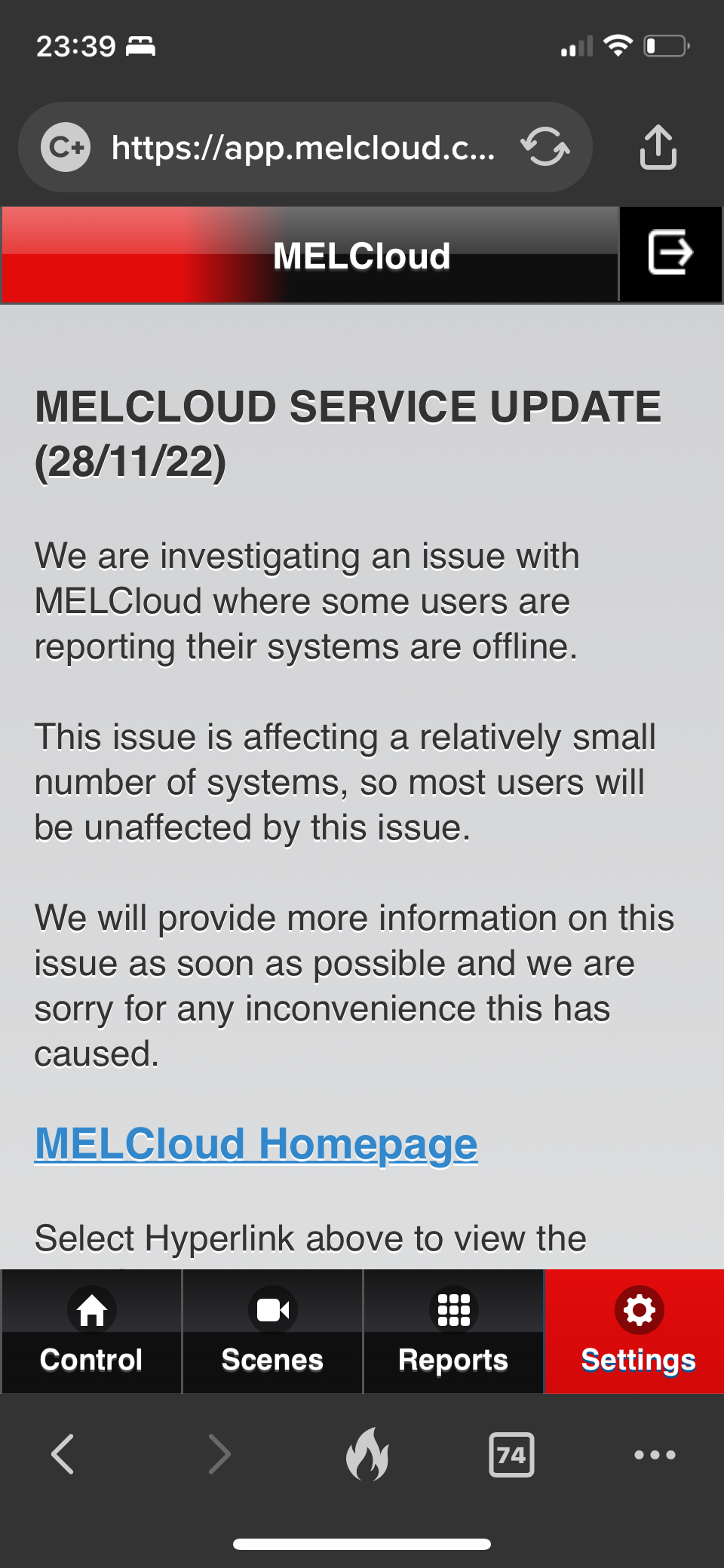
It seems to be a wider issue as there’s an update on the support page. 
 

not sure I believe the ‘relatively small’ numbers affected. 
 

I can’t find anyway to submit a support ticket. 


46 replies

HillsidesSolved
Newcomer
November 28, 2022

It seems to be a wider issue as there’s an update on the support page. 
 

not sure I believe the ‘relatively small’ numbers affected. 
 

I can’t find anyway to submit a support ticket. 


TonyShepAuthor
Rank 2
November 29, 2022

@lycandroid , @Hillsides 

Thanks for your replies and comments. 
My issue is exactly as @Hillsides describes. 
MELCloud link working fine for over a year and able to look at data and system readings. 
lost communication a couple of weeks ago, no wifi signal strength showing on app and data not refreshing. Unable to reconnect. Tried the usual reset and reconnect via access point method but it fails every time. 

Newcomer
November 29, 2022

Interesting as the problem seems to manifest as a local wifi connection issue, not a melcloud server connection issue, which suggests a firmware update broke things.  Anyway... we’ll see what mitsubishi say.

I can’t find anyway to submit a support ticket. 

If you go to https://les.mitsubishielectric.co.uk/homeowners/homeowner-welcome-pack/connect then click Product Support it opens a form to post an issue.  I’ve not had to use it though so far.

I don’t really want to go off topic but have others signed up to the “Homeowner Portal” at https://les.mitsubishielectric.co.uk/homeowners/homeowner-welcome-pack ?  I have not done so as yet.  For anyone that has, does it then allow a more direct way of logging support requests?

Just a random comment possibly, and maybe everyone knows this already (did I mention I’m new to all this) but you can go to https://app.melcloud.com/ and you’ll just get the same interface you get via the app on your phone.  I personally find this more convenient than the app as I’m normally working on my laptop.  If you’re familiar with these things, it also allows you to gain some insight into how the app gets data.

Blastoise186
Super User
Super User
November 29, 2022

My datamining tool suggests 100+ users are affected. This is based off of forum posts here and elsewhere along with a wider internet search

Securing energy by zapping security bugs... For that is The Blastoise Way! Remember, I'm just like you - AI Powered Evil Geniuses aren't Staff!
Newcomer
November 29, 2022

@lycandroid I use the web based app a bit. But I’d like to meet someone who could extract any insight from the data. I’ve looked at it regularly for the last 18 months and it’s heavy on charts and very light on insight. 
Questions like…  the freeze stat setting is more frequently on these days. Is that something I need to be concerned with?

it also says a lot of some stuff is indicative data but it’s not clear which

generally  it’s fairly useless Without trend or some clever stuff to alert you to issues.  

Newcomer
November 29, 2022

Well I would agree with you that the app is rather “suboptimal” (putting it kindly).  I do have some experience of the toolkit they have used to build the app (cordova) and that’s mostly outdated these days, and it kinda explains the “klunk” factor using the app.

To be pedantic, my point about insight was how data was obtained as opposed to the data itself being insightful. 

By using the browser dev tools you can see how the web page makes requests to get the raw data.  You can therefore write your own tool that makes the same requests and then store and analyse the data your own way.  Trouble is, for a non-programmer, this is not really viable.  I did have a quick try myself but failed on the authentication side of things, but I’m sure it’s possible and will pick it up again at some point.

On the freeze stat point:

  • I have switched that off on my system as it has glycol added to it and I was advised it was safe to turn off the antifreeze cycle in that case.  My reason for turning it off, apart from the electricity use, is to reduce pipe noise overnight.
  • Possibly stating the obvious, but its supposed to come on when the outside temperature drops below a certain value - that value can be configured via the controller.  So maybe that explains why its only running on certain days.
TonyShepAuthor
Rank 2
November 29, 2022

Useful thread everyone.

I gave also logged onto MELCloud via the web but it only responds to the data transmitted by the ‘dongle’ connected to my heating system, so when that loses connection there is no data to read  

Let’s Hope Mitsubishi can respond to this as @Blastoise186 seems to think it may be a wider problem affecting many users.

I am now away from home for a while and will have to rely on my Tado system and my electrical consumption to monitor if my Ecodan heating is working properly. 

Newcomer
November 29, 2022

@lycandroid 

There lots of examples of the API being reverse engineered in home automation apps to integrate the melcloud API.

but it seems even the API is half baked. 

I’ve used the node-red version to pull data into a dashboard in an attempt to make it useful. But it’s still fairly dumb without anything to compare it to. 
 

https://flows.nodered.org/node/node-red-contrib-melcloud

But really it’s about monitoring energy which doesn’t  seem to be included in the systems or the API by default. (As far as I can tell)


Blastoise186
Super User
Super User
November 29, 2022

It looks like you might also be able to use Home Assistant with their MELCloud Integration. https://www.home-assistant.io/integrations/melcloud/

It’s worth noting however that it’s classed as Cloud Polling, so updates won’t be quite as quick as you might like.

Securing energy by zapping security bugs... For that is The Blastoise Way! Remember, I'm just like you - AI Powered Evil Geniuses aren't Staff!
Newcomer
November 29, 2022

@Hillsides thanks, yes I’m sure there are plenty of attempts out there.  I will probably do it myself just from an interest point of view.

But really it’s about monitoring energy which doesn’t  seem to be included in the systems or the API by default. (As far as I can tell)

In https://library.mitsubishielectric.co.uk/pdf/download_full/2395 it says:

Energy Monitoring Pack 1 (EMP1)
The FTC5 system comes with in-built energy monitoring functionality which does not require any additional hardware.
This provides an estimate of energy usage to nearest kilowatt hour, this energy usage data can be viewed on the local Ecodan Main Controller this estimated energy data is NOT viewable in MELCloud.

So, on the default system, I think we’re out of luck with energy monitoring via the API.
