




Second generation (S2) Aclara smart meter health check (SMHC)
Updated on 06/10/26 by Chris_OVO
Your guide to the SMETS2 Smart Meter Health Check (MHC)
If you think there might be communication issues with your SMETS2 meters, we’d recommend checking out the advice given in the following topics first:
Still having communication difficulties? A Smart Meter Health Check can help diagnose things. Carry out the checks below - and submit the answers directly on this online form. It goes straight to the right team!
If your Secure Liberty SMETS1 smart meter is having communication issues, find the SMETS1 Smart Meter Health Check here.
The SMETS2 smart meter health check
Ready for the questions? Let’s do it:
What are your smart meter serial (MSN) numbers?
Where to find them?
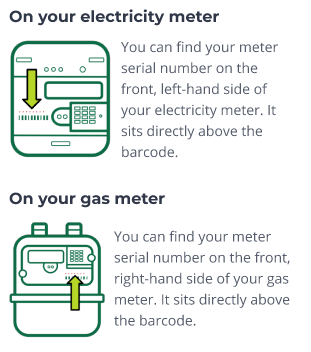
You can find them directly above the barcode on each meter.
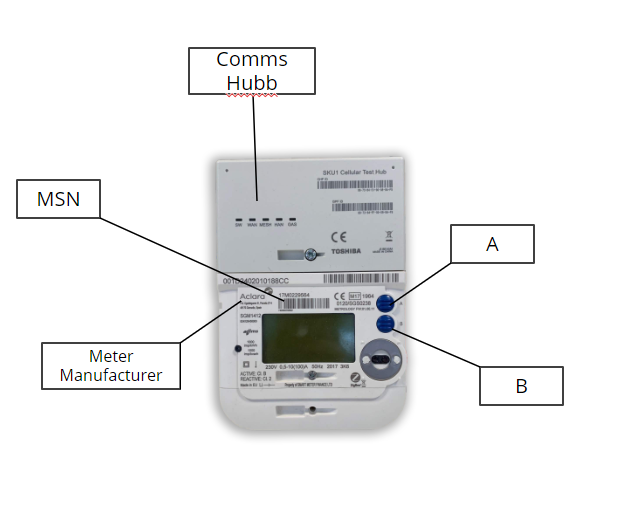
The MSN for an S2 electricity smart meter can be found near the meters barcode above the display. The Aclara version of the S2 will start with either 17M, 18M, 19M, 20M, 21M or 22M (depending on the year the meter was manufactured). The Honeywell meters will start with either 17K, 18k, 19K, 20K, 21K or 22K.
Gas
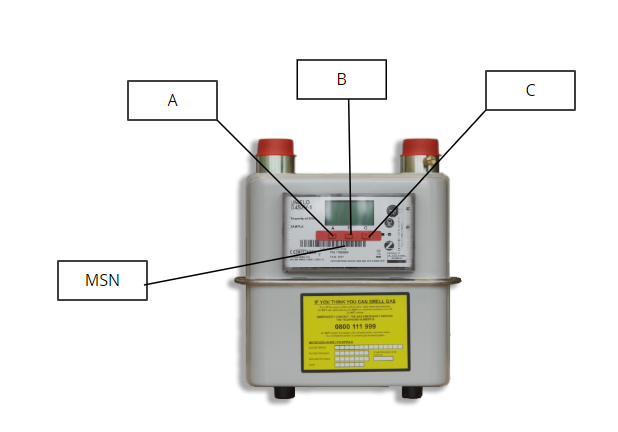
The MSN for a gas smart meter can be found below the display. It will start with G4F. For Honeywell, it will start with G4K.
You can check these match the meter details shown on the ‘Meter Readings’ page on your online account or OVO app (download for Android or iOS).
Next, look for the light labelled WAN on the front of your electricity meter
What is WAN?
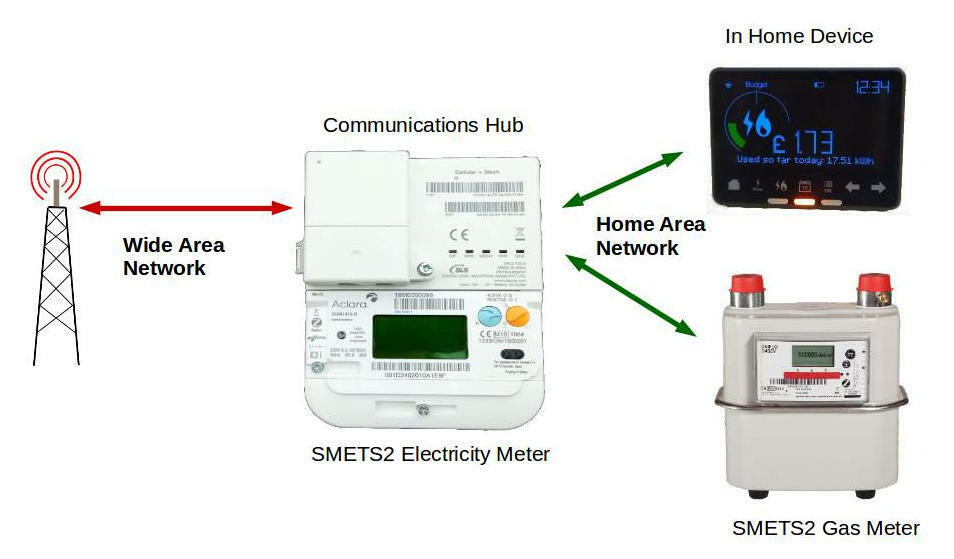
WAN stands for wide area network, it allows an electricity smart meter to send or receive data (such as meter readings) securely.
These are the lights on the communications (comms) hub for SMETS2 found on the electricity meter:
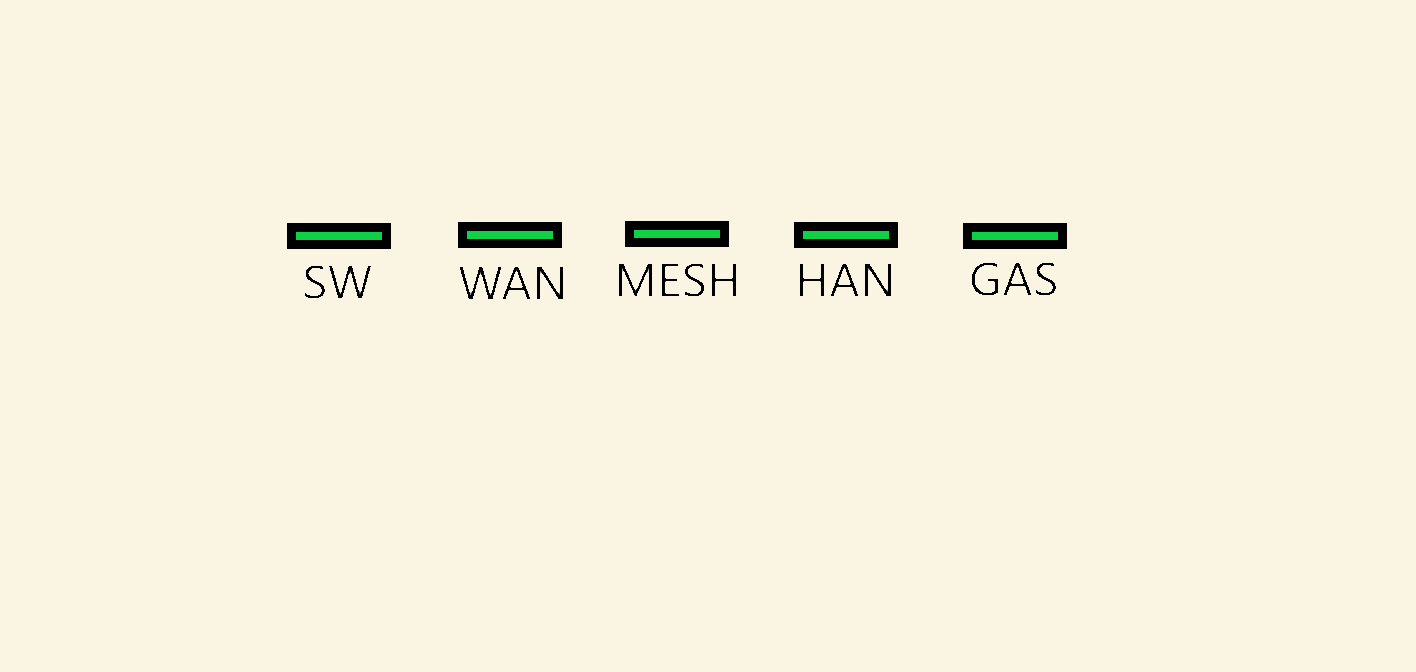
SW - Represents the status of the comms hub's software
WAN - The comms hubs ability to communicate with us
MESH - Communication through another S2 comms hub (will be more applicable when there are more S2 smart meters)
HAN - Communication of elec meter, gas meter, and IHD with the comms hub
GAS - Gas meter HAN connectivity
Where can I find it?
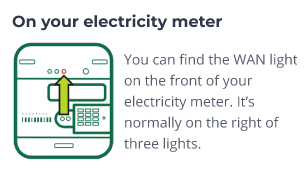
Is the WAN light flashing, On or Off?
On - every 5 seconds - everything is fine here
Flashing - every 3 seconds - searching for connectivity
Flashing - every 1 second - connectivity issue
Off - connectivity issue
Please check your electricity meter and confirm what the LED light labelled 'WAN' is doing. The lights are on the communication hub, which is above the electricity meter.
If the lights aren’t flashing every five seconds, this indicates there may be an issue for our Support team to investigate further.
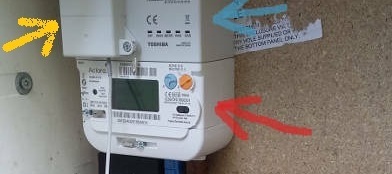
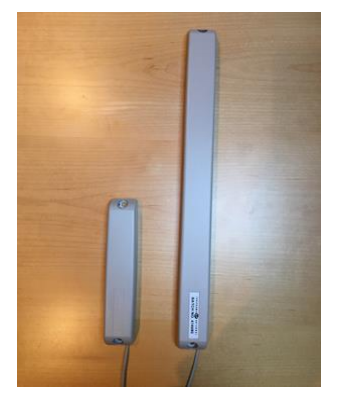
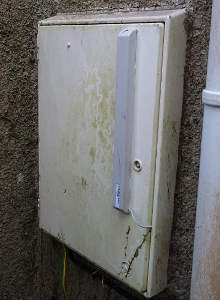
When fitting SMETS2 meters in low WAN areas engineers will fit an aerial to the meter. On these meters there’ll be a box (yellow arrow in pic below) sticking out of the comms hub and a wire connecting to the a small (T1) or large (T2) external aerial. So if there are WAN issues and an aerial has been fitted, make sure you find out which size has been installed. Please bear in mind that if you have a larger aerial already installed, there is nothing more we can do to improve WAN.

Aerials
Now look for a light labelled HAN
What is HAN?
HAN is a Home Area Network which connects the devices in your home. Your electricity smart meter creates a short range wireless network. This allows it to communicate with your gas smart meter.
If the HAN light isn’t flashing on the smart meter communications hub (attached to the top of the electricity meter), this suggests that the meter hasn’t been commissioned. Further to this, on the screen itself, a commissioned meter would have a signal bar and "HAN" written on it to indicate connection.
Is the HAN light flashing or On?
Please provide your current reading
How to take a manual smart meter reading?
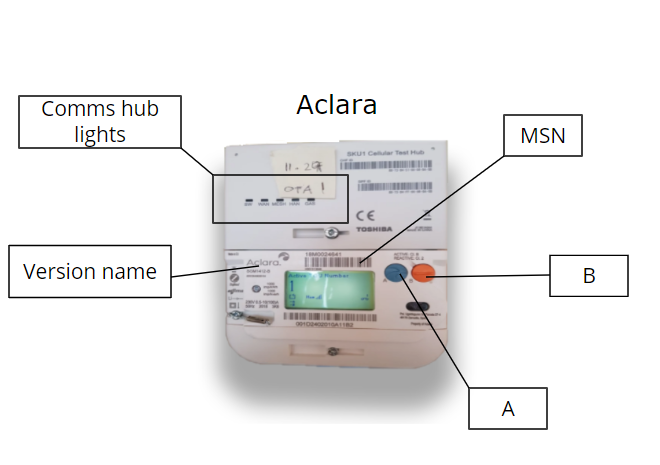
To find out your current reading press the menu button or A on your electricity smart meter and the reading will appear after the words IMP KWH.
Aclara (Flonidan for gas)
-
Electricity: There’s 2 buttons on an electricity meter. Pressing B will cycle through all the menus on the meter screen and pressing A will cycle through all the sub menus. To take an electricity reading, you will need to press A - TOU rate 1 will be the electricity reading. For Economy 7 members, TOU rate 2 will show the rate 2 reading.
-
Gas: Gas meters have A, B and C. Pressing C will give you the menu and A & B will allow you to scroll through the options. The balance section is where you can check the reading (when you wake up the meter it should automatically default to the reading screen). Screen 1 - readings, active tariff price, standing charge, export reads, meter mode.
Honeywell
-
Electricity: Press the top button once or twice to access the reading.
-
Gas: Press the middle button once or twice to access the reading.
If you have a Landis+Gyr smart meter, see this topic guide here to confirm how to read it:
Aclara V1 Elec
Aclara V2.5 Elec
Flonidan Gas
Where is your electricity meter?
This helps us know of anywhere that could be blocking the signal.
Outside- front of home
Outside- back of home
Basement
Inside- ground floor
Inside- first floor
Inside- second floor or above
How is the mobile signal next to the meter?
Used for checking if there are issues with your meter communicating.
Good
Average
Poor
Please let us know roughly how far your gas meter is from your electricity meter?
10 metres or less
More than 10 metres
Are there any thick walls that could be blocking the signal between your gas and electricity meters?
Do you have thick walls, maybe old, solid stone walls? Or are there multiple walls between the meters?
Head over to this online form to submit these answers directly to the right team!
OVO customer but not got a smart meter yet? - Book today!
Interested but not yet an OVO customer? - Check out our plans!
Need more help?
This topic is now closed, so you won’t be able to reply here. If your question hasn’t been answered or you need more advice, feel free to ask the community — we’re here to help!
Give us your feedback!
Was this article helpful? Is our Library missing content? Share your anonymous feedback here and help us improve!

