


Rank 1
April 14, 2020
Solved

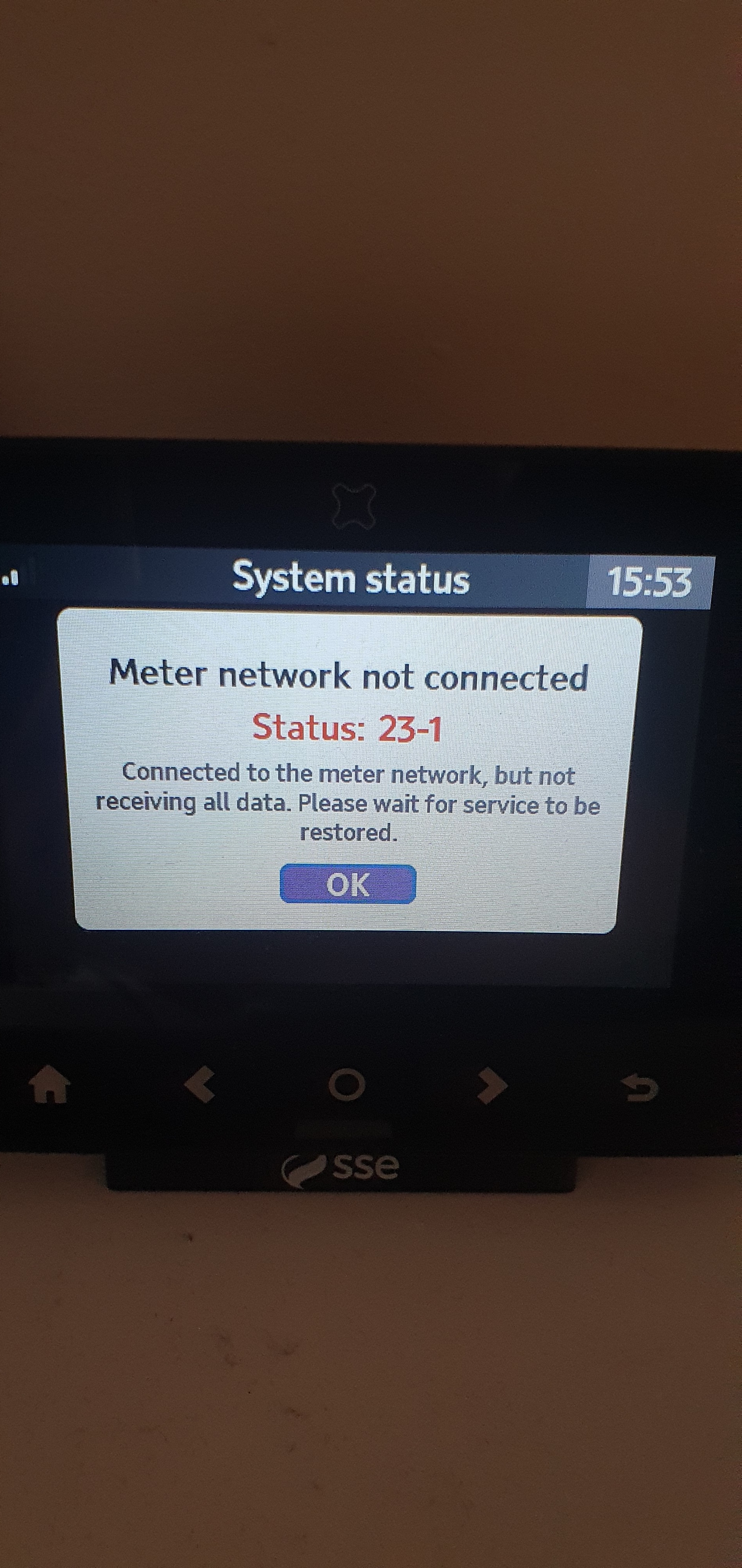
Why is Geo Trio In-Home Display (IHD) showing "Meter Network Not Connected: Status 23-1"?

  • April 14, 2020
  • 18 replies
  • 11311 views

Can anyone help me solve this problem please ? 
 

Best answer by Ed_OVO

Updated on 30/10/25 by Ben_OVO


We’ve now made an FAQ covering these Geo In-Home Displays. If you’re an OVO customer and are seeing this error message on your Geo IHD we’d recommend carrying out the trouble-shooting steps below.


Checking the smart meter connection (WAN) via your Online account or OVO App


Check is your online account or OVO app (download for Android or iOS). If we’ve lost connection to your smart meters for over 5 days you may see a message on screen to let you know we’ve got communication issues.


In this case the best next steps would be to carry out a smart meter health check for your meter type below:


Once any communication issues with your meters are resolved, we’ll be able to get your IHD connected and showing your usage data again too!


DIY steps to help with issues with your Home-Area Network (HAN)


Checked your online account and no ongoing smart meter communication issues to see? In this case it’s more likely to be an issue with the connection between the device itself and the smart meters (also known as the HAN).


The IHD connects to your smart meters via the communications hub attached to your electricity meter, so it sometimes helps to move your IHD closer to your electricity meter to help it regain connection. It’s best to leave the IHD in this new spot and try re-booting the device after 24 hours. Sometimes this simple step will do the trick!


Contacting our Support Team


Can’t get things back on track with the above steps? Not to worry - our Support Team can help get the issue escalated to our smart metering team for further investigations.


Another way to check your usage


So long as we’re in communication with your smart meters themselves, you can always keep an eye on your usage data by checking the ‘Usage’ pages of your online account, or app:


OVO member but not got a smart meter yet? - Book today!

Interested but not yet an OVO member? - Check out our plans!


18 replies

Blastoise186
Super User
Super User
February 18, 2023

The Geo IHDs can do it as well, but you need an accessory, specifically this one https://geotogether.com/product/wifi-module/

I need to know the Status Code for gas from the System Status menu to be able to advise further. Geo gave me a list with all the details but I’m afraid I don’t have psychic powers.

Securing energy by zapping security bugs... For that is The Blastoise Way! Remember, I'm just like you - AI Powered Evil Geniuses aren't Staff!
Newcomer
February 18, 2023

Hi Blastoise. When I go into the System Menu, this is what I get - no code, I’m afraid.

If I click on the Gas and Electric Icons, they both tell me that the connection to the Electric and Gas meters are OK. Clearly they aren’t, because the Gas is not showing on the home screen and is says ‘Gas Disconnected’. 

If I click on the Display and WiFi buttons, I get nothing.

Does this help?


Blastoise186
Super User
Super User
February 18, 2023

Hmmm… Thanks.

That suggests to me there is no fault with the connection between the IHD and Comms Hub and Comms Hub to Gas Meter - everything seems to be talking just fine.

I’ve checked the document Geo gave me and there’s nothing in there to cover this exact scenario I’m afraid. I kinda feel like the best solution might be to have the Gas Meter and/or Comms Hub rebooted remotely. OVO can make the arrangements for you but it may take some time to do.

Securing energy by zapping security bugs... For that is The Blastoise Way! Remember, I'm just like you - AI Powered Evil Geniuses aren't Staff!
Newcomer
February 18, 2023

Hi all, today morning my IHD stopped working. There is a message “meter network not connected”. Tried to move close to a meter with no result. Is there any possibility I could “fix it” by myself rather to spend half of the day trying to call OVO support? Tia 

Blastoise186
Super User
Super User
February 19, 2023

You need to turn the IHD off and back on again. If that still doesn’t solve your problem, the Comms Hub might also need a reboot.

I’ve looked up that status code and the long story short version is that your IHD isn’t able to get the time synced, therefore cannot establish a full connection. Geo has informed me that power cycling the device will often fix this issue.

Securing energy by zapping security bugs... For that is The Blastoise Way! Remember, I'm just like you - AI Powered Evil Geniuses aren't Staff!
Newcomer
February 19, 2023

Thanks Blastoise 186. Your parents were very creative when they gave you that name.

I’ll get onto OVO tomorrow - again! Looks like another long wait for them to get their finger out. It comes to something when the customer has to tell them what to look for, doesn’t it?

I mean, how long does it take to press a few buttons or click a keyboard? 💤

Cheers, Dave.

Blastoise186
Super User
Super User
February 19, 2023

Hehehe, thanks. It’s actually partially a name of my own creation. The joke is that it took 186 generations of Blastoise before me. :)

It’s not my real name however. I keep my real life identity extremely well hidden, so much so that there’s pretty much nothing of the person at the keyboard anywhere on the public internet that can be found. Blastoise186 instead is not just how I represent myself online, but is in itself its own identity - kinda helps to maintain that separation of worlds!

Anyway… Back on track…

Rebooting the Comms Hub is unfortunately not something OVO can do by themselves. Only DCC can do it and if you think OVO is slow… DCC is an absolute sloth when it comes to these requests!

Securing energy by zapping security bugs... For that is The Blastoise Way! Remember, I'm just like you - AI Powered Evil Geniuses aren't Staff!
Newcomer
February 19, 2023

I’ll let you know how it goes. I could be a while! 🤡


