


Rank 1
April 14, 2020
Solved

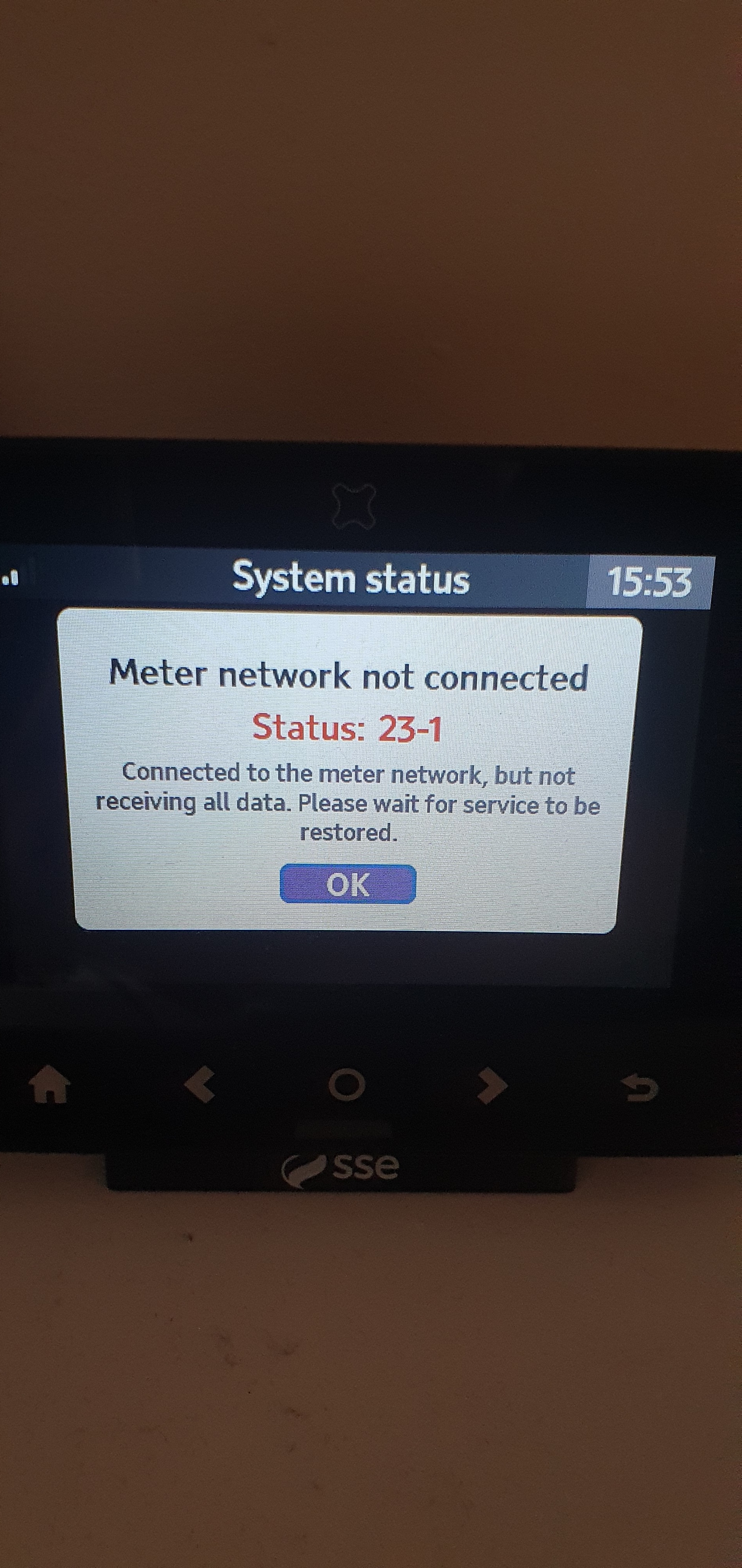
Why is Geo Trio In-Home Display (IHD) showing "Meter Network Not Connected: Status 23-1"?

  • April 14, 2020
  • 18 replies
  • 11311 views

Can anyone help me solve this problem please ? 
 

Best answer by Ed_OVO

Updated on 30/10/25 by Ben_OVO


We’ve now made an FAQ covering these Geo In-Home Displays. If you’re an OVO customer and are seeing this error message on your Geo IHD we’d recommend carrying out the trouble-shooting steps below.


Checking the smart meter connection (WAN) via your Online account or OVO App


Check is your online account or OVO app (download for Android or iOS). If we’ve lost connection to your smart meters for over 5 days you may see a message on screen to let you know we’ve got communication issues.


In this case the best next steps would be to carry out a smart meter health check for your meter type below:


Once any communication issues with your meters are resolved, we’ll be able to get your IHD connected and showing your usage data again too!


DIY steps to help with issues with your Home-Area Network (HAN)


Checked your online account and no ongoing smart meter communication issues to see? In this case it’s more likely to be an issue with the connection between the device itself and the smart meters (also known as the HAN).


The IHD connects to your smart meters via the communications hub attached to your electricity meter, so it sometimes helps to move your IHD closer to your electricity meter to help it regain connection. It’s best to leave the IHD in this new spot and try re-booting the device after 24 hours. Sometimes this simple step will do the trick!


Contacting our Support Team


Can’t get things back on track with the above steps? Not to worry - our Support Team can help get the issue escalated to our smart metering team for further investigations.


Another way to check your usage


So long as we’re in communication with your smart meters themselves, you can always keep an eye on your usage data by checking the ‘Usage’ pages of your online account, or app:


OVO member but not got a smart meter yet? - Book today!

Interested but not yet an OVO member? - Check out our plans!


18 replies

Ed_OVO
Retired Moderator
Ed_OVOSolved
Retired Moderator
April 15, 2020

Updated on 30/10/25 by Ben_OVO


We’ve now made an FAQ covering these Geo In-Home Displays. If you’re an OVO customer and are seeing this error message on your Geo IHD we’d recommend carrying out the trouble-shooting steps below.


Checking the smart meter connection (WAN) via your Online account or OVO App


Check is your online account or OVO app (download for Android or iOS). If we’ve lost connection to your smart meters for over 5 days you may see a message on screen to let you know we’ve got communication issues.


In this case the best next steps would be to carry out a smart meter health check for your meter type below:


Once any communication issues with your meters are resolved, we’ll be able to get your IHD connected and showing your usage data again too!


DIY steps to help with issues with your Home-Area Network (HAN)


Checked your online account and no ongoing smart meter communication issues to see? In this case it’s more likely to be an issue with the connection between the device itself and the smart meters (also known as the HAN).


The IHD connects to your smart meters via the communications hub attached to your electricity meter, so it sometimes helps to move your IHD closer to your electricity meter to help it regain connection. It’s best to leave the IHD in this new spot and try re-booting the device after 24 hours. Sometimes this simple step will do the trick!


Contacting our Support Team


Can’t get things back on track with the above steps? Not to worry - our Support Team can help get the issue escalated to our smart metering team for further investigations.


Another way to check your usage


So long as we’re in communication with your smart meters themselves, you can always keep an eye on your usage data by checking the ‘Usage’ pages of your online account, or app:


OVO member but not got a smart meter yet? - Book today!

Interested but not yet an OVO member? - Check out our plans!


I'm shocking at energy puns...
Cookie16Author
Rank 1
April 15, 2020

Thank you will have a go 🙂

Transparent
Rank 20
Rank 20
April 15, 2020

May I just clarify…
The link that @Ed_OVO has just given to Smart Meter Troubleshooting is not a current help-page. It refers solely to the earlier SMETS1 meters manufactured by Secure and the Pipit IHDs

I assume Ed will now alert the relevant web-technician that the page needs modifying to make this clear? Thanks.

…. and do I get a gold-star for spotting the issue?!

Save energy... recycle electrons!
Ed_OVO
Retired Moderator
Retired Moderator
April 15, 2020

Good catch, @Transparent, thanks!


There are still customers with the SMETS1 meters, so it’s worth us keeping the link alive for those, but it’s certainly worth us getting some further SMETS2 info on there, and clarifying all of this!


10 gold stars for you sir! :star::star::star::star::star::star::star::star::star::star:


Thanks,

Ed

I'm shocking at energy puns...
Newcomer
February 17, 2023

 I had a Smets 2 Electric meter fitted by OVO last year for the Electric. (I was with British Gas at the time with the old style analogue meter). OVO provided me with the Chameleon IHD7 Monitor and it worked fine. I later got British Gas to fit a Smart Meter and they said that I should be able to read my Gas usage on the IHD7 that I already had, after a short period of time. After much frustration trying to get British Gas to sort it, I decided to close my account with them and get the Gas supplied by OVO, as well as the Electric. 

I did this last December and, despite many tries to get the Gas meter to communicate with the IHD7, they could not get not get it working either. Eventually, they sent me a new GEO Meter and I was instructed to switch it off for 24 hours, switch it on and the Gas should start to show as well as the Electric. Well, no it doesn’t. I have talked to their support team both on-line and on the phone numerous times. I have had 2 e-mails from the site support team saying that they have removed the old device (IHD7) off the system and installed the new one (GEO).  On both occasions, they asked me to switch the IHD off for 24 hours and then switch it on and wait for 30 minutes. 

I am still only getting the Electric reading and am going round in circles with them. It feels like they are ignoring me now. I can only conclude that the Gas Smart Meter is not communicating with the Electric Smart Meter (I understand that it needs to do this for the information to appear on my In Home Display (IHD). It is clear that they cannot solve this problem remotely, so I think I should have a site visit to check that the Gas meter is functioning properly. I have suggested that, but they say that if there is nothing wrong with it, I shall be charged.

We are Pensioners and on the Exemption Form and really want to be able to read which appliances use how much, so that we can regulate our usage to what we can afford. Otherwise, what is the point of us having a Smart meter in the first place?


Blastoise186
Super User
Super User
February 17, 2023

Hey @Dave Hutton !

It looks like you might have a Geo IHD. Could you go into the menu, bring up System Status, select Gas and tell me the Status Code please?

If you could also snap some photos of both meters, that would be great.

Thanks!

Securing energy by zapping security bugs... For that is The Blastoise Way! Remember, I'm just like you - AI Powered Evil Geniuses aren't Staff!
Newcomer
February 17, 2023

Had a similar problem a while ago eventually a man came out he sorted it within 30 seconds even though I gave them the correct serial numbers of my meters which they asked for someone at the other end didn't bother to check the serial numbers and one was wrong, so once they had the correct serial number everything started to work fine. I hope this helps 

Newcomer
February 18, 2023

Thank you David. I have been onto them every week since mid-December. I have sent them pictures of the Smart Gas meter showing all serial numbers. I have said to them that someone needs to come out and check the meter, but they are threatening me with a charge, if there is nothing wrong with the meter. I have suspected for some time that it is operator error when they are trying to pair it remotely. 

As a matter of interest, did you have to switch your IHD off when the engineer left and wait 24 hours for it to register? Which IHD do you have - is it the Chameleon IHD6 or 7 or the newer GEO which they have now sent me? I have been asking for the Accessible In Home Display (AIHD), because it is larger and better for my poor eyesight. So far they have ignored my request and sent me the GEO instead.

Newcomer
February 18, 2023

Hi Blastoise. I’ve brought up the System Status and it is not giving me a code. However, I have noticed that by trawling through the Gas icon, it is telling me that the Gas connection is OK and even gives me some readings. 

However, on the home page, it still says that the Gas is disconnected and there is no indicator for Gas usage, as there is for electric.

Anyway, here’s a few pics. See what you make of them.

Thanks, Dave.


Newcomer
February 18, 2023

It looks like it has only sent one picture, whereas I uploaded quite a few to tell the story.

Whilst here, I was able to connect my Chameleon IHD7 to my Router, but the GEO doesn’t seem to have that facility. However, the status bar on the top left looks as if it is connected. Could it have done that without me needing to enter the security code from my Router?


