Rank 2
November 20, 2025
Solved

Smart meter reporting and electric meter do not match

  • November 20, 2025
  • 40 replies
  • 1190 views

Hi,

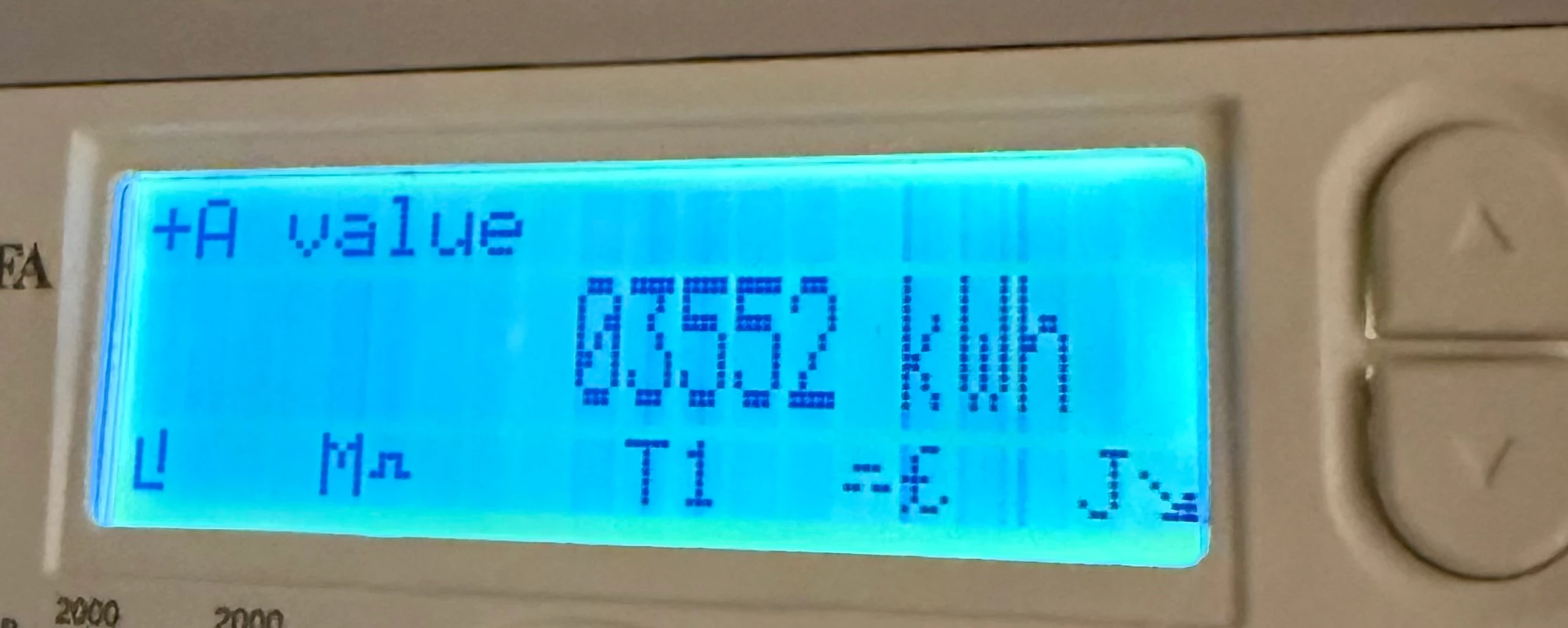
I have just moved into a newbuild apartment where the utilities have been handed over from the developer. The current meter reading is 03552 (shown by the photo), slightly above the confirmed reading I received off the developer on completion.

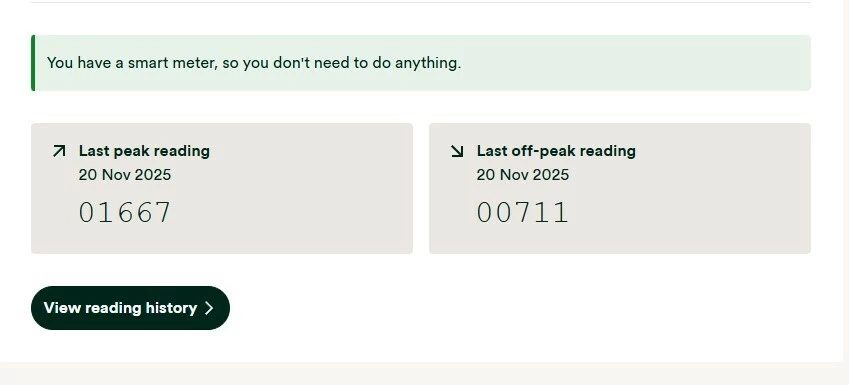
I registered with OVO Energy this week and found out from them that my meter is apparently a smart meter. However, upon checking the readings it has sent to OVO (photo also attached)  they appear to be completely different and far lower than the reading I see on the meter.

Is it possible this is fine and it sends different readings from the display I see when reporting as a smart meter, or is there something potentially wrong with my electric meter/out of sync and I need to call ASAP.


Best answer by Firedog

Updated on 04/12/25 by Ben_OVO

The first thing to check is that the Meter Serial Number shown just above You have a smart meter, so you don't need to do anything is the one actually printed on the front of the meter itself. It’s not at all uncommon for meters in new build estates to be assigned to the wrong property.

If that isn’t the problem, then check what other kWh readings your meter can display. I assume it’s an MA 120 or MA 120B. These are the instructions I found; sadly, there’s no guarantee that they will apply to your meter:

Follow these steps to read the two rates on your electricity meter:

  1. Press the top white button to open the menu
  2. Check the arrow on the screen is pointing to 'General Display' (if not, use the top and bottom white buttons to move the arrow up and down)
  3. Press and hold the top white button to select 'General Display'
  4. Press the bottom white button to move the arrow down to 'Tariff Matrix'
  5. Press and hold the top white button to select 'Tariff Matrix'
  6. Check the arrow is pointing to 'TOU Register' (if not, use the top and bottom white buttons to move the arrow up and down)
  7. Press and hold the top white button to select 'TOU Register'
  8. Write down the numbers under 'T01' (they'll be followed by 'kWh') – this is your Rate 1 reading
  9. Then write down the numbers under T02 – this is your Rate 2 reading.

Please come back and tell us whether you were able to follow these steps.

If the meter readings shown on your meter are different to those displayed on your online account / app / statements, you’ll need to get in contact with our Support Team. In this scenario, you may also find these guides helpful for trying to diagnose the issue:


40 replies

Rank 2
December 5, 2025
(image edited by Moderator)

Last Mile have just got back to me… Everything is correct (apart from the last letter of the post code which should be M5 4TU)

So I am guessing it’s just a faulty smart meter.

Firedog
Super User
Super User
December 5, 2025

   … back soon ...

Noel | I have no official status; I'm just a volunteer who comes here to help other customers. My gear: Aclara SGM 1416-B Electricity-only E7 meter; Chameleon IHD3-PPMID-AAA | It may look as if I know what I’m talking about, but don’t let that fool you. |

Firedog
Super User
Super User
December 5, 2025

Kudos to LMAM for getting back to you so quickly. That looks pretty conclusive, so the mystery is just as deep as before. There is one last check to be made, though, since it seems that OVO is connected to a meter which isn’t the one you know to be yours.  

Communications between meters and suppliers go through the DCC, who carry out the authentication checks. DCC maintains a database of the equipment communicating through their portals, and each piece of equipment is identified by its MAC address. The last check, then, is that the meter on your wall has the same MAC address as the one DCC and OVO think you’ve got. 

You can see the MAC address LMAM have recorded for your meter at the very bottom of their impressive site information table: 00-1C-55-00-00-03-65-4C. You can check what DCC - and thus, I think, OVO - have recorded for your meter by running this harmless little utility: n3rgy data Smart Meter check. Homebrew calls the MAC address the GUID, which of course it is, too. Is it the same as LMAM’s?

[There’s a lot of personal information in the table, so I’ve asked the forum mods to remove it just in case.]

Noel | I have no official status; I'm just a volunteer who comes here to help other customers. My gear: Aclara SGM 1416-B Electricity-only E7 meter; Chameleon IHD3-PPMID-AAA | It may look as if I know what I’m talking about, but don’t let that fool you. |

Rank 2
December 5, 2025

The MAC address on homebrew is 00-1C-55-00-00-03-64-69, so very slightly different

Firedog
Super User
Super User
December 5, 2025

The MAC address on homebrew is 00-1C-55-00-00-03-64-69, so very slightly different
  

Right. I admit to flying by the seat of my pants here, but I’d guess that in a situation like this, a miss is as good as a mile. I can’t imagine how this could happen, but it looks like it has happened. You have a photo of the front of your meter; the MAC address on it should be the same as what Homebrew is reporting. I suspect it isn’t. I can’t imagine how this can have happened, because the numbers and barcodes on the meter are I understand laser-printed on it in the factory. It shouldn’t be possible for a mismatch ever to arise.

Now, what to do about it? Again, I’m guessing, but it’s possible that one of your neighbours is in a similar situation. LMAM should be able to find the MAC address on the front of your meter in their database of assets in this development. At the moment, it looks as if the fault may be in LMAM’s records, so I’d get back to them to ask if this mismatch - if that’s what it is - can possibly have happened on their watch. 

Noel | I have no official status; I'm just a volunteer who comes here to help other customers. My gear: Aclara SGM 1416-B Electricity-only E7 meter; Chameleon IHD3-PPMID-AAA | It may look as if I know what I’m talking about, but don’t let that fool you. |

Firedog
Super User
Super User
December 5, 2025

Revisiting after a few hours off, I see that we may have overlooked something. I have referred to ‘the meter on your wall’, but now I’m wondering if that is in fact the case. It’s common for meters in blocks of flats to be located centrally, often in the basement. If your meter isn’t actually in your apartment, where is it?

We’ve seen many cases where flat-dwellers are told which of many meter is theirs, only to discover later that in fact it was someone else’s. It’s not difficult to sort that sort of confusion out, but it can take time. However, if your meter is inside the flat, this sort of crossed-meter scenario is really unlikely. 


Noel | I have no official status; I'm just a volunteer who comes here to help other customers. My gear: Aclara SGM 1416-B Electricity-only E7 meter; Chameleon IHD3-PPMID-AAA | It may look as if I know what I’m talking about, but don’t let that fool you. |

Ben_OVO
Community Manager
Community Manager
December 8, 2025

@oaashy1411 good morning, I hope you’re well.


I’m sorry to hear that you haven't had the most helpful service from OVO since reporting this. It sounds to me as if a complaint has not actually been logged. If it had have been, you would have been provided with a complaints reference number, and you’d have been assigned a complaints handler. The fact that an advisor booked you in for a meter read appointment shows that they must not have understood what’s going on with your account.


I’d recommend getting back in touch to log a complaint. When you get in touch, advise that you tried to log a complaint previously, but were never provided with a reference number. Also, request that the Metering case number is provided (a case will most likely need to be raised to our back-office Metering team to get this looked into).


We don’t have access to customer accounts on the Forum, so can only speculate as to what’s happening, but it sounds to me like this just hasn’t been logged correctly. This is a really complex one, and sometimes these sort of queries just need to be logged correctly as a complaint in the first instance, to ensure that it’s sent to someone with more experience. Please keep us updated as to how you get on - we’ll continue to help as much as we can here.


@Firedog thanks again for helping so much on this one!

Powered by the Sun
Rank 2
December 9, 2025

I did raise a complaints email on the 27th a few hours before I got the call from the agent to arrange a visit. After the visit on the 5th turned out to be just a meter reader, I sent a follow up email forwarding my original complaint.

However, the only item I have received back is this automatic email to my original complaint on the 27th - so no reference number/dedicated handler at the moment.

Rank 2
December 9, 2025

Interestingly, the reading taken by the meter reader has so far not shown up on my account which makes me wonder if that was done just to establish there is an actual problem.

Ben_OVO
Community Manager
Community Manager
December 10, 2025

@oaashy1411 I’d definitely recommend getting back in touch to request that the complaint is raised properly. If it had have been raised, you’d have received a complaints reference number by now. 


You could either email hello@ovoenergy.com, or contact us via social media which might get a quicker response. You can reach us on Facebook and Twitter.


Please keep us updated as to how you get on, cheers!

Powered by the Sun