Rank 2
November 20, 2025
Solved

Smart meter reporting and electric meter do not match

  • November 20, 2025
  • 40 replies
  • 1190 views

Hi,

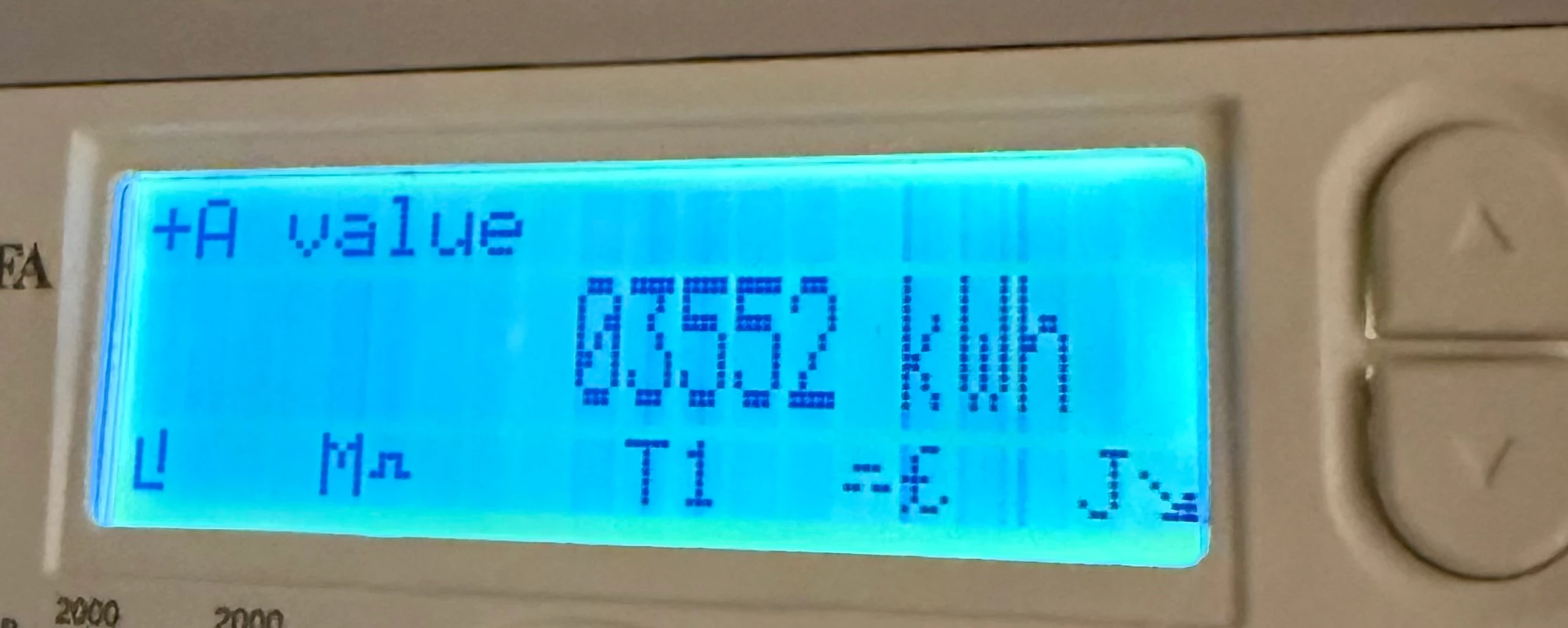
I have just moved into a newbuild apartment where the utilities have been handed over from the developer. The current meter reading is 03552 (shown by the photo), slightly above the confirmed reading I received off the developer on completion.

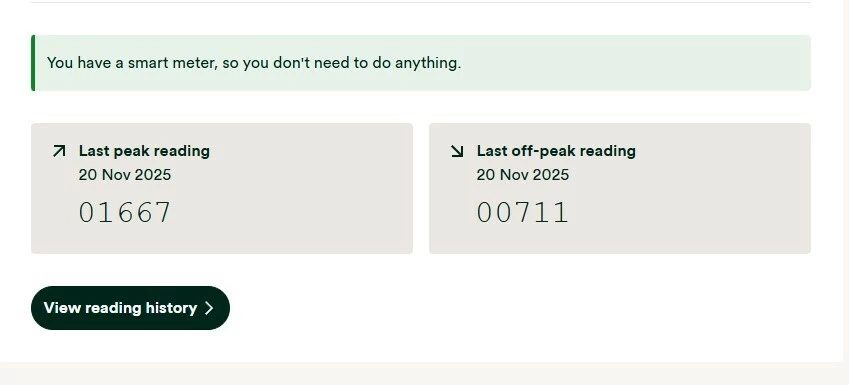
I registered with OVO Energy this week and found out from them that my meter is apparently a smart meter. However, upon checking the readings it has sent to OVO (photo also attached)  they appear to be completely different and far lower than the reading I see on the meter.

Is it possible this is fine and it sends different readings from the display I see when reporting as a smart meter, or is there something potentially wrong with my electric meter/out of sync and I need to call ASAP.


Best answer by Firedog

Updated on 04/12/25 by Ben_OVO

The first thing to check is that the Meter Serial Number shown just above You have a smart meter, so you don't need to do anything is the one actually printed on the front of the meter itself. It’s not at all uncommon for meters in new build estates to be assigned to the wrong property.

If that isn’t the problem, then check what other kWh readings your meter can display. I assume it’s an MA 120 or MA 120B. These are the instructions I found; sadly, there’s no guarantee that they will apply to your meter:

Follow these steps to read the two rates on your electricity meter:

  1. Press the top white button to open the menu
  2. Check the arrow on the screen is pointing to 'General Display' (if not, use the top and bottom white buttons to move the arrow up and down)
  3. Press and hold the top white button to select 'General Display'
  4. Press the bottom white button to move the arrow down to 'Tariff Matrix'
  5. Press and hold the top white button to select 'Tariff Matrix'
  6. Check the arrow is pointing to 'TOU Register' (if not, use the top and bottom white buttons to move the arrow up and down)
  7. Press and hold the top white button to select 'TOU Register'
  8. Write down the numbers under 'T01' (they'll be followed by 'kWh') – this is your Rate 1 reading
  9. Then write down the numbers under T02 – this is your Rate 2 reading.

Please come back and tell us whether you were able to follow these steps.

If the meter readings shown on your meter are different to those displayed on your online account / app / statements, you’ll need to get in contact with our Support Team. In this scenario, you may also find these guides helpful for trying to diagnose the issue:


40 replies

Rank 2
December 15, 2025

I’ve emailed the complaint line forwarding my original two emails to them to ask for an update/the complaint to be logged and also to check in due to the lack of response from them following the meter reader’s visit. Have also cc’d in the general queries email - so hopefully someone eventually replies. I have indicated I’ll escalate it to the ombudsman on 22 January if there is still no communication or there is not sufficient progress looking at my meter.

Rank 2
December 15, 2025

Is there any potential reason why the complaints team have not logged the complaint or emailed me back?

-First emailed general queries line: w/c 24 November

-General queries line replies and states they will pass my query to the metering team to look at: 26 November

-Also emailed the complaints line to get it registered: 27 November

-OVO get in touch via phone call to book in an engineer visit (I assume this is from the action from the general queries line): 28 November

-Engineer turns out to be a meter reader: 5 December

———-

No further contact received from OVO

———

-Sent a follow up email to the complaints line with no response: 5 December

-Sent a second follow up email to the complaints line: 14 December

Will keep the forum updated and see if OVO get back to me.

Chris_OVO
Community Manager
Community Manager
December 16, 2025

Hey ​@oaashy1411,


I’m really sorry for the delay in hearing back from our complaints team! I’ve checked in with them to see if we can get someone to reach out to you soon and find out what’s causing the hold-up. I’ll keep you posted as soon as I hear more. Thank you for your patience!

Renewable energy jokes never get old.
Rank 2
December 16, 2025

Hey ​@oaashy1411,


I’m really sorry for the delay in hearing back from our complaints team! I’ve checked in with them to see if we can get someone to reach out to you soon and find out what’s causing the hold-up. I’ll keep you posted as soon as I hear more. Thank you for your patience!

Many thanks for this! I received a call today from Tom - an amazing complaints handler. He has understood the issue in full, has given me a reference number, and will be in touch to sort a proper engineer visit.

A big thanks to the forum for all of you helping me along with this.

Abby_OVO
Community Manager
Community Manager
December 17, 2025

Hey ​@oaashy1411 


Thanks for coming back with that update! I’m glad to hear ​@Chris_OVO was able to check with the team and you got that call in the end!


Do let us know how everything goes, but I’m glad to hear it’s now in the right hands.

Currently Playing: She's Electric
Firedog
Super User
Super User
December 19, 2025


… Tom ... has understood the issue in full, has given me a reference number, and will be in touch to sort a proper engineer visit.
 

It’s a bit sad that it took a kick from a forum mod (an ex-member of a support team, I think) to get Complaints to spark, but I’m glad someone has taken ownership of your case at last.

Just a word of caution: many customers and indeed support agents seem to regard meter engineers as wizards, relying on them to fix all manner of ills. Of course, much of what they do appears as wizardry, but there are some problems that can’t be solved by an engineer visit. I’m not convinced that yours can, I’m afraid, and I’d rather have done a bit more investigation first. It might help to have done this before the engineer visits. The questions I would have asked are:

  • Where is your meter physically located?
    -  inside your apartment;
    -  on the wall outside your apartment, alone or with others;
    -  in a communal utility room, e.g. in the basement; 
    -  somewhere else?
  • What is its MAC address? (That’s the GUID starting with 00-1C-55- … printed on the meter above a barcode);
  • Do you know who lives in the apartment formerly known as Plot 307? It’s possible that there’s just been a straight swap, which would be much easier to unravel than a daisy chain around the block … 
  • Have LMAM been able to track down the the meters that the two similar MAC addresses belong to in their records? (One ends in -03-64-69, the other in -03-65-4C)
  • You will probably be asked to perform a sanity check on your meter, so you could try this in a quiet moment. Here are instructions I found but forgot to note where:
    •  Arm yourself with a good torch, then turn lots of high-power stuff on in the flat - plug-in heaters, immersion heater, tumble dryer, oven, kettle, toaster, iron etc. 
    • Find the meter with the serial number shown on your bill and look at the red LED marked nnnn Imp/kWh. It should be flashing rapidly. 
    • Unplug all sensitive electronic equipment and switch everything off again. Then at the consumer unit (“fuse box”) throw the master switch(es) off.
    • Go back to the meter and watch the red LED for a couple of minutes, to be sure it’s not flashing at all. On some types of meter, it may just glow solid red; that’s quite normal if everything the meter’s powering is switched off. I don’t know whether your Kaifa MA120 does this. In any case, it shouldn’t flash at all with everything switched off.
    • Turn the master switch(es) on again.
    • Finally, you could do a quick accuracy. I doubt there’s any problem with precision, but you could test it by plugging in just one item of known high power; a full 3kW kettle is ideal provided that you're quick enough to complete the test before it boils. Back at the meter, count the number of flashes N per minute to calculate the power P kW being drawn. For example, if the LED is marked '2000 Imp/kWh,' that is the meter’s EMP: P = N x 60 / EMP. You'd expect to see about 100 flashes per minute: N = P x EMP / 60 or 3 kW x 2000 imp/kWh / 60 mins/hr = 100.

  
These checks should establish whether or not the meter you think is yours is actually measuring the electricity you’re using in your flat.

  • If it is, OVO seem to have the wrong meter recorded on your account.
  • If it isn’t, the meter measuring your usage is somewhere else.

My guess is that LMAM are the ones best placed to find the source of the problem and suggest how to put it right. Another possibility is Kaifa, since there’s a suspicion that two meters apparently have the same serial number. They should know which MSN corresponds to the specific GUID. I’m not certain that your OVO contact or a visiting meter engineer will go so far as to call LMAM or Kaifa. 


Noel | I have no official status; I'm just a volunteer who comes here to help other customers. My gear: Aclara SGM 1416-B Electricity-only E7 meter; Chameleon IHD3-PPMID-AAA | It may look as if I know what I’m talking about, but don’t let that fool you. |

Newcomer
January 2, 2026

The physical meter reading is what matters for your actual bill. If the app is lagging, it’s usually a signal issue. You might want to run the 'Smart Meter Health Check' in your OVO online account - it’s a quick automated tool that can tell you if your comms hub is actually talking to them properly.

Rank 2
January 2, 2026

The engineer visited today and was very helpful. His diagnoses of the problem was that the communications hub is reporting via radio frequency… But because it is deep within the building and may have a weak signal, it is giving slow and inaccurate readings.

He is going to book me in to have a new 4G communications hub fitted to my meter which should give accurate readings. I did ask about the MAC address mix up and it potentially being connected to another address in their database, but he thought this unlikely.

Even then, a new communications hub should fix the problem anyway I think as I am guessing it’ll have to be registered/its own unique details added to the database.

Firedog
Super User
Super User
January 2, 2026

This looks promising, but I have some misgivings …
  

His diagnoses of the problem was that the communications hub is reporting via radio frequency… But because it is deep within the building and may have a weak signal, it is giving slow and inaccurate readings.

This sounds unlikely, so I wonder if the engineer was paraphrasing a bit for your benefit. The comms hub is just that - a device to communicate, in this context passing data from the meter to the supplier. Each packet of data is time-stamped, so there’s no such thing as ‘slow readings’. They might not always turn up at OVO’s end as promptly as everyone would like, but your data are being received as the very first support agent told you.

The remark about inaccurate readings is more worrying. A smart meter - even a Kaifa - is a precision instrument, warranted by the manufacturer to measure within the prescribed limits for precision. There have been very few cases that I’ve heard of where readings have been inaccurate, and they all involved gas meters. The meter measures, and stores the measurements for a long time. When OVO wants data, a request is sent by their data processor via the DCC to the comms hub and on to the meter. When everything is working properly, the meter coughs up the requested data and pushes them back to the originator by the exact same route, in the opposite direction. It would be a very serious matter indeed if a data packet that the supplier received had contents different from those sent by the meter. Any hint that the packet sent wasn’t kosher would simply result in a null (= no data) value being received. 

That said, I would hope that fitting a new comms hub will get your meter working properly again, so long as there’s a decent 4G signal where the meter is 🤞.


Noel | I have no official status; I'm just a volunteer who comes here to help other customers. My gear: Aclara SGM 1416-B Electricity-only E7 meter; Chameleon IHD3-PPMID-AAA | It may look as if I know what I’m talking about, but don’t let that fool you. |

Newcomer
May 12, 2026

I have a very similar problem (albeit with a different provider), and I’d be very interested to know if this issue was resolved - and if so, what the problem was?

Thanks.

@oaashy1411