Rank 6
April 11, 2020
Solved

OVO SMETS2 smart meter communication - what do the WAN, HAN lights mean?

  • April 11, 2020
  • 72 replies
  • 19859 views

Hi. I am new to the forum.

I have been with OVO for 10 months and I have had 2 SMETS2 meters fitted not long after I moved to OVO.

Unfortunately, the system has never worked properly since installation !

What used to happen intermittently was one of 2 scenarios:

The WAN light used to go off and my smart meter would stop sending my meter readings to OVO or the HAN light used to go off and my IHD would stop working with the message "waiting for current data"  being displayed.

Last week all 4 lights (including the WAN and HAN lights) continued to work on the meter (they all flashed on once every 4 or 5 seconds) and yet my IHD stopped working which had never happened before whilst all 4 lights were working !?

A couple of days ago the IHD came back on again but despite all 4 lights still displaying on the meter, my meter readings don't update on the OVO app.

How is this ?

 I thought if the WAN (Wide Area Network) light was on, my electric meter could communicate my meter readings to OVO.

Also I can't understand why last time, my IHD lost the wifi signal in the first place with the HAN (Home Area Network) light being on ?

By the way I have a Chameleon IHD and regarding the wifi signal on the IHD, it is a strong signal (4 bars) as my IHD is only around 5 meters from the meter with only an internal wall (4" thick) which has no effect on the wifi signal. 

The lowest it goes down to is 3 bars.

Any feedback would be much appreciated.

Mike


Best answer by Transparent

Updated on 30/10/25 by Ben_OVO

Sorry to hear of the communication issues you’re having with your S2 smart meters - In order to diagnose what might be causing these issues we’d recommend carrying out a smart meter health check.

For a full lowdown on what the lights on your meter indicate check out the detailed response from our Community member below:


WAN, MESH and HAN lights:


WAN - Wide Area Network

Shows your communication hub’s ability to communicate with your supplier. Flashing indicate a connection. 


MESH - Mesh Communications Network

If you have a SK2 or SKU3 type of Communications Hub, then both WAN and MESH are active, and will display the slow-flash from these indicators if all is well.


If you have a SKU1 (85% of houses do), then the MESH indicator will always be off because that section of electronics isn’t present.


HAN - Home Area Network

This light shows the connection status of your electricity meter, gas meter and IHD with your communications hub on the HAN (Home Area Network).


See this topic for a complete guide on what each hub indicate light means.


What the lights mean when there’s a fault:


Now let’s just separate out the different faults you’ve been seeing.


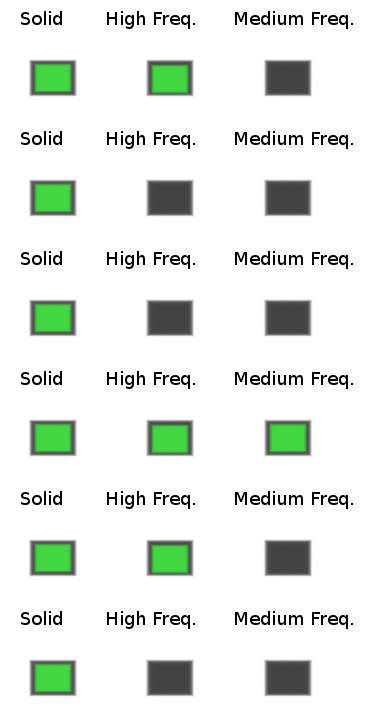
A; A solid WAN may indicate a lack of communication with OVO. the WAN and/or HAN indicator going off is very unusual. In the case of a fault on either of these networks, the correct flash rate should be “medium” (roughly once every 5 seconds).

Communications Hub indicator error sequences

It’s unlikely that you’ll ever actually see the “High” flash rate because this occurs when the Communications Hub is starting up and trying to find the networks.

An indicator that’s completely off means that this part of the code isn’t operational at all. Most customers have SKU1-type SMETS2 meters, in which case the Mesh indicator will be off. Ie there is no Mesh network for this model.


B; It isn’t unusual to have an IHD not displaying correct data but still have the HAN indicator showing the usual slow-flash. The indicator only shows that the Zigbee carrier frequency is alive. Frustratingly it doesn’t mean that any useful data is being transferred!

The same is true of the signal-strength bars on your Chameleon IHD. They will still be present even if the code receiving/interpreting data from the Comms Hub isn’t working. :confounded:


C; In similar fashion, just because the WAN indicator is in slow-flash mode doesn’t mean that OVO are actually receiving your data. Since you’re in the Telefonica territory, the WAN merely informs you that the carrier between you and the mast is alive.

The only way to tell if OVO is successfully receiving data from your site is to login to your online account and view your Usage statistics.


So there’s some initial feedback on what you’ve carefully described to us. And you might also want to read this topic where a few of us have recently been discussing IHD-related errors, and this topic is a great one for the ‘Waiting for current data’ issue.


How to confirm no communication from solid WAN 


If the WAN on your meter is solid, and you’ve confirmed no usage data on your online account, you can reach out to our Support Team to book an appointment to get it all fixed, free of charge.


OVO customer but not got a smart meter yet? - Book today!

Smart meter not communicating? Fill out this Online Form

Interested but not yet an OVO customer? - Check out our plans!

72 replies

Blastoise186
Super User
Super User
November 8, 2022

Just got my electricity bill. From the 1 to the 31st October it was 165 pounds with no 66 discount and 14 days to pay. 

Why has it not added my discount and why am I paying monthly when it was quarterly. Its really starting to affect my mental heath and my husband is furious and tells me not to politely to ignore it and not pay but then I’d end up with penalties. Husband is planning to go to CAB.

You should still pay for now anyway to get it cleared off the account. Any issues like the £66 not coming through can be fixed later. Paying off the bill now is more important.

Securing energy by zapping security bugs... For that is The Blastoise Way! Remember, I'm just like you - AI Powered Evil Geniuses aren't Staff!
Tim_OVO
OVO Staff
OVO Forum Legend
November 8, 2022

Hi @Scoobnut 


If you came from over and you were on quarterly billing with a quarterly Direct Debit, this should’ve changed over with you. Our Support team can check on this and the £66 energy bills support scheme payment. I suspect it’s been refunded to your bank account but this should show on the statement as money in and out: https://account.ovoenergy.com/billing-details

Carbon neutral - we need a community to get there! My green tech: Aclara SGM 1411-B smart meter, Chameleon IHD6
Newcomer
November 8, 2022

Hi, I found it had discounted the 66 it was on the next page.  Unfortunately I am paying monthly even though it was quarterly with SSE. Plan on ringing them today.

Newcomer
November 30, 2023

New smets 2 electric meter fitted nearly 3 weeks ago.  Engineer said it was not communicating with DCC.  In first week it appeared to work and smart meter readings were shown on the OVO app.  Then it stopped and only my manual readings appear once I take them.  The wan light flashes every 5 seconds occasionally so this means it is commutating?  Will OVO or DCC contact us if it does not start to work?  Will the engineer put another meter in as he suggested might be the outcome?  We are in the Highlands of Scotland.  Any thoughts?

Jeffus
Rank 20
Rank 20
November 30, 2023

Hi @carnbeejohn 

Sorry to hear that. I am just a customer like you.

The full commissioning of new and replacement smart meters can take 8 weeks so it is very unlikely your meter is completely commissioned yet. Some will be quicker. 

It is unfortunate this was not made clear at the installation. It is a common issue that this isn't made clear by the engineers.

During that time it is not unusual for meters to connect then disconnect.

There is more information here. 

https://www.ovoenergy.com/help/smart-meter-installation

Ovo will look to fix the issue if it doesn't work after 8 weeks.

After 8 weeks if it isn't working try this tool

https://smart-meter-help.ovoenergy.com/

Can you post a photo of your meter?

While you are waiting you could keep an eye on whether any of the 3rd party apps can see your meter over time. For example 

https://hugoenergyapp.co.uk/

Or check this tool

https://smartmetercheck.citizensadvice.org.uk/

I suspect neither will work yet.

There are a couple of places to keep an eye out for data on the ovo website as you may know

https://account.ovoenergy.com/usage

https://account.ovoenergy.com/meter-readings

Newcomer
November 30, 2023

Thanks so basically wait and see if it starts working 


Jeffus
Rank 20
Rank 20
November 30, 2023

Thanks so basically wait and see if it starts working 


Yep. Best wait the 8 weeks usually. You won't get much out of ovo until then even if there is an issue in the end.

Rank 5
November 30, 2023

mine didn’t work properly (was working with Shell) when I moved to OVO in April.  Have you checked you can see anything using a 3rd party app like loop or HUGO?  I couldn’t see all my data in Loop but NOTHING in the OVO app apart from a random 2 days in May!  It took until mid-august for it to get sorted

Newcomer
November 30, 2023

Going to give other apps a go and see if they show anything.  Will wait the 8 weeks to see if anything changes.  

Newcomer
April 27, 2024

Smart meter and IHD installed 26 hours ago. Meter Type ALCARA SGM1411-B.  IHD IHD3-PPMID-AAA TYPE1. IHD has been showing message Waiting for current data for last 26 hours. The meter SW WAN MESH HAN LIGHTS are all flashing together every 5 seconds. The IHD is within 3 feet of the meter with no obstructions. I have tried turning the IHD on and off. Leaving it off and then turning back on. Nothing works. In other properties the IHD has connected with the meter in minutes. any ideas as OVO are closed until monday.