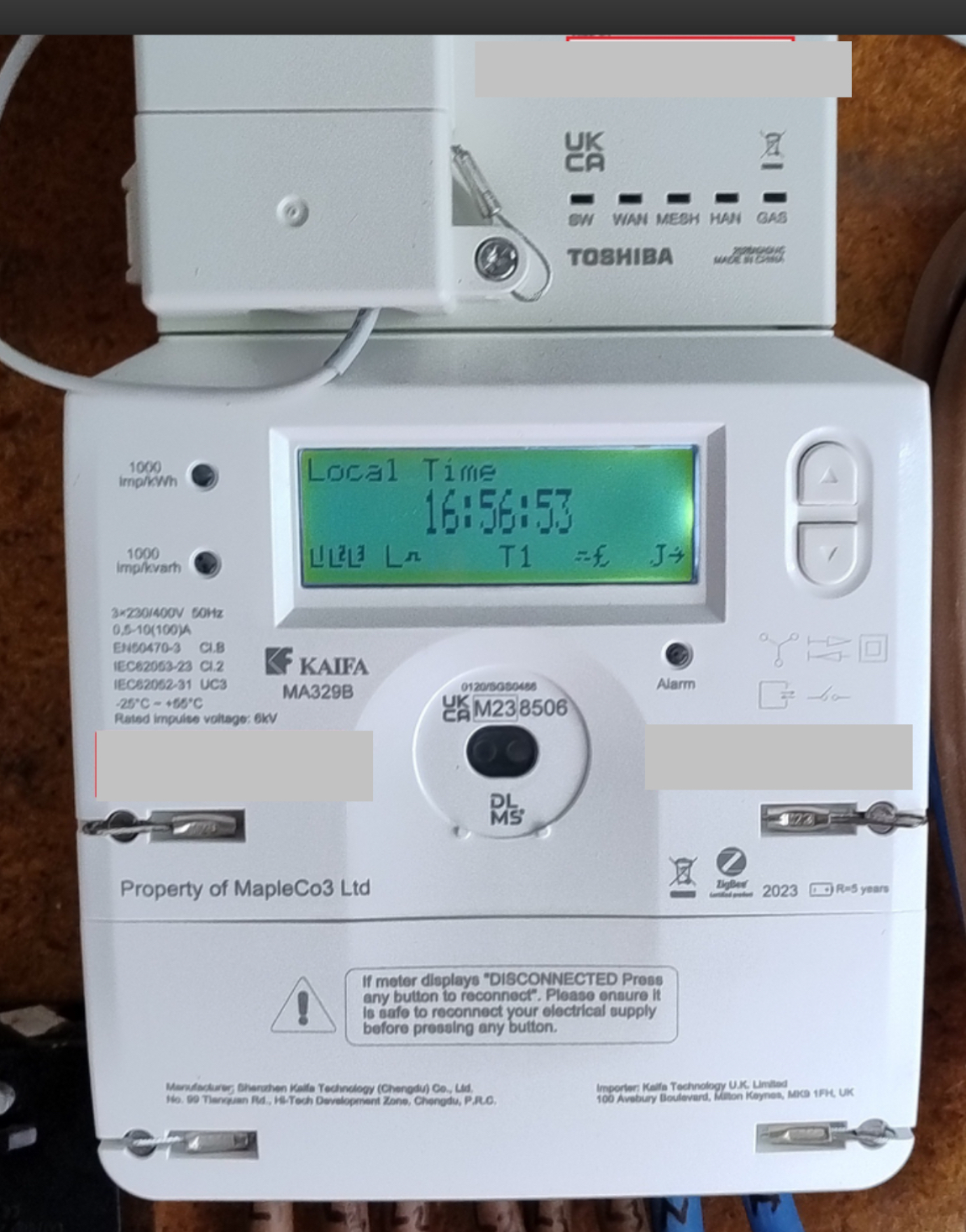
I managed to get some information from Kaifa about a different meter (MA120) which has a similar display/interface to the MA329B. I hope this description might be of use to others with this meter.
To add some information to the image posted by @BPLightlog. Let’s call the two user buttons on the rhs K1 (top ) and K2 (underneath). The meter can operate as a pre-payment meter, but I’ll ignore that aspect of the interface.
The display normally scrolls through a number of items with a 10 second delay between each item. The set of items is configurable by the supplier, but the default set is: Current Time, Current Date, +A value , -A value.
+A is the total accumulated number of units (kWh) used from the grid. If you have Economy 7 (dual rates), +A is the total of the peak and off-peak units used.
-A is the total accumulated number of units exported back to the grid (e.g. if you have solar equipment that can export excess solar).
Icons on the Display
Snipping a part of @BPLightlog’s image to explain the icons at the bottom of the display (from L to R):
L1, L2, L3: show the three phases are active. If you are exporting on one of those phases, the L for that phase will be blinking.
L: This is currently showing Low energy consumption. It could also be M or H for Medium or High consumption. I don’t know what the ranges are for those three bands of consumption.
The “hat” icon: This shows the state of the electricity supply. The version in the image above indicates the supply is on and normal. A version of this icon without the two vertical lines indicates either disconnected, or if flashing, ready to connect.
T1: This is indicating which tariff is in use (see later). The value could be T2 is you have dual rates.
The “hat” icon without the vertical lines before the £ sign: I don’t know what this represents.
£: Currency unit.
J: If on, the meter is connected to the network. If blinking, the meter is joining the network. If the J is replaced by a blinking S, the meter is searching for the network.
->: This can be pointing in a number of directions. Taking @BPLightlog’s reply to a related topic, the arrow is something to do with information about a vector parameter for the supply (active, reactive, ...), and I suspect is not of interest to the home user.
User Keys K1 and K2:
A short press is pressing the key for less than 2 seconds. A long press is greater than 2 seconds.
K1: Short press: 1st press - activate LCD backlight; 2nd press - change from Scroll mode to Menu mode. Each press after this will move the cursor up one line.
K1: Long press: In Menu mode, selects the item being pointed to by the cursor >. Return back to the previous level when cursor is on “Return” item in menu.
K2: Short press: 1st press - activate LCD backlight; 2nd press - change from Scroll mode to Menu mode. Each press after this will move the cursor down one line.
Taking Total Accumulated Energy Use Meter Readings from the Meter
These are the +A and -A readings discussed earlier and that appear during the automatic scroll through items. To read them from the meter:
When the CD backlight is on and items are scrolling, short press K1. This will enter the menu system and display a list of items.
With the cursor (>) next to item >General Display, long press K1 to enter the menu system associated with this item.
With the cursor next to item >Basic Data, long press K1 to enter this item.
The +A value is then displayed, i.e. the current accumulated energy imported from the grid (in kWh) since the meter was installed.
Short press K2 to move down to the -A value, i.e. the energy exported since the meter was installed.
There are other data items, but not relevant to this section.
When you wish to exit, long press K1 which will return you to >Basic Data. Scroll down using K2 until you get to the menu item >Return. Long press K1 will activate this item (i.e. return you to the previous level, which was the auto scrolling). Alternatively, the menu system will eventually time out and return to scroll mode.
Taking Economy 7 Energy Use Meter Readings from the Meter
When the CD backlight is on and items are scrolling, short press K1. This will enter the menu system and display a list of items.
With the cursor (>) next to item >General Display, long press K1 to enter the menu system associated with this item.
Press K2 to move the cursor down to item >Tariff Matrix.
With the cursor next to item >Tariff Matrix, long press K1 to enter this item.
With the cursor next to item >TOU Register long press K1. You will then see a list of the TOU (Time of Use) registers for each rate. Economy 7 will just use T1 and T2. In my system T01 is Peak usage, T02 is Off-peak usage. The readings show the total accumulated energy use (kWh) for that rate.
When you wish to exit, long press K1 which will return you to >Tariff Matrix. Scroll down using K2 until you get to the menu item >Return. Long press K1 will activate this item and return you to >Basic Data. Scroll down using K2 until you get to the menu item >Return. Long press K1 will activate this item (i.e. return you to the previous level, which was the auto scrolling). Alternatively, the menu system will eventually time out and return to scroll mode.
The 329B is a 3 phase meter so not a common install.
This is really helpful!! Thanks for sharing it with us. Would you mind if I created a full article from it and we can share it so that it’s easier to find? Any more information you have you could either post in here or drop me a message and we can build on it.
@Lukepeniket_OVO tagging you also as this could be really helpful for you and the engineers.
Renewable energy jokes never get old.
A
Anonymous
Oct 14, 2024 3:49 PM UTC
Hi @Chris_OVO :
Sure, take whatever you need from the post, if that’s the best way to make it available for others. I haven’t got any more information that I can check for correctness (e.g. using the meter in prepayment mode), but post any queries here.
I have just had a KAIFA SMART Meter Type KA329B installed to replace my old RTS Metet and Time Switch.
Engineer said he had no user manuals and could not tell me who would provide them or where I could get them.
He switched the power on and told me it would work in exactly the same way as my old meter
I.e. My dual tariffs remained the same and that in about an hour from switching ON, I would be able to se the meter readings and my energy usage data displayed.
It is now over 24 hours and so far I can only see the display changing with following information only
Local Date
Local Time
+A Value 000005KWh
-A Value 000000KWh
Towards the bottom of screen there is ‘T1’. With no no other information provided, I guess it represents ‘Tariff-1’
I cannot see any actual meter reading values.
Also the remote display terminal only displays one usage value whilst I should be seeing two values.
Has anyone got any information on workings of this model of SMART meter on a domestic 3 Phase Supply and Economy 7 Tariffs?
I did raise my concerns with OVO in writing well in advance of meter change, but their answers have been conflicting from a fuzzy cloud. In short deflecting the question.
I can see @BPLightlog has linked you to a handy article - I’m wondering whether you have the MA329B model, and maybe the ‘K’ you’ve mentioned is a typo?
Which model of In Home Display do you have? It might be that it’ll only show you a combined electricity usage figure, rather than peak and off peak.
My reference is for MA329B and my typo error is acknowledged. Thank you for picking up.
Now taking up the question of Model Number for Home display, all I can barely read in small greyed out bit is Chameleon Technology.
OVO engineer switched ON the supply and told me I should see everything in about an hour. That is not what I call demonstrating OVO’s new installed electrical items in customer’s premises.
As a retired electrical engineer specially trained and qualified for electrical machinery safety and ‘CE’ marking, I note OVO’s SMART Meter is certified under ‘UKCA - M238506’.
For those not familiar with certification process and markings, UKCA is a parallel version of certification of Electrical and Electronic products/machinery in U.K. (following identical requirements as CE£. For anyone who knows and understand requirements of meeting certification requirements, a key element of ‘Technical Documentation’ requires manufacturer providing a full Installation and User Manuals in relevant language for the country.
Against this, OVO engineer left nothing, said next to minimum and left.
Reality: I cannot access or see anything except the four screen message sequence.
To say I am annoyed and frustrated with OVO would be an under statement. Prior to this installation taking place, I have tried everything possible to educate OVO on what my installation was, what tariffs I had and more importantly my ongoing preps for the immediate future to for converting the whole house to be reliant on Electrical Energy usage.
Now what I am left with is not workable or acceptable. So, having served OVO more than one pre-action conduct notices I am now spending my time and energy to kick the OVO donkey and make a county court claim. A letter to this effect will be served in the next few days (experience tells me it is futile mistake to raise serious issues with OVO because there is no ownership for any problems.
Ben, I am not sure if you are a real person or one of those chat bots. If indeed, you are a real person then please do the necessary and make available required manuals. I am sure there are other OVO customers stuck in a similar situation. And I believe they may not be aware of or know what the regulations state
It is concerning that OVO appears to be using AI CHATBOT in this forum to create an image that someone at OVO is directly involved in an attempt to resolve any issue.
This conclusion is drawn from the fact that in reply to my query, ‘Ben’ the OVO chatbot just coupled my message to other chats related to my concerns. But, when confronted to provide clarity of information required, it got stuck.
It is good to know that people are sharing their concerns and experiences, but please be mindful that cumulatively someone may come to some harm because forum comments are treated as real answers.
in so far as the not so SMART METERS are concerned, law requires a documented user manuals must be provided. This is something that this forum is unable to provide.
Just be aware that the parameters and workings of your SMART METER are subject to alterations by OVO and historically they are terrible in customer communication (speaking from experiences)
@SP27 just to put your mind at rest - Ben is a real person not a chatbot !
Blastoise said he will do some digging for you regarding your meter. This forum is a “Community” of interested people (and not all of us are OVO customers). OVO staff have _OVO at the end of their username.
As it’s a fabulously hot weekend I imagine lots of people are out enjoying (or avoiding) the sun.