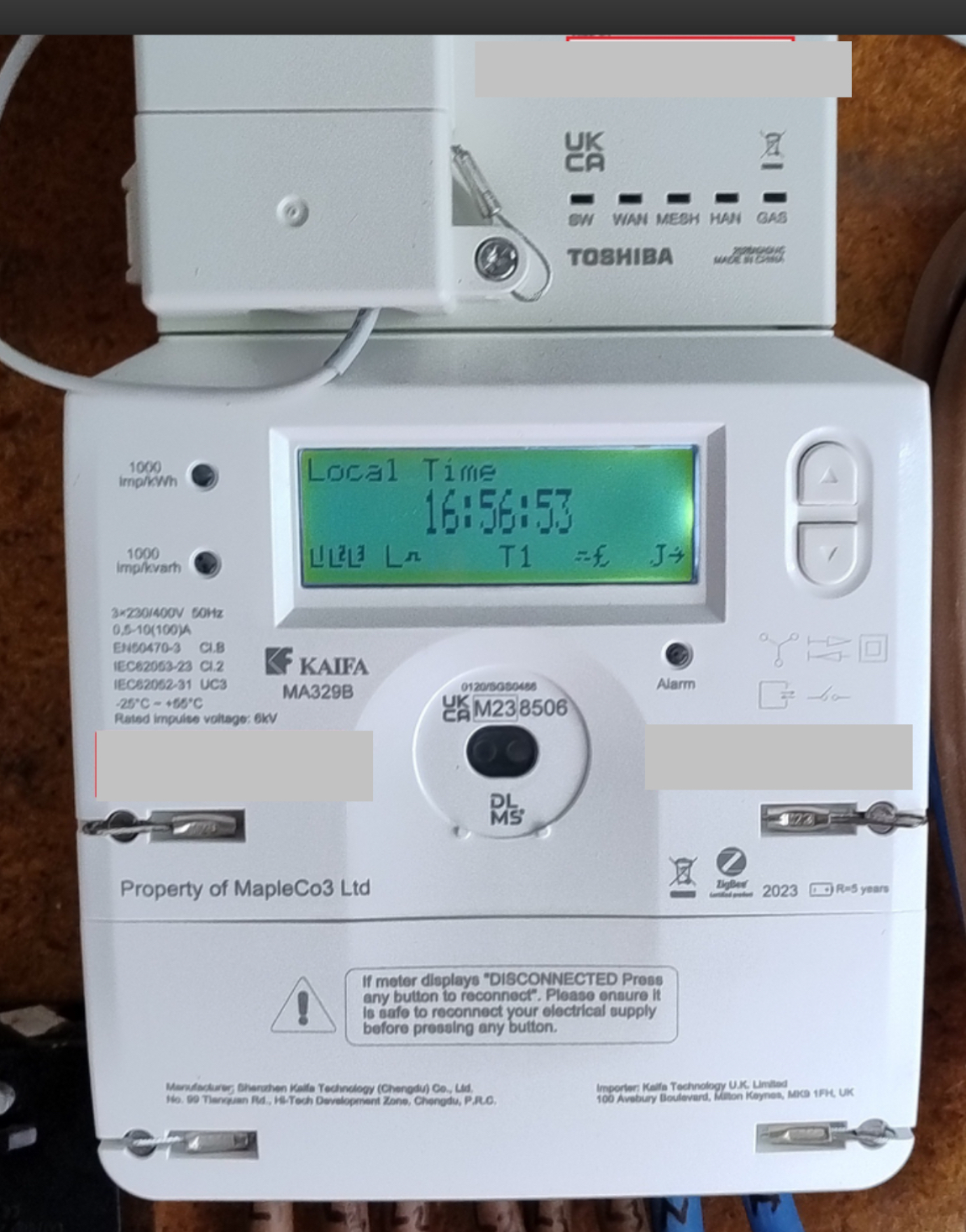
I managed to get some information from Kaifa about a different meter (MA120) which has a similar display/interface to the MA329B. I hope this description might be of use to others with this meter.
To add some information to the image posted by @BPLightlog. Let’s call the two user buttons on the rhs K1 (top ) and K2 (underneath). The meter can operate as a pre-payment meter, but I’ll ignore that aspect of the interface.
The display normally scrolls through a number of items with a 10 second delay between each item. The set of items is configurable by the supplier, but the default set is: Current Time, Current Date, +A value , -A value.
+A is the total accumulated number of units (kWh) used from the grid. If you have Economy 7 (dual rates), +A is the total of the peak and off-peak units used.
-A is the total accumulated number of units exported back to the grid (e.g. if you have solar equipment that can export excess solar).
Icons on the Display
Snipping a part of @BPLightlog’s image to explain the icons at the bottom of the display (from L to R):
L1, L2, L3: show the three phases are active. If you are exporting on one of those phases, the L for that phase will be blinking.
L: This is currently showing Low energy consumption. It could also be M or H for Medium or High consumption. I don’t know what the ranges are for those three bands of consumption.
The “hat” icon: This shows the state of the electricity supply. The version in the image above indicates the supply is on and normal. A version of this icon without the two vertical lines indicates either disconnected, or if flashing, ready to connect.
T1: This is indicating which tariff is in use (see later). The value could be T2 is you have dual rates.
The “hat” icon without the vertical lines before the £ sign: I don’t know what this represents.
£: Currency unit.
J: If on, the meter is connected to the network. If blinking, the meter is joining the network. If the J is replaced by a blinking S, the meter is searching for the network.
->: This can be pointing in a number of directions. Taking @BPLightlog’s reply to a related topic, the arrow is something to do with information about a vector parameter for the supply (active, reactive, ...), and I suspect is not of interest to the home user.
User Keys K1 and K2:
A short press is pressing the key for less than 2 seconds. A long press is greater than 2 seconds.
K1: Short press: 1st press - activate LCD backlight; 2nd press - change from Scroll mode to Menu mode. Each press after this will move the cursor up one line.
K1: Long press: In Menu mode, selects the item being pointed to by the cursor >. Return back to the previous level when cursor is on “Return” item in menu.
K2: Short press: 1st press - activate LCD backlight; 2nd press - change from Scroll mode to Menu mode. Each press after this will move the cursor down one line.
Taking Total Accumulated Energy Use Meter Readings from the Meter
These are the +A and -A readings discussed earlier and that appear during the automatic scroll through items. To read them from the meter:
When the CD backlight is on and items are scrolling, short press K1. This will enter the menu system and display a list of items.
With the cursor (>) next to item >General Display, long press K1 to enter the menu system associated with this item.
With the cursor next to item >Basic Data, long press K1 to enter this item.
The +A value is then displayed, i.e. the current accumulated energy imported from the grid (in kWh) since the meter was installed.
Short press K2 to move down to the -A value, i.e. the energy exported since the meter was installed.
There are other data items, but not relevant to this section.
When you wish to exit, long press K1 which will return you to >Basic Data. Scroll down using K2 until you get to the menu item >Return. Long press K1 will activate this item (i.e. return you to the previous level, which was the auto scrolling). Alternatively, the menu system will eventually time out and return to scroll mode.
Taking Economy 7 Energy Use Meter Readings from the Meter
When the CD backlight is on and items are scrolling, short press K1. This will enter the menu system and display a list of items.
With the cursor (>) next to item >General Display, long press K1 to enter the menu system associated with this item.
Press K2 to move the cursor down to item >Tariff Matrix.
With the cursor next to item >Tariff Matrix, long press K1 to enter this item.
With the cursor next to item >TOU Register long press K1. You will then see a list of the TOU (Time of Use) registers for each rate. Economy 7 will just use T1 and T2. In my system T01 is Peak usage, T02 is Off-peak usage. The readings show the total accumulated energy use (kWh) for that rate.
When you wish to exit, long press K1 which will return you to >Tariff Matrix. Scroll down using K2 until you get to the menu item >Return. Long press K1 will activate this item and return you to >Basic Data. Scroll down using K2 until you get to the menu item >Return. Long press K1 will activate this item (i.e. return you to the previous level, which was the auto scrolling). Alternatively, the menu system will eventually time out and return to scroll mode.
The 329B is a 3 phase meter so not a common install.
It is concerning that OVO appears to be using AI CHATBOT in this forum to create an image that someone at OVO is directly involved in an attempt to resolve any issue.
This conclusion is drawn from the fact that in reply to my query, ‘Ben’ the OVO chatbot …….
I can assure you that Ben is not bot; in fact is is a very helpful human.
In his previous role in complaints resolution he helped me personally with a seemingly intractable account problem that I had last year.
It’s a long story but basically following a meter serial number mix up on the National Database my account was screwed up and no one in support could unscrew it. it was Ben who took ownership of the problem and took the time and trouble to rebuild my account going back a number of years so that it would once again function as it should.
Just a further point to consider here - An AI chatbot would have replied to you almost instantly with some generic comment or other scraped from the web, that is what they do. It’s us humans that go off doing other things and so not replying straight away.
Of course you may now jump to the conclusion that I too am a bot, be careful because that way madness lies.
I hope you are what you say you are. Proof lies in whether ‘BEN’ comes up with real answers to my questions.
It has to be remembered that an old style meter presented an average consumer (not an electrical or electronic engineer) with a numeric number value on which his bills were calculated.
SMART METER brings in a whole lot of other information presented (hopefully) in a simplified and meaningful way to a consumer.
But in the wrong hands and good intentions and progress become NOT SO SMART and every Joe blog is left to unknowingly left to suffer.
In short, indeed if this BEN is a real person and has the guts, then he should reply to at least the following.
1- Why did the engineer install and leave on the huff to keep another appointment without demonstrating and proving newly installed meter. In my case his only statement to me was, everything is up and running as normal and that I would see all real time values of all my meter readings in about an hour.
2- BEN, where is the instruction manuals for SMART METET and Remote Display? This is not for community discussion topic, it is OVO’s legal obligation.
If BEN does not answer now, I hope he will wait and watch what happens next and he, and any other OVO member will have an obligatory opportunity to answer in presence of a knowledgeable expert in the field of consumer contract disputes.
Perhaps some words of advice from myself - one of the most experienced volunteers here - might be of benefit.
I can vouch for Ben and confirm he is indeed, human. I’ve verified him several times and he’s satisfied every anti-bot check I’ve thrown his way.
Please remember that while Ben is a Forum Moderator here, he doesn’t have the ability to answer everything himself. He’s not around 24/7/365 and can’t just answer you instantly like a bot can. His role is mostly about helping to keep the show going, so he can’t always watch a single thread - he needs to keep watch over a lot of threads. It’s also true that other users may be more suited to answer a particular question because they have more experience. I have a ton of that, but even I don’t know all the answers to absolutely everything!
The OVO Forum is primarily patrolled by Forum Volunteers who are the ones most likely to respond to questions. You’ve already met four of us and we’re just as capable of answering questions as the Forum Moderators. In actual fact, we can often answer faster than the moderators because there’s more of us than there are moderators. You simply need to post on here and we’ll stop by when we get chance.
As for your questions…
Your question about the engineer leaving is, unfortunately, something that appears to be an account-specific question. If I’m being honest with you, there’s barely anything on the meter itself that’s worthy of being demonstrated to you unless you’re on PAYG - the meter itself is basically intended to just sit there quietly doing its thing undisturbed for its entire service life, that’s the whole idea. As for the IHD? Gonna be honest… They’re fairly simple devices and it doesn’t usually take long for most people to figure out the basics. For anything else, you can always grab a copy of the user manual from the OVO website - see my links below and you can download a copy for free to keep on your computer or print off, whichever you prefer.
Either way, a Smart Meter is designed so that once it’s fully operational, the taking and submission of meter readings is able to be 100% automated so that you don’t even have to lift a finger to get accurate bills. Does it work 100% reliably for 100% of customers? Of course it doesn’t - that’s the same as just about anything. But you can just grab a manual reading anyway from the meter display if that happened.
It’s actually a piece of cake to find instructions from OVO for a Chameleon IHD for all three actively supported models - the IHD3, IHD6 and IHD7. I found this very helpful guide by Googling it - the answer came back in a few seconds: https://www.ovoenergy.com/guides/chameleon-in-home-display-guide
We cannot provide the full technical manual for Kaifa meters. It is quite literally not in my archives because Kaifa doesn’t even want members of the public (such as myself!) getting hold of it and have shown themselves to be extremely protective of their intellectual property - and they consider their user manuals/technical manuals to be part of that locked down IP stuff. None of us here on the Forum can get a copy, so by extension we’re unable to provide it to you.
As the customer of an energy supplier, you do not have the legal rights to demand the technical manual of the meter either. While you are correct that such technical manuals must exist, the only customer/client who actually needs them is the energy supplier who fits them - they and they alone are the ones who such powerful documentation must be supplied to by law, almost no-one else qualifies under those rules.
I must advise you on something I’ve noticed however. Please bear in mind that you don’t have the right to demand answers out of any of us on the OVO Forum. We are unpaid volunteers (other than the Forum Moderators who are paid OVO Staff) and we help out in our own time because we want to and we have full discretion over which questions/threads we answer and which ones we don’t touch. Usually, the ones we don’t touch are more likely because we’re either still researching something or because we don’t have an answer handy.
However, we also may choose to not respond if we feel uncomfortable with the direction a thread is taking. Please try to be respectful to us - we’re trying to help you - otherwise we might feel that we can’t go any further. Mentioning legal action/legal threats is one of those things that often makes us uncomfortable and more often than not leads us to pull back as we can’t help you at all once you start that process.
Securing energy by zapping security bugs... For that is The Blastoise Way! Remember, I'm just like you - AI Powered Evil Geniuses aren't Staff!
I’m glad to see some of our community members have already stopped by to assure you that @Ben_OVO is not an AI bot, he is in fact a real person, part of the moderation team on the Forum. You can find out more below on what the team does:
1- Why did the engineer install and leave on the huff to keep another appointment without demonstrating and proving newly installed meter. In my case his only statement to me was, everything is up and running as normal and that I would see all real time values of all my meter readings in about an hour.
2- BEN, where is the instruction manuals for SMART METET and Remote Display? This is not for community discussion topic, it is OVO’s legal obligation.
If BEN does not answer now, I hope he will wait and watch what happens next and he, and any other OVO member will have an obligatory opportunity to answer in presence of a knowledgeable expert in the field of consumer contract disputes.
As you’ve had a smart meter installed, there’s not much you’ll actually need to do with the meter, it sends readings itself so you don’t have to.
The engineers may not always have a physical copy of manufacturer guides at all times but our Support Team can always send one out by email for both the smart meter and In-Home Display (IHDs) as they have access to the information about the meter and In-Home Display you’ve been provided.
We do have guides here on the Forum for smart meters and IHDs which you can find in our Library here, but without knowing the model we can’t know for certain which guide to present to you specifically for the IHD.
Instructions on how to read your Kaifa meter can be found on the webpage, we also have a helpful topic below but as I recommended, I’d get in touch with the Support Team so they can email those guides out to you:
Sorry to say and I beg to differ. To me it looks like this forum is ill equipped to answer my queries.
My position remains unchanged and my next steps are now being implemented.
I hope those who rely upon this forum will be mindful that answers and solutions suggested may leave you short changed.
If you wish to take that route, that’s your choice. However, as we’ve advised, doing so means you’ll be unable to get any further assistance from us here on the Forum for anything related to this matter. We all take a pretty hard stance that we won’t let ourselves get tangled up in legal cases, so if that’s what you’ve chosen, then I’m afraid you’re on your own from here.
I have concerns that you’re not going to get anywhere via the legal routes other than just wasting a ton of money, so I’d encourage you to reconsider. That is as much as I can say...
Securing energy by zapping security bugs... For that is The Blastoise Way! Remember, I'm just like you - AI Powered Evil Geniuses aren't Staff!
It appears there is lack of knowledge and understanding to differentiate between a TCF (which may or may not contain manufacturer IP) that is not required for customer disclosure AGAINST ‘Product Instruction & Installation Manual’ which is included in TCF as a record of what information is provided to end user.
Manufacturer or the importer is responsible for provision of this document
When a supplier or installer withholds this user information it becomes liable.
if this is beyond the basic understanding, the I could carry on and give a full lecture!
‘Under the UKCA marking scheme, manufacturers have a legal obligation to provide operating instructions for their products. These instructions must be clear, legible, and easily understandable in English. The instructions should also be specific to the product and cover necessary safety information’.
For anyone who does not understand UKCA or CE marking legal requirements, please seek some advice from proper sources other than OVO.
From formal training as Machinery Safety Expert related to certification of electrical products and over 45 years of working with standards and regulations, information and statements paraded on this OVO forum at best are misguided and misrepresentation of facts.
if forums purpose is to defend OVO, then forums purposev is a lost cause
OVO is not the manufacturer nor importer of any Smart Meter. While the Gas Act 1986/Electricity Act 1989 makes it so the Meter is property of the Supplier, these days the meters are almost always “owned” by a Meter Asset Provider who basically gives OVO long-term loans of said Meters. It’s a… Complex relationship.
The technical manuals for Smart Meters often includes a ton of stuff which should not be public knowledge. The reason is simple - it’s a safety risk if this stuff were to just be published raw because it makes tampering or unauthorised install/maintenance “too easy”. The sole reason we’re able to get the ones for Aclara is someone leaked them onto the internet ages ago (I do not know the original source of the leak) and we got hold of that one as a result. No other manufacturer has made that possible.
I can tell you now however. The Aclara technical manual does NOT include anything that can simply be transferred raw into a customer friendly guide - OVO had to create one from scratch. There is no reason why you need to know how to install such equipment. In actual fact, you shouldn’t touch it at all outside of the buttons and display it offers you access to.
Unless you’re willing to be a bit more reasonable with how you handle our answers, I don’t think there’s much more for you to discuss here. Please consider looking elsewhere for the answers you seek.
Securing energy by zapping security bugs... For that is The Blastoise Way! Remember, I'm just like you - AI Powered Evil Geniuses aren't Staff!
No one is asking for a technical manual here. Please go back to the start of this thread.
My query relates to two simple questions:
1- Engineer left with little or no information to prove the meter was safely installed, it was working correctly to my contracted tariffs and leave a copy of ‘Operating Manual’.
YES , I believe you are 100% right to be on the wrong track.
So kindly explain to me where is that Operating Manual which OVO has created and who are you to decide what and how a customer uses that information?
If there is such a manual then I am sure there will be less need for people to rely on third party opinions like yours.
To do the right thing point me in the direction where I can find the Operating Manual, not the TCF and not the Technical Manual.
If you or any other surrogates of ‘Ben’ do not have that answer, then please just say you do not have it. STOP GOING AROUND IN CIRCLES
You have provided no proof or evidence that the install was not done to spec. While we do have the ability to chat with an engineer ourselves, we are not prepared to do so in your case due to the way you have acted towards us. All you need to do is look around the Forum and you’ll find the info that is available - we’ve already linked to it at least once.
Every part of the operating manual that you can be given access to, has either already been provided to you, or we’ve given you options that will allow it to be sent out to you. You appear to have refused to engage with any of those offers.
We are not prepared to answer any further questions from you as a result of your behaviour towards us. However, you can still review all the threads on the OVO Forum, or check out resources such as https://smartme.co.uk for advice, or just contact the owner of that site directly. You can also still post on the OVO Forum if you wish, but we make no promises that we’ll answer your questions in the future.