Rank 1
January 14, 2020
Solved

How do I read rate 1 & 2 on my Landis+Gyr (L&G) E470 series 3 S2 electric smart meter?

  • January 14, 2020
  • 15 replies
  • 24159 views

How do I read rate 1 & 2 on my E470 series 3 smet s2 electric meter as I can only find rate 1

Best answer by Amy_OVO

Updated on 17/04/26 by Abby_OVO


Great question to ask about how to take a reading from your Landis and Gyr E470 smart meter. These meters are pretty confusing as there’s a few different types with the same model name which may be SMETS1 or SMETS2  (more info on this great user-guide).


In general the method for taking peak and off peak (day / night) readings for these meters is the same, even though the buttons involved may be spaced slightly differently:


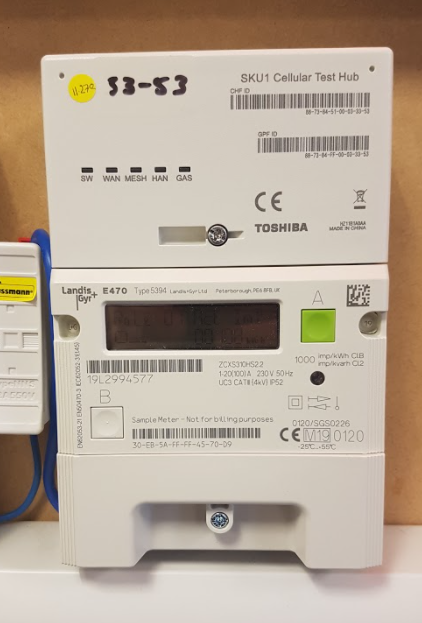
Press and hold down the ‘B’ button for roughly 5 - 10 seconds  - then tap the ‘A’ button. This will toggle between the ‘R01’ reading and the ‘R02’ reading as demonstrated in this handy video.


If your square buttons are spaced out in diagonally opposite corners like this:


And this one’s type 5394


It may look slightly different but the process is the same, but you can check out this video here, also.


We’ve also got a similar guide on reading these meters over here.

15 replies

Rank 2
October 3, 2025

Hi All,


For those who tried to help me.

I appears an incorrect meter was fitted!!!!!!!!!!

A new meter is to be fitted next week...

Ben_OVO
Community Manager
Community Manager
October 6, 2025

@ypr52 that’s a shame to hear that the wrong meter was fitted, but at least now you’ve got a clear answer as to what was going wrong.


We’d appreciate it if you could keep us updated as to how the appointment goes, and whether the problem is resolved afterwards. Bear in mind, once a new meter is installed, it can take up to six weeks for the new meter details to be updated on our systems, so you may not see the new meter and readings updated on your account and bills for a little wile. Don’t panic, this is normal process, and everything gets backdated accordingly. 


When the new meter is fitted you should hopefully be able to see two readings on it, and everything will then be sorted. The engineer will need to take two opening reads from the meter, so they should be able to let you know that its set up to provide two reads during the appointment.

Powered by the Sun
Rank 2
October 8, 2025

A new meter was fitted yesterday. I understand that there may have been some issues with setting up the previous meter, however, it all works now and I can read the two different rates. Success!

Ben_OVO
Community Manager
Community Manager
October 9, 2025

@ypr52 amazing news 🎉.


Just to let you know, it may take up to six weeks for the new meter details to be updated on your account so, if you don’t see the correct meter details and reads on your online account or app for a while don’t panic. 


When meters are changed, the details need to be passed to and from the wider Industry, and the job reports need to be checked etc. For this reason it’s normal to see a four to six week delay in new meter details being added to an account. That said, its often a lot quicker than that. If it ends up being longer than six weeks from the appointment date (unlikely) for the meter details to be updated on your online account, please contact our Support Team who’ll look into this. We also won’t bill your account until the new meter details are updated. You can find out more here:


I hope this helps!


Powered by the Sun
Rank 2
October 9, 2025

Many thanks for your advice.