Rank 2
November 3, 2025
Solved

aclara sgm 1422-b smart meter

  • November 3, 2025
  • 43 replies
  • 620 views

I manuaaly topped up my smart meter and I saw the message saying it was accepted, but when it returned to the main menu, it didn’t show my current balance at all. Did I navigate back to the wrong screen?

TIA

Best answer by Firedog

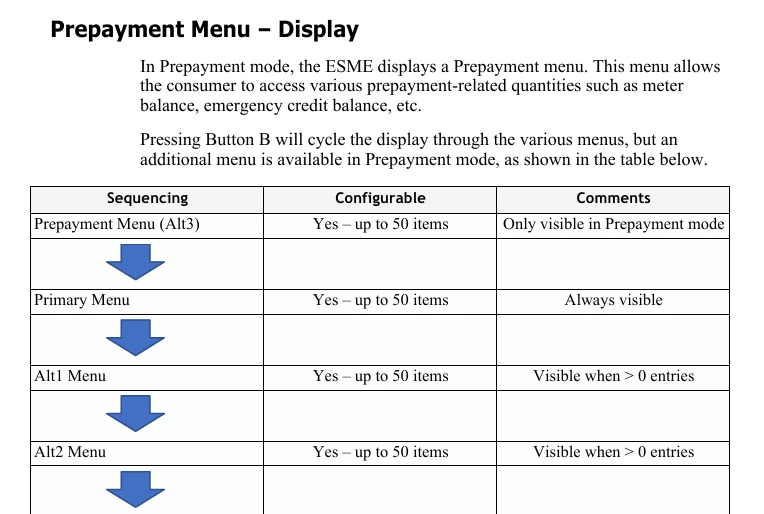
The display menus on these Aclara meters (SGM-1400 series) are supplier-configurable, so it’s not possible to say just how your menus are laid out. The user manual gives some idea, though. These are the menus revealed by repeated presses of button ‘B’:


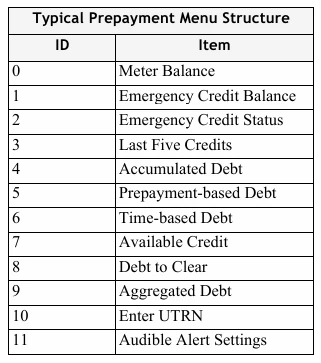
You’ll see that the first is Prepayment. When that shows, pressing button ‘A’ should display what you’re looking for. This is a typical prepayment menu:


It would be good to hear whether this helps.


PS ‘ESME’ is Electricity Smart Metering Equipment, technical jargon for ‘meter’.

43 replies

Blastoise186
Super User
Super User
November 4, 2025

IIRC you can hold the button to go back up a level - usually B, but it might be A

Securing energy by zapping security bugs... For that is The Blastoise Way! Remember, I'm just like you - AI Powered Evil Geniuses aren't Staff!
Hajni10Author
Rank 2
November 4, 2025

If I’m pressing the B button: 

Total Act Import kwh -2

Total act export kwh -2

local date

R1BL1 kwh

Engineering menu

Scottish Power

Meter signal strength

Blastoise186
Super User
Super User
November 4, 2025

Makes me feel as if SP has messed with configs...

Securing energy by zapping security bugs... For that is The Blastoise Way! Remember, I'm just like you - AI Powered Evil Geniuses aren't Staff!
BPLightlog
Super User
Super User
November 4, 2025

“Continue to press B until you see the start of the menu sequence you want.” - This was my first thought, however, as clueless old cow, how will I know which is the start of my original menu sequence?  

When I start pressing the B button, as its cycles through the menu items, I don’t see any exit option that would take me back to the original menu. 

There is no exit option - it just moves to the start of the next menu.

When you’ve pressed button B, pressing button A takes you through options in that menu sequence . If your required item doesn’t show, press button B again then press button A repeatedly to read through its options 


Bring me Sunshine ~ E&E {Solar PV, Battery Storage, Hybrid EV, ASHP and Home Assistant automation}
Hajni10Author
Rank 2
November 4, 2025

Blastoise186 - Thank you so much for your help and support.  

While I’m thinking and trying not to make things worse (with brainless button pushing), I Also wrote an email to the Aclara support team. There’s nothing to lose.


Hajni10Author
Rank 2
November 4, 2025

BPLightlog : What should I do? 

TIA

BPLightlog
Super User
Super User
November 4, 2025

BPLightlog : What should I do? 

TIA

If you go back to the list Firedog showed, button B switches to a certain menu. At this point pressing button A repeatedly will show the options in that specific menu.

If the reading/item you want isn’t there, press button B and then press button A repeatedly to see its options. 
Continue until you find your item

Note: if you see a menu regarding a PIN or Engineering menu, just move on to the next menu - do not press button A in that situation 

Bring me Sunshine ~ E&E {Solar PV, Battery Storage, Hybrid EV, ASHP and Home Assistant automation}
Firedog
Super User
Super User
November 4, 2025

While I’m thinking and trying not to make things worse (with brainless button pushing),
  

You can’t really do any harm unless you press and hold a button if it’s indicated that this will present an option to change something. If you get stuck somewhere, just wait a few moments. The display will eventually revert to its default state, so you can start hunting again.
  

Noel | I have no official status; I'm just a volunteer who comes here to help other customers. My gear: Aclara SGM 1416-B Electricity-only E7 meter; Chameleon IHD3-PPMID-AAA | It may look as if I know what I’m talking about, but don’t let that fool you. |
Hajni10Author
Rank 2
November 4, 2025

The SP customer service is the most useless in the entire world.

Hajni10Author
Rank 2
November 4, 2025

Received message from the Aclara company (promptly and accurate) “There is a chance that when you navigated away, you activated by accident the Privacy Pin (Privacy Pin Enabled). If this is the case, the prepayment menu is no longer available for you and won’t be able to find it. I’m a bit worried that this might be the case because the meter is set up to go to the main display after 30 sec, if you don’t press any buttons. I’m not sure if this is happening for your meter. If you try to navigate through alternating buttons B and A and you still cannot find the meter balance, then I’m afraid that you need to contact SP in order to resolve the issue for you.”