Solved

aclara sgm 1422-b smart meter

  • November 3, 2025
  • 43 replies
  • 446 views

Show first post

43 replies

  • Author
  • Rank 2
  • November 4, 2025

BPLightlog : What should I do? 

TIA


BPLightlog
Super User
Forum|alt.badge.img+9
  • Super User
  • November 4, 2025

BPLightlog : What should I do? 

TIA

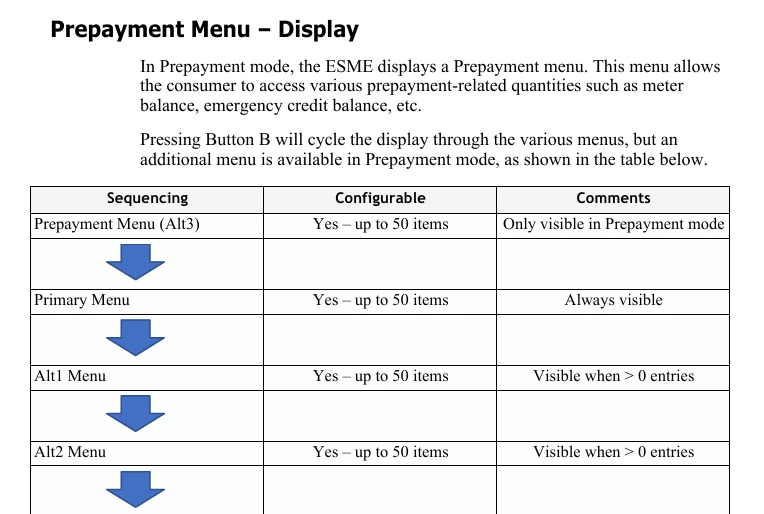
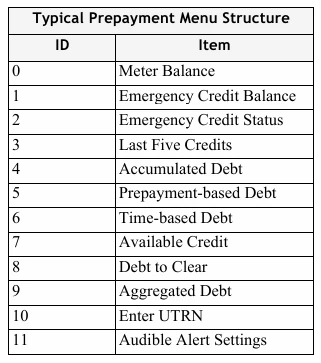
If you go back to the list Firedog showed, button B switches to a certain menu. At this point pressing button A repeatedly will show the options in that specific menu.

If the reading/item you want isn’t there, press button B and then press button A repeatedly to see its options. 
Continue until you find your item

Note: if you see a menu regarding a PIN or Engineering menu, just move on to the next menu - do not press button A in that situation 


Firedog
Super User
Forum|alt.badge.img+7
  • Super User
  • November 4, 2025

While I’m thinking and trying not to make things worse (with brainless button pushing),
  

You can’t really do any harm unless you press and hold a button if it’s indicated that this will present an option to change something. If you get stuck somewhere, just wait a few moments. The display will eventually revert to its default state, so you can start hunting again.


  • Author
  • Rank 2
  • November 4, 2025

The SP customer service is the most useless in the entire world.


  • Author
  • Rank 2
  • November 4, 2025

Received message from the Aclara company (promptly and accurate) “There is a chance that when you navigated away, you activated by accident the Privacy Pin (Privacy Pin Enabled). If this is the case, the prepayment menu is no longer available for you and won’t be able to find it. I’m a bit worried that this might be the case because the meter is set up to go to the main display after 30 sec, if you don’t press any buttons. I’m not sure if this is happening for your meter. If you try to navigate through alternating buttons B and A and you still cannot find the meter balance, then I’m afraid that you need to contact SP in order to resolve the issue for you.”


  • Author
  • Rank 2
  • November 4, 2025

Firedog: “You can’t really do any harm unless you press and hold a button if it’s indicated that this will present an option to change something. If you get stuck somewhere, just wait a few moments. The display will eventually revert to its default state, so you can start hunting again.” Maybe I already done….


Firedog
Super User
Forum|alt.badge.img+7
  • Super User
  • November 4, 2025

“You can’t really do any harm ...”
Maybe I already done….
 

I can’t imagine that you enabled the Privacy PIN by accident, but I suppose it’s possible. I’ve had my own SGM 1416B for more than two years and spent hours of ‘brainless button pushing’ going through all its menus, but I’ve never managed to do that. Sorry!

The default PIN is allegedly 0000 ...


Blastoise186
Super User
Forum|alt.badge.img+8
  • Super User
  • November 4, 2025

Aclara doesn’t have a default Privacy PIN IIRC - it gets wiped every time you disable the feature. My suspicion is that you (or someone else!) probably did enable it.

You can also have it disabled by the supplier with the SMETS Command Disable Privacy PIN if the Meter is communicating.


  • Author
  • Rank 2
  • November 4, 2025

Well yes, that's the main problem: The new Smart Meter was installed over a month ago, and 3 days later, the WAN connection stopped working, and with it, all of the 'smart' functionalities. Since then, I've been trying to get the company to fix it.

If there was a communication link, I wouldn't have had to top up manually, and then this whole menu incident wouldn't have happened either. Thanks SP!


Firedog
Super User
Forum|alt.badge.img+7
  • Super User
  • November 4, 2025

The new Smart Meter was installed over a month ago, and 3 days later, the WAN connection stopped working,
 

OK. That complicates things. On the communications hub (normally fitted to the top of the meter) there are two or more little LEDs, depending on what type it is. Which LEDs do you have? What are they doing - flashing green at five-second intervals, say?

I wonder what happens if you use this little (quite harmless) utility:  https://homebrew.n3rgy.com/. [n3rgy is part of SMS, one of the biggest smart meter providers in the country.] The utility just queries the DCC to return details of your communication equipment, in your case probably just the meter itself, the communications hub and the IHD. Enter your MPAN and tick the tiny confirmation box, then Check meter. (I’m hoping you only have one MPAN; some SP and EDF customers were equipped with twin-element meters (like the SGM 1422-B) to replace their RTS systems, which may have worked with two MPANs. It has usually taken more than a month to unravel the MPANs and remove the extraneous one from the national database after the installation of a smart meter.)

If you do get a report from the Homebrew utility, you can safely ignore any warnings about security certification - they don’t affect your system’s operation. Any errors or other warnings might be significant.

Whew!


  • Author
  • Rank 2
  • November 5, 2025

When the smart meter was installed, the app and the IHD (In-Home Display) worked for 3 days. Then they suddenly stopped. On the smart meter, only the SW and HAN LEDs are flashing.

I reported the problem, especially since manual meter top up is a bit difficult as the meter is above the bathroom door in a dark area, only accessible with a flimsy ladder. So, the central system also can't see or access the meter (lack of WAN signal?).

Ps: Which is the MPAN/MPRN

number on the meter?


  • Author
  • Rank 2
  • November 5, 2025

Side-note

(I know it’s not fair to compere my “smart” meter to the Voyager program, but I just can’t help thinking about   🚀  “Voyager 1 is a NASA spacecraft launched in 1977 that studied Jupiter and Saturn before becoming the first human-made object to enter interstellar space in 2012. Now over 15 billion miles from Earth, it continues to send back data from beyond the Sun's heliosphere. “ )


Firedog
Super User
Forum|alt.badge.img+7
  • Super User
  • November 5, 2025

Ps: Which is the MPAN/MPRN number on the meter?
 

It’s not on the meter. The MPAN (or MPRN for gas) is the identifier for the supply to the premises, allocated by the company that actually delivers energy (the Distribution Network Operator, DNO, for electricity, or Gas Transporter). The supply ID won’t normally change at all even though different meters may be installed.

You’ll find the full MPAN (sometimes called the ‘S’ panel for obvious reasons) on the bill, or with any luck somewhere in the online account. The bit usually asked for is the sequence of 13 digits in the bottom line. This is mine:
  

The MPAN is Personally Identifiable Information, so the ‘identifiable’ bit
is here replaced with nnnn for privacy.


For Homebrew and similar situations, I’d enter 110000nnnn018 (using the actual numbers, of course).


  • Author
  • Rank 2
  • November 5, 2025
Firedog: Thank you for the link. Result: “DCC response not available” (?)

Meanwhile: I wrote my second official complaint letter to the Scottish Power in which I also mentioned Ofgem. A few minutes later they replied and even called me. Unfortunately, this still won’t make an engineer come, but it’s strange how mentioning Ofgem works like a magic spell and suddenly gets them moving a little bit faster. Just a little bit... 


Firedog
Super User
Forum|alt.badge.img+7
  • Super User
  • November 5, 2025

Thank you for the link. Result: “DCC response not available” (?)
  

OK, so the meter (if you got the right MPAN) still hasn’t made contact with DCC. 
  

A few minutes later they replied and even called me. Unfortunately, this still won’t make an engineer come, 


Did you ask them about the MPAN? If this is a meter exchange consequent to the RTS shut-down, then you might have had two MPANs before the exchange. Your bills from the period will tell you. SP should edit the one (keeping its bottom line) to reflect the new arrangement and have the other removed from the national database. It won’t all come right until this is done - and it can from others’ experience take months.

The DCC database of communication equipment should be updated when the meter is commissioned, but that update clearly hasn’t happened yet.

If the HAN light is flashing at 5-second intervals, what does the IHD say? The HAN (Home Area Network) is quite independent of the WAN (Wide Area Network). If no (or the wrong) configuration data has been pushed to the meter, whatever the IHD shows may not make much sense until the WAN connection is sorted out. 


Firedog
Super User
Forum|alt.badge.img+7
  • Super User
  • November 5, 2025

Voyager 1 continues to send back data from beyond the Sun's heliosphere. 
 

Yes, I’m afraid SP’s tech staff aren’t quite in the NASA class. They seem to be learning as they go along with twin-element meters for domestic supplies, but they’ll probably get there one day (not beyond the heliosphere, though). 


  • Author
  • Rank 2
  • November 5, 2025

I didn’t ask them about the MPAN. 

Yes, I have two MPAN numbers on my last prepayment bill.

I assume the new meter was commissioned, since it worked for three days.

I turned off my IHD after I went through all the troubleshooting steps at lest 3 times (it stopped working after 3 days just like the app).

Side-note: It seems like smart meter communication issues have been around for a long time and are pretty common. What do you think is causing it? Cheap devices, not enough communication hubs/capacity issues, lack of engineers - or a mix of everything? What’s happening? 


Firedog
Super User
Forum|alt.badge.img+7
  • Super User
  • November 5, 2025

Yes, I have two MPAN numbers on my last prepayment bill.
  

OK. I take it you can’t find the current one on your online SP account because it hasn’t yet been updated and confirmed. Do you get the same Homebrew result trying both of the old ones?


It seems like smart meter communication issues have been around for a long time and are pretty common. What do you think is causing it? 


I’ve no idea. The Smart Meter Wide Area Network is an incredibly complex affair, complicated by its multiple layers of security to protect your precious data. Complex systems are often more prone to errors than simple ones, just because there are so many things that could go wrong. ‘Pretty common’ is perhaps not really accurate - there are after all some 37 million smart meters out there, so I’m sure most of them are communicating just as expected. No-one writes to the papers or posts on social media just to say ‘my meter’s working perfectly’, after all.

It’s true, though, that the transition from RTS to smart metering has not been as smooth as anyone could wish for all those affected. It’s a completely new ball game that’s replacing a system introduced more than 40 years ago - teething troubles have been and will continue to be unavoidable for some time to come. We can only hope that SP will get their act together before too long. 

My own guess would be that your case is waiting to reach the top of the pile in the in-tray of some poor overworked minion at Elexon, where the national database lives. Once it does that and he does his stuff, assuming he gets it right, SP can start working out how to get your meter communicating again.

Hang in there!