Rank 2
November 3, 2025
Solved

aclara sgm 1422-b smart meter

  • November 3, 2025
  • 43 replies
  • 620 views

I manuaaly topped up my smart meter and I saw the message saying it was accepted, but when it returned to the main menu, it didn’t show my current balance at all. Did I navigate back to the wrong screen?

TIA

Best answer by Firedog

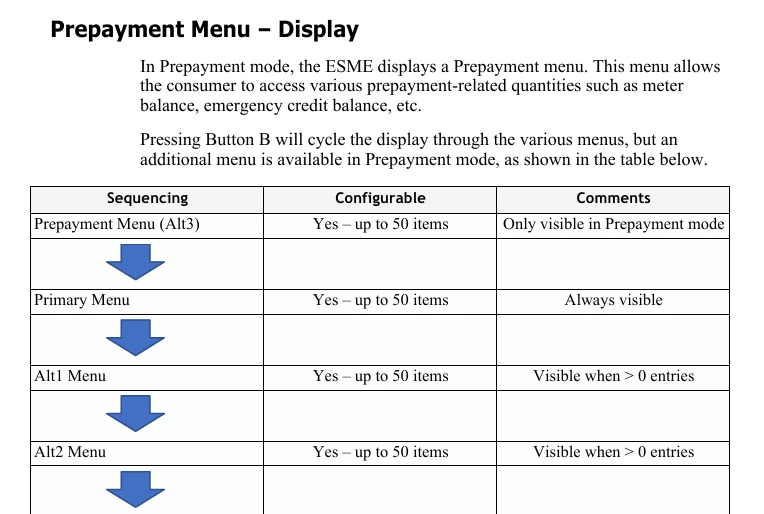
The display menus on these Aclara meters (SGM-1400 series) are supplier-configurable, so it’s not possible to say just how your menus are laid out. The user manual gives some idea, though. These are the menus revealed by repeated presses of button ‘B’:


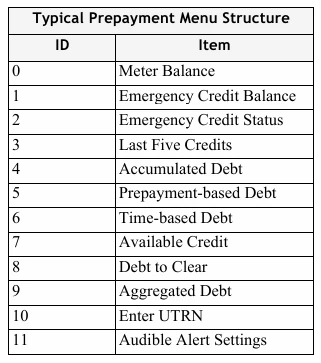
You’ll see that the first is Prepayment. When that shows, pressing button ‘A’ should display what you’re looking for. This is a typical prepayment menu:


It would be good to hear whether this helps.


PS ‘ESME’ is Electricity Smart Metering Equipment, technical jargon for ‘meter’.

43 replies

Hajni10Author
Rank 2
November 4, 2025

Firedog: “You can’t really do any harm unless you press and hold a button if it’s indicated that this will present an option to change something. If you get stuck somewhere, just wait a few moments. The display will eventually revert to its default state, so you can start hunting again.” Maybe I already done….

Firedog
Super User
Super User
November 4, 2025

“You can’t really do any harm ...”
Maybe I already done….
 

I can’t imagine that you enabled the Privacy PIN by accident, but I suppose it’s possible. I’ve had my own SGM 1416B for more than two years and spent hours of ‘brainless button pushing’ going through all its menus, but I’ve never managed to do that. Sorry!

The default PIN is allegedly 0000 ...

Noel | I have no official status; I'm just a volunteer who comes here to help other customers. My gear: Aclara SGM 1416-B Electricity-only E7 meter; Chameleon IHD3-PPMID-AAA | It may look as if I know what I’m talking about, but don’t let that fool you. |
Blastoise186
Super User
Super User
November 4, 2025

Aclara doesn’t have a default Privacy PIN IIRC - it gets wiped every time you disable the feature. My suspicion is that you (or someone else!) probably did enable it.

You can also have it disabled by the supplier with the SMETS Command Disable Privacy PIN if the Meter is communicating.

Securing energy by zapping security bugs... For that is The Blastoise Way! Remember, I'm just like you - AI Powered Evil Geniuses aren't Staff!
Hajni10Author
Rank 2
November 4, 2025

Well yes, that's the main problem: The new Smart Meter was installed over a month ago, and 3 days later, the WAN connection stopped working, and with it, all of the 'smart' functionalities. Since then, I've been trying to get the company to fix it.

If there was a communication link, I wouldn't have had to top up manually, and then this whole menu incident wouldn't have happened either. Thanks SP!

Firedog
Super User
Super User
November 4, 2025

The new Smart Meter was installed over a month ago, and 3 days later, the WAN connection stopped working,
 

OK. That complicates things. On the communications hub (normally fitted to the top of the meter) there are two or more little LEDs, depending on what type it is. Which LEDs do you have? What are they doing - flashing green at five-second intervals, say?

I wonder what happens if you use this little (quite harmless) utility:  https://homebrew.n3rgy.com/. [n3rgy is part of SMS, one of the biggest smart meter providers in the country.] The utility just queries the DCC to return details of your communication equipment, in your case probably just the meter itself, the communications hub and the IHD. Enter your MPAN and tick the tiny confirmation box, then Check meter. (I’m hoping you only have one MPAN; some SP and EDF customers were equipped with twin-element meters (like the SGM 1422-B) to replace their RTS systems, which may have worked with two MPANs. It has usually taken more than a month to unravel the MPANs and remove the extraneous one from the national database after the installation of a smart meter.)

If you do get a report from the Homebrew utility, you can safely ignore any warnings about security certification - they don’t affect your system’s operation. Any errors or other warnings might be significant.

Whew!


Noel | I have no official status; I'm just a volunteer who comes here to help other customers. My gear: Aclara SGM 1416-B Electricity-only E7 meter; Chameleon IHD3-PPMID-AAA | It may look as if I know what I’m talking about, but don’t let that fool you. |
Hajni10Author
Rank 2
November 5, 2025

When the smart meter was installed, the app and the IHD (In-Home Display) worked for 3 days. Then they suddenly stopped. On the smart meter, only the SW and HAN LEDs are flashing.

I reported the problem, especially since manual meter top up is a bit difficult as the meter is above the bathroom door in a dark area, only accessible with a flimsy ladder. So, the central system also can't see or access the meter (lack of WAN signal?).

Ps: Which is the MPAN/MPRN

number on the meter?

Hajni10Author
Rank 2
November 5, 2025

Side-note

(I know it’s not fair to compere my “smart” meter to the Voyager program, but I just can’t help thinking about   🚀  “Voyager 1 is a NASA spacecraft launched in 1977 that studied Jupiter and Saturn before becoming the first human-made object to enter interstellar space in 2012. Now over 15 billion miles from Earth, it continues to send back data from beyond the Sun's heliosphere. “ )

Firedog
Super User
Super User
November 5, 2025

Ps: Which is the MPAN/MPRN number on the meter?
 

It’s not on the meter. The MPAN (or MPRN for gas) is the identifier for the supply to the premises, allocated by the company that actually delivers energy (the Distribution Network Operator, DNO, for electricity, or Gas Transporter). The supply ID won’t normally change at all even though different meters may be installed.

You’ll find the full MPAN (sometimes called the ‘S’ panel for obvious reasons) on the bill, or with any luck somewhere in the online account. The bit usually asked for is the sequence of 13 digits in the bottom line. This is mine:
  

The MPAN is Personally Identifiable Information, so the ‘identifiable’ bit
is here replaced with nnnn for privacy.


For Homebrew and similar situations, I’d enter 110000nnnn018 (using the actual numbers, of course).

Noel | I have no official status; I'm just a volunteer who comes here to help other customers. My gear: Aclara SGM 1416-B Electricity-only E7 meter; Chameleon IHD3-PPMID-AAA | It may look as if I know what I’m talking about, but don’t let that fool you. |
Hajni10Author
Rank 2
November 5, 2025
Firedog: Thank you for the link. Result: “DCC response not available” (?)

Meanwhile: I wrote my second official complaint letter to the Scottish Power in which I also mentioned Ofgem. A few minutes later they replied and even called me. Unfortunately, this still won’t make an engineer come, but it’s strange how mentioning Ofgem works like a magic spell and suddenly gets them moving a little bit faster. Just a little bit... 


Firedog
Super User
Super User
November 5, 2025

Thank you for the link. Result: “DCC response not available” (?)
  

OK, so the meter (if you got the right MPAN) still hasn’t made contact with DCC. 
  

A few minutes later they replied and even called me. Unfortunately, this still won’t make an engineer come, 


Did you ask them about the MPAN? If this is a meter exchange consequent to the RTS shut-down, then you might have had two MPANs before the exchange. Your bills from the period will tell you. SP should edit the one (keeping its bottom line) to reflect the new arrangement and have the other removed from the national database. It won’t all come right until this is done - and it can from others’ experience take months.

The DCC database of communication equipment should be updated when the meter is commissioned, but that update clearly hasn’t happened yet.

If the HAN light is flashing at 5-second intervals, what does the IHD say? The HAN (Home Area Network) is quite independent of the WAN (Wide Area Network). If no (or the wrong) configuration data has been pushed to the meter, whatever the IHD shows may not make much sense until the WAN connection is sorted out. 


Noel | I have no official status; I'm just a volunteer who comes here to help other customers. My gear: Aclara SGM 1416-B Electricity-only E7 meter; Chameleon IHD3-PPMID-AAA | It may look as if I know what I’m talking about, but don’t let that fool you. |