



Moving into a home that OVO supplies - A guide
Updated on 01/07/26 by Abby_OVO
Your guide to setting up an account after a home move
Finding out the current energy supplier
It might not be the first thing on your to-do list when you're packing up and moving into a new place - but before you make a start on the unpacking it’s always best to find out who’s supplying the energy. You might have found out that’s us through the letting agency or previous homeowners. Or you might see a nice ‘Welcome’ letter from OVO waiting for you when you move in.
If you’re not sure who’s the supplier use this online tool to find out your gas supplier. You can find out who supplies your electricity through your Distribution Network Operator (DNO). You can locate your DNO using this map (you can find an interactive map via this link).
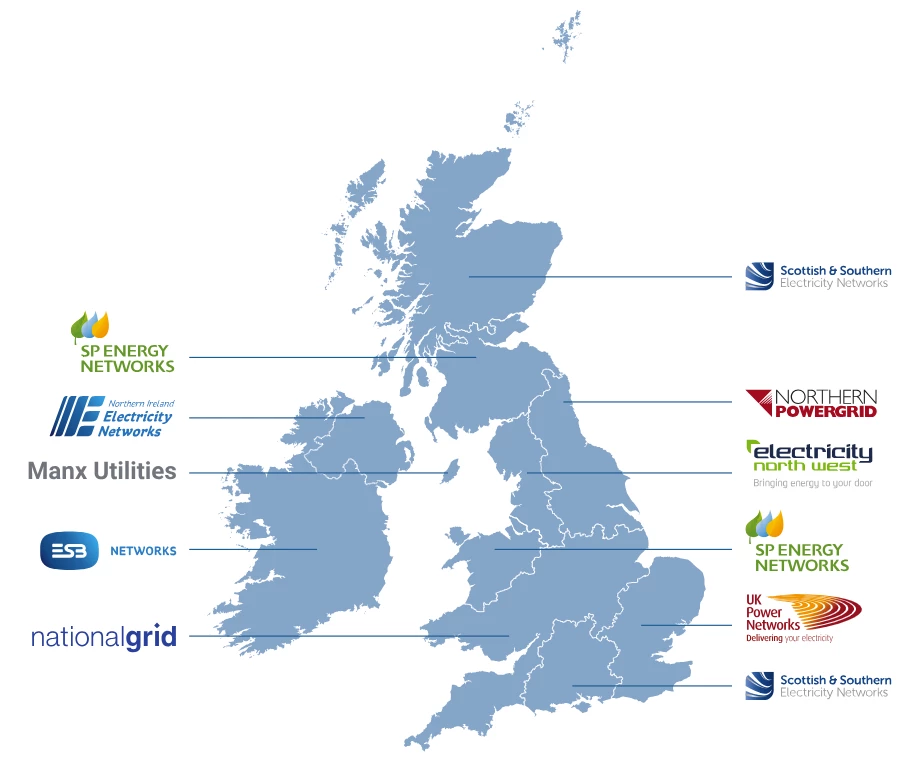
And then find out your supplier using the online tool provided by your local DNO below:
Scottish and Southern Energy Networks
Taking opening meter readings
Before contacting the current energy supplier of your new home, you’ll need to find out the meter reading on the day you moved in. We’d advise making a check of the meters one of the first things on your moving in checklist, that’s right even before getting started on unpacking.
Your landlord or the previous homeowner should let you know where to find the meters. As the meter locations can vary wildly from home to home; a cobwebby cupboard under the stairs to a meter box attached to an exterior wall, it’s best to ask if you’re not sure.
Even if you find there’s a smart meter installed it’s always worth taking the reading manually, just in case. Having an accurate reading from the date you took on responsibility avoids the chance of being charged for energy used before you moved in. It’s a good idea to take a photo of the meter when you move in. If you need help taking a manual reading from a smart meter check out this guide for an OVO installed smart meter, or this guide to reading an L+G meter.
Getting the best plan
As you’re not tied to the supplier that supplies the property when you first moved in, it might be worth checking the current plans on offer by all suppliers to help you decide which is the best option for you.
You can check the current plans available with OVO here. As you’ve just moved in you might not have accurate annual usage figures, so it’s worth bearing in mind we’d use the average national figures for your type of property when calculating your Direct Debit amount. The Direct Debit amount can be changed later down the line once we have an idea of your actual usage. You can find out the exact annual consumption figures your quote is based on by clicking on each fuel under the ‘Tariff Information Label’. When checking the plans offered by other suppliers, we’d recommend using the same consumption figures to enable you to make a fair comparison of what’s on offer.
Setting up an OVO account
Even if you’re planning a next day switch, setting up an account with OVO is necessary. Doing this helps the switch progress smoothly and ensures you receive an accurate statement covering the time between your move-in and your switch away.
If your new home is supplied by OVO, you can do it all online by signing up here - once you put in your new address details the website will recognise we already supply your new home and give you a quote based on the usage figures we have for the property. Or you can contact our Support Team if you need some help getting signed up:
Managing your account online
Once you’ve received your ‘Welcome’ pack, head on over here to log in to your new OVO online account. The same great online features are also available on the OVO app (download for Android or iOS).
First things first, you’ll need to set a new password following these steps:
- On the log in screen Click ‘set up account’
- Enter your email address when prompted
- You’ll be sent an email containing a link to set a new password
- Once you’ve set a new password you should have access
Once you’re logged in, our great online account tutorial collection will help you navigate the online portal and the app.
Need any extra help?
We’re hoping we’ve pretty much covered the basics in terms of getting set-up. Got any more questions on getting to grips with your new account? You’ve come to the best place.
Check out this guide on how to use this community to get the help and support you might need, we’re always happy to help!
OVO customer but not got a smart meter yet? - Book today
Interested but not yet an OVO member? - Check out our plans
Need more help?
This topic is now closed, so you won’t be able to reply here. If your question hasn’t been answered or you need more advice, feel free to ask the community — we’re here to help!
Give us your feedback!
Was this article helpful? Is our Library missing content? Share your anonymous feedback here and help us improve!

