Solved

Can't download my bills

  • October 17, 2025
  • 15 replies
  • 338 views

When i try to download my bill i get this message...":"OAuth plugin - No refresh_token present

 

Best answer by Nukecad

As an alternative to setting your browser guest/incognito mode as suggested by Blastoise186:

I have found that pausing or turning off your browser adblocker(s) will then let me download the bills.

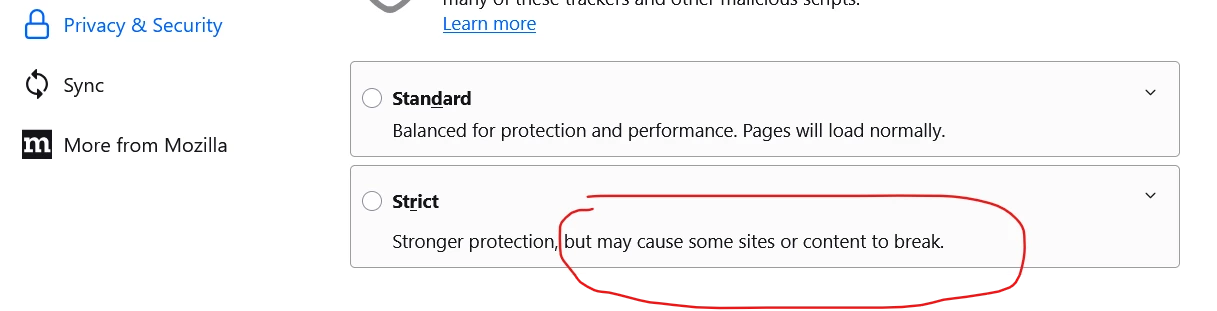
Note also that if your browser is set to ‘Enhanced’ or ‘Strict’ security that too can block the downloading - the browsers do warn about that in the settings.
If that is the case then set the browsers security to ‘Standard’.


15 replies

Blastoise186
Super User
Forum|alt.badge.img+8
  • Super User
  • October 17, 2025

Hi ​@dandave ,

This is a known issue - it’s already being investigated.

For now as a workaround, please use Guest Mode (preferred)/Incognito Mode (alternative) in your browser to help bypass it.


  • Author
  • Rank 1
  • October 17, 2025

ok thanks 


Firedog
Super User
Forum|alt.badge.img+7
  • Super User
  • October 17, 2025

When i try to download my bill i get this message...":"OAuth plugin - No refresh_token present
  

What do you do immediately before seeing this message?

  1. Click on a Download bill link on the Billing History page?
  2. Click on a Download bill link on the Billing details page?
  3. Right-click on a Download bill link and select an option like Save target as, Save link as …? 
  4. Right-click on a Download bill link and select an option like Open link in new tab or new window?

In my experience, refreshing the page followed by a simple click on the Download bill link works, but the other options I listed all return the error message you quote.

Alternatively, accessing the bill in the OVO Energy app on a mobile device bypasses the ‘billing details’ page and presents the PDF file itself ready to be saved or shared.    


  • Author
  • Rank 1
  • October 17, 2025

All 4 choices produce the same result...  OAuth plugin - No refresh_token present - don’t have a mobile with internet or apps, its a nokia 1999 belongs in a museum, i know! Previous reply said it’s being investigated so i will wait til they sort it


Blastoise186
Super User
Forum|alt.badge.img+8
  • Super User
  • October 17, 2025

Just a heads up. If you have an ancient Nokia, it may stop working sooner or later due to 2G/3G switch-offs. You may need to ask your network for an upgrade.


Nukecad
Super User
Forum|alt.badge.img+4
  • Super User
  • Solved
  • October 18, 2025

As an alternative to setting your browser guest/incognito mode as suggested by Blastoise186:

I have found that pausing or turning off your browser adblocker(s) will then let me download the bills.

Note also that if your browser is set to ‘Enhanced’ or ‘Strict’ security that too can block the downloading - the browsers do warn about that in the settings.
If that is the case then set the browsers security to ‘Standard’.


Abby_OVO
Community Manager
Forum|alt.badge.img+4
  • Community Manager
  • October 20, 2025

Hey ​@dandave 


What browser have you been using for this? If you’ve not been using Google Chrome, could you give that a try and let us know how you get on trying on a different browser.


Abby_OVO
Community Manager
Forum|alt.badge.img+4
  • Community Manager
  • October 30, 2025

Hey ​@dandave 


Did you manage to get your bills downloaded in the end?


  • January 5, 2026
Has there been a progress update from Ovo on a fix to error? I am using MS Edge, Edge inPrivate, standard chrome and incognito chrome and have encountered the {"message":"OAuth plugin - No refresh_token present"} error in all of them. 

Ben_OVO
Community Manager
Forum|alt.badge.img+4
  • Community Manager
  • January 6, 2026

​@Gizzo good morning - I’m sorry to hear this. As of yet there’s no fix in place.


Please could you confirm whether you’ve tried the workaround that ​@Nukecad posted above? (See below):


As an alternative to setting your browser guest/incognito mode as suggested by Blastoise186:

I have found that pausing or turning off your browser adblocker(s) will then let me download the bills.

Note also that if your browser is set to ‘Enhanced’ or ‘Strict’ security that too can block the downloading - the browsers do warn about that in the settings.
If that is the case then set the browsers security to ‘Standard’.


  • January 6, 2026

I found that I could download the documents using a Chromebook. On my PC I disabled Avast Online Security & Privacy extension and have been able to download the statements so this work around will suffice. 


Ben_OVO
Community Manager
Forum|alt.badge.img+4
  • Community Manager
  • January 7, 2026

​@Gizzo thank you very much for the update - this info is massively helpful.


I’m going to reach out to our IT team to see if there’s any update on this one. Not sure whether I’ll get an answer but, if so, I’ll update you all.


Ben_OVO
Community Manager
Forum|alt.badge.img+4
  • Community Manager
  • January 7, 2026

​@dandave / ​@Gizzo please could you confirm if you’re able to view pdf statements in the app without issue?


  • January 10, 2026

Ben


The app is able to show me the pdf statements on my phone and to send them via email.  That process is working perfectly


Ben_OVO
Community Manager
Forum|alt.badge.img+4
  • Community Manager
  • January 12, 2026

Cheers for this ​@Gizzo, I’ll relay this to our IT team. Hopefully they can fix this soon.