




Everything you need to know about an Economy 7 (Eco 7) energy plan

Updated on 23/06/26 by Ben_OVO
Economy 7 meters have two readings: one for day usage (peak) and another for night usage (off-peak). These meters usually work with night-time storage heaters and/or immersion heaters that use a lot of energy during off-peak hours.
Is an Economy 7 plan right for me?
An Economy 7 plan offers a lower electricity rate during off-peak hours, making it cheaper to use power at night. This rate is often several pence less per kWh than the standard rate. However, to balance this, Economy 7 plans charge a higher rate during the day compared to standard plans.
To benefit from this plan, you need to use a certain percentage of your electricity during off-peak hours. This percentage varies based on the current tariff prices.
Can I get a smart meter with an Economy 7 plan?
We install Aclara SMETS 2 meters, which work with an Economy 7 plan. If you have night storage heaters that need a time switch, we can also install a 5-port terminal version of this meter. We previously installed the Secure SMETS 1 meter, which was compatible with a dual-rate plan and storage heaters. Read more about the benefits of smart meters here.
Can I switch from an Economy 7 plan to a single rate plan?
We currently can’t change smart meters from a single rate to Economy 7, or the other way around. We are working on this and will update you on our progress in the Forum.
However, we can change an Economy 7 tariff to a single rate tariff. This means we will still take both readings but charge you a flat rate for the total usage. This change usually helps customers who have removed their storage heaters or immersion heaters.
If you have an Economy 7 tariff but don’t use storage heaters or an immersion heater, our Support Team can check if switching to a single rate plan would be better for you.
Can I change from a single rate plan to an Economy 7 plan?
Unfortunately, we're unable to make this change due to some technical limitations.
How do I read my Economy 7 meter?
If you have a traditional meter, your readings are usually labeled as ‘high’ and ‘low,’ ‘day’ and ‘night,’ or ‘peak’ and ‘off-peak.’
Sometimes, they are called rate 1 and rate 2. Rate 1 usually refers to your daytime usage, but it’s a good idea to check this before you send in your meter readings. You can find out which reading is which by looking at your current reading and comparing it to your reading history on the ‘Meter Readings’ page of your online account or in the OVO app, available for download on Android or iOS.
If you’ve got a smart meter, the labels depend on the specific model you have. Make sure to check the instructions for each type of smart meter that OVO installs below.
For the Secure Liberty 110 S1 smart meter press 9 on the keypad to take day and night readings. For the Secure Liberty 100 S1 smart meter, press 6 to confirm the day and night readings.
If you’re a single-rate customer using this meter, pressing 9 will show your reading.
SMETS2 Aclara, Flonidan, Honeywell or Elster
| Aclara (Elec) / Flonidan (Gas) | Elster (Elec) / Honeywell (Gas) | |
| Reading the meter |
|
|
If you’ve got a dual rate version of this meter press and hold down the ‘B’ button for roughly 5 - 10 seconds, then tap the ‘A’ button. This will toggle between the ‘R01’ reading and the ‘R02’ reading as demonstrated in this handy YouTube video.
How do I tell my day and night readings apart?
If you're not sure which reading is which, look for labels like "high" and "low" or "day" and "night." If there are no labels, check your current reading against your reading history on the 'Meter Readings' page of your online account.
If you still can't figure it out, perform a load test. This means taking two sets of readings during the day. Only one reading should change between these times; that will be your daytime register.
When are my peak/off peak hours?
If you have an OVO-installed Smart Meter, you can find out your off-peak times using your Meter Point Administration Number (MPAN). You can find your MPAN on the ‘Plan’ page of your online account or in the OVO app, which you can download for Android or iOS.
To see your off-peak times, look at the table below. The first two digits of your MPAN show your ‘Area ID’, and the off-peak times are in the second column from the right.
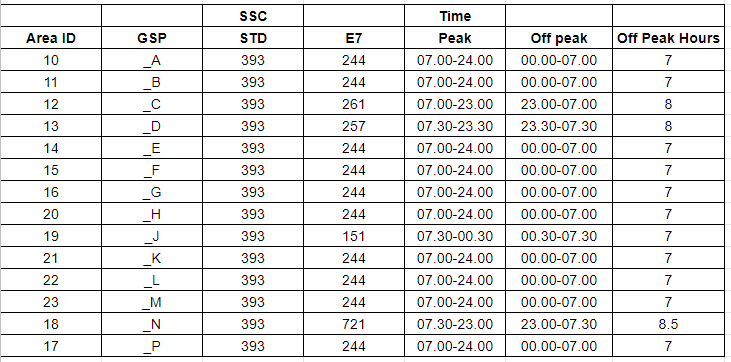
Keep in mind that Secure, Aclara and Honeywell smart meters do not change for British Summer Time. This means that during summer, your off-peak times will be one hour later than shown above.
If you have a traditional meter or a smart meter not installed by OVO, your off-peak hours may be different. In this case, contact your energy supplier or our Support Team if you’re an OVO customer.
Can I switch suppliers with an Economy 7 plan?
Check if the supplier offers Economy 7 plans, as not all suppliers have this option. If you’re not yet an OVO customer, you can look at our Economy 7 plans here.
Need more help?
This topic is now closed, so you won’t be able to reply here. If your question hasn’t been answered or you need more advice, feel free to ask the community — we’re here to help!
Give us your feedback!
Was this article helpful? Is our Library missing content? Share your anonymous feedback here and help us improve!

