Got issues registering or resetting a password for your OVO app or online account? We’ve made a recent change that might help:
OVO customers should ideally complete these steps in the web portal (online account) first. Once complete, these details will be copied over and available for use in the OVO App.
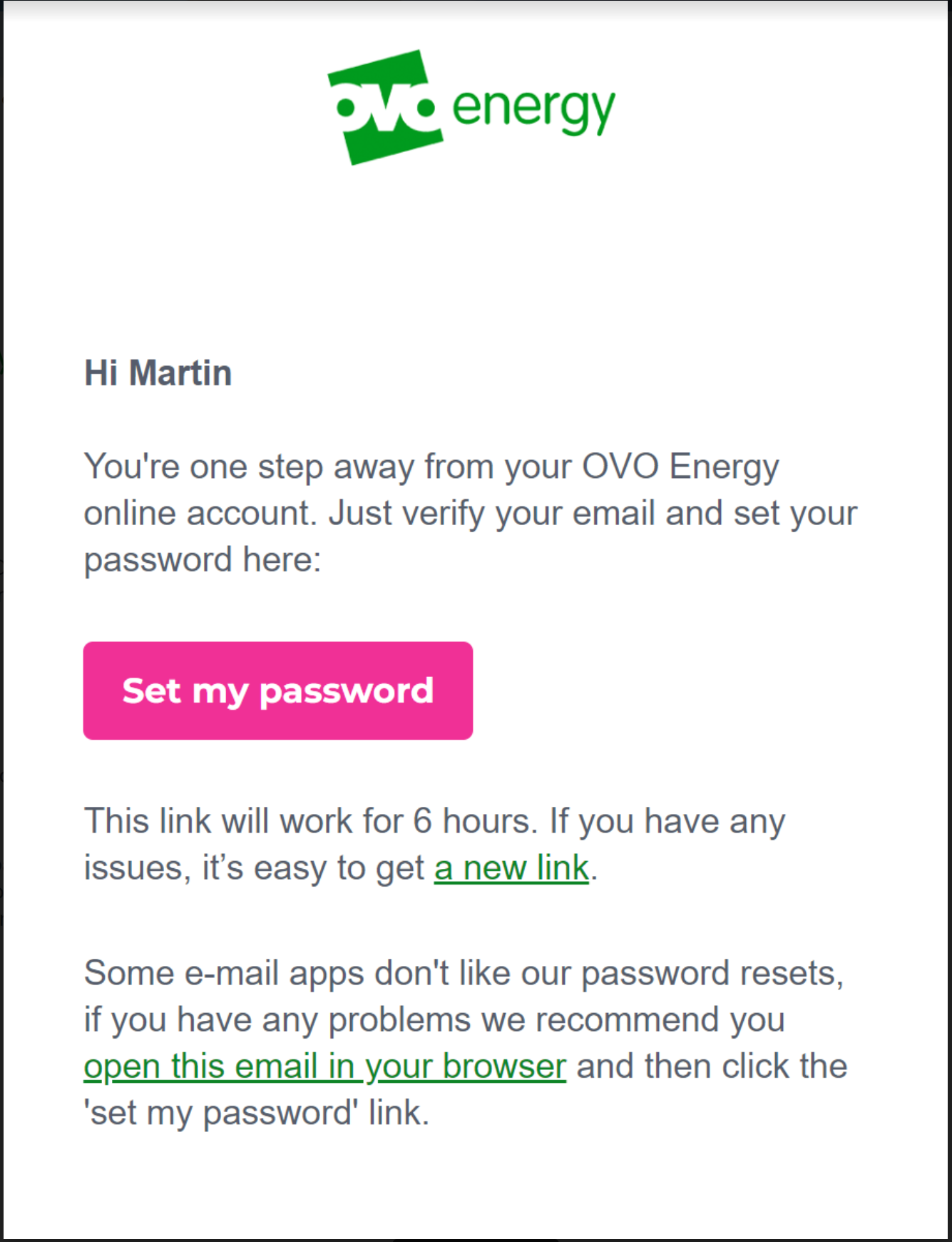
Select the option at the bottom of the reset email "open this email in your browser"
This should then allow you to follow the steps as prompted and login into your account.
Please note: This has been extensively tested and in the vast majority of cases will resolve the issue. However, there are still some issues with users of any Microsoft email domains such as Hotmail, Live, Outlook, Microsoft. We are working on the resolution for these customers and will update once a fix is made available.
There may still be issues for other customers with different email domains but these could be related to something else. See the advice below for some ideas to try, and let us know in the comments below if you still have an issue resetting your password. Alternatively our Support team may be able to advise with this.
When something’s gone wrong with your online account or OVO app login
Login Basics
Once we’ve updated our online account, you’ll only be able to log in using your email address, your Customer ID number will no longer be recognised.
You’ll only be able to set one password per email address. This means that if you’ve got the same email address registered to multiple accounts, all these accounts will use the same password. This also means that password resets will affect all accounts.
If there's no email address registered to your OVO account, you won’t be able login. You can register your email address when you first join us, or by reaching out to the Support Team if you’re already a member.
First Steps
It’s always best to check we hold an accurate email address for you. A good way to confirm this is to see whether you’ve received any emails from us already, this could include your welcome email or monthly summaries.
Our Support Team can help correct or register your email address if you haven’t yet received any emails from us.
Error Message?
If you’re having an issue resetting your password and are using the Outlook Live app we are aware this may cause an error message, if so, please switch to a browser version.
This error message usually means there’s a technical issue which is linking a failed account to your details, for example if you’ve recently moved in and your new account hasn’t been fully activated. In this case reach out to our Support Team, they’ll be able to get things corrected with the help of our Tech team.
Duplicate Emails
If your email is a used on more than one OVO account, there could be two ways to login:
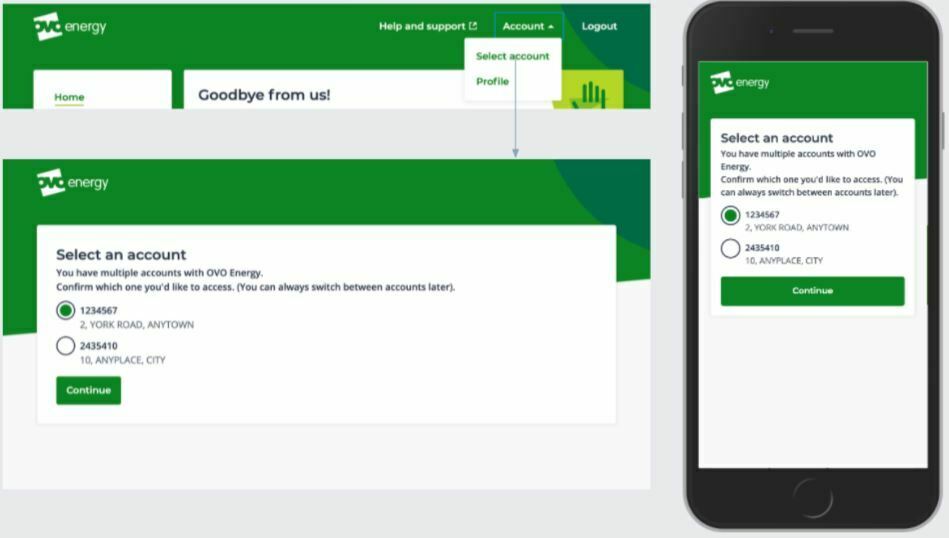
If you have multiple accounts which have all been migrated to our new billing platform you’ll just need to login using your email address. You’ll be shown a landing page, from here you can select the relevant account number which will open that online account. You can switch between the accounts by clicking ‘Account’ in the top right of the Homepage.
Exact appearance may vary
If one of your accounts is yet to be migrated, you’ll need to use the Customer ID for the one of the accounts instead of your email address. Both accounts will still use the same password. If you’re not sure whether your account is on the new or older platform, our Support Team will be able to check and advise on whether you’ll need to login using your email address or Customer ID number,
There's no difference between ‘First time logging in?’ and ‘Reset my password’
Password reset emails expire after six hours or if a newer password reset is requested within that time
A reset email is only sent if the email address used matches a registered email address
If multiple password reset emails are sent, only the most recent one is valid
The criteria for setting a password is:
At least 8 characters
At least 1 upper case letter
At least 1 lower case letter
At least 1 number
At least 1 special character (!?£@#$%)
If you’re not able to access the password reset screen by clicking on the ‘Reset My Password’ button in the reset email, you can copy and paste the long reset link from the bottom of the email into the URL to get to the same destination. An example is shown here:
Haven’t received a password reset email?
There are no known issues with the password reset platform and reset emails are typically delivered within seconds.
If you haven’t received the email then it’s usually caused by the following:
Your email inbox hasn’t refreshed
The email may have been delivered but hasn’t synced on the member's device/browser. This could be due to a network issue or because their email client is set to refresh on a schedule, e.g. every 15 minutes. Try refreshing this manually.
The email address you’ve got registered has recently been changed on our systems and hasn’t had time to update on your online account
If you've changed your registered email address it can sometimes take up to 24 hours for this to update. In this case, try and request a password rest email the following day.
If none of the above is successful
Check you’re using the most recent version of the app (try deleting and re-downloading for Android and iOS) or Google Chrome browser if logging in to your online account.
Try disabling any password managers that may be interfering with the login details you’re entering.
You should also try:
Logging in via the app if you can’t login via a browser (or vice-versa).
Using a different device or browser (Chrome is recommended).
Clear cache/cookies on browser.
Clear cache and app data then uninstall/reinstall the app.
Waiting a day for any changes you've made to update across all systems.
If you've followed all of these steps and you're confident there's still a login issue with your online account or the OVO App then contact the Support Team. If you can provide as much of the the following information as possible we’ll then be able to forward this on to our Tech team if required:
Mention all actions you have taken already.
The correct email address that you’d would like to use.
Are you trying to login using the app or browser?
What device, OS and browser are you using?
Are there any specific error messages? This does not include 'Wrong Email or Password'.
How long has this been occurring?
Relevant screenshots are always welcome and useful.
I have been a customer with OVO for many years. Last week i noticed that i was unable to login to my account. It said the login details were wrong. I hadn’t changed them, so i emailed customer services. An automated response said that my email address wasn’t registered with them, despite me using it for over a year. By chance i noticed that there were a couple of emails from OVO that had recently been sent to the email address of my late husband. He used to manage the account before he died, and i altered the registered email address to mine last September. I sent another email to customer services this time from his email address, but as yet haven’t had a reply. Out of curiosity, i tried logging in to the online account using his email address and was taken to the old system, which i was transferred from in April 2021. It seems like there are some ‘crossed wires’ somewhere. Any thoughts on how to access my ‘normal’ account?
Hi @OllyWithHerBrolly I think your best bet is to phone the customer services number armed with the email addresses and account details. Sorry not to have any other suggestion. If you could get on a Chat link that would be better but I think you have to be logged in to see the Chat button (during business hours) but of course that’s the very thing you can’t do 🤦♀️ Good luck !!
I think our Support Team may be best placed to deal with this as they’ll be able to access your account. It does certainly sound like there must be some crossed wires somewhere.
As @juliamc kindly pointed out, web messenger is probably the quickest way to get in touch. You should be able to access this without being logged in through the ‘help center’. It appears as a small green messenger icon in the bottom right hand of your screen.
Thank you very much for your replies @juliamc and @Emmanuelle_OVO
I managed to speak to someone via the online chat and she said she would reset the email back to mine. I have to wait 24 hrs and then she thinks i will need to change my password before i can get back in. Fingers crossed this will work...
Update on OVO app issues from this weekend: This has now been fixed and the OVO app is now available along with the web online account: https://my.ovoenergy.com/login
Carbon neutral - we need a community to get there! My green tech: Aclara SGM 1411-B smart meter, Chameleon IHD6
If you read the ‘best answer’ on this thread it explains what’s happening. It probably won’t take till the end of the year but there’ll be something about your account that needs manual intervention to move it to the system most people are on.