Rank 2
July 15, 2023
Solved

Switched from British Gas- How do I take a smart meter reading?

  • July 15, 2023
  • 13 replies
  • 530 views

Hello, I've just joined OVO from British Gas as of today and I've been asked to provide a meter reading. I'm not sure whether I need to do this, as I have a smart meter, but if I do, how do i do it? I thought I'd managed it, but the readings are not being accepted 

Best answer by BPLightlog

Updated on 28/06/24 by Shads_OVO


It hasn't worked!! Not to worry. You've given me a lot of help though. Thanks.

Does it give you any hint as to why?

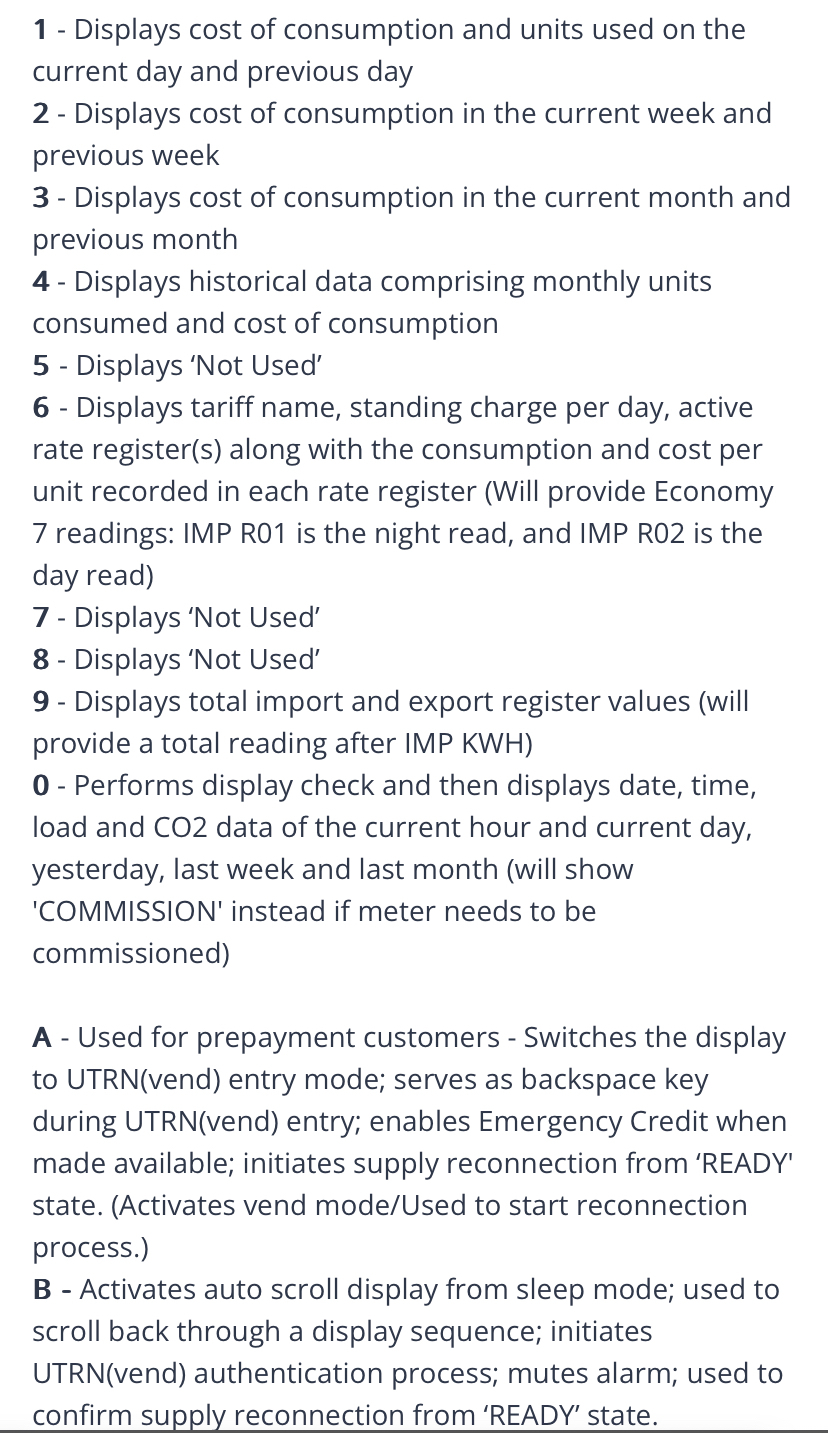
On the electric meter, make sure you’ve used the reading after pressing 6 on the keyboard. 

This is the instruction info sheet for the meter

13 replies

BPLightlog
Super User
Super User
July 15, 2023

Hi @KathM1976 , the smart meter may not be fully connected yet. Which meter(s) do you have?

Bring me Sunshine ~ E&E {Solar PV, Battery Storage, Hybrid EV, ASHP and Home Assistant automation}
Jeffus
Rank 20
Rank 20
July 15, 2023

If you download the app. 

Try clicking on Account in the bottom navigation, then Meter readings


KathM1976Author
Rank 2
July 15, 2023

Thank you. There's nothing showing on the app.
I don't have a clue what kind of meter I have.

They have A and B on them, if that helps?

BPLightlog
Super User
Super User
July 15, 2023

Thank you. There's nothing showing on the app.
I don't have a clue what kind of meter I have.

They have A and B on them, if that helps?

Can you post photos so someone can try and help?

Perhaps it’s something like this .. 

Electric 

Or gas 


Bring me Sunshine ~ E&E {Solar PV, Battery Storage, Hybrid EV, ASHP and Home Assistant automation}
KathM1976Author
Rank 2
July 15, 2023

I'm trying to post the photos, but they're not uploading. I'll keep trying 

KathM1976Author
Rank 2
July 15, 2023


BPLightlog
Super User
Super User
July 15, 2023

Ok so the top picture is a Secure Liberty and from that display the reading is 16153 (ignore anything after a decimal point).

The bottom photo is a Liberty EG4 and I can’t quite see if it’s 07781 or 01181 but again only use the digits before any decimal point. If the input needs 5 digits, don’t forget the first 0 on the reading

Bring me Sunshine ~ E&E {Solar PV, Battery Storage, Hybrid EV, ASHP and Home Assistant automation}
KathM1976Author
Rank 2
July 15, 2023

@BPLightlog  Thank you so much. That's great.

KathM1976Author
Rank 2
July 15, 2023

It hasn't worked!! Not to worry. You've given me a lot of help though. Thanks.

BPLightlog
Super User
Super User
July 15, 2023

Updated on 28/06/24 by Shads_OVO


It hasn't worked!! Not to worry. You've given me a lot of help though. Thanks.

Does it give you any hint as to why?

On the electric meter, make sure you’ve used the reading after pressing 6 on the keyboard. 

This is the instruction info sheet for the meter

Bring me Sunshine ~ E&E {Solar PV, Battery Storage, Hybrid EV, ASHP and Home Assistant automation}