Rank 2
October 1, 2022
Solved

No Smart Meter readings shown on the Online Account since the 1st October?

  • October 1, 2022
  • 154 replies
  • 3859 views

The website today shows the last smart meter readings as 30 September. Last night’s readings should be logged as 1 October. Have the new charges caused a problem? I have SMETS2 electricity and gas meters. It is now 10am on 1 October. My in home display is working.

Readings seem to have ceased at 00:30 on 30 September according to the app.
 

Best answer by Jeffus

Updated on 09/08/24 by Shads_OVO

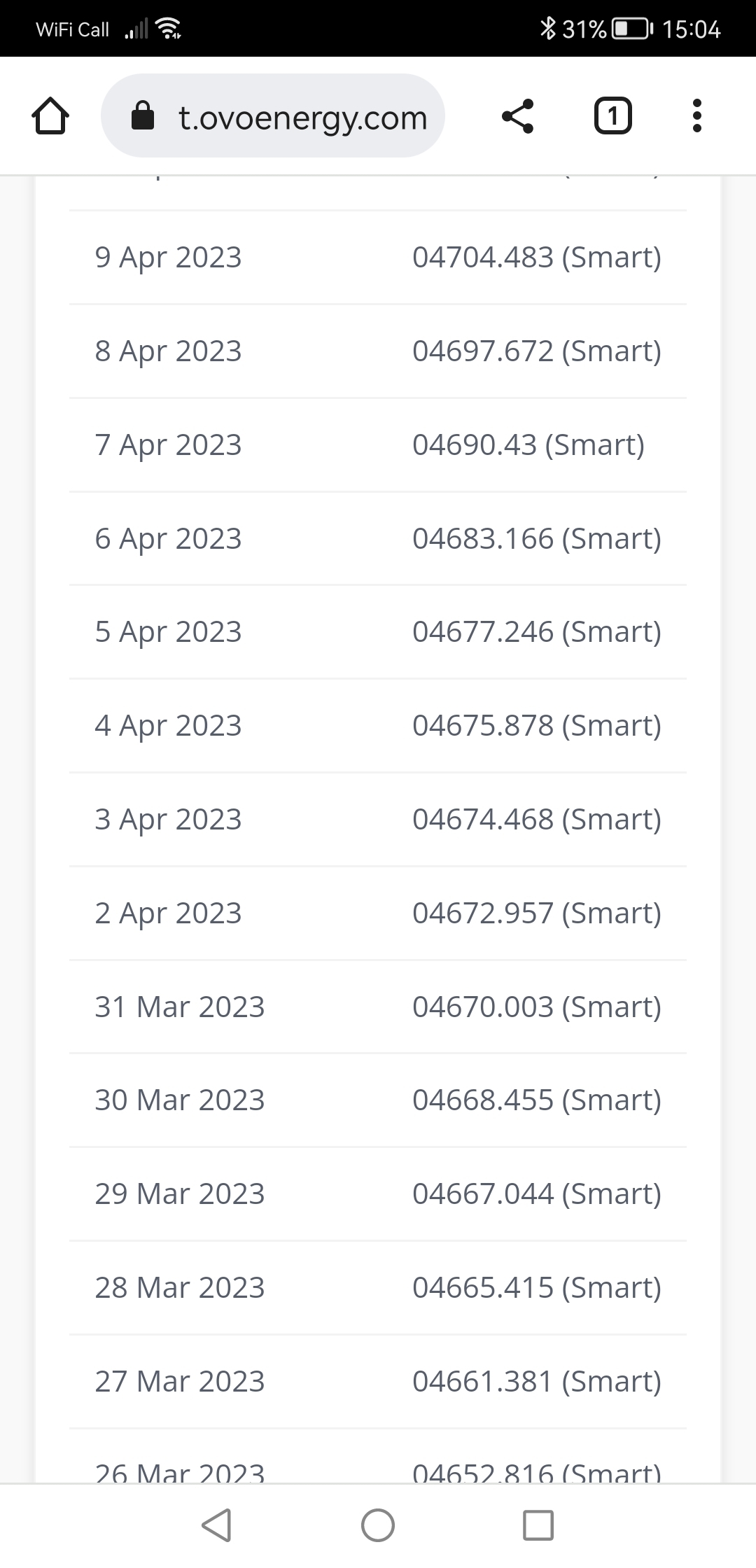
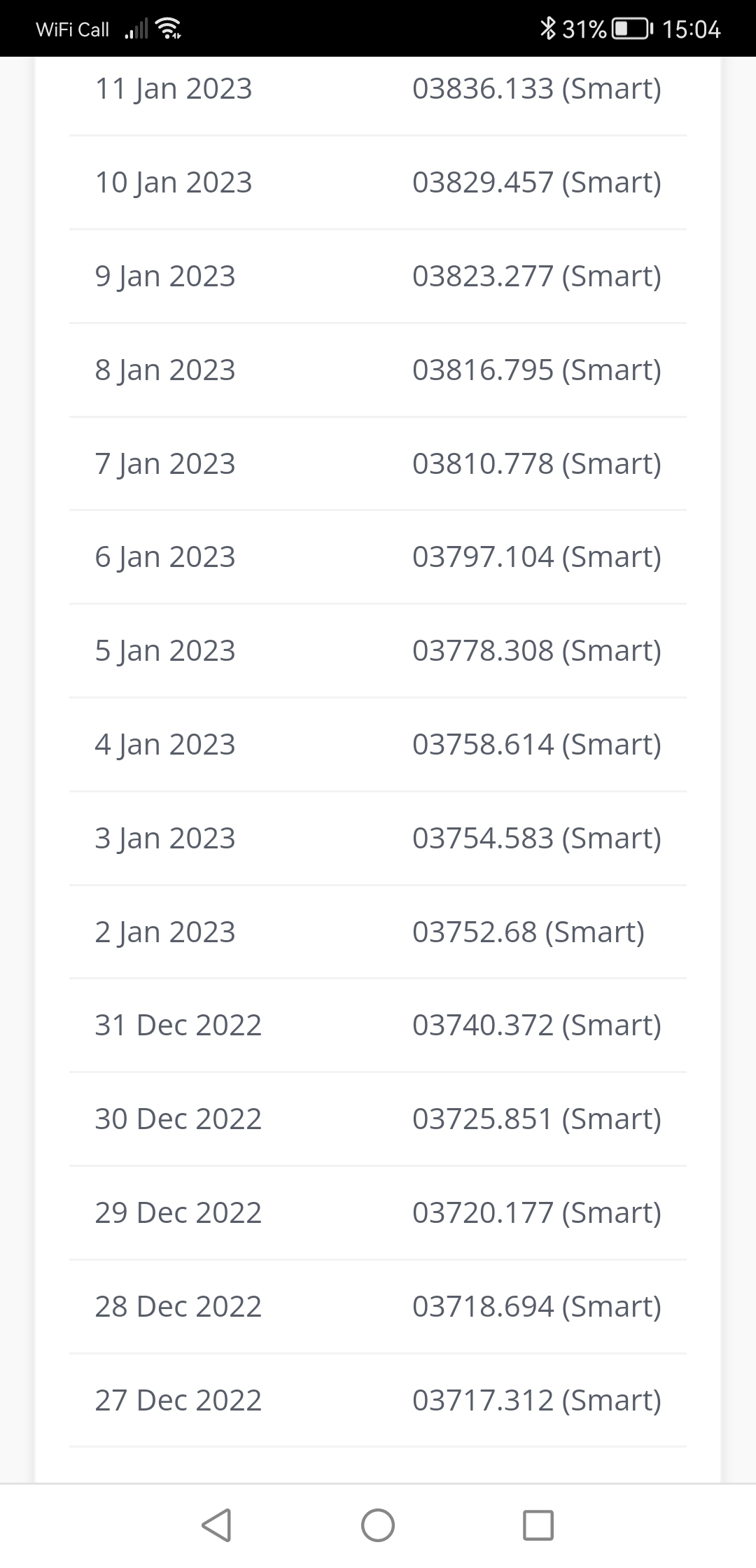
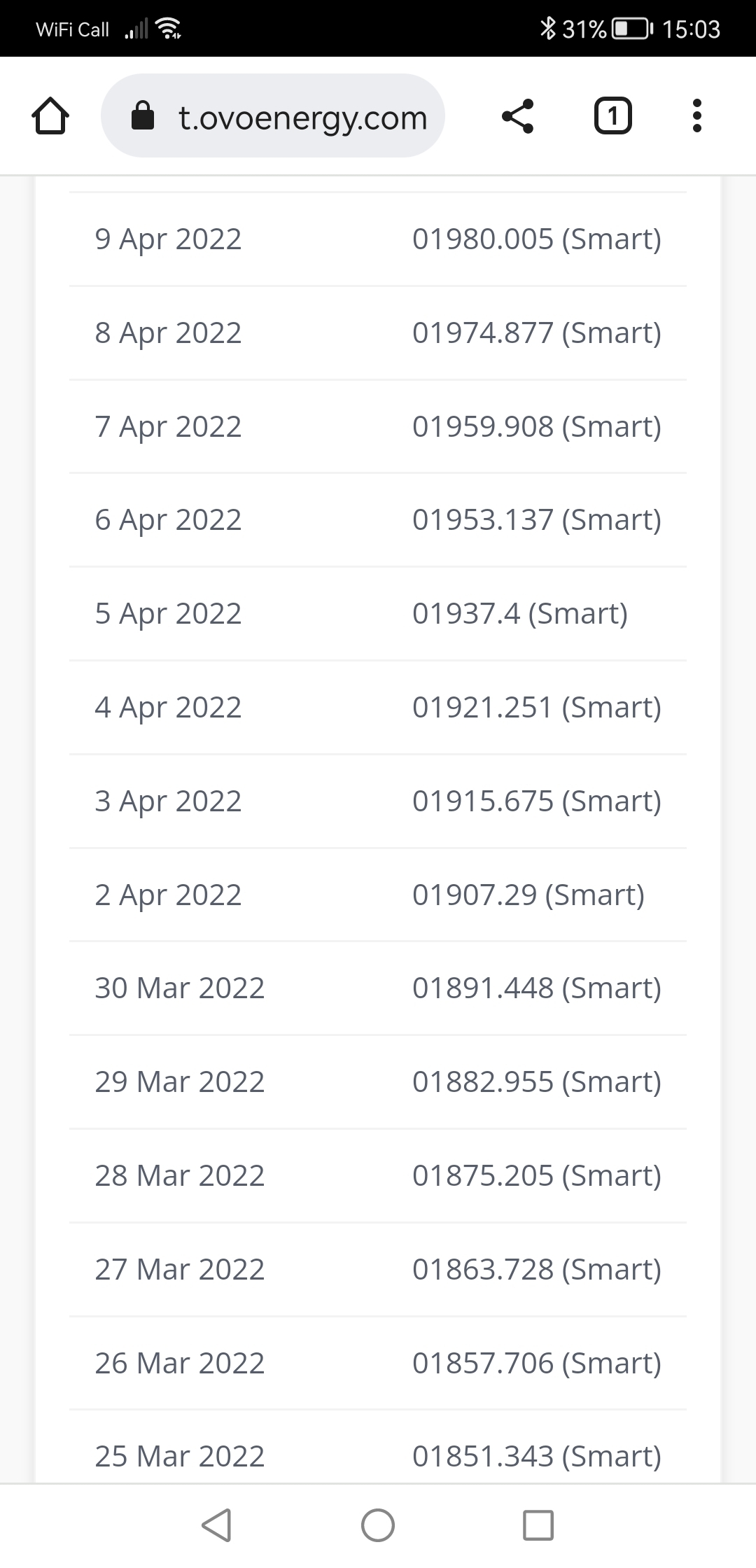
The missing daily readings happens at every switch of the price cap since i had a smart meter with ovo when i look at my account. I have learnt just to ignore it as i suspect it will never change. It doesn’t impact me as the next reading catches up. 

This is as far as i can go back on the readings page although i had an ovo smart meter before this. I guess old readings are removed. 

So i suspect i will see it every 3 months now. 

1st April

1st July

1st Oct

1st Jan


154 replies

Tim_OVO
OVO Staff
OVO Forum Legend
October 17, 2022

Hi @Firedog and thanks for posting this question. Lots of detail and some screenshots. How come you have darkmode on your online account? @Blastoise186’s idea hasn’t been implemented has it?


I’ve checked my online account usage page and current billing period and for the electricity, they align exactly. For the gas, they’re out as the billing period for the gas is two days shorter than the usage section. Why? The usage section can guess in the absence of readings. When the readings are received the charges will align. 


Our advice is always to refer to the actual billing section for charges, as the usage sections aim to indicate usage over time. I think it relates to the smart meter data and how it can actually be estimated for any missing sections for the usage, but it’s a bit over my head as this billing platform is provided by OVO’s sister company, Kaluza. Keen to hear from other forum members if they see something similar… 

Carbon neutral - we need a community to get there! My green tech: Aclara SGM 1411-B smart meter, Chameleon IHD6
Blastoise186
Super User
Super User
October 17, 2022

That’ll either be a browser feature (some browsers support automatic dark mode for websites now!) or a browser extension doing it like Dark Reader.

Securing energy by zapping security bugs... For that is The Blastoise Way! Remember, I'm just like you - AI Powered Evil Geniuses aren't Staff!
Tim_OVO
OVO Staff
OVO Forum Legend
October 17, 2022

Sorry @croninsfc I can’t offer much more advice about the smart meter issue than what I have above. You’re able to request a move to the variable rate, Simpler, if you prefer. It sounds like you might be in the band of customers who have a fixed tariff that ends up being roughly the same price wise. Without access to your account I can’t confirm. 


To see the Energy Bills Support Scheme payments, look at the October billing period here: https://account.ovoenergy.com/billing-history


if you’re a Direct Debit customer, make sure to expand the summary with ‘View more details’ to see the payment into and out of your OVO account as it goes to your bank account following a Direct Debit payment. 

Carbon neutral - we need a community to get there! My green tech: Aclara SGM 1411-B smart meter, Chameleon IHD6
Firedog
Super User
Super User
October 17, 2022

How come you have darkmode on your online account?

Microsoft Edge with this flag enabled: edge://flags/#enable-force-dark. I use it all the time, and it works well for almost all the sites I visit.

Sorry if this is a bit long, but I wanted to include enough detail to avoid being advised to do stuff I’d already tried. 


After a lot of clicking around, I found that the half-hourly readings were not being received? | recorded? by the online account. I eventually found a notice reading 

Looks like we couldn’t find your usage data

We’ll take a look at this shortly, please try again later.

So i waited until later. At some stage I came across (not sure where) a button inviting me to submit a manual reading. It brought up a page telling me that because I have a smart meter, I don’t need to submit readings manually. Stymied, I gave up.

Then I remembered that someone had written that things ‘work differently on the app,’ so I downloaded the app. There I found pretty much the same as before, except that the button I found labelled Send electricity reading worked and I was able to submit a reading. 

After that, I logged on again on the computer, and now I could see the reading I’d just submitted on the Meter readings page, along with this note:
Your electricity smart meter hasn't sent us any readings lately. To keep your account up to date, you'll need to send us regular manual readings. Find out more

That page assured me that This usually fixes itself, so I stopped worrying for the time being, except that it didn’t tell me what ‘regular’ means here - every half hour? Every day? Every month? I rather rely on the half-hourly readings to keep me on track, but I settled on bedtime each day.

I’m fairly sure the meter is working properly; its little red light flashes reassuringly with 3-5 blips per burst, and the IHD is working normally.

It looks as if the figures in my original question are arrived at by (over-)estimating usage for the days when readings weren’t available. It’s all in order now on the two pages concerned, even though the Usage page still shows the inaccurate estimates. 

It’s now nine days since my last smart readings were recorded. How long should I wait before panicking? What should I do then? 


In general, I find it really difficult to track down what appears to be reams of detailed advice and guidance at this site. I have happened upon some helpful pages labelled  Tutorial  or  FAQ  because others have linked to them in replies to forum posts. I still haven’t found out where these pages lurk.

On one of them, I learned that I would have to take register readings from the Liberty 110 meter itself, because theyre not accessible from the Pipit 500 IHD. This isn’t true, at least for single-fuel systems: Menu > History > Usage shows the status of both registers.
  

[I’ll clean the screen before photographing it next]

It certainly beats standing out in a thunderstorm trying to juggle umbrella, cabinet key, torch, pencil and paper while trying to stab the right tiny buttons with a frozen woolly-gloved finger (believe me, it can’t be done!).

Noel | I have no official status; I'm just a volunteer who comes here to help other customers. My gear: Aclara SGM 1416-B Electricity-only E7 meter; Chameleon IHD3-PPMID-AAA | It may look as if I know what I’m talking about, but don’t let that fool you. |
Tim_OVO
OVO Staff
OVO Forum Legend
October 17, 2022

I’m sorry to hear about these continued smart meter data issues. I don’t want to lump issues together that might actually have different causes and solutions. For anyone unsure if their smart meter is having communication issues, see these health check guides:


Our Support team remains available and will do their best to help with anything. Please bear in mind that we’re seeing very large contact volumes. Unless you have concerns around the charges on the account as a result of the smart meter issue, it may be worth waiting to see if these resolve themselves. 


Carbon neutral - we need a community to get there! My green tech: Aclara SGM 1411-B smart meter, Chameleon IHD6
Blastoise186
Super User
Super User
October 17, 2022

That’s a Chromium Flag so it’s also available on Chrome too with chrome://flags/#enable-force-dark

However. Heed this warning please! You enable Flags ENTIRELY AT YOUR OWN RISK!!!

As for your other comments, I’ll be back later hopefully! Thanks for posting them. :)

Securing energy by zapping security bugs... For that is The Blastoise Way! Remember, I'm just like you - AI Powered Evil Geniuses aren't Staff!
Firedog
Super User
Super User
October 17, 2022

[OT]
Thanks for your concern, Blastoise. I’ve been a beta tester for Edge since it was first released in 2019, so I think I know my way around it. Not all flags are equal, and experiments have different purposes. I’ve been using various flavours of the dark mode flag since it became available, but it’s never caused any of the problems in the warning. I suspect that the feature can’t be unflagged until a majority of popular sites provide dark-mode capability and the best set of options has been established through telemetry. That might take a few more years yet.  

Noel | I have no official status; I'm just a volunteer who comes here to help other customers. My gear: Aclara SGM 1416-B Electricity-only E7 meter; Chameleon IHD3-PPMID-AAA | It may look as if I know what I’m talking about, but don’t let that fool you. |
Newcomer
October 17, 2022

Hello,

My smart readers have not provided a reading to Ovo since 9th October.    Nothing has changed my end, and the eletric meter is still flashing five times to indicate it is connected to the network and has a good connection.

I am a V2G customer and therefore I am worried that this will affect my export payments so would be grateful if someone could investigate asap.

I have the HUGO app on my android phone which is still receiving the meter readings each day with no problems which makes me think this is some sort of Ovo configuration error.

Can anyone please help?

Many thanks.

Firedog
Super User
Super User
October 17, 2022

PS An important fact I forgot to mention: the Citizens’ Advice tool ‘can’t find my meter’ and goes on to report 
 

Your supplier is working to connect your meter to the network. They'll let you know when they've done this. They'll do this remotely, so you won't need to do anything to your meter.


Trouble is, they’ve been saying this since sometime last year, so I’ll expect it when I see it.

Is there any way to find out when Ovo will get round to migrating me to the DCC? The deadline was at one stage 2021, then March 2022, then September and now ‘end of 2022.’ Tim says in his article that we receive notification of which accounts will be updated 15 days in advance which gives us time to send an email or letter to let you know. Since I’ve not heard anything, I assume that my missing meter readings haven’t disappeared because of this migration, as was suggested somewhere in the hundreds of posts I’ve read in the past few days.


Noel | I have no official status; I'm just a volunteer who comes here to help other customers. My gear: Aclara SGM 1416-B Electricity-only E7 meter; Chameleon IHD3-PPMID-AAA | It may look as if I know what I’m talking about, but don’t let that fool you. |
Firedog
Super User
Super User
October 17, 2022

Can anyone please help?

Not me, I’m afraid. This is just to say you’re not alone; my meter readings also stopped appearing online on 9 October. I’ve been sending daily readings since I found out they were (over-)estimating my usage.

It might help to confirm or refute this as a coincidence if you gave a few more details of your situation: type of meter, method of payment, date of direct debit if appropriate (mine is the 8th) and anything else you think might be relevant. The more details, the easier it becomes to pinpoint the cause of the fault. Meanwhile, I’d suggest submitting daily meter readings so that your billing page reflects your usage more accurately.

Noel | I have no official status; I'm just a volunteer who comes here to help other customers. My gear: Aclara SGM 1416-B Electricity-only E7 meter; Chameleon IHD3-PPMID-AAA | It may look as if I know what I’m talking about, but don’t let that fool you. |