Rank 1
April 20, 2020
Solved

How do I submit my smart meter readings on the online account or OVO app?

  • April 20, 2020
  • 28 replies
  • 2469 views

Hello,

I’m an ovo customer and I’ve just been “upgraded” to the new website at https://smartpaym.ovoenergy.com/


In the new website I can’t find anymore the form for submitting meter readings?

How do I submit meter readings going forward?


I have smart meters installed by Ovo, but the gas meter has never been able to submit readings automatically (too far from the electricity meter) so I had to submit those manually every month, but this option does not seem to be available to me anymore unless I missed something.


Thanks for the feedback.


Best answer by Ed_OVO

Updated on 14/09/23 by Abby_OVO


Great to hear you’ve now got access to the latest version of your online account and OVO app (download for Android or iOS).


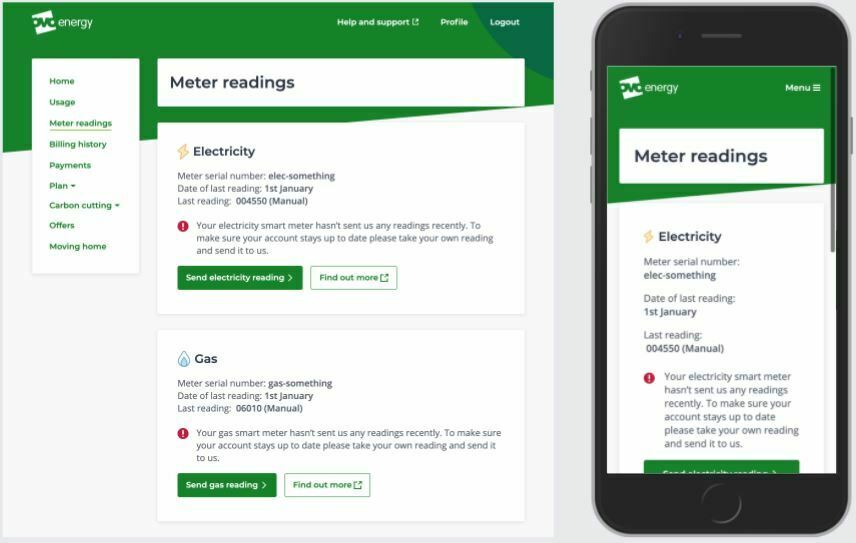
You should still be able to submit your gas readings manually here (although things might look a little bit different). Just head on over to the ‘meter readings’ page. If we’re not in communication with one of your smart meters you should see the option to submit a reading manually,


Exact appearance may vary

There’s more helpful info on this great guide:


Hope this helps! :slight_smile:


28 replies

Blastoise186
Super User
Super User
June 22, 2021

Hey there @Jeffus !

I’m just reviewing your question now. Please bear with me for about five or ten minutes and I’ll get right back to you. :)

Securing energy by zapping security bugs... For that is The Blastoise Way! Remember, I'm just like you - AI Powered Evil Geniuses aren't Staff!
Blastoise186
Super User
Super User
June 22, 2021

Thanks for waiting. I’d like to introduce myself really quickly if that’s OK @Jeffus .

I’m Blastoise186, but you can call me Blastoise if you prefer. I’m one of the forum volunteers over here on the OVO Forum, and I’m also one of the main volunteers who helps out with bug reports like this. Thanks for bringing it up!

It seems that the meter readings have indeed been recorded on your account, but somehow haven’t been fully applied to your Billing History. I can’t access your account, so you may want to ask the Support Team to raise a tech case to get this looked into properly (which I see you’ve done already, nice one!). But I can give you some details that will definitely help. If you let them know that Blastoise186 has helped you out on the forum and provide a link to this thread, that will definitely help them out too. The Support Team are able to access this forum, so everything in this thread can also be submitted as part of the case.

Normally I can get bug reports sent to the Tech Team directly from here, so I’ll ping @Tim_OVO just in case too. But if it’s account specific, that will also need someone to look at your account directly.

You are indeed on the new billing platform. If you’re on a smartphone or tablet, you may find it easier to use the OVO Energy app rather than the mobile site. I’ve linked it below for you.

It looks like you’ve triggered a rare bug somehow, which are my favourite kinds too! If you ever spot more bugs again, feel free to let us know here on the forum. Myself and other volunteers are always happy to help out with these and we’re able to get them escalated directly.

Don’t worry about this affecting the smart meter stuff, it shouldn’t cause problems there. :)

If you ever need help with anything else, we’ll be right here for you 24/7.

Securing energy by zapping security bugs... For that is The Blastoise Way! Remember, I'm just like you - AI Powered Evil Geniuses aren't Staff!
Jeffus
Rank 20
Rank 20
June 22, 2021

Thanks. I will post a link via Private message on twitter to ovo.

I did download the app, but funny enough found the website easier. Particularly when trying to figure out what was happening to my electricity bill. 

Blastoise186
Super User
Super User
June 22, 2021

No worries, glad I could help. I’m very well known to the Support Team, so no doubt they’ll be happy with that too.

I personally prefer the app myself, but OVO has made sure that you can use whichever method works best for you. Especially after I helped to fix a bug that caused a few issues with that.

The forum is mainly volunteer led and we can’t access your account directly from here, but it’s another option that sits alongside all the others. Pretty cool eh? :wink:

Securing energy by zapping security bugs... For that is The Blastoise Way! Remember, I'm just like you - AI Powered Evil Geniuses aren't Staff!
Jeffus
Rank 20
Rank 20
June 23, 2021

Got up to 18th June last night

Jeffus
Rank 20
Rank 20
June 23, 2021

Now caught up and using all the meter readings to calculate the bill. I will enter another reading today to see if it is back to normal 

Blastoise186
Super User
Super User
June 23, 2021

Yay!

Securing energy by zapping security bugs... For that is The Blastoise Way! Remember, I'm just like you - AI Powered Evil Geniuses aren't Staff!
Blastoise186
Super User
Super User
June 23, 2021

While you’re here actually, I’ve got some really good advice for you regarding the new smart meters. It’s pretty important and not the most fun to explain, but definitely worth knowing.

After your new smart meters are installed, it may take around six to eight weeks for them to be fully commissioned. In the meantime, you may need to submit manual readings in order to keep your account up-to-date but you’ll know once your smart meter starts sending Smart readings. Please wait a few days before putting manual readings in though after the Meter Exchange - OVO will need to register the Meter Serial Numbers to your account first and reset the clock. You’ll be able to tell when this is done because the old Meter Readings under the reading history will be erased (but they’ll remain on the Billing History). After that point, you can submit manual readings again but you’ll have to wait a few days between each one.

Once your meters begin to submit proper Smart readings, you’ll start to see them go in based on your preferences. Make sure to let the Support Team know whether you’d like Half-Hourly, Daily or Monthly Mode and they’ll arrange to apply that setting as soon as possible. For me, Raichu started to submit Smart readings precisely two weeks after it was installed, but it can vary.

The OVO Energy app is the easiest way to know when this has started - as it lists whether individual meter readings were Manual or Smart. MyOVO doesn’t yet show this, but it's a feature idea I’ll probably suggest when I get chance.

Your In-Home Display should start working pretty quickly though - but it may show things like “Waiting for data”. This is normal during the commissioning process. If you leave it on for a while, it should eventually start working. In general, it will start showing usage data within five minutes of being powered on as long as it’s getting a signal from your meters.

If you need a hand with anything else, feel free to stop by. :)

Securing energy by zapping security bugs... For that is The Blastoise Way! Remember, I'm just like you - AI Powered Evil Geniuses aren't Staff!
Jeffus
Rank 20
Rank 20
June 24, 2021

Working fine now I think. I submitted a manual reading just before my smart meter was installed today and it appeared on my bill fine. 

I'll leave everything now until we get back from our camping trip in a couple of weeks. So hopefully I'll be able to submit manually when we get back until the commissioning process is complete. 

Interesting it takes 6 to 8 weeks for the commission process. To a lay person that is a long time for a tech change, irrespective of the number of things that need doing. I wonder which parts of the process cause the delay.

Also interesting you need to wait a few days between each manual reading, but I didn't have to wait when I had a manual meter. I wonder what causes that limitation. 

Can I see the smart meter reading frequency that has been setup anywhere? Or do I need to ask Ovo? I seem to remember I requested 30min in the form to request the smart meter but can't honestly remember. It would be useful to be able to see and change this on the website and app. Would seem a useful self service feature. 

Thanks for your help

Blastoise186
Super User
Super User
June 24, 2021

No worries, glad I could help!

Six to eight weeks for a full commission is pretty long I’m afraid, but it can’t be made faster. It’s all the processes, testing, firmware updates and tons more that make it take ages. :stuck_out_tongue:

However, in some cases you may start to see Smart readings on your account in as little as two weeks. It kinda depends if you get lucky or not. The reason behind the five day gap between manual readings with a smart meter is because of a safety measure to help prevent clashes. But if no readings go in at all for five days, you’ll be asked to submit a manual reading. But any kind of reading at all resets the clock - including manual readings. This applies only if you have a smart meter though, not to traditional meters.

As for the reading schedule, that should be set as part of the process. It’s not possible to view or change that setting via self-service at all I’m afraid, because it has to be done via a specific system that can’t be made publicly accessible at all from my understanding. But the Support Team are always happy to tell you the current settings and apply any changes on request anytime. :)

Securing energy by zapping security bugs... For that is The Blastoise Way! Remember, I'm just like you - AI Powered Evil Geniuses aren't Staff!