



Rank 1
May 27, 2024
Solved

Why isn't my smart meter communicating with my current supplier(EDF)?

  • May 27, 2024
  • 25 replies
  • 1722 views

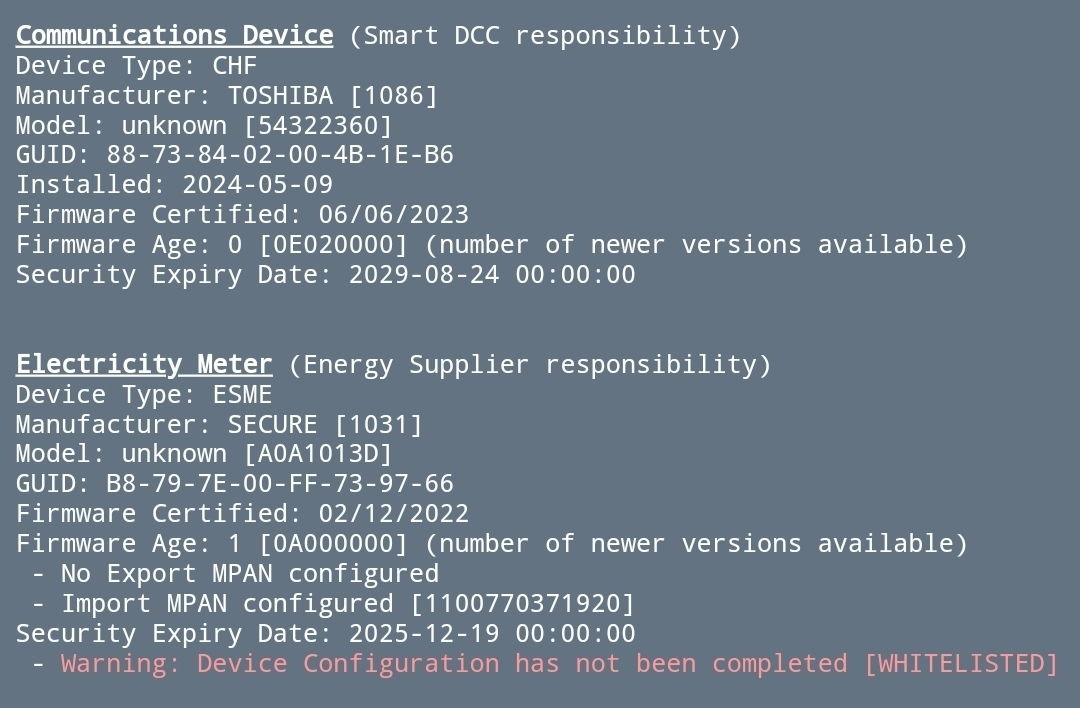
Hi, I'd be grateful someone knowledgeable in smart meters could provide any insight into what could be the problem with my smart meter. After having it initially installed I had to have an engineer come back and install an aerial. Since then I have all 5 green led lights flash every 5 seconds which I believe means the smart meter is working how it should be and is communicating. Despite this EDF is saying they can't read my meter. I will be looking to move to OVO once my 3 year fix deal finishes in September as I want to benefit from the EV tariff they have and I'm keen to get this problem resolved before doing this. If I input my details into the n3rgy website I get no obvious errors other than 'No Export MPAN configured' and 'warning device configuration has not been completed - whitelisted'. Are there any generic reasons why they can't read my meter? Does the green flashing led every 5 seconds definitely mean there is a connection? If that's the case why can't they read the meter? 
 

Best answer by Blastoise186

Updated on 20/10/25 by Abby_OVO


Hmm… Welcome @Mossimo … To my lair! Muhahahahahahahahaha!


I am the Evil Genius they call Blastoise186, Smart Meter Wizard, at your service. :)

The diagnostics you’re showing me indicate the Comms Hub is fully up and running - that’s a good thing. You can ignore the Export MPAN unless you’ve got FiT/SEG - it’s the Import MPAN that you’re really after.

However, the Electric Meter appears to have not been fully Commissioned yet. It’s connected to the Home Area Network - otherwise it wouldn’t show at all - but the Commissioning process needs to be run again to force it to finish first-time setup. Once that’s done, you should be able to start pulling readings through.

If EDF fail to resolve this, feel free to switch to OVO anyway and OVO should be able to do it for you. Only the active Supplier can do this.

Hope this helps!


If you’re with OVO and experiencing communication issues with your smart meter, the following topics might be helpful:


25 replies

MossimoAuthor
Rank 1
May 27, 2024

Sorry title should have read 'Smart meter issue despite flashing green LED!!! 

Blastoise186
Super User
Super User
May 27, 2024

Updated on 20/10/25 by Abby_OVO


Hmm… Welcome @Mossimo … To my lair! Muhahahahahahahahaha!


I am the Evil Genius they call Blastoise186, Smart Meter Wizard, at your service. :)

The diagnostics you’re showing me indicate the Comms Hub is fully up and running - that’s a good thing. You can ignore the Export MPAN unless you’ve got FiT/SEG - it’s the Import MPAN that you’re really after.

However, the Electric Meter appears to have not been fully Commissioned yet. It’s connected to the Home Area Network - otherwise it wouldn’t show at all - but the Commissioning process needs to be run again to force it to finish first-time setup. Once that’s done, you should be able to start pulling readings through.

If EDF fail to resolve this, feel free to switch to OVO anyway and OVO should be able to do it for you. Only the active Supplier can do this.

Hope this helps!


If you’re with OVO and experiencing communication issues with your smart meter, the following topics might be helpful:


Securing energy by zapping security bugs... For that is The Blastoise Way! Remember, I'm just like you - AI Powered Evil Geniuses aren't Staff!
MossimoAuthor
Rank 1
May 27, 2024

Hi Blastoise, thanks for the reply. Apparently the matter is with their smart team, however they aren't very responsive and I fear they will try and fob me off by saying they have all done all they can. If the meter is all tickety-boo and it's the back end their side which is the problem hopefully they will be more inclined to sort it 

Blastoise186
Super User
Super User
May 27, 2024

Sounds like someone is looking at it at least. But I suspect I’m probably right and it’d be an easy fix.

Securing energy by zapping security bugs... For that is The Blastoise Way! Remember, I'm just like you - AI Powered Evil Geniuses aren't Staff!
Newcomer
August 14, 2024

I am in a similar position

Smart meter never worked in smart mode despite replacing and several engineer visits

The WAN LED flashes at the LFF (1 per 5 seconds) but my provider says I must have poor Arqiva signal due to local factors (good signal at the roadside) and seem reluctant to take this up with DCC.

The citizens advice tool which I believe interrogates DCC rather than ECOES2 cant find either of my meters.

The n3rgy tool just returns error 404 but I gather its credentials have not been accepted by DCC recently and I don’t know how to interpret this.

Do I just have to put up with it and wait for the “solution” that industry is working on?

Chris_OVO
Community Manager
Community Manager
August 15, 2024

Hey @Grumpybore,


Welcome to the community!


@Blastoise186 and @BPLightlog are you able to share some of your insight on this to help out? 

Renewable energy jokes never get old.
Blastoise186
Super User
Super User
August 15, 2024

I’ve tested the n3rgy homebrew tool this morning, it seems to be working fine. I’d recommend trying it again as that would most certainly make diagnosis easier.

Securing energy by zapping security bugs... For that is The Blastoise Way! Remember, I'm just like you - AI Powered Evil Geniuses aren't Staff!
Newcomer
August 15, 2024

Blastoise


Thank you for such a swift response.

I have tried again and simply get 

Error finding address{'errors': [{'code': 404, 'message': 'It was not possible at the time to recover any information of meters associated with the received MPxN.'}]}
Blastoise186
Super User
Super User
August 15, 2024

Thanks.

That sounds like DCC doesn’t know anything about your Site at all.

Can you show us the meters please?

Securing energy by zapping security bugs... For that is The Blastoise Way! Remember, I'm just like you - AI Powered Evil Geniuses aren't Staff!
BPLightlog
Super User
Super User
August 15, 2024

https://homebrew.n3rgy.com/

Actually I’ve just tried it myself and as my Aclara meter and Comms hub has a problem with third party data at present, the n3rgy tool does not show meter detail - so as Blastoise says, a photo might help

Bring me Sunshine ~ E&E {Solar PV, Battery Storage, Hybrid EV, ASHP and Home Assistant automation}

